
201871010105-曹玉中《面向对象程序设计(java)》第八周学习总结
201871010105-曹玉中《面向对象程序设计(java)》第八周学习总结
| 项目 | 内容 |
| 《面向对象程序设计(java)》 | https://www.cnblogs.com/nwnu-daizh/ |
| 这个作业的要求在哪里 | https://www.cnblogs.com/nwnu-daizh/p/11654436.html |
| 作业学习目标 |
(1) 掌握接口定义方法; (2) 掌握实现接口类的定义要求; (3) 掌握实现了接口类的使用要求; (4) 掌握程序回调设计模式; (5) 掌握Comparator接口用法; (6) 掌握对象浅层拷贝与深层拷贝方法; (7) 掌握Lambda表达式语法; (8) 了解内部类的用途及语法要求。 |
一:理论部分。
1.接口:Java为了克服单继承的缺点,Java使用了接口,一个类可以实现一个或多接口。(接口不是类,而是对类的一组需求描述,它由常量和一组抽象方法组成)
1)通常,接口名称以able或ible结尾。
接口中不包括变量和有具体实现的方法。
2)声明方式:public interface 接口名 { }
扩展方法:public interface 接口1 extends 接口2{ }
3)接口中的所有常量必须是public static final,方法必须是public abstract。(系统默认的)
要将类声明为实现某个接口,需要使用关键字implements:class Employee implements Printable
4)接口不能构造接口对象,但可以声明接口变量以指向一个实现了该接口的类对象。、
5)接口与抽象类的区别:a.接口不能实现任何方法,而抽象类可以
b.一个类只能有一个父类,可以有多个接口
2.接口示例。
1)回调:它一种程序设计模式,可指出某个特定事件发生时程序应该采取的动作。
例如在java。swing包中有一个Timer类,可以使用它在达到给定时间间隔发出通告。
3.Comparator接口(java.util.*包中)的用途:处理字符串按长度进行排序的操作.
4.对象克隆:如果希望copy是一个新对象,它的初始状态与original相同,但是之后他们会有各自不同的状态,这是就可以使用clone方法。
1)clone方法是Object的一个protected方法,如果要调用clone方法,就需要覆盖clone()方法,并将属性设置为public。(在类的clone方法中,调用super.clone())
Object.clone()方法返回一个Object对象,必须进行强制类型转换才能得到需要的类型。
2)浅层拷贝:被拷贝对象的所有常量成员和基本类型属性都有与原来对象相同的拷贝值,而若成员域是一个对象,则被拷贝对象该对象域的对象引用仍然指向原来的对象。
深层拷贝:被拷贝对象的所有成员域都含有与原来对象相同的值,且对象域将指向被复制过的新对象,而不是原有对象被引用的对象。(要实现深拷贝,必须克隆类中所有的对象实例域。)
5.lambda表达式:本质上是一个匿名方法。
如public int add(intx,int y){return x+y};用lambda表达式表达为:lambda(int x,int y)->x+y;
6.函数式接口:只有一个方法的接口(标注:@FunctionalInterface)
二:实验部分。
1、实验目的与要求
(1) 掌握接口定义方法;
(2) 掌握实现接口类的定义要求;
(3) 掌握实现了接口类的使用要求;
(4) 掌握程序回调设计模式;
(5) 掌握Comparator接口用法;
(6) 掌握对象浅层拷贝与深层拷贝方法;
(7) 掌握Lambda表达式语法;
(8) 了解内部类的用途及语法要求。
2、程序测试。
2、实验内容和步骤
实验1: 导入第6章示例程序,测试程序并进行代码注释。
测试程序1:
编辑、编译、调试运行阅读教材214页-215页程序6-1、6-2,理解程序并分析程序运行结果;
在程序中相关代码处添加新知识的注释。
掌握接口的实现用法;
掌握内置接口Compareable的用法。
代码如下:
import java.util.*;

/**

 * This program demonstrates the use of the Comparable interface.

 * @version 1.30 2004-02-27

 * @author Cay Horstmann

 */

public class EmployeeSortTest

{

   public static void main(String[] args)

   {

      Employee[] staff = new Employee[3];

      staff[0] = new Employee("Harry Hacker", 35000);

      staff[1] = new Employee("Carl Cracker", 75000);

      staff[2] = new Employee("Tony Tester", 38000);

      Arrays.sort(staff);//调用Arrays类的sort方法(只有被static方法修饰了才可以这样调用)

      //输出所有employee对象的信息

      for (Employee e : staff)

         System.out.println("name=" + e.getName() + ",salary=" + e.getSalary());

   }

}
用户自定义模块:
public class Employee implements Comparable<Employee>//实现接口类

{

   private String name;

   private double salary;

   public Employee(String name, double salary)

   {

      this.name = name;

      this.salary = salary;

   }

   public String getName()

   {

      return name;

   }

   public double getSalary()

   {

      return salary;

   }

   public void raiseSalary(double byPercent)

   {

      double raise = salary * byPercent / 100;

      salary += raise;

   }

   /**

    * Compares employees by salary

    * @param other another Employee object

    * @return a negative value if this employee has a lower salary than

    * otherObject, 0 if the salaries are the same, a positive value otherwise

    */

   public int compareTo(Employee other)//比较Employee与其他对象的大小

   {

      return Double.compare(salary, other.salary);//调用double的compare方法

   }

}
运行结果如下:

测试程序2:
l 编辑、编译、调试以下程序,结合程序运行结果理解程序;
|
interface A { double g=9.8; void show( ); } class C implements A { public void show( ) {System.out.println("g="+g);} }
class InterfaceTest { public static void main(String[ ] args) { A a=new C( ); a.show( ); System.out.println("g="+C.g); } } |
代码如下:
interface  A//接口A

{

  double g=9.8;

  void show( );

}

class C implements A//C实现接口A

{

  public void show( )

  {System.out.println("g="+g);}

}

class InterfaceTest

{

  public static void main(String[ ] args)

  {

       A a=new C( );

       a.show( );

       System.out.println("g="+C.g);//C实现了接口A,所以可以用C调用A中的变量

  }

}
运行结果如下:

试程序3:
l 在elipse IDE中调试运行教材223页6-3,结合程序运行结果理解程序;
l 26行、36行代码参阅224页,详细内容涉及教材12章。
l 在程序中相关代码处添加新知识的注释。
l 掌握回调程序设计模式;
代码如下:
/**

   @version 1.01 2015-05-12

   @author Cay Horstmann

*/

import java.awt.*;

import java.awt.event.*;

import java.util.*;

import javax.swing.*;

import javax.swing.Timer;

// to resolve conflict with java.util.Timer

public class TimerTest

{

   public static void main(String[] args)

   {

      ActionListener listener = new TimePrinter();//实现ActionListener类接口

      //创建一个名为listener的timer数组

      // 每十秒钟一次

      Timer t = new Timer(10000, listener);//生成内置类对象

      t.start();//调用t中的start方法

      JOptionPane.showMessageDialog(null, "Quit program?");//窗口显示信息“Quit program?”

      System.exit(0);

   }

}

class TimePrinter implements ActionListener//用户自定义类:实现接口

{

   public void actionPerformed(ActionEvent event)

   {

      System.out.println("At the tone, the time is " + new Date());

      Toolkit.getDefaultToolkit().beep();//返回Toolkit方法,借助Toolkit对象控制响铃

   }

}
运行结果如下:

测试程序4:
l 调试运行教材229页-231页程序6-4、6-5,结合程序运行结果理解程序;
l 在程序中相关代码处添加新知识的注释。
l 掌握对象克隆实现技术;
掌握浅拷贝和深拷贝的差别。
代码如下:
/**

 * This program demonstrates cloning.

 * @version 1.10 2002-07-01

 * @author Cay Horstmann

 */

public class CloneTest

{

   public static void main(String[] args)

   {

      try//try子句,后面是有可能会产生错误的代码

      {

         Employee original = new Employee("John Q. Public", 50000);

         original.setHireDay(2000, 1, 1);

         Employee copy = original.clone();

         copy.raiseSalary(10);

         copy.setHireDay(2002, 12, 31);

         System.out.println("original=" + original);

         System.out.println("copy=" + copy);

      }

      catch (CloneNotSupportedException e)//没有实现cloneable接口,抛出一个异常

      {

         e.printStackTrace();

      }

   }

}
import java.util.Date;

import java.util.GregorianCalendar;

public class Employee implements Cloneable

{

   private String name;

   private double salary;

   private Date hireDay;

   public Employee(String name, double salary)

   {

      this.name = name;

      this.salary = salary;

      hireDay = new Date();

   }

   public Employee clone() throws CloneNotSupportedException

   {

      // 调用对象克隆

      Employee cloned = (Employee) super.clone();

      // 克隆易变字段

      cloned.hireDay = (Date) hireDay.clone();

      return cloned;

   }//可能产生异常,放在try子句中

   /**

    * Set the hire day to a given date.

    * @param year the year of the hire day

    * @param month the month of the hire day

    * @param day the day of the hire day

    */

   public void setHireDay(int year, int month, int day)

   {

      Date newHireDay = new GregorianCalendar(year, month - 1, day).getTime();

      // 实例字段突变

      hireDay.setTime(newHireDay.getTime());

   }

   public void raiseSalary(double byPercent)

   {

      double raise = salary * byPercent / 100;

      salary += raise;

   }

   public String toString()

   {

      return "Employee[name=" + name + ",salary=" + salary + ",hireDay=" + hireDay + "]";

   }

}
运行结果如下:

实验2: 导入第6章示例程序6-6,学习Lambda表达式用法。
l 调试运行教材233页-234页程序6-6,结合程序运行结果理解程序;
l 在程序中相关代码处添加新知识的注释。
l 将27-29行代码与教材223页程序对比,将27-29行代码与此程序对比,体会Lambda表达式的优点。
代码如下:
import java.util.*;

import javax.swing.*;

import javax.swing.Timer;

/**

 * This program demonstrates the use of lambda expressions.

 * @version 1.0 2015-05-12

 * @author Cay Horstmann

 */

public class LambdaTest

{

   public static void main(String[] args)

   {

      String[] planets = new String[] { "Mercury", "Venus", "Earth", "Mars",

            "Jupiter", "Saturn", "Uranus", "Neptune" };

      System.out.println(Arrays.toString(planets));

      System.out.println("Sorted in dictionary order:");

      Arrays.sort(planets);//调用Arrays类的sort方法

      System.out.println(Arrays.toString(planets));

      System.out.println("Sorted by length:");

      Arrays.sort(planets, (first, second) -> first.length() - second.length());//lambda表达式

      System.out.println(Arrays.toString(planets));

      Timer t = new Timer(1000, event ->

         System.out.println("The time is " + new Date()));

      t.start();

      // keep program running until user selects "Ok"

      JOptionPane.showMessageDialog(null, "Quit program?");//窗口显示信息“Quit program?”

      System.exit(0);

   }

}
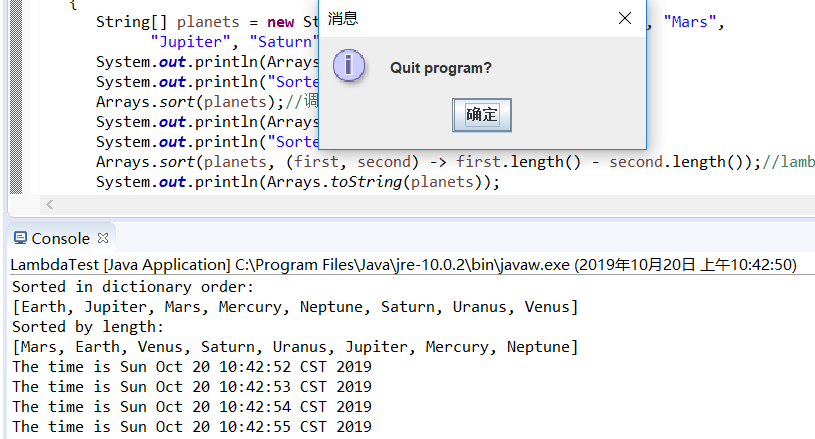
运行结果如下:
以下实验课后完成
实验3: 编程练习
l 编制一个程序,将身份证号.txt 中的信息读入到内存中;
l 按姓名字典序输出人员信息;
l 查询最大年龄的人员信息;
l 查询最小年龄人员信息;
l 输入你的年龄,查询身份证号.txt中年龄与你最近人的姓名、身份证号、年龄、性别和出生地;
l 查询人员中是否有你的同乡。
代码如下:
package cyz;

import java.io.BufferedReader;

        import java.io.File;

        import java.io.FileInputStream;

        import java.io.FileNotFoundException;

        import java.io.IOException;

        import java.io.InputStreamReader;

        import java.util.ArrayList;

        import java.util.Arrays;

        import java.util.Collections;

        import java.util.Scanner;

public class Test{

      private static ArrayList<Person> Personlist1;

       public static void main(String[] args) {

          Personlist1 = new ArrayList<>();

          Scanner scanner = new Scanner(System.in);

          File file = new File("D:\\身份证号.txt");

                try {

                     FileInputStream F = new FileInputStream(file);

                     BufferedReader in = new BufferedReader(new InputStreamReader(F));

                     String temp = null;

                     while ((temp = in.readLine()) != null) {

                        Scanner linescanner = new Scanner(temp);

                        linescanner.useDelimiter(" ");

                        String name = linescanner.next();

                        String id = linescanner.next();

                        String sex = linescanner.next();

                        String age = linescanner.next();

                        String place =linescanner.nextLine();

                        Person Person = new Person();

                        Person.setname(name);

                        Person.setid(id);

                        Person.setsex(sex);

                        int a = Integer.parseInt(age);

                        Person.setage(a);

                        Person.setbirthplace(place);

                        Personlist1.add(Person);

                    }

                } catch (FileNotFoundException e) {

                    System.out.println("查找不到信息");

                    e.printStackTrace();

                } catch (IOException e) {

                    System.out.println("信息读取有误");

                    e.printStackTrace();

                }

                boolean isTrue = true;

                while (isTrue) {

                    System.out.println("1:按姓名字典序输出人员信息;");

                    System.out.println("2:查询最大年龄与最小年龄人员信息;");

                    System.out.println("3.输入你的年龄,查询身份证号.txt中年龄与你最近人的姓名、身份证号、年龄、性别和出生地");

                    System.out.println("4:按省份找你的同乡;");

                    System.out.println("5:退出");

                    int type = scanner.nextInt();

                    switch (type) {

                    case 1:

                        Collections.sort(Personlist1);

                        System.out.println(Personlist1.toString());

                        break;

                    case 2:

                        int max=0,min=100;int j,k1 = 0,k2=0;

                        for(int i=1;i<Personlist1.size();i++)

                        {

                            j=Personlist1.get(i).getage();

                           if(j>max)

                           {

                               max=j;

                               k1=i;

                           }

                           if(j<min)

                           {

                               min=j;

                               k2=i;

                           }

                        }

                        System.out.println("年龄最大:"+Personlist1.get(k1));

                        System.out.println("年龄最小:"+Personlist1.get(k2));

                        break;

                    case 3:

                        System.out.println("place?");

                        String find = scanner.next();

                        String place=find.substring(0,3);

                        String place2=find.substring(0,3);

                        for (int i = 0; i <Personlist1.size(); i++)

                        {

                            if(Personlist1.get(i).getbirthplace().substring(1,4).equals(place))

                            {

                                System.out.println("你的同乡:"+Personlist1.get(i));

                            }

                        }

                        break;

                    case 4:

                        System.out.println("年龄:");

                        int yourage = scanner.nextInt();

                        int close=ageclose(yourage);

                        int d_value=yourage-Personlist1.get(close).getage();

                        System.out.println(""+Personlist1.get(close));

                        break;

                    case 5:

                   isTrue = false;

                   System.out.println("再见!");

                        break;

                    default:

                        System.out.println("输入有误");

                    }

                }

            }

            public static int ageclose(int age) {

                   int m=0;

                int    max=53;

                int d_value=0;

                int k=0;

                for (int i = 0; i < Personlist1.size(); i++)

                {

                    d_value=Personlist1.get(i).getage()-age;

                    if(d_value<0) d_value=-d_value;

                    if (d_value<max)

                    {

                       max=d_value;

                       k=i;

                    }

                 }    return k;

             }

}
package cyz;

public class Person implements Comparable<Person> {

            private String name;

            private String id;

            private int age;

            private String sex;

            private String birthplace;

    public String getname() {

        return name;

        }

    public void setname(String name) {

        this.name = name;

    }

    public String getid() {

        return id;

    }

    public void setid(String id) {

        this.id= id;

    }

    public int getage() {

        return age;

    }

    public void setage(int age) {

        // int a = Integer.parseInt(age);

        this.age= age;

    }

    public String getsex() {

        return sex;

    }

    public void setsex(String sex) {

        this.sex= sex;

    }

    public String getbirthplace() {

        return birthplace;

    }

    public void setbirthplace(String birthplace) {

        this.birthplace= birthplace;

}

    public int compareTo(Person o) {

        return this.name.compareTo(o.getname());

}

    public String toString() {

        return  name+"\t"+sex+"\t"+age+"\t"+id+"\t";

}

}
运行结果如下:

实验4:内部类语法验证实验
实验程序1:
l 编辑、调试运行教材246页-247页程序6-7,结合程序运行结果理解程序;
l 了解内部类的基本用法。
代码如下:
import java.awt.*;

import java.awt.event.*;

import java.util.*;

import javax.swing.*;

import javax.swing.Timer;

/**

 * This program demonstrates the use of inner classes.

 * @version 1.11 2015-05-12

 * @author Cay Horstmann

 */

public class InnerClassTest

{

   public static void main(String[] args)

   {

      TalkingClock clock = new TalkingClock(1000, true);

      clock.start();

      // keep program running until user selects "Ok"

      JOptionPane.showMessageDialog(null, "Quit program?");

      System.exit(0);

   }

}

/**

 * A clock that prints the time in regular intervals.

 */

class TalkingClock

{

   private int interval;

   private boolean beep;

   /**

    * Constructs a talking clock

    * @param interval the interval between messages (in milliseconds)

    * @param beep true if the clock should beep

    */

   public TalkingClock(int interval, boolean beep)

   {

      this.interval = interval;

      this.beep = beep;

   }

   /**

    * Starts the clock.

    */

   public void start()

   {

      ActionListener listener = new TimePrinter();

      Timer t = new Timer(interval, listener);

      t.start();

   }

   public class TimePrinter implements ActionListener

   {

      public void actionPerformed(ActionEvent event)

      {

         System.out.println("At the tone, the time is " + new Date(interval));
if (beep) Toolkit.getDefaultToolkit().beep(); }
}
}
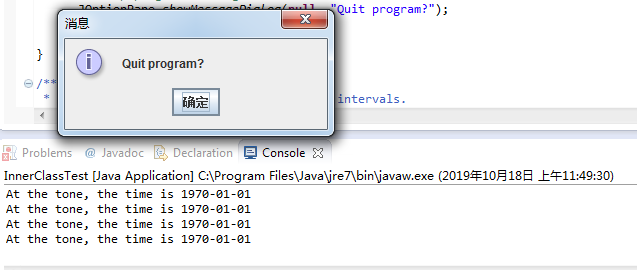
运行结果如下:
实验程序2:
l 编辑、调试运行教材254页程序6-8,结合程序运行结果理解程序;
l 掌握匿名内部类的用法。
代码如下:
import java.awt.*;

import java.awt.event.*;

import java.util.*;

import javax.swing.*;

import javax.swing.Timer;

/**

 * This program demonstrates anonymous inner classes.

 * @version 1.11 2015-05-12

 * @author Cay Horstmann

 */

public class AnonymousInnerClassTest

{

   public static void main(String[] args)

   {

      TalkingClock clock = new TalkingClock();

      clock.start(1000, true);

      // keep program running until user selects "Ok"

      JOptionPane.showMessageDialog(null, "Quit program?");

      System.exit(0);

   }

}

/**

 * A clock that prints the time in regular intervals.

 */

class TalkingClock

{

   /**

    * Starts the clock.

    * @param interval the interval between messages (in milliseconds)

    * @param beep true if the clock should beep

    */

   public void start(int interval, boolean beep)

   {

      ActionListener listener = new ActionListener()

         {

            public void actionPerformed(ActionEvent event)

            {

               System.out.println("At the tone, the time is " + new Date());

               if (beep) Toolkit.getDefaultToolkit().beep();

            }

         };

      Timer t = new Timer(interval, listener);

      t.start();

   }

}
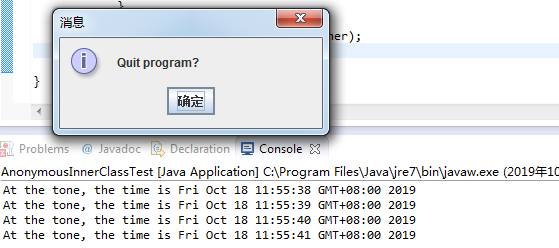
运行结果如下:
实验程序3:
l 在elipse IDE中调试运行教材257页-258页程序6-9,结合程序运行结果理解程序;
了解静态内部类的用法。
代码如下:
/**

 * This program demonstrates the use of static inner classes.

 * @version 1.02 2015-05-12

 * @author Cay Horstmann

 */

public class StaticInnerClassTest

{

   public static void main(String[] args)

   {

      var values = new double[20];

      for (int i = 0; i < values.length; i++)

         values[i] = 100 * Math.random();

      ArrayAlg.Pair p = ArrayAlg.minmax(values);

      System.out.println("min = " + p.getFirst());

      System.out.println("max = " + p.getSecond());

   }

}

class ArrayAlg

{

   /**

    * A pair of floating-point numbers

    */

   public static class Pair

   {

      private double first;

      private double second;

      /**

       * Constructs a pair from two floating-point numbers

       * @param f the first number

       * @param s the second number

       */

      public Pair(double f, double s)

      {

         first = f;

         second = s;

      }

      /**

       * Returns the first number of the pair

       * @return the first number

       */

      public double getFirst()

      {

         return first;

      }

      /**

       * Returns the second number of the pair

       * @return the second number

       */

      public double getSecond()

      {

         return second;

      }

   }

   /**

    * Computes both the minimum and the maximum of an array

    * @param values an array of floating-point numbers

    * @return a pair whose first element is the minimum and whose second element

    * is the maximum

    */

   public static Pair minmax(double[] values)

   {

      double min = Double.POSITIVE_INFINITY;

      double max = Double.NEGATIVE_INFINITY;

      for (double v : values)

      {

         if (min > v) min = v;

         if (max < v) max = v;

      }

      return new Pair(min, max);

   }

}
运行结果如下:

实验总结:
在本周的学习过程中,主要了解了接口,接口和继承在某些方面比较相似,但是接口又在继承的基础上发展了一些优点,克服了java单继承的缺点。
在学习过程中,可能是因为接口并不是具体的类,它只是实现,所以感觉接口比继承抽象一些,不太容易理解。但通过这周的学习以及实验中对具体
程序的运行,对接口有了一定的掌握。自己编写饰演的过程中,在之前的基础上有的接口等新内容,自己还是不能独立完成,在同学的帮助下才勉强
完成了实验。在实验课上老师讲的克隆以及函数接口等,自己还没有太掌握,在之后的学习中,一定会继续深入学习。
201871010105-曹玉中《面向对象程序设计(java)》第八周学习总结的更多相关文章
- 201771010134杨其菊《面向对象程序设计java》第九周学习总结
第九周学习总结 第一部分:理论知识 异常.断言和调试.日志 1.捕获 ...
- 201871010132-张潇潇《面向对象程序设计(java)》第一周学习总结
面向对象程序设计(Java) 博文正文开头 项目 内容 这个作业属于哪个课程 https://www.cnblogs.com/nwnu-daizh/ 这个作业的要求在哪里 https://www.cn ...
- 扎西平措 201571030332《面向对象程序设计 Java 》第一周学习总结
<面向对象程序设计(java)>第一周学习总结 正文开头: 项目 内容 这个作业属于哪个课程 https://www.cnblogs.com/nwnu-daizh/ 这个作业的要求在哪里 ...
- 杨其菊201771010134《面向对象程序设计Java》第二周学习总结
第三章 Java基本程序设计结构 第一部分:(理论知识部分) 本章主要学习:基本内容:数据类型:变量:运算符:类型转换,字符串,输入输出,控制流程,大数值以及数组. 1.基本概念: 1)标识符:由字母 ...
- 201871010124 王生涛《面向对象程序设计JAVA》第一周学习总结
项目 内容 这个作业属于哪个课程 https://www.cnblogs.com/nwnu-daizh/ 这个作业的要求在哪里 https://edu.cnblogs.com/campus/xbsf/ ...
- 201871010115——马北《面向对象程序设计JAVA》第二周学习总结
项目 内容 这个作业属于哪个课程 https://www.cnblogs.com/nwnu-daizh/ 这个作业的要求在哪里 https://www.cnblogs.com/nwnu-daizh/p ...
- 201777010217-金云馨《面向对象程序设计(Java)》第二周学习总结
项目 内容 这个作业属于哪个课程 https://www.cnblogs.com/nwnu-daizh/ 这个作业的要求在哪里 https://www.cnblogs.com/nwnu-daizh/p ...
- 201871010132——张潇潇《面向对象程序设计JAVA》第二周学习总结
项目 内容 这个作业属于哪个课程 https://www.cnblogs.com/nwnu-daizh/ 这个作业的要求在哪里 https://www.cnblogs.com/nwnu-daizh/p ...
- 201771010123汪慧和《面向对象程序设计Java》第二周学习总结
一.理论知识部分 1.标识符由字母.下划线.美元符号和数字组成, 且第一个符号不能为数字.标识符可用作: 类名.变量名.方法名.数组名.文件名等.第二部分:理论知识学习部分 2.关键字就是Java语言 ...
- 20155319 2016-2017-2 《Java程序设计》第八周学习总结
20155319 2016-2017-2 <Java程序设计>第八周学习总结 教材学习内容总结 NIO与NIO2 - NIO使用频道(channel)来衔接数据节点 - read()将Re ...
随机推荐
- [C6] Andrew Ng - Convolutional Neural Networks
About this Course This course will teach you how to build convolutional neural networks and apply it ...
- jenkins构建:通过testng.xml构建项目
1.项目的pom.xml中build下添加maven插件,xmlFileName为可变参数 2.jenkins新建maven项目 构建脚本: 原文:https://www.jianshu.com/p/ ...
- Django 连接数据库
配置数据库 Django 默认连接的是SQLite,如果想要连接MySQL则需修改配置:在 setting.py 中找到数据库的默认配置: DATABASES = { 'default': { 'EN ...
- NXP官方的i.mx6ul板级uboot源码适配
1.前言 CoM-P6UL是盈鹏飞科技有限公司基于NXP原厂I.MX6UL芯片生产研发的核心板,本文将对CoM-P6UL适配NXP的基于Linux4.1.15版本的uboot板级源码. 2.开发环境 ...
- sitecore系列教程场所分类简介
在Sitecore体验平台(XP)中,场所是可跟踪的离线交互发生的位置.这些是发生交互的物理位置,例如特定的零售场所或公共汽车站. 您可以使用场所分类记录特定交互发生的位置.此信息保存在体验数据库(x ...
- 【UOJ#82】【UR #7】水题生成器(贪心)
[UOJ#82][UR #7]水题生成器(贪心) 题面 UOJ 题解 把\(n!\)的所有约数搜出来,这个个数不会很多. 然后从大往小能选则选就好了. #include<iostream> ...
- 转 Yolov3转化Caffe框架详解
转自https://blog.csdn.net/watermelon1123/article/details/82083522 前些日子因工程需求,需要将yolov3从基于darknet转化为基于Ca ...
- java架构之路-(nginx使用详解)nginx的安装和基本配置
Linux是一套免费使用和自由传播的类Unix操作系统,是一个基于POSIX和Unix的多用户.多任务.支持多线程和多CPU的操作系统.它能运行主要的Unix工具软件.应用程序和网络协议.它支持32位 ...
- 【JS】---4用JS获取地址栏参数方法
用JS获取地址栏参数方法 // 方法一:采用正则表达式获取地址栏参数:( 强烈推荐,既实用又方便!) function GetQueryString(name) { var reg = new Reg ...
- win7搭建本地SonarQube环境进行c#代码分析
1.SonarQube需要正常运行,首先需要安装Java环境,我这里安装的是jdk-8u181版本,可以在下面网站找适的版本去下载安装 https://www.oracle.com/technetwo ...