
The Role of View Controllers
https://developer.apple.com/library/content/featuredarticles/ViewControllerPGforiPhoneOS/index.html#//apple_ref/doc/uid/TP40007457-CH2-SW1
View controllers are the foundation of your app’s internal structure. Every app has at least one view controller, and most apps have several. Each view controller manages a portion of your app’s user interface as well as the interactions between that interface and the underlying data. View controllers also facilitate transitions between different parts of your user interface.
Because they play such an important role in your app, view controllers are at the center of almost everything you do. The UIViewController class defines the methods and properties for managing your views, handling events, transitioning from one view controller to another, and coordinating with other parts of your app. You subclass UIViewController (or one of its subclasses) and add the custom code you need to implement your app’s behavior.
There are two types of view controllers:
Content view controllers manage a discrete piece of your app’s content and are the main type of view controller that you create.
Container view controllers collect information from other view controllers (known as child view controllers) and present it in a way that facilitates navigation or presents the content of those view controllers differently.
Most apps are a mixture of both types of view controllers.
View Management
The most important role of a view controller is to manage a hierarchy of views. Every view controller has a single root view that encloses all of the view controller’s content. To that root view, you add the views you need to display your content. Figure 1-1 illustrates the built-in relationship between the view controller and its views. The view controller always has a reference to its root view and each view has strong references to its subviews.
Figure 1-1Relationship between a view controller and its views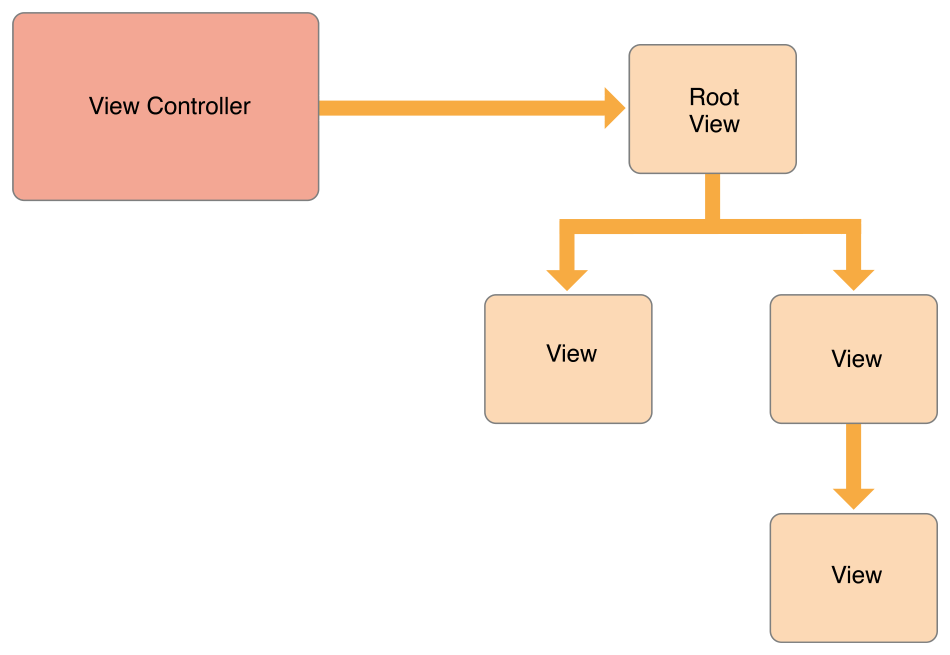
NOTE
It is common practice to use outlets to access other views in your view controller’s view hierarchy. Because a view controller manages the content of all its views, outlets let you store references to the views that you need. The outlets themselves are connected to the actual view objects automatically when the views are loaded from the storyboard.
A content view controller manages all of its views by itself. A container view controller manages its own views plus the root views from one or more of its child view controllers. The container does not manage the content of its children. It manages only the root view, sizing and placing it according to the container’s design. Figure 1-2 illustrates the relationship between a split view controller and its children. The split view controller manages the overall size and position of its child views, but the child view controllers manage the actual contents of those views.
Figure 1-2View controllers can manage content from other view controllers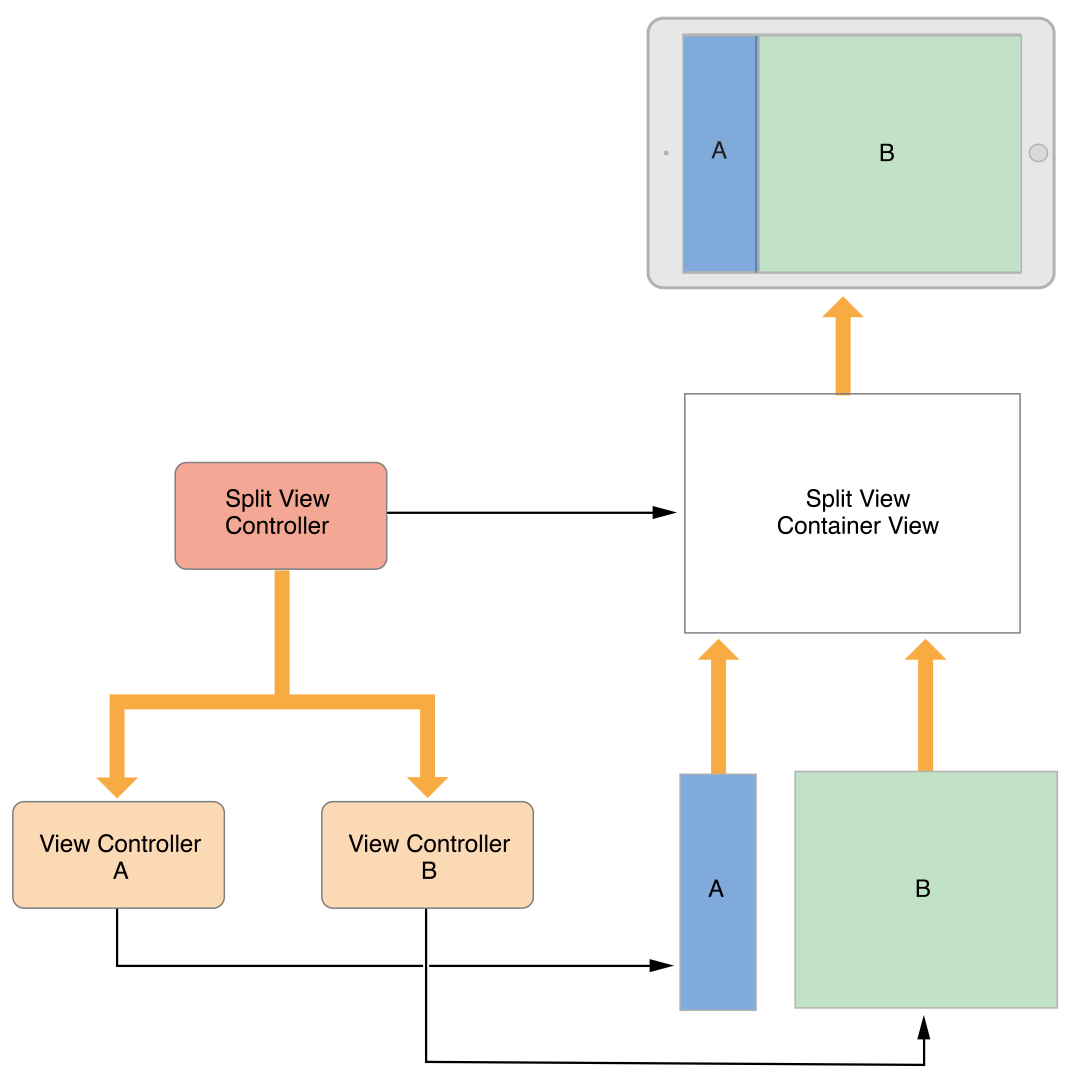
For information about managing your view controller’s views, see Managing View Layout.
The Role of View Controllers的更多相关文章
- 【IOS笔记】Creating Custom Content View Controllers
Creating Custom Content View Controllers 自定义内容视图控制器 Custom content view controllers are the heart of ...
- View Controller Programming Guide for iOS---(四)---Creating Custom Content View Controllers
Creating Custom Content View Controllers 创建自定义内容视图控制器 Custom content view controllers are the heart ...
- View Controller Programming Guide for iOS---(一)---About View Controllers
About View Controllers View controllers are a vital link between an app’s data and its visual appear ...
- Presenting view controllers on detached view controllers is discouraged <CallViewController: 0x14676e240>.
今天在优化app时,发现程序出现这种警告:“ Presenting view controllers on detached view controllers is discouraged <C ...
- 更轻量的 View Controllers
iew controllers 通常是 iOS 项目中最大的文件,并且它们包含了许多不必要的代码.所以 View controllers 中的代码几乎总是复用率最低的.我们将会看到给 view con ...
- 【IOS笔记】Resource Management in View Controllers
Resource Management in View Controllers 视图控制器的资源管理 View controllers are an essential part of managin ...
- 【IOS笔记】Using View Controllers in Your App
参考:http://www.cnblogs.com/patientAndPersist/p/3279645.html Using View Controllers in Your App Whethe ...
- iphone dev 入门实例2:Pass Data Between View Controllers using segue
Assigning View Controller Class In the first tutorial, we simply create a view controller that serve ...
- iOS错误之-Presenting view controllers on detached view controllers is discouraged
遇到这个警告后找了一下网络资源,基本上只说通过 [self.view.window.rootViewController presentViewController:controller animat ...
随机推荐
- mapreduce 函数入门 二
m apreduce三大组件:Combiner\Sort\Partitioner 默认组件:排序,分区(不设置,系统有默认值) 一.mapreduce中的Combiner 1.什么是combiner ...
- 在RedisTemplate中使用scan代替keys指令
keys * 这个命令千万别在生产环境乱用.特别是数据庞大的情况下.因为Keys会引发Redis锁,并且增加Redis的CPU占用.很多公司的运维都是禁止了这个命令的 当需要扫描key,匹配出自己需要 ...
- C语言函数调用
1.backtrace一些内存检测工具如Valgrind,调试工具如GDB,可以查看程序运行时函数调用的堆栈信息,有时候在分析程序时要获得堆栈信息,借助于backtrace是很有帮助的,其原型如下: ...
- Go学习笔记之Map
Go学习笔记之Map Map 引用类型,哈希表.map的key必须可以比较相等,除了slice, map, function的内建类型都可以作为key.struct类型不包含上述字段,也可作为key. ...
- windows 批处理命令
关机: shutdown -s -t 1 ::-t后面添加时间,表示多少秒之后关机, 删除文件夹以及子文件: rd file2 /s/q ::/s 删除子文件 /q不需要确认 新建文件夹: md f ...
- Replication:The replication agent has not logged a progress message in 10 minutes.
打开Replication Monitor,在Subscription Watch List Tab中,发现有大量的status= “Performance critical” 的黄色Warning, ...
- 36、v-charts一些基本配置修改
例如柱状图: <ve-histogram :settings="chartSettings" :extend="chartExtend" :grid=&q ...
- Java 之 匿名对象
一.匿名对象 创建对象时,只有创建对象的语句,却没有把对象地址赋值给某个变量. 虽然是创建对象的简化写法,但是应用场景非常有限. 匿名对象:没有变量名的对象. 语法格式: new 类名(参数列表): ...
- MES被重新定义?做到这几点才算智能制造
在工业4.0背景下,推动智能制造,构建智能工厂.智能生产.智能物流和智能服务体系,我们需要对MES系统重新进行定义,主要从以下几个方面进行说明: MES深度融入企业运营环节 智能工厂中的机器将全部由软 ...
- MySQL 如何优化大分页查询?
一 背景 大部分开发和DBA同行都对分页查询非常非常了解,看帖子翻页需要分页查询,搜索商品也需要分页查询.那么问题来了,遇到上千万或者上亿的数据量怎么快速的拉取全量,比如大商家拉取每月千万级别的订单数 ...