
odoo开发笔记 -- 借助模块queue_job实现异步方法调用
场景描述:
对比了几个定时调度的框架,发现各有优缺点;
celery 很强,异步定时调度,异步周期调度,也有延时调度的功能,但是延时调度的案例比较少,遂暂时不使用。
queue_job,一个odoo第三方应用模块,同样功能强大,可以满足日常的异步方法执行;
模块github地址:https://github.com/OCA/queue/tree/10.0/queue_job
但是我们的场景稍微有些不同,就是需要在异步调用的基础上增加一个延时(例5秒);
一般的异步调度机制:异步执行避免了任务的阻塞,相当于将需要下一步执行的任务(函数or方法),添加到了一个待执行的队列中,然后交给后台程序去慢慢处理,
处理的速度及性能,取决于服务器的硬件配置以及给相应任务开辟的进程数量。
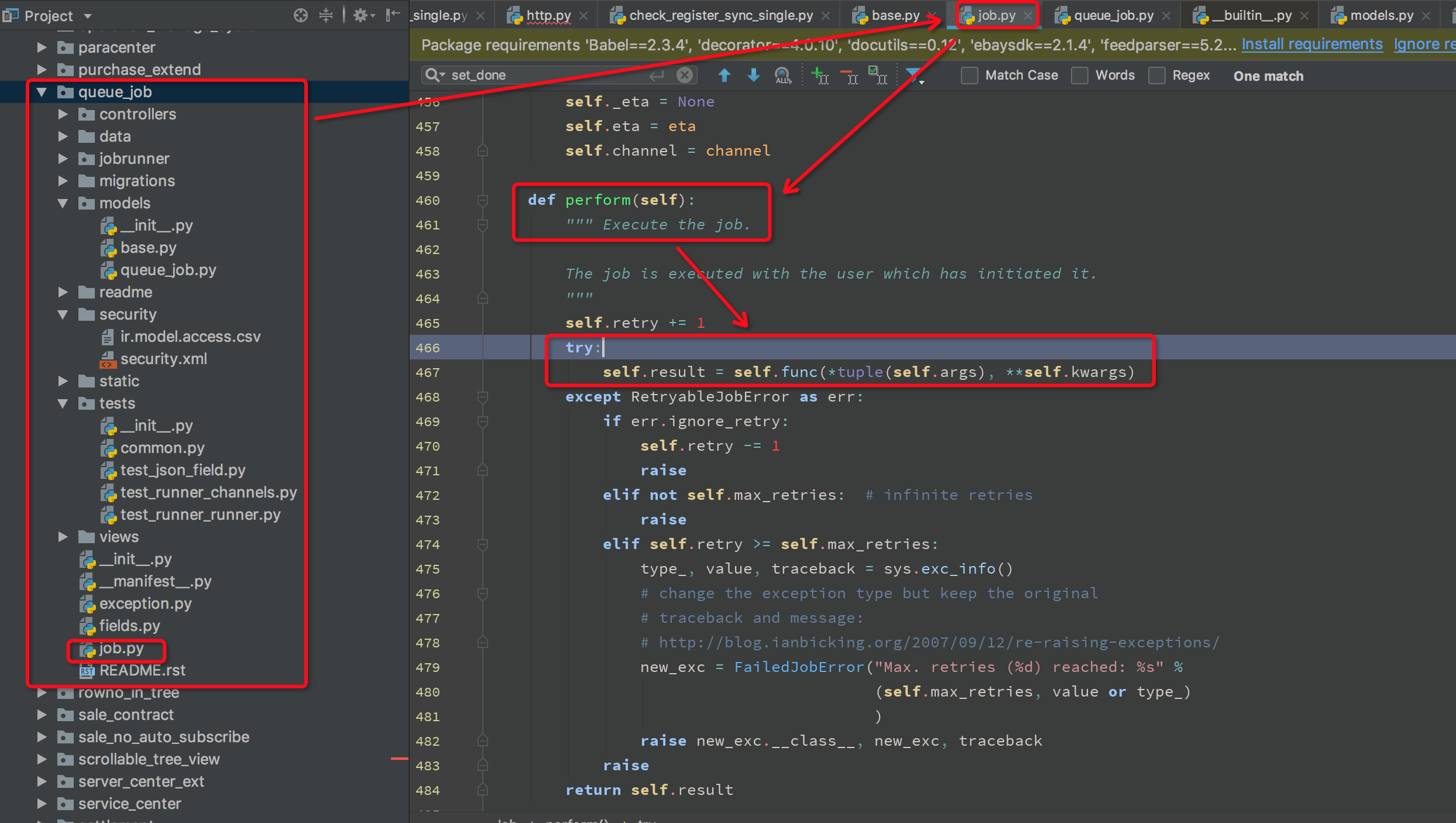
回到我们的需求,通过分析queue_job模块的代码,大概找到我们需要定制修改的位置,即:在job开始执行前增加一个延时,下图为未修改之前:
修改后代码:
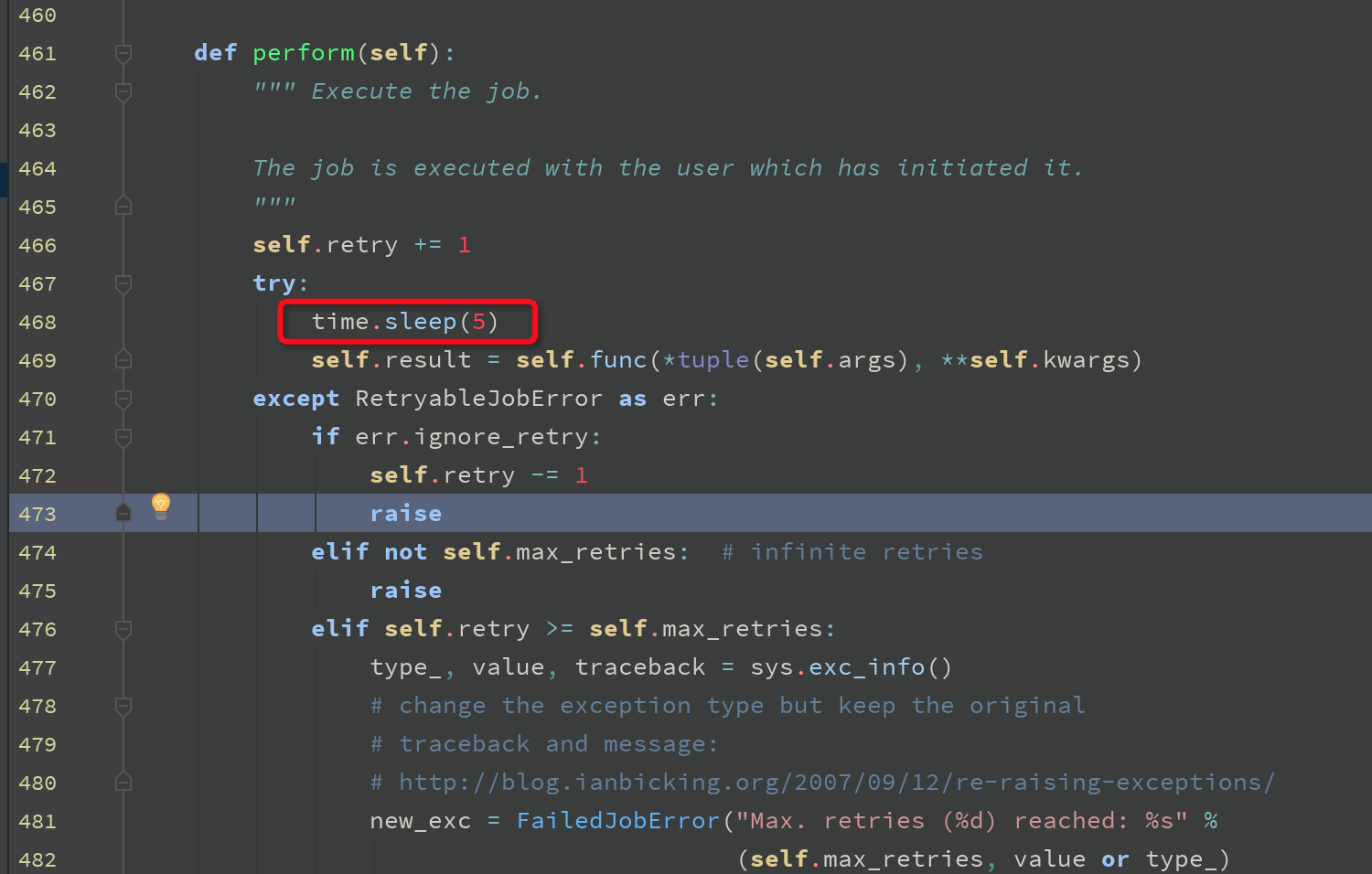
注意:这样虽然可以满足需求,但是会有新的问题,造成系统走到这里需要等待5秒时间,
实际生产环境,修改后,需要观察性能,如果处理效率满足不了实际情况,可以考虑适当增加服务器CPU配置,以及配置文件中的worker数,即多开辟进程。
顺便分享下,模块queue_job的基本使用及配置。
1. 模块介绍
2. 下载--根据自己odoo实际版本下载
第三方市场:https://www.odoo.com/apps/modules/10.0/queue_job/
github: https://github.com/OCA/queue/tree/10.0/queue_job
3. 配置
 This addon adds an integrated Job Queue to Odoo.

 It allows to postpone method calls executed asynchronously.

 Jobs are executed in the background by a Jobrunner, in their own transaction.

 Example:

 from odoo import models, fields, api

 from odoo.addons.queue_job.job import job

 class MyModel(models.Model):

    _name = 'my.model'

    @api.multi

    @job

    def my_method(self, a, k=None):

        _logger.info('executed with a: %s and k: %s', a, k)

 class MyOtherModel(models.Model):

     _name = 'my.other.model'

     @api.multi

     def button_do_stuff(self):

         self.env['my.model'].with_delay().my_method('a', k=2)

 In the snippet of code above, when we call button_do_stuff, a job capturing the method and arguments will be postponed. It will be executed as soon as the Jobrunner has a free bucket, which can be instantaneous if no other job is running.

 Features:

 Views for jobs, jobs are stored in PostgreSQL

 Jobrunner: execute the jobs, highly efficient thanks to PostgreSQL's NOTIFY

 Channels: give a capacity for the root channel and its sub-channels and segregate jobs in them. Allow for instance to restrict heavy jobs to be executed one at a time while little ones are executed 4 at a times.

 Retries: Ability to retry jobs by raising a type of exception

 Retry Pattern: the 3 first tries, retry after 10 seconds, the 5 next tries, retry after 1 minutes, ...

 Job properties: priorities, estimated time of arrival (ETA), custom description, number of retries

 Related Actions: link an action on the job view, such as open the record concerned by the job

 Table of contents

 Installation

 Configuration

 Usage

 Developers

 Known issues / Roadmap

 Changelog

 Next

 10.0.1.0.0

 Bug Tracker

 Credits

 Authors

 Contributors

 Maintainers

 Installation

 Be sure to have the requests library.

 Configuration

 Using environment variables and command line:

 Adjust environment variables (optional):

 ODOO_QUEUE_JOB_CHANNELS=root:4 or any other channels configuration. The default is root:1

 if xmlrpc_port is not set: ODOO_QUEUE_JOB_PORT=8069

 Start Odoo with --load=web,web_kanban,queue_job and --workers greater than 1. [1]

 Using the Odoo configuration file:

 [options]

 (...)

 workers = 6

 server_wide_modules = web,queue_job

 (...)

 [queue_job]

 channels = root:2

 Confirm the runner is starting correctly by checking the odoo log file:

 ...INFO...queue_job.jobrunner.runner: starting

 ...INFO...queue_job.jobrunner.runner: initializing database connections

 ...INFO...queue_job.jobrunner.runner: queue job runner ready for db <dbname>

 ...INFO...queue_job.jobrunner.runner: database connections ready

 Create jobs (eg using base_import_async) and observe they start immediately and in parallel.

 Tip: to enable debug logging for the queue job, use --log-handler=odoo.addons.queue_job:DEBUG

 [1]    It works with the threaded Odoo server too, although this way of running Odoo is obviously not for production purposes.

 Usage

 To use this module, you need to:

 Go to Job Queue menu

 Developers

 Bypass jobs on running Odoo

 When you are developing (ie: connector modules) you might want to bypass the queue job and run your code immediately.

 To do so you can set TEST_QUEUE_JOB_NO_DELAY=1 in your enviroment.

 Bypass jobs in tests

 When writing tests on job-related methods is always tricky to deal with delayed recordsets. To make your testing life easier you can set test_queue_job_no_delay=True in the context.

 Tip: you can do this at test case level like this

 @classmethod

 def setUpClass(cls):

     super().setUpClass()

     cls.env = cls.env(context=dict(

         cls.env.context,

         test_queue_job_no_delay=True,  # no jobs thanks

     ))

 Then all your tests execute the job methods synchronously without delaying any jobs.
官方说明
先配置odoo配置文件:
在odoo.conf中增加如下:
4. 使用
5. 查看结果
odoo开发笔记 -- 借助模块queue_job实现异步方法调用的更多相关文章
- odoo开发笔记--一个模块显示两个一级菜单
场景描述: 在已启动开发的模块中,odoo顶部一级菜单只有一个“会员管理”,需求是:在同一级顶部菜单,增加新菜单“产品管理”.举例如图: 处理方式: 按照odoo的机制,实现这种效果,可以 ...
- odoo开发笔记 -- 升级模块 提示外部ID找不到
可能的原因: 排查顺序: 1.id在视图中的加载顺序问题. 可能是:__manifest__.py文件,view文件先后加载顺序有问题:也可能是:xml 视图文件中,被引用的id出现在了引用id的下方 ...
- odoo开发笔记 -- 官方模块一览表
模块名称 技术名称 作者 电子发票管理 account OpenERP SA 会计与财务 account_accountant OpenERP SA 合同管理 account_analytic_ana ...
- odoo开发笔记 -- 新建模块扩展原模块增加菜单示例
场景描述: 1. 扩展了新模块 2.想要
- odoo开发笔记 -- div标签代替odoo button写法
odoo开发笔记 -- div标签代替odoo button写法 并调用自定义js <footer> <div id="confirm_request_cloud_repo ...
- odoo开发笔记 -- 搜索视图继承扩展
odoo开发笔记 -- 搜索视图继承扩展
- odoo开发笔记 -- 后台日志输出及分析
odoo开发笔记 -- 后台日志输出及分析 附:日志分析软件
- odoo开发笔记 -- 附件上传
附件上传基本原理实现,可以参考这篇: https://www.cnblogs.com/ljwTiey/p/7348291.html http://blog.csdn.net/wangnan537/ar ...
- odoo开发笔记 -- 用户配置界面如何增加模块访问权限
在odoo设置界面,点击用户,进入用户配置界面,会看到: 访问权 | 个人资料菜单 在访问权 page菜单界面,可以看到系统预制的一些模块都会显示在这里, 那么,我们自己开发的模块如何显示在这块呢,从 ...
随机推荐
- Python学习日记(三十九) Mysql数据库篇 七
Mysql函数 高级函数 1.BIN(N) 返回N的二进制编码 ); 执行结果: 2.BINARY(str) 将字符串str转换为二进制字符串 select BINARY('ASCII'); 执行结果 ...
- java实现表达式求值 (20 分)-------非递归版
Dr.Kong设计的机器人卡多掌握了加减法运算以后,最近由学会了一些简单的函数求值.比如,它知道函数min(20, 23)的值是20, add(10, 98)的值是108等等.经过训练,Dr.Kong ...
- Odoo XML中操作记录与函数
转载请注明原文地址:https://www.cnblogs.com/ygj0930/p/10826037.html 一:XML文件中定义记录 XML中定义记录: 每个<record>元素有 ...
- Linux必知必会--awk
弱者,是没有资格要求公平的. --<秦时明月>卫庄 参考文献: http://www.ruanyifeng.com/blog/2018/11/awk.html 阮一峰 https://ww ...
- JavaFX 井字棋游戏
利用JavaFX设计一个井字棋游戏,其中包括了能够与玩家对战的AI.AI的实现相比五子棋来说要简单得多,可以保证AI在后手情况下绝对不会输,具体实现如下: /* * To change this li ...
- python 监听键盘输入
import sys, select, tty, termios old_attr = termios.tcgetattr(sys.stdin) tty.setcbreak(sys.stdin.fil ...
- new.target元属性 | 分别用es5、es6 判断一个函数是否使用new操作符
函数内部有两个方法 [[call]] 和 [[construct]] (箭头函数没有这个方法),当使用new 操作符时, 函数内部调用 [[construct]], 创建一个新实例,this指向这个实 ...
- 代码的结合性:继承 扩展 组合 变换--swift暗含的四根主线
类型继承: 类型扩展: 类型组合: 类型变换:
- 第3章 Spring AOP
3.1 Spring AOP简介 3.11什么是AOP? AOP的全称是Aspect-Oriented Programming,即面向切面编程(也称面向方面编程).它是面向对象编程(OOP)的一种补充 ...
- Laravel 自定义公共函数全局使用,并设置自定加载
开发中经常定义一些公共函数(如:获取用户信息.csv导入导出等常用函数),方便控制层,模型层调用. 那么在Laravle框架中怎么使用? 方法如下: 1.在根目录app下新建公共目录Library/U ...