
MVC中使用MVCPager简单分页
一、建立数据库以及建立MVC项目
自己随便建立一个数据库,并且添加数据。我建立的数据库如下。
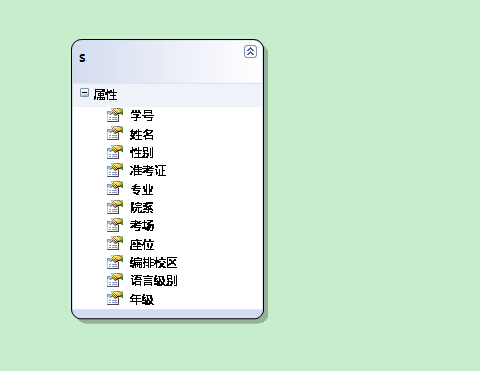
二、建立LINQ to SQL映射。

然后一步步点确定
三、编写代码
在Controllers中建立控制器,模板为空。建立的项目如下:
要添加视图Index

在Controller中选中Index 并且添加视图, 模板选中List, 如下

注意后台要添加对MvcPager的程序集引用,后台代码如下:
using Webdiyer.WebControls.Mvc;
 public class StudentController : Controller

    {

        //

        // GET: /Student/

        public ActionResult Index(int id=1)

        {

           Models.StudentEntityDataContext student= new Models.StudentEntityDataContext();

           IQueryable<Models.S> p = from c in student.S

                                    select c;

           PagedList<Models.S> m = p.ToPagedList(id,10);

            return View(m);

        }

    }
前台代码如下:
@model PagedList<MvcApplication1.Models.S>

@{

    Layout = null;

}

@using Webdiyer.WebControls.Mvc;  //添加对程序集的引用

<!DOCTYPE html>

<html>

<head>

    <title>Index</title>

// 控制分页的CSS样式

    <style type="text/css">

        table, td

        {

            font: 100% Arial, Helvetica, sans-serif;

        }

        table

        {

            width: 100%;

            border-collapse: collapse;

            margin: 1em 0;

        }

        th, td

        {

            text-align: left;

            padding: .5em;

            border: 1px solid #fff;

        }

        th

        {

            background: #328aa4;

            color: #fff;

        }

        td

        {

            background: #e5f1f4;

        }

        /*div布局*/

        .div float

        {

            float: left;

            width: 50%;

        }

        #div pages

        {

            height: 300px;

        }

        /*分页工具栏样式*/

        .pages

        {

            color: #045FB4;

            font-weight: bold;

            font-size: 14px;

        }

        .pages .item

        {

            padding: 1px 6px;

            font-size: 14px;

        }

        /*号码页数*/

        .pages .cpb

        {

            color: #045FB4;

            padding: 1px 6px;

            font-size: 13px;

        }

        /*当前页数*/

        .pages a

        {

            text-decoration: none;

            padding: 0 5px;

            border: 1px solid #BDBDBD;

            margin: 0 2px;

            color: #000;

            font-weight: normal;

        }

        .pages a:hover

        {

            background-color: #0174DF;

            color: #fff;

            border: 1px solid #0174DF;

            text-decoration: none;

            font-weight: normal;

        }

        </style>

</head>

<body>

    <p>

        @Html.ActionLink("Create New", "Create")

    </p>

    <table>

        <tr>

            <th>

                学号

            </th>

            <th>

                姓名

            </th>

            <th>

                 性别

            </th>

            <th>

                准考证

            </th>

            <th>

                专业

            </th>

            <th>

                院系

            </th>

            <th>

                考场

            </th>

            <th>

                座位

            </th>

            <th>

                编排校区

            </th>

            <th>

                语言级别

            </th>

            <th>

                年级

            </th>

            <th></th>

        </tr>

    @foreach (var item in Model) {

        <tr>

            <td>

                @Html.DisplayFor(modelItem => item.学号)

            </td>

            <td>

                @Html.DisplayFor(modelItem => item.姓名)

            </td>

            <td>

                @Html.DisplayFor(modelItem => item.性别)

            </td>

            <td>

                @Html.DisplayFor(modelItem => item.准考证)

            </td>

            <td>

                @Html.DisplayFor(modelItem => item.专业)

            </td>

            <td>

                @Html.DisplayFor(modelItem => item.院系)

            </td>

            <td>

                @Html.DisplayFor(modelItem => item.考场)

            </td>

            <td>

                @Html.DisplayFor(modelItem => item.座位)

            </td>

            <td>

                @Html.DisplayFor(modelItem => item.编排校区)

            </td>

            <td>

                @Html.DisplayFor(modelItem => item.语言级别)

            </td>

            <td>

                @Html.DisplayFor(modelItem => item.年级)

            </td>

            <td>

                @Html.ActionLink("Edit", "Edit", new { /* id=item.PrimaryKey */ }) |

                @Html.ActionLink("Details", "Details", new { /* id=item.PrimaryKey */ }) |

                @Html.ActionLink("Delete", "Delete", new { /* id=item.PrimaryKey */ })

            </td>

        </tr>

    }

    </table>

//这里是分页的控制

  <div>

 @Html.AjaxPager(Model, new PagerOptions() { CssClass = "pages", PageIndexParameterName = "id",

    ShowPageIndexBox = true, PageIndexBoxType = PageIndexBoxType.TextBox, ShowGoButton = true,

    PageIndexBoxWrapperFormatString="转到{0}"}, new AjaxOptions() { UpdateTargetId = "dvOrders" })

    </div>

</body>

</html>
四、最终分页效果

代码下载地址: http://download.csdn.net/detail/luoyangwyb/7581651
MvcPager官方下载网址:http://mvcpager.codeplex.com/releases/view/47201
Demo的示例网址:http://en.webdiyer.com/
MVC中使用MVCPager简单分页的更多相关文章
- ASP.NET MVC中使用MvcPager异步分页+在分页中复选框下一页上一页也保持选中
ASP.NET MVC 分页使用的是作者杨涛的MvcPager分页控件 地址:http://www.webdiyer.com/mvcpager/demos/ajaxpaging/ 这个分页控件在里面 ...
- FineUIMvc随笔(6)对比WebForms和MVC中表格的数据库分页
声明:FineUIMvc(基础版)是免费软件,本系列文章适用于基础版. 通过对比WebForms和MVC中表格数据库分页代码的不同,可以对 MVC 中的数据流转有更加深入的了解. WebForms 中 ...
- asp.net mvc 中 一种简单的 URL 重写
asp.net mvc 中 一种简单的 URL 重写 Intro 在项目中想增加一个公告的功能,但是又不想直接用默认带的那种路由,感觉好low逼,想弄成那种伪静态化的路由 (别问我为什么不直接静态化, ...
- MVC001之mvcpager简单分页
描述:用mvcpager实现简单分页功能 参考网址: http://www.cnblogs.com/iamlilinfeng/archive/2013/03/11/2951460.html http: ...
- asp.net -mvc框架复习(5)-ASP.NET MVC中的视图简单使用
1.视图分类 ASPX视图(现在讲解) Razor视图(后面讲解) ASPX 视图: 2.@page指令 作用:页面的声明 要求:必须放在第一行,常用指令属性如下: 3.服务器端内嵌语法 小脚本:在A ...
- 【MVC】使用MvcPager进行分页
1.添加引用: mvcPager 版本高的提供的功能也更多. 注:下载了第一个,但是里面的一些字段是只读的.(eg:PagedList<T> .TotalItemCount)这是不符合的. ...
- MVC中验证码的简单使用
首先新建一个MVC项目 添加类:验证码帮助类(ValidateCodeHelper) using System; using System.Collections.Generic; using Sys ...
- .net mvc中一种简单的工作流的设计
开篇前的废话:工作流是我们在做互联网应用开发时经常需要用到的一种技术,复杂的工作流我们基本是借助一些开源的 工作流项目来做,比如 ccflow等,但是有时候,我们只需要实现一些简单的工作流流程,这时候 ...
- mvc中hangfire全局简单配置
public void Configuration(IAppBuilder app) { ConfigureAuth(app); //指定使用Sql ...
随机推荐
- python学习第一
#python学习day1#一.变量#变量命名规范:#驼峰命名法:AgeOfPlane#下划线命名(推荐):age_of_plane#变量格式同C/C++#注意:变量不以中文命名:变量不宜过长:变量因 ...
- HTML5你必须知道的28个新特性
1. 新的Doctype 尽管使用<!DOCTYPE html>,即使浏览器不懂这句话也会按照标准模式去渲染 2. Figure元素 用<figure>和<figcapt ...
- UVA - 1401 Remember the Word(trie+dp)
1.给一个串,在给一个单词集合,求用这个单词集合组成串,共有多少种组法. 例如:串 abcd, 单词集合 a, b, cd, ab 组合方式:2种: a,b,cd ab,cd 2.把单词集合建立字典树 ...
- Masonry 动画更新约束
前言 说到iOS自动布局,有很多的解决办法.有的人使用xib/storyboard自动布局,也有人使用frame来适配.对于前者,笔者并不喜欢,也不支持.对于后者,更是麻烦,到处计算高度.宽度等,千万 ...
- [Usaco2015DEC] Breed Counting
[题目链接] https://www.lydsy.com/JudgeOnline/problem.php?id=4397 [算法] 树状数组 时间复杂度 : O(QlogN) [代码] #includ ...
- bzoj 4596
4596: [Shoi2016]黑暗前的幻想乡 Time Limit: 20 Sec Memory Limit: 256 MBSubmit: 257 Solved: 152[Submit][Sta ...
- HDU 3037 Saving Beans (数论,Lucas定理)
题意:问用不超过 m 颗种子放到 n 棵树中,有多少种方法. 析:题意可以转化为 x1 + x2 + .. + xn = m,有多少种解,然后运用组合的知识就能得到答案就是 C(n+m, m). 然后 ...
- 洛谷 P3959 宝藏【状压dp】
一开始状态设计错了-- 设f[i][s]为当前与根节点联通状况为s,最深深度为i 转移的话枚举当前没有和根联通的点集,预处理出把这些点加进联通块的代价(枚举s中的点和当前点的连边乘以i即可),然后用没 ...
- bzoj 3675: [Apio2014]序列分割【斜率优化dp】
首先看这个得分方式,容易发现就相当于分k段,每段的值和两两乘起来. 这样就很容易列出dp方程:设f[i][j]为到j分成分成i段,转移是 \[ f[i][j]=max { f[k][j]+s[k]*( ...
- poj 3281 Dining【最大流】
记得把牛拆掉!拆成两个点i和i'在中间连一条流量为1的边,来限制每头牛只能选一组 一般来讲是一种物品一个消费者各占一边,但是这里有两个物品,所以考虑把牛放在中间,s向所有的食物连流量为1的边,所有食物 ...