
Linux系统权限
目
录
2.2 第二种方法chmod nnn [-R] filename 1
权限描述
在Linux中权限是非常重要要的,因为Linux一切皆文件,合理的分配每个文件,每个用户的权限是保证整个系统安全运行的必备操作
权限描述
/root/dir的权限是所属用户root读写执行,所属组root读执行,其他用户读执行
/root/dir/file的权限是所属用户root读写,所属组root读,其他用户读
[root@oldboy ~]# ll -d dir/
drwxr-xr-x 2 root root 18 8月 16 15:32 dir/
[root@oldboy ~]# ll dir/file
-rw-r--r-- 1 root root 0 8月 16 15:32 dir/file
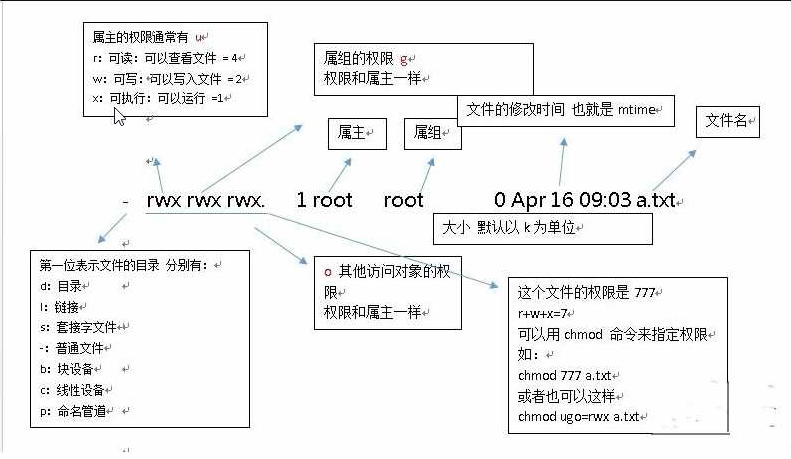
文件权限对应表
|
w(write) |
写入权限 |
2 |
|
x(execute) |
执行权限 |
1 |
|
-(没有权限) |
没有权限 |
0 |
三种角色
|
User(u): |
属主用户(文件所有者) |
|
Group(g): |
属组用户(包含组成员) |
|
Other(o): |
匿名用户(其他人) |
文件和用户以及组之间的关系
- 判断用户是否为文件的所有者,如果是,按所有者的权限进行访问
- 判断是否为文件的所有组成员,如果是,就按组的权限去访问
- 不满足上面条件的用户就是文件的其他的人,按其他人的权限去访问
修改权限命令chmod
chmod[ugoa][+-=][rwx][-R] filename #修改文件目录权限rwx
-R:级联修改,递归修改
第一种方法
增加权限+
[root@oldboy dir]# ll
-rw-r--r-- 1 root root 0 8月 16 15:32 file #增加其他人的执行权限
[root@oldboy dir]# chmod o+x /root/dir/file
[root@oldboy dir]# ll
-rw-r--r-x 1 root root 0 8月 16 15:32 file
去掉权限-
[root@oldboy dir]# ll
-rw-r--r-x 1 root root 0 8月 16 15:32 file
[root@oldboy dir]# chmod g-r /root/dir/file #去掉所属组的读权限
[root@oldboy dir]# ll
-rw----r-x 1 root root 0 8月 16 15:32 file
指定权限=
[root@oldboy dir]# ll
-rw----r-x 1 root root 0 8月 16 15:32 file
[root@oldboy dir]# chmod ugo=rwx /root/dir/file #指定所有用户拥有读写执行权限
[root@oldboy dir]# ll
-rwxrwxrwx 1 root root 0 8月 16 15:32 file
第二种方法chmod nnn [-R] filename
第一个n:U
第一个n:G
第一个n:O
|
执行权限 |
1 |
|
没有权限 |
0 |
常用几种组合
默认目录755
默认文件644
目录:755 750 700
文件:644 640 600
用数字修改权限
-rwxrwxrwx 1 root root 0 8月 16 15:32 file
[root@oldboy dir]# chmod 644 /root/dir/file #指定拥有者权限为读写,所属组和其他人权限为读权限
[root@oldboy dir]# ll
-rw-r--r-- 1 root root 0 8月 16 15:32 file
修改文件所属 chown
chown[user][.|:][group][-R]filename
-rw-r--r-- 1 root root 0 8月 16 15:32 file
[root@oldboy dir]# chown oldboy.music file #修改file文件属于oldboy用户属于music组
[root@oldboy dir]# ll
-rw-r--r-- 1 oldboy music 0 8月 16 15:32 file
基础权限设置案例
|
权限 |
对文件的影响 |
对目录的影响 |
|
读取权限(r) |
具有读取阅读文件内容的权限 |
具有浏览目录和子目录的权限 |
|
写入权限(w) |
具有新增修改文件内容的权限 |
具有增加和删除目录内文件 |
|
执行(x) |
具有执行文件的权限 |
具有访问目录内容(取决于目录中文件的权限) |
文件权限试验案例
|
文件权限 |
结果 |
|
读取权限(r) |
文件只有r权限: 具有读取\阅读文件内容权限 1.能使用查看类命令 cat、head、tail、less、more 2.不能移动、不能编辑,不能删除 |
|
写入权限(w) |
如果文件只有w权限: 具有新增、修改文件内容的权限 1.使用vim编辑,会提示权限拒绝, 但可强制保存,会覆盖之前文件内容 2.使用echo命令重定向或追加重定向技术可以往文件内写入数据 3.使用cat命令读取文件, 将读取到的文件输出交给仅有w权限文件的输入 4.不能复制、不能移动、不能删除,(删除需要看上级目录w的权限) |
|
执行权限(x) |
文件只有x权限,具有执行文件的权限。 //注意: 普通用户需要有r权限,管理员不需要 1.不能执行、查看、编辑、复制、移动、删除 |
|
rw权限 |
可以查看和编辑文件内容 |
|
rx权限 |
只能查看和执行文件、不能编辑、复制、移动、删除 |
|
rx权限 |
允许浏览目录内文件以及子目录、并允许在目录内新建文件, 不允许创建、删除文件和目录 |
- 默认文件其他用户仅有读权限
-rwxrwxr-- 1 root root 0 8月 16 15:32 file
[oldboy@oldboy dir]$ cat file
date
[oldboy@oldboy dir]$ echo hello > file
-bash: file: 权限不够
只能查看不能修改
2、//测试读权限(无法执行或删除)
[root@oldboy ~]# su - oldboy
[oldboy@oldboy ~]$ cat /tmp/date.txt
date
[oldboy@oldboy ~]$ echo "test" >/tmp/date.txt
-bash: /tmp/date.txt: Permission denied
[oldboy@oldboy ~]$ /tmp/date.txt
-bash: /tmp/date.txt: Permission denied
3、增加执行权限测试执行权限
[root@oldboy ~]# chmod o+x /tmp/date.txt
[root@oldboy ~]# ll /tmp/date.txt
-rw-r--r-x. 1 root root 5 Aug 16 06:37 /tmp/date.txt
[oldboy@oldboy ~]$ /tmp/date.txt
Thu Aug 16 06:40:56 CST 2018
4、增加w写权限测试写权限
[root@oldboy ~]# chmod o+w /tmp/date.txt
[root@oldboy ~]# ll /tmp/date.txt
-rw-r--rwx 1 root root 5 Aug 16 06:38 /tmp/date.txt
[oldboy@oldboy ~]$ echo "test" >/tmp/date.txt
目录权限实验案例
|
目录权限 |
执行结果 |
|
只有r权限 |
1.能使用ls命令浏览目录及子目录, 同时会提示权限拒绝 2.能使用ls -l命令浏览目录及子目录, 会带问号,同时只能看到文件名 总结: 目录只有r权限,仅仅只能浏览内的文件名,无其他操作权限 |
|
写入权限(w) |
如果目录只有w权限:具有增加、删除或修改目录内文件名权限(需要x配合) //注意:如果目录有w权限, 可以在目录创建文件, 可以删除目录中的文件(跟文件权限无关) 不能进入目录、不能复制目录、不能删除目录、不能移动目录 |
|
执行权限(x) |
目录只有x权限 1.只能进入目录 2.不能浏览、复制、移动、删除 |
1:、对目录没有 w,对文件有 rwx
[root@oldboy ~]# mkdir /test
[root@oldboy ~]# echo "test" > /test/test.txt
[root@oldboy ~]# chmod 777 /test/test.txt
[root@oldboy ~]# ll -d /test
drwxr-xr-x. 2 root root 22 Aug 16 06:52 /test
[root@oldboy ~]# ll /test/test.txt
-rwxrwxrwx. 1 root root 5 Aug 16 06:52 /test/test.txt
普通用户验证权限
[oldboy@oldboy ~]$ cat /test/test.txt
test
[oldboy@oldboy ~]$ rm -f /test/test.txt
2:、对目录有 w,对文件没有任何权限
[root@oldboy ~]# chmod 777 /test/
[root@oldboy ~]# chmod 000 /test/test.txt
[root@oldboy ~]# ll -d /test
drwxrwxrwx. 2 root root 22 Aug 16 06:52 /test
[root@oldboy ~]# ll -d /test/test.txt
----------. 1 root root 5 Aug 16 06:52 /test/test.txt
/普通用户验证权限
[oldboy@oldboy ~]$ cat /test/test.txt
cat: /test/test.txt: Permission denied
[oldboy@oldboy ~]$ rm -f /test/test.txt
[oldboy@oldboy ~]$ touch /test/test1.txt
3:、对目录没有 x,对文件有任何权限
[root@oldboy ~]# chmod 766 /test/
[root@oldboy ~]# chmod 777 /test/test.txt
[root@oldboy ~]# ll -d /test/
drwxrw-rw-. 2 root root 22 Aug 16 06:58 /test/
[root@oldboy ~]# ll /test/test.txt
-rwxrwxrwx. 1 root root 5 Aug 16 06:58 /test/test.txt
普通用户验证权限
[oldboy@oldboy ~]$ cd /test
-bash: cd: /test: Permission denied
[oldboy@oldboy ~]$ cat /test/test.txt
cat: /test/test.txt: Permission denied
[oldboy@oldboy ~]$ rm -f /test/test.txt
rm: cannot remove '/test/test.txt': Permission denied
Linux系统权限的更多相关文章
- Linux系统权限设置 - 运用指南
下面对linux系统下的有关权限操作命令进行了梳理总结,并配合简单实例进行说明.linux中除了常见的读(r).写(w).执行(x)权限以外,还有其他的一些特殊或隐藏权限,熟练掌握这些权限知识的使用, ...
- linux系统权限(基本权限)
linux的系统权限:r-- 100 4-w- 010 2--x 001 1 [root@localhost ~]# ll -d dir drwxrwxrwx root root Nov : di ...
- linux系统权限管理拓展:特殊权限
文件与目录权限设置不止读.写.执行这些,还有所谓的特殊权限,由于特殊权限会拥有一些"特权": 1 2 3 4 本章内容 SUID SGID SBIT 文件扩展权限ACL 1.SUI ...
- linux 系统权限 数字含义
摘抄: sudo chmod XXX dir_name XXX是你要设置的权限代号,第一位代表Owner,第二位代表Group,第三位代表Others XXX中0代表什么都不可以,1代表可执行,2代表 ...
- Linux文件权限;ACL;Setuid、Setgid、Stick bit特殊权限;sudo提权
相关学习资料 http://blog.sina.com.cn/s/blog_4e2e6d6a0100g47o.html http://blog.csdn.net/aegoose/article/det ...
- Linux系统基础知识整理
一.说明 本篇文章,我将结合自己的实践以及简介,来对linux系统做一个直观清晰的介绍,使得哪些刚接触Linux的小伙伴可以快速入门,也方便自己以后进行复习查阅. 二.基本知识整理 1.Linux文件 ...
- Linux系统基础知识整理(一)
本文来自于: https://www.cnblogs.com/hafiz/p/6686187.html#4196989 一.说明 本篇文章,我将结合自己的实践以及简介,来对linux系统做一个直观清晰 ...
- linux系统下的权限知识梳理
下面对linux系统下的有关权限操作命令进行了梳理总结,并配合简单实例进行说明.linux中除了常见的读(r).写(w).执行(x)权限以外,还有其他的一些特殊或隐藏权限,熟练掌握这些权限知识的使用, ...
- linux系统下修改文件夹目录权限
linux系统下修改文件夹目录权限 文件夹权限问题 Linux.Fedora.Ubuntu修改文件.文件夹权限的方法差不多.很多人开始接触Linux时都很头痛Linux的文件权限问题.这里告诉大家如何 ...
随机推荐
- 函数和代码复用 --Python
1.关于递归函数的描述,以下选项中正确的是 A.包含一个循环结构 B.函数比较复杂 C.函数内部包含对本函数的再次调用 D.函数名称作为返回值 答案:D 答案解析:递归函数是指函数内部包含对本函数的再 ...
- iOS音频与视频的开发(二)- 使用AVAudioRecorder进行录制音频
1.使用AVAudioRecorder录制视频 AVAudioRecorder与AVAudioPlayer类似,它们都属于AVFoundation的类.AVAudioRecorder的功能类似于一个录 ...
- Vue-CLI3详解
vue-cli3快速开始 node 安装,略. webpack 安装webpack npm install webpack webpack-cli -g 查看版本 webpack -v vue-cli ...
- 51Nod 1021 石子归并(动态规划)
#include <iostream> #include <algorithm> #include <string> #include <iostream&g ...
- AtCoder Grand Contest 015 C - Nuske vs Phantom Thnook
题目传送门:https://agc015.contest.atcoder.jp/tasks/agc015_c 题目大意: 现有一个\(N×M\)的矩阵\(S\),若\(S_{i,j}=1\),则该处为 ...
- noip初赛
运算符 联结词名称 异或 ⊕ 非¬(-) 否定 与∧(·) 对应集合∩交集 对应按位与符号& 合取 或∨(+) 对应集合∪并集 对应按位或符号| 析取 条件→ ...
- 500 Keyboard Row 键盘行
给定一个单词列表,只返回可以使用在键盘同一行的字母打印出来的单词. 详见:https://leetcode.com/problems/keyboard-row/description/ C++: cl ...
- mybatis generator 整合lombok
<?xml version="1.0" encoding="UTF-8"?> <!DOCTYPE generatorConfiguration ...
- AJPFX总结面向对象(this和super的区别和应用)
面向对象(this和super的区别和应用)(掌握)* A:this和super都代表什么 * this:代表当前对象的引用,谁来调用我,我就代表谁 * super:代表当 ...
- LN : leetcode 684 Redundant Connection
lc 684 Redundant Connection 684 Redundant Connection In this problem, a tree is an undirected graph ...