
图形变幻矩阵 Transforms
https://developer.apple.com/library/mac/documentation/GraphicsImaging/Conceptual/drawingwithquartz2d/dq_affine/dq_affine.html#//apple_ref/doc/uid/TP30001066-CH204-CJBECIAD
The Quartz 2D drawing model defines two completely separate coordinate spaces: user space, which represents the document page, and device space, which represents the native resolution of a device. User space coordinates are floating-point numbers that are unrelated to the resolution of pixels in device space. When you want to print or display your document, Quartz maps user space coordinates to device space coordinates. Therefore, you never have to rewrite your application or write additional code to adjust the output from your application for optimum display on different devices.
You can modify the default user space by operating on the current transformation matrix, or CTM. After you create a graphics context, the CTM is the identity matrix. You can use Quartz transformation functions to modify the CTM and, as a result, modify drawing in user space.
This chapter:
Provides an overview of the functions you can use to perform transformations
Shows how to modify the CTM
Describes how to create an affine transform
Shows how to determine if two transforms are equivalent
Describes how to obtain the user-to-device-space transform
Discusses the math behind affine transforms
About Quartz Transformation Functions
You can easily translate, scale, and rotate your drawing using the Quartz 2D built-in transformation functions. With just a few lines of code, you can apply these transformations in any order and in any combination. Figure 5-1 illustrates the effects of scaling and rotating an image. Each transformation you apply updates the CTM. The CTM always represents the current mapping between user space and device space. This mapping ensures that the output from your application looks great on any display screen or printer.
Figure 5-1 Applying scaling and rotation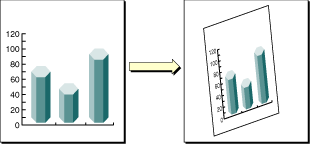
The Quartz 2D API provides five functions that allow you to obtain and modify the CTM. You can rotate, translate, and scale the CTM, and you can concatenate an affine transformation matrix with the CTM. See Modifying the Current Transformation Matrix.
Quartz also allows you to create affine transforms that don’t operate on user space until you decide to apply the transform to the CTM. You use another set of functions to create affine transforms, which can then be concatenated with the CTM. See Creating Affine Transforms.
You can use either set of functions without understanding anything about matrix math. However if you want to understand what Quartz does when you call one of the transform functions, read The Math Behind the Matrices.
Modifying the Current Transformation Matrix
You manipulate the CTM to rotate, scale, or translate the page before drawing an image, thereby transforming the object you are about to draw. Before you transform the CTM, you need to save the graphics state so that you can restore it after drawing. You can also concatenate the CTM with an affine transform (see Creating Affine Transforms). Each of these four operations—translation, rotation, scaling, and concatenation—is described in this section along with the CTM functions that perform each operation.
The following line of code draws an image, assuming that you provide a valid graphics context, a pointer to the rectangle to draw the image to, and a valid CGImage object. The code draws an image, such as the sample rooster image shown in Figure 5-2. As you read the rest of this section, you’ll see how the image changes as you apply transformations.
CGContextDrawImage (myContext, rect, myImage); |
Figure 5-2 An image that is not transformed
Translation moves the origin of the coordinate space by the amount you specify for the x and y axes. You call the function CGContextTranslateCTM to modify the x and y coordinates of each point by a specified amount. Figure 5-3 shows an image translated by 100 units in the x-axis and 50 units in the y-axis, using the following line of code:
CGContextTranslateCTM (myContext, 100, 50); |
Figure 5-3 A translated image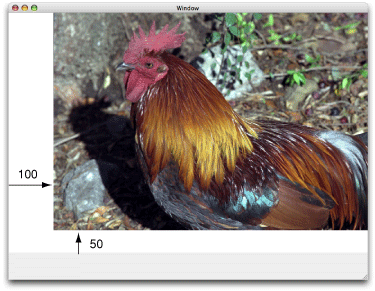
Rotation moves the coordinate space by the angle you specify. You call the function CGContextRotateCTM to specify the rotation angle, in radians. Figure 5-4 shows an image rotated by –45 degrees about the origin, which is the lower left of the window, using the following line of code:
CGContextRotateCTM (myContext, radians(–45.)); |
The image is clipped because the rotation moved part of the image to a location outside the context. You need to specify the rotation angle in radians.
It’s useful to write a radians routine if you plan to perform many rotations.
#include <math.h> |
static inline double radians (double degrees) {return degrees * M_PI/180;}
|
Figure 5-4 A rotated image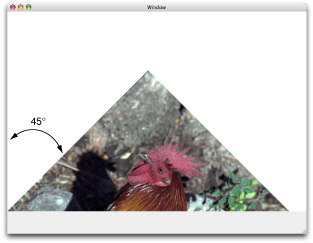
Scaling changes the scale of the coordinate space by the x and y factors you specify, effectively stretching or shrinking the image. The magnitude of the x and y factors governs whether the new coordinates are larger or smaller than the original. In addition, by making the x factor negative, you can flip the coordinates along the x-axis; similarly, you can flip coordinates horizontally, along the y-axis, by making the y factor negative. You call the function CGContextScaleCTM to specify the x and y scaling factors. Figure 5-5 shows an image whose x values are scaled by .5 and whose y values are scaled by .75, using the following line of code:
CGContextScaleCTM (myContext, .5, .75); |
Figure 5-5 A scaled image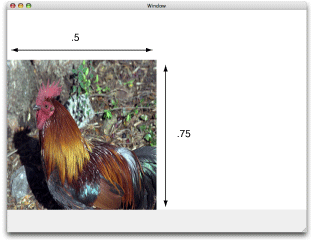
Concatenation combines two matrices by multiplying them together. You can concatenate several matrices to form a single matrix that contains the cumulative effects of the matrices. You call the function CGContextConcatCTM to combine the CTM with an affine transform. Affine transforms, and the functions that create them, are discussed in Creating Affine Transforms.
Another way to achieve a cumulative effect is to perform two or more transformations without restoring the graphics state between transformation calls. Figure 5-6 shows an image that results from translating an image and then rotating it, using the following lines of code:
CGContextTranslateCTM (myContext, w,h); |
CGContextRotateCTM (myContext, radians(-180.)); |
Figure 5-6 An image that is translated and rotated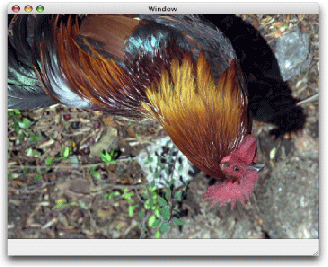
Figure 5-7 shows an image that is translated, scaled, and rotated, using the following lines of code:
CGContextTranslateCTM (myContext, w/4, 0); |
CGContextScaleCTM (myContext, .25, .5); |
CGContextRotateCTM (myContext, radians ( 22.)); |
Figure 5-7 An image that is translated, scaled, and then rotated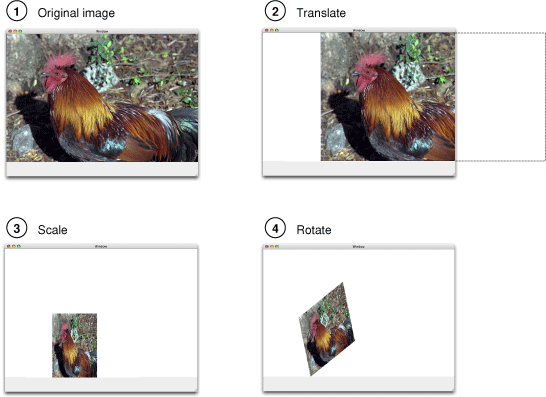
The order in which you perform multiple transformations matters; you get different results if you reverse the order. Reverse the order of transformations used to create Figure 5-7 and you get the results shown in Figure 5-8, which is produced with this code:
CGContextRotateCTM (myContext, radians ( 22.)); |
CGContextScaleCTM (myContext, .25, .5); |
CGContextTranslateCTM (myContext, w/4, 0); |
Figure 5-8 An image that is rotated, scaled, and then translated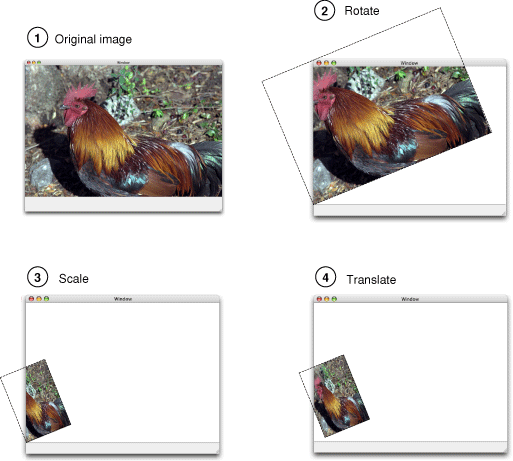
Creating Affine Transforms
The affine transform functions available in Quartz operate on matrices, not on the CTM. You can use these functions to construct a matrix that you later apply to the CTM by calling the function CGContextConcatCTM. The affine transform functions either operate on, or return, a CGAffineTransform data structure. You can construct simple or complex affine transforms that are reusable.
The affine transform functions perform the same operations as the CTM functions—translation, rotation, scaling, and concatenation. Table 5-1 lists the functions that perform these operations along with information on their use. Note that there are two functions for each of the translation, rotation, and scaling operations.
|
Function |
Use |
|---|---|
|
|
To construct a new translation matrix from x and y values that specify how much to move the origin. |
|
|
To apply a translation operation to an existing affine transform. |
|
|
To construct a new rotation matrix from a value that specifies in radians how much to rotate the coordinate system. |
|
|
To apply a rotation operation to an existing affine transform. |
|
|
To construct a new scaling matrix from x and y values that specify how much to stretch or shrink coordinates. |
|
|
To apply a scaling operation to an existing affine transform. |
Quartz also provides an affine transform function that inverts a matrix, CGAffineTransformInvert. Inversion is generally used to provide reverse transformation of points within transformed objects. Inversion can be useful when you need to recover a value that has been transformed by a matrix: Invert the matrix, and multiply the value by the inverted matrix, and the result is the original value. You usually don’t need to invert transforms because you can reverse the effects of transforming the CTM by saving and restoring the graphics state.
In some situations you might not want to transform the entire space, but just a point or a size. You operate on a CGPoint structure by calling the function CGPointApplyAffineTransform. You operate on a CGSize structure by calling the function CGSizeApplyAffineTransform. You can operate on a CGRect structure by calling the function CGRectApplyAffineTransform. This function returns the smallest rectangle that contains the transformed corner points of the rectangle passed to it. If the affine transform that operates on the rectangle performs only scaling and translation operations, the returned rectangle coincides with the rectangle constructed from the four transformed corners.
You can create a new affine transform by calling the function CGAffineTransformMake, but unlike the other functions that make new affine transforms, this one requires you to supply matrix entries. To effectively use this function, you need to have an understanding of matrix math. See The Math Behind the Matrices.
Evaluating Affine Transforms
You can determine whether one affine transform is equal to another by calling the function CGAffineTransformEqualToTransform. This function returns true if the two transforms passed to it are equal and false otherwise.
The function CGAffineTransformIsIdentity is a useful function for checking whether a transform is the identity transform. The identity transform performs no translation, scaling, or rotation. Applying this transform to the input coordinates always returns the input coordinates. The Quartz constant CGAffineTransformIdentity represents the identity transform.
Getting the User to Device Space Transform
Typically when you draw with Quartz 2D, you work only in user space. Quartz takes care of transforming between user and device space for you. If your application needs to obtain the affine transform that Quartz uses to convert between user and device space, you can call the function CGContextGetUserSpaceToDeviceSpaceTransform.
Quartz provides a number of convenience functions to transform the following geometries between user space and device space. You might find these functions easier to use than applying the affine transform returned from the function CGContextGetUserSpaceToDeviceSpaceTransform.
Points. The functions
CGContextConvertPointToDeviceSpaceandCGContextConvertPointToUserSpacetransform aCGPointdata type from one space to the other.Sizes. The functions
CGContextConvertSizeToDeviceSpaceandCGContextConvertSizeToUserSpacetransform aCGSizedata type from one space to the other.Rectangles. The functions
CGContextConvertRectToDeviceSpaceandCGContextConvertRectToUserSpacetransform aCGRectdata type from one space to the other.
The Math Behind the Matrices
The only Quartz 2D function for which you need an understanding of matrix math is the function CGAffineTransformMake, which makes an affine transform from the six critical entries in a 3 x 3 matrix. Even if you never plan to construct an affine transformation matrix from scratch, you might find the math behind the transform functions interesting. If not, you can skip the rest of this chapter.
The six critical values of a 3 x 3 transformation matrix —a, b, c, d, tx and ty— are shown in the following matrix:

Note: The rightmost column of the matrix always contains the constant values 0, 0, 1. Mathematically, this third column is required to allow concatenation, which is explained later in this section. It appears in this section for the sake of mathematical correctness only.
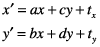
Given the 3 x 3 transformation matrix described above, Quartz uses this equation to transform a point (x, y) into a resultant point (x’, y’):
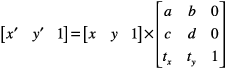
The result is in a different coordinate system, the one transformed by the variable values in the transformation matrix. The following equations are the definition of the previous matrix transform:
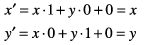
The following matrix is the identity matrix. It performs no translation, scaling, or rotation. Multiplying this matrix by the input coordinates always returns the input coordinates.

Using the formulas discussed earlier, you can see that this matrix would generate a new point (x’, y’) that is the same as the old point (x, y):
This matrix describes a translation operation:

These are the resulting equations that Quartz uses to apply the translation:

This matrix describes a scaling operation on a point (x, y):

These are the resulting equations that Quartz uses to scale the coordinates:

This matrix describes a rotation operation, rotating the point (x, y) counterclockwise by an angle a:
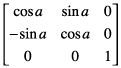
These are the resulting equations that Quartz uses to apply the rotation:
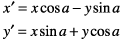
This equation concatenates a rotation operation with a translation operation:
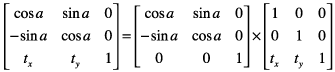
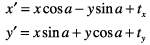
These are the resulting equations that Quartz uses to apply the transform:
Note that the order in which you concatenate matrices is important—matrix multiplication is not commutative. That is, the result of multiplying matrix A by matrix B does not necessarily equal the result of multiplying matrix B by matrix A.
As previously mentioned, concatenation is the reason the affine transformation matrix contains a third column with the constant values 0, 0, 1. To multiply one matrix against another matrix, the number of columns of one matrix must match the number of rows of the other. This means that a 2 x 3 matrix cannot be multiplied against a 2 x 3 matrix. Thus we need the extra column containing the constant values.
An inversion operation produces original coordinates from transformed ones. Given the coordinates (x, y), which have been transformed by a given matrix A to new coordinates (x’, y’), transforming the coordinates (x’, y’) by the inverse of matrix A produces the original coordinates (x, y). When a matrix is multiplied by its inverse, the result is the identity matrix.
图形变幻矩阵 Transforms的更多相关文章
- Unity手游之路<四>3d旋转-四元数,欧拉角和变幻矩阵
http://blog.csdn.net/janeky/article/details/17272625 今天我们来谈谈关于Unity中的旋转.主要有三种方式.变换矩阵,四元数和欧拉角. 定义 变换矩 ...
- iOS开发之Quarz2D:九:图形上下文矩阵操作
#import "VCView.h" @implementation VCView - (void)drawRect:(CGRect)rect { // Drawing code ...
- hdu1542矩阵的并 线段树+扫描线
求矩阵的并,也就是要求所有的面积.那可以吧总的图形按照矩阵来切割.使其为一块一块. 输入的时候用坐标表示,这里扫描线从下到上扫描.初始时让下面的边为1,上面的为-1: 用一条先从下面开始想上扫描.遇到 ...
- canvas新属性
lineCap默认值是butt,还有aquare,round 使用:context.lineCap="butt" lineJoin miter是默认 还可以是round,bevel ...
- unity--------------------四元数的旋转与原理
[Unity技巧]四元数(Quaternion)和旋转 原文:http://blog.csdn.net/candycat1992/article/details/41254799 四元数介绍 旋转,应 ...
- 【转载】3D/2D中的D3DXMatrixPerspectiveFovLH和D3DXMatrixOrthoLH投影函数详解
原文:3D/2D中的D3DXMatrixPerspectiveFovLH和D3DXMatrixOrthoLH投影函数详解 3D中z值会影响屏幕坐标系到世界坐标系之间的转换,2D中Z值不会产生影响(而只 ...
- MATLAB命令大全
一.常用对象操作:除了一般windows窗口的常用功能键外.1.!dir 可以查看当前工作目录的文件. !dir& 可以在dos状态下查看.2.who 可以查看当前工作空间变量名, whos ...
- (转)如何学好C语言,一个成功人士的心得!
zidier111发表于 2013-1-26 08:59:05 今 天,我能够自称是一个混IT的人,并能以此谋生,将来大家能一次谋生,都要感谢两个人:克劳德.香农和约翰.冯.诺依曼,是他们发现了所 ...
- [转] MATLAB快捷键
原文地址:MATLAB快捷键大全 (转载)作者:掷地有声 一.索引混排版 备注:删除了如F1(帮助)等类型的常见快捷命令 SHIFT+DELETE永久删除 DELETE删除 ALT+ENTER属性 A ...
随机推荐
- SQL2008安装提示"Microsoft visual studio 2008早期之前的版本"解决(这是我认为最简单有效的方法)
作者:冰封 日期:2013-10-18 原文地址:http://www.skywj.com/thread-9230-1-1.html 在安装SQL Server的时候提示 Microsoft visu ...
- 使用UIBezierPath和CAShapeLayer画各种图形
转载自:http://www.cocoachina.com/ios/20160214/15251.html CAShapeLayer 是 CALayer 的子类,但是比 CALayer 更灵活,可以画 ...
- js原型解析
我们都知道javascript因为具有了继承以及变量等等一系列的特性之后才被人们认为具有一门编程语言的资格,在后续的不断发展中,js在原生的基础上扩展了基于jquery等等的库,甚至衍生了像node. ...
- [jQuery] Cannot read property ‘msie’ of undefined错误的解决方法
最近把一个项目的jQuery升级到最新版,发现有些页面报错Cannot read property ‘msie’ of undefined.上jQuery网站上搜了一下,原因是$.browser这个a ...
- Web动效研究与实践
随着CSS3和HTML5的发展,越来越多狂拽炫酷叼炸天的动效在网页设计上遍地开花,根据最新的浏览器市场份额报告,IE6的份额已经降到了5.21%,这简直是一个喜大普奔的消息,做动效可以完全不care低 ...
- Apache .htaccess Rewrite解决问号匹配的写法
如news.asp?id=123 需要把它定向到 news/123.html 这个用 RewriteRule 怎么写啊? RewriteRule ^news\.asp\?id=(\d+)$ news/ ...
- Sevlet局部变量初始化
//java 代码部分package com.servlet; import java.io.IOException; import java.io.PrintWriter; import java. ...
- ASP.NET MVC轻教程 Step By Step 6——改进表单
上一节我们使用原始的HTML表单来完成留言功能,但是ASP.NET MVC提供了丰富的HTML辅助方法来帮助我们构建更简洁优雅的表单. Step 1. 修改Form标签 首先,我们可以使用Html.B ...
- SQL Server日期函数之获得一个月中的天数
SQL Server日期函数之获得一个月中的天数在实际中的应用比例还是占为多数的,如果你对这一技术,心存好奇的话,以下的文章将会揭开它的神秘面纱,望会在以后的学习或是工作中带来很大的帮助. 获得一个月 ...
- ALTER TABLE 语句与 FOREIGN KEY 约束"FK_SCHEDULE_REFERENCE_POSTCONF"冲突。
主要原因是因为两个表中有数据不匹配,只要把不匹配的数据删掉就行了.