
Nodejs in Visual Studio Code 07.学习Oracle
1.开始
Node.js:https://nodejs.org
OracleDB: https://github.com/oracle/node-oracledb/blob/master/INSTALL.md#instwin
https://github.com/oracle/node-oracledb/blob/master/doc/api.md#resultsethandling
2.OracleDB安装
下载安装即可,略
- C Compiler with support for C++ 11 (Xcode, gcc, Visual Studio or similar)
打开Visual Studio的安装文件,查看C编译器是否安装,见下图

- The small, free Oracle Instant Client "basic" and "SDK" packages if your database is remote. Or use a locally installed database such as the free Oracle XE release
打开Oracle Instant Client,免费下载basic和sdk两个压缩包,绿色软件无须安装
instantclient-basic-windows.x64-12.1.0.2.0.zip 69MB
instantclient-sdk-windows.x64-12.1.0.2.0.zip 2.62MB

将两个ZIP文件解压到同一个目录中Z:\Softs\OracleClient\12GX64
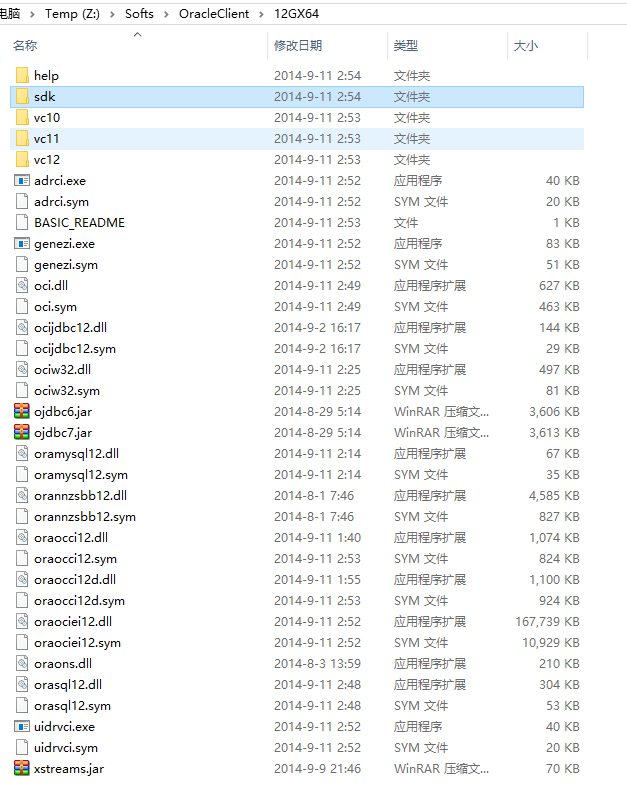
- Set
OCI_LIB_DIRandOCI_INC_DIRduring installation if the Oracle libraries and headers are in a non-default location
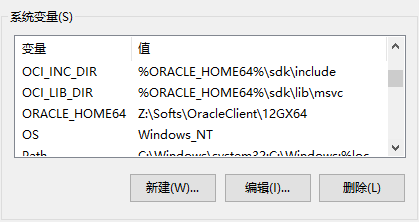
打开我的电脑->属性->高级属性->环境变量,新增两个环境变量ORACLE_HOME64,OCI_LIB_DIR 和 OCI_INV_DIR
ORACLE_HOME64 : Z:\Softs\OracleClient\12GX64
OCI_LIB_DIR : %ORACLE_HOME64%\sdk\lib\msvc
OCI_INV_DIR : %ORACLE_HOME64%\sdk\include
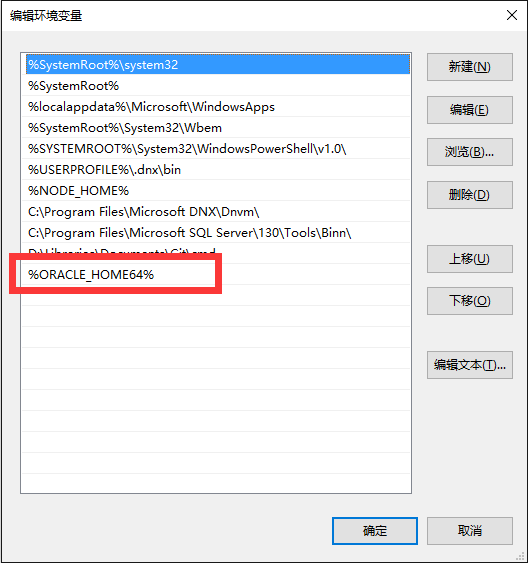
将Z:\Softs\OracleClient\12GX64这个路径%ORACLE_HOME64%加到Path中。
- 执行CMD命令
$ npm install oracledb
3.OracleDB普通查询
dbconfig.js 配置数据库连接字符串
module.exports = {

  user          : process.env.NODE_ORACLEDB_USER || "test",

  // Instead of hard coding the password, consider prompting for it,

  // passing it in an environment variable via process.env, or using

  // External Authentication.

  password      : process.env.NODE_ORACLEDB_PASSWORD || "test",

  // For information on connection strings see:

  // https://github.com/oracle/node-oracledb/blob/master/doc/api.md#connectionstrings

  connectString : process.env.NODE_ORACLEDB_CONNECTIONSTRING || "192.168.1.100/orcl",

  // Setting externalAuth is optional.  It defaults to false.  See:

  // https://github.com/oracle/node-oracledb/blob/master/doc/api.md#extauth

  externalAuth  : process.env.NODE_ORACLEDB_EXTERNALAUTH ? true : false

};
app.js执行一个简单的查询语句
var oracledb = require('oracledb');

var dbConfig = require('./dbconfig.js');

//打开一个链接

oracledb.getConnection(

  {

    user          : dbConfig.user,

    password      : dbConfig.password,

    connectString : dbConfig.connectString

  },

  function(err, connection)

  {

    if (err) {

      console.error(err.message);

      return;

    }

    //执行查询语句

    connection.execute(

      "SELECT department_id, department_name " +

        "FROM departments " +

        "WHERE manager_id < :id",

      [110],  // bind value for :id

      { maxRows: 10 },  // a maximum of 10 rows will be returned.  Default limit is 100

      function(err, result)

      {

        if (err) {

          console.error(err.message);

          doRelease(connection);

          return;

        }

        console.log(result.metaData);

        console.log(result.rows);

        //查询结束后记得释放链接资源

        doRelease(connection);

      });

  });

function doRelease(connection)

{

  connection.release(

    function(err) {

      if (err) {

        console.error(err.message);

      }

    });

}
4.OracleDB ResultSet查询
普通查询,默认最大返回100条数据,如果需要查询更多的数据那么需要建立一个DataReader和数据库保持连接然后一行一行的读取数据,这个在nodejs oracledb里面就叫ResultSet查询。
你可以这样使用ResultSet,每次返回一行数据
connection.execute(

  "SELECT employee_id, last_name FROM employees ORDER BY employee_id",

  [], // no bind variables

  { resultSet: true }, // return a result set.  Default is false

  function(err, result)

  {

    if (err) { . . . }

    fetchOneRowFromRS(connection, result.resultSet);

  });

});

. . .

function fetchOneRowFromRS(connection, resultSet)

{

  resultSet.getRow( // get one row

    function (err, row)

    {

      if (err) {

         . . .           // close the result set and release the connection

      } else if (!row) { // no rows, or no more rows

        . . .            // close the result set and release the connection

      } else {

        console.log(row);

        fetchOneRowFromRS(connection, resultSet);  // get next row

      }

    });

}
当然也可以每次返回多行数据,请使用numRows参数
var numRows = 10;  // number of rows to return from each call to getRows()

connection.execute(

  "SELECT employee_id, last_name FROM employees ORDER BY employee_id",

  [], // no bind variables

  { resultSet: true }, // return a result set.  Default is false

  function(err, result)

  {

    if (err) { . . . }

    fetchRowsFromRS(connection, result.resultSet, numRows);

  });

});

. . .

function fetchRowsFromRS(connection, resultSet, numRows)

{

  resultSet.getRows( // get numRows rows

    numRows,

    function (err, rows)

    {

      if (err) {

         . . .                        // close the result set and release the connection

      } else if (rows.length == 0) {  // no rows, or no more rows

        . . .                         // close the result set and release the connection

      } else if (rows.length > 0) {

        console.log(rows);

        fetchRowsFromRS(connection, resultSet, numRows);  // get next set of rows

      }

    });

}
Nodejs in Visual Studio Code 07.学习Oracle的更多相关文章
- crossplatform---Nodejs in Visual Studio Code 07.学习Oracle
1.开始 Node.js:https://nodejs.org OracleDB: https://github.com/oracle/node-oracledb/blob/master/INSTAL ...
- Nodejs in Visual Studio Code 02.学习Nodejs
1.开始 源码下载:https://github.com/sayar/NodeMVA 在线视频:https://mva.microsoft.com/en-US/training-courses/usi ...
- Nodejs in Visual Studio Code 03.学习Express
1.开始 下载源码:https://github.com/sayar/NodeMVA Express组件:npm install express -g(全局安装) 2.ExpressRest 打开目录 ...
- Nodejs in Visual Studio Code 14.IISNode与IIS7.x
1.开始 部署IISNode环境请参考:Nodejs in Visual Studio Code 08.IIS 部署Nodejs程序请参考:Nodejs in Visual Studio Code 1 ...
- Nodejs in Visual Studio Code 11.前端工程优化
1.开始 随着互联网技术的发展,企业应用里到处都是B/S设计,我有幸经历了很多项目有Asp.Net的,有Html/js的,有Silverlight的,有Flex的.很遗憾这些项目很少关注前端优化的问题 ...
- Nodejs in Visual Studio Code 10.IISNode
1.开始 Nodejs in Visual Studio Code 08.IIS : http://www.cnblogs.com/mengkzhaoyun/p/5410185.html 参考此篇内容 ...
- Nodejs in Visual Studio Code 01.简单介绍Nodejs
1.开始 作者自己:开发人员,Asp.Net , html / js , restful , memcached , oracle ,windows , iis 目标读者:供自己以后回顾 2.我看No ...
- Nodejs in Visual Studio Code 04.Swig模版
1.开始 设置Node_Global:npm config set prefix "C:\Program Files\nodejs" Express组件:npm install e ...
- crossplatform---Nodejs in Visual Studio Code 02.学习Nodejs
1.开始 源码下载:https://github.com/sayar/NodeMVA 在线视频:https://mva.microsoft.com/en-US/training-courses/usi ...
随机推荐
- Uncaught SecurityError: Failed to execute 'toDataURL' on 'HTMLCanvasElement': Tainted canvases may not be exported.
canvas绘制图片,由于浏览器的安全考虑,如果在使用canvas绘图的过程中,使用到了外域的图片资源,那么在toDataURL()时会抛出安全异常: Uncaught SecurityError: ...
- Linux软件
网上下载:Chrome Browser for Linux; sqlite; WPS; symbol-fonts; 软件中心:Terminator; Code::Blocks IDE; 新立得软件 ...
- Oracle数据导入导出imp/exp命令总结
racle数据导入导出imp/exp就相当于oracle数据还原与备份.exp命令可以把数据从远程数据库服务器导出到本地的dmp文件,imp命令可以把dmp文件从本地导入到远处的数据库服务器中. 利用 ...
- Alljoyn 概述(1)
Alljoyn Overview Feb. 2012- AllJoyn 是什么? • 2011年2月9日发布,由 QuiC(高通创新中心)开发维护的开源软 件项目,采用 Apache license ...
- Ubuntu 12.04下解决Rhythmbox Music Player乱码问题
1.打开终端输入如下信息: $ sudo gedit ~/.profile 2.在打开的文档末尾加上如下两句: export GST_ID3_TAG_ENCODING=GBK:UTF-8:GB1803 ...
- 【转】 wpf系列-入门
转自:http://www.cnblogs.com/huangxincheng/category/388852.html 8天入门wpf—— 第八天 最后的补充 摘要: 从这一篇往前看,其实wpf ...
- QT QSettings 操作(导入导出、保存获取信息)*.ini文件详解
1.QSettings基本使用 1.1.生成.ini文件,来点实用的代码吧. QString fileName;fileName = QCoreApplication::applicationDirP ...
- php基础知识【oop/mvc/orm/aop】
OOP 面向对象编程是一种计算机编程架构.OOP 的一条基本原则是计算机程序是由单个能够起到子程序作用的单元或对象组合而成.OOP 达到了软件工程的三个主要目标:重用性.灵活性和扩展性.为了实现整体运 ...
- js操作Cookie,实现历史浏览记录
/** * history_teacher.jsp中的js,最近浏览名师 * @version: 1.0 * @author: mingming */ $(function(){ getHistory ...
- ueditor的过滤、转义、格式丢失问题
1. 过滤 http://www.cnblogs.com/Olive116/p/3464495.html 2. 转义 http://segmentfault.com/q/101000000048928 ...