
ValueError: option names {'--alluredir'} already added 报错
运行测试用例
import pytest
from WXP2P_2.test_data2.login_case import logindata_error1,logindata_error2,logindata_right
class TestLogin:
    """测试登录"""

    @pytest.mark.parametrize("data",logindata_error1)#装饰测试用例。
    @pytest.mark.wrong
    def test_error1(self,data,int_start):
        """错误信息"""
        int_start[0].login(data["use"],data["password"])
        try:
            assert (int_start[0].error_value()==data["expected"])
            print("测试用例通过,预期结果{}与实际结果{}一致".format(data["expected"],int_start[0].error_value()))
        except AssertionError as e:
            print("用例失败")
            raise e
        finally:
           int_start[0].clear()#清空输入框
        # Login().login(data["use"], data["password"])#错误示范,这种调用方法,会多次打开浏览器
        # Login().clear()#错误示范,这种调用方法,会多次打开网页
#     @pytest.mark.parametrize("data",logindata_error2)
#     def test_error2(self, data):
#         """错误信息"""
#         self.login.login(data["use"], data["password"])
#         try:
#             assert (self.login.error_value1() == data["expected"])
#             print("测试用例通过,预期结果{}与实际结果{}一致".format(data["expected"], self.login.error_value1()))
#         except AssertionError as e:
#             print("用例失败")
#             raise e
#         finally:
#             self.login.clear()  # 清空输入框
#     @pytest.mark.ok
#     @pytest.mark.parametrize("data",logindata_right)#装饰测试用例
#     def test_right(self,data):
#         """正确的信息登录"""
#         self.login.login(data["use"], data["password"])
#         try:
#             assert (data["expected"] in self.login.right_value())
#             print("测试用例通过,预期结果{}与实际结果{}一致".format(data["expected"], self.login.right_value()))
#         except AssertionError as e:
#             print("用例失败")
#             raise e
#         # Login().login(data["use"], data["password"])#错误示范,这种调用方法,会多次打开网页
if __name__ == '__main__':
    pytest.main(["-m wrong","-s"])
执行结果
Traceback (most recent call last):
  File "D:/WX_P2P_ITEM/WXP2P_2/test_login.py", line 46, in <module>
    pytest.main(["-m wrong","-s"])
  File "D:\Python\lib\site-packages\_pytest\config\__init__.py", line 60, in main
    config = _prepareconfig(args, plugins)
  File "D:\Python\lib\site-packages\_pytest\config\__init__.py", line 204, in _prepareconfig
    pluginmanager=pluginmanager, args=args
  File "D:\Python\lib\site-packages\pluggy\hooks.py", line 289, in __call__
    return self._hookexec(self, self.get_hookimpls(), kwargs)
  File "D:\Python\lib\site-packages\pluggy\manager.py", line 68, in _hookexec
    return self._inner_hookexec(hook, methods, kwargs)
  File "D:\Python\lib\site-packages\pluggy\manager.py", line 62, in <lambda>
    firstresult=hook.spec.opts.get("firstresult") if hook.spec else False,
  File "D:\Python\lib\site-packages\pluggy\callers.py", line 203, in _multicall
    gen.send(outcome)
  File "D:\Python\lib\site-packages\_pytest\helpconfig.py", line 93, in pytest_cmdline_parse
    config = outcome.get_result()
  File "D:\Python\lib\site-packages\pluggy\callers.py", line 80, in get_result
    raise ex[1].with_traceback(ex[2])
  File "D:\Python\lib\site-packages\pluggy\callers.py", line 187, in _multicall
    res = hook_impl.function(*args)
  File "D:\Python\lib\site-packages\_pytest\config\__init__.py", line 684, in pytest_cmdline_parse
    self.parse(args)
  File "D:\Python\lib\site-packages\_pytest\config\__init__.py", line 901, in parse
    self._preparse(args, addopts=addopts)
  File "D:\Python\lib\site-packages\_pytest\config\__init__.py", line 846, in _preparse
    self.pluginmanager.load_setuptools_entrypoints("pytest11")
  File "D:\Python\lib\site-packages\pluggy\manager.py", line 282, in load_setuptools_entrypoints
    self.register(plugin, name=ep.name)
  File "D:\Python\lib\site-packages\_pytest\config\__init__.py", line 318, in register
    ret = super(PytestPluginManager, self).register(plugin, name)
  File "D:\Python\lib\site-packages\pluggy\manager.py", line 102, in register
    hook._maybe_apply_history(hookimpl)
  File "D:\Python\lib\site-packages\pluggy\hooks.py", line 336, in _maybe_apply_history
    res = self._hookexec(self, [method], kwargs)
  File "D:\Python\lib\site-packages\pluggy\manager.py", line 68, in _hookexec
    return self._inner_hookexec(hook, methods, kwargs)
  File "D:\Python\lib\site-packages\pluggy\manager.py", line 62, in <lambda>
    firstresult=hook.spec.opts.get("firstresult") if hook.spec else False,
  File "D:\Python\lib\site-packages\pluggy\callers.py", line 208, in _multicall
    return outcome.get_result()
  File "D:\Python\lib\site-packages\pluggy\callers.py", line 80, in get_result
    raise ex[1].with_traceback(ex[2])
  File "D:\Python\lib\site-packages\pluggy\callers.py", line 187, in _multicall
    res = hook_impl.function(*args)
  File "D:\Python\lib\site-packages\allure_pytest\plugin.py", line 21, in pytest_addoption
    help="Generate Allure report in the specified directory (may not exist)")
  File "D:\Python\lib\site-packages\_pytest\config\argparsing.py", line 303, in addoption
    raise ValueError("option names %s already added" % conflict)
ValueError: option names {'--alluredir'} already added
这是因为pytest-allure-adaptor与allure-pytest的alluredir都被引用造成冲突
需要卸载pytest-allure-adaptor
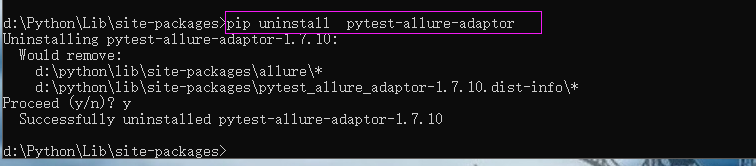
卸载完成后,再执行测试模块
============================= test session starts =============================
platform win32 -- Python 3.6.3, pytest-4.5.0, py-1.8.0, pluggy-0.11.0
rootdir: D:\WX_P2P_ITEM\WXP2P_2
plugins: allure-pytest-2.6.5
collected 5 items / 3 deselected / 2 selected

test_login.py 测试用例通过,预期结果请输入正确的手机号与实际结果请输入正确的手机号一致
.测试用例通过,预期结果请输入手机号与实际结果请输入手机号一致
.
ValueError: option names {'--alluredir'} already added 报错的更多相关文章
- moviepy音视频剪辑:使用fl_time进行时间特效处理报错ValueError: Attribute duration not set
专栏:Python基础教程目录 专栏:使用PyQt开发图形界面Python应用 专栏:PyQt+moviepy音视频剪辑实战 专栏:PyQt入门学习 老猿Python博文目录 老猿学5G博文目录 在使 ...
- Unity在OpenGL模式下Shader编译报错
报错信息 GLSL compilation failed: 0(21) : error C7528: OpenGL reserves names containing '__' 双击报错VS自动打开V ...
- Oracle Online Patching报错"This is not a RAC setup. OPatch cannot determine the local node name"
Oracle Online Patching报错"This is not a RAC setup. OPatch cannot determine the local node name&q ...
- 报错问题: AtrributeError:module ‘allure’ has no attribute ‘’severity_level’
问题:执行命令报错:pytest -s -q --alluredir report 报错问题: AtrributeError:module 'allure' has no attribute ''se ...
- weblogic启动报错之Unrecognized option: -jrockit
报错如下: $ ./startWebLogic.sh . . JAVA Memory arguments: -Xms512m -Xmx512m . WLS Start Mode=Production ...
- windows 8 安装 oracle 11g 报错:command line option syntax error,type command/? for help
windows 8 安装 oracle 11g 报错:command line option syntax error,type command/? for help 在windows8操作系统上安装 ...
- Android报错:WindowManager$BadTokenException: Unable to add window -- window has already been added
很久之前测试通过的代码,现在手机升级了Android7.0后一运行就崩溃,报出这样的错误,具体错误如下: Process: com.example.sho.android_anti_theft, PI ...
- tensorflow-TFRecord报错ValueError: Protocol message Feature has no "feature" field.
编写代码用TFRecord数据结构存储数据集信息是报错:ValueError: Protocol message Feature has no "feature" field.或和 ...
- 关于SVN报错 svn: E170013 E125006: contains invalid filesystem format option 'addressing logical'
在使用svn的时候,遇到了这样的一个问题 首先我使用TortoiseSVN 右键创建的repository. 之后用IDEA,配置了1.9.4版本的SVN,去commit访问这个仓库 结果出现了以下的 ...
随机推荐
- HTML5 中的meter 标签的样式设置
meter { -webkit-appearance: none; position: relative; display: block; margin: 8px auto; width: 100px ...
- jpa使用原生SQL查询数据库like的用法
jpa使用like查询,需要拼接字符串,如下 oracle用法: //dao层代码 @Query(value = "SELECT * FROM TABLENAME WHERE USER_NA ...
- 我不知道的C#—字符串池机制
字符串具有值类型的特点对字符串,对同一个字符串大量修改或者对多个引用赋值同一个字符串对象时会产生大量的临时字符串对象,影响性能,但是CLR为我们做了一些工作来消除这些弊端. 对同一个字符串大 ...
- IT兄弟连 JavaWeb教程 EL表达式获取对象的属性以及数组的元素
使用${对象名.属性名} EL表达式语言可以使用点号运算符"."来访问对象的属性,例如表达式${customer.name}表示customer对象的name属性. 使用${对象名 ...
- XHTML学习笔记 part1
XHTML: 可扩展超文本标记语言 HTML语言最开始是用来描述文档的结构,如标题,段落等标记,后来HTML有增加了一些控制字体,对齐等方面的标记和属性,这样做的结果是HTML既可以用来描述文档的结构 ...
- GoldenGate对接 mysql
环境: centos 7.4 mysql 5.5.58 glibc 64 位版,下载链接:https://dev.mysql.com/downloads/mysql/5.5.html#download ...
- gcd(2018.10.24)
良心题,暴力枚举即可. 代码: #include<cstdio> #include<cmath> #include<algorithm> using namespa ...
- 黑马Stream流学习 Stream流 函数式接口 Lambda表达式 方法引用
- PostgreSQL - pgAdmin4远程连接数据库
前言 PostgreSQL在安装的时候自带的pgAdmin这个可视化工具,自从将PostgreSQL9升级到了10版本后,自带的pgAdmin也从3升级到了4版本.pgAdmin4的变化非常巨大,刚接 ...
- SpringBoot | 集成Java Mail
Spring Boot 对Java mail 集成提供了自动配置的支持,只需要配置依赖以及在application.properties 里配置邮件信息即可. 添加依赖: <dependency ...