
USB 调试工具(python2.7 + Tkinter + pyusb/pywinusb)
项目地址:USB-HID-TEST
整体预览图(win8下的效果):

======================
项目结构:
COM
--hidHelper.py
--usbHelper.py
UI
--Adaptive.py
--HID_TESTUI.py
--PyTkinter.py
main.py
======================
UI文件夹:
使用PyTkinter来初始化一些颜色配置(个人喜好)
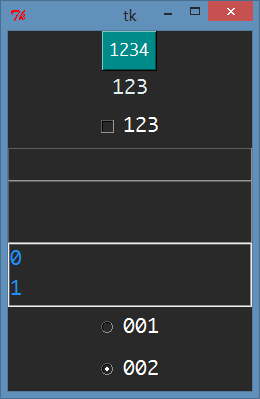
实现代码:
 #! /usr/bin/env python

 # -*- coding: utf-8 -*-

 '''

 Tkinter控件初始化配置(默认为深色)

 '''

 __author__ = "jakey.chen"

 __version__ = "v1.0"

 import Tkinter as tk

 g_default_theme = "dark"

 # g_default_theme = "default"

 class PyButton(tk.Button):

     '''

     Button

     '''

     def __init__(self, master, theme=g_default_theme, **kv):

         self.theme = theme

         self.kv = kv

         self.temp = dict()

         self.choose_theme()

         tk.Button.__init__(self, master, self.temp)

     def choose_theme(self):

         if self.theme == "dark":

             dark_theme_dict = {

                                 "activebackground": "#00B2EE",

                                 "activeforeground": "#E0EEEE",

                                 "bg": "#008B8B",

                                 "fg": "#FFFFFF"

                               }

             for key,value in dark_theme_dict.items():

                 self.temp[key] = value

             for key,value in self.kv.items():

                 self.temp[key] = value

 class PyLabel(tk.Label):

     '''

     Label

     '''

     def __init__(self, master, theme=g_default_theme, **kv):

         self.theme = theme

         self.kv = kv

         self.temp = dict()

         self.choose_theme()

         tk.Label.__init__(self, master, self.temp)

     def choose_theme(self):

         if self.theme == "dark":

             dark_theme_dict = {

                                 "bg": "#292929",

                                 "fg": "#E0EEEE"

                               }

             for key,value in dark_theme_dict.items():

                 self.temp[key] = value

             for key,value in self.kv.items():

                 self.temp[key] = value

 class PyLabelFrame(tk.LabelFrame):

     '''

     Frame

     '''

     def __init__(self, master, theme=g_default_theme, **kv):

         self.theme = theme

         self.kv = kv

         self.temp = dict()

         self.choose_theme()

         tk.LabelFrame.__init__(self, master, self.temp)

     def choose_theme(self):

         if self.theme == "dark":

             dark_theme_dict = {

                                 "bg": "#292929",

                                 "fg": "#1E90FF"

                               }

             for key,value in dark_theme_dict.items():

                 self.temp[key] = value

             for key,value in self.kv.items():

                 self.temp[key] = value

 class PyListbox(tk.Listbox):

     '''

     Listbox

     '''

     def __init__(self, master, theme=g_default_theme, **kv):

         self.theme = theme

         self.kv = kv

         self.temp = dict()

         self.choose_theme()

         tk.Listbox.__init__(self, master, self.temp)

     def choose_theme(self):

         if self.theme == "dark":

             dark_theme_dict = {

                                 "bg": "#292929",

                                 "fg": "#1E90FF",

                                 "selectbackground": "#00B2EE"

                               }

             for key,value in dark_theme_dict.items():

                 self.temp[key] = value

             for key,value in self.kv.items():

                 self.temp[key] = value

 class PyText(tk.Text):

     '''

     Text

     '''

     def __init__(self, master, theme=g_default_theme, **kv):

         self.theme = theme

         self.kv = kv

         self.temp = dict()

         self.choose_theme()

         tk.Text.__init__(self, master, self.temp)

     def choose_theme(self):

         if self.theme == "dark":

             dark_theme_dict = {

                                 "bg": "#292929",

                                 "fg": "#1E90FF"

                               }

             for key,value in dark_theme_dict.items():

                 self.temp[key] = value

             for key,value in self.kv.items():

                 self.temp[key] = value

 class PyCheckbutton(tk.Checkbutton):

     '''

     Checkbutton

     '''

     def __init__(self, master, theme=g_default_theme, **kv):

         self.theme = theme

         self.kv = kv

         self.temp = dict()

         self.choose_theme()

         tk.Checkbutton.__init__(self, master, self.temp)

     def choose_theme(self):

         if self.theme == "dark":

             dark_theme_dict = {

                                 "bg": "#292929",

                                 "fg": "#FFFFFF",

                                 "activebackground": "#292929",

                                 "activeforeground": "#FFFFFF",

                                 "selectcolor": "#292929"

                               }

             for key,value in dark_theme_dict.items():

                 self.temp[key] = value

             for key,value in self.kv.items():

                 self.temp[key] = value

 class PyRadiobutton(tk.Radiobutton):

     '''

     Radiobutton

     '''

     def __init__(self, master, theme=g_default_theme, **kv):

         self.theme = theme

         self.kv = kv

         self.temp = dict()

         self.choose_theme()

         tk.Radiobutton.__init__(self, master, self.temp)

     def choose_theme(self):

         if self.theme == "dark":

             dark_theme_dict = {

                                 "bg": "#292929",

                                 "fg": "#FFFFFF",

                                 "activebackground": "#292929",

                                 "selectcolor": "#292929"

                               }

             for key,value in dark_theme_dict.items():

                 self.temp[key] = value

             for key,value in self.kv.items():

                 self.temp[key] = value

 class PyEntry(tk.Entry):

     '''

     Entry

     '''

     def __init__(self, master, theme=g_default_theme, **kv):

         self.theme = theme

         self.kv = kv

         self.temp = dict()

         self.choose_theme()

         tk.Entry.__init__(self, master, self.temp)

     def choose_theme(self):

         if self.theme == "dark":

             dark_theme_dict = {

                                 "bg": "#292929",

                                 "fg": "#E0EEEE",

                                 "insertbackground": "#E0EEEE"

                               }

             for key,value in dark_theme_dict.items():

                 self.temp[key] = value

             for key,value in self.kv.items():

                 self.temp[key] = value

 if __name__ == '__main__':

     root = tk.Tk()

     root.configure(bg="#292929")

     PyButton(root, text="", font=("Monaco", 12)).pack()

     PyLabel(root, text="", font=("Monaco", 15)).pack()

     PyCheckbutton(root, text="", font=("Monaco", 15)).pack()

     PyEntry(root, font=("Monaco", 15)).pack()

     PyText(root, font=("Monaco", 15), height=2, width=20).pack()

     listbox_0 = PyListbox(root, height=2, font=("Monaco", 15))

     listbox_0.pack()

     for i in range(2):

         listbox_0.insert("end", i)

     radio_intvar = tk.IntVar()

     PyRadiobutton(root, text="", variable=radio_intvar, value=0, font=("Monaco", 15)).pack()

     PyRadiobutton(root, text="", variable=radio_intvar, value=1, font=("Monaco", 15)).pack()

     radio_intvar.set(1)

     root.mainloop()
主界面构建不表,使用LabelFrame通过grid布局组成
具体自行查看项目代码
======================
COM文件夹
Windows下:
使用pywinusb
 #! /usr/bin/env python

 # -*- coding: utf-8 -*-

 '''

 win下使用的HID设备通讯帮助类

 '''

 __author__ = "jakey.chen"

 __version__ = "v1.0"

 import pywinusb.hid as hid

 class hidHelper(object):

     def __init__(self, vid=0x1391, pid=0x2111):

         self.alive = False

         self.device = None

         self.report = None

         self.vid = vid

         self.pid = pid

     def start(self):

         '''

         开始,打开HID设备

         '''

         _filter = hid.HidDeviceFilter(vendor_id = self.vid, product_id = self.pid)

         hid_device = _filter.get_devices()

         if len(hid_device) > 0:

             self.device = hid_device[0]

             self.device.open()

             self.report = self.device.find_output_reports()

             self.alive = True

     def stop(self):

         '''

         停止,关闭HID设备

         '''

         self.alive = False

         if self.device:

             self.device.close()

     def setcallback(self):

         '''

         设置接收数据回调函数

         '''

         if self.device:

             self.device.set_raw_data_handler(self.read)

     def read(self, data):

         '''

         接收数据回调函数

         '''

         print([hex(item).upper() for item in data[1:]])

     def write(self, send_list):

         '''

         向HID设备发送数据

         '''

         if self.device:

             if self.report:

                 self.report[0].set_raw_data(send_list)

                 bytes_num = self.report[0].send()

                 return bytes_num

 if __name__ == '__main__':

     myhid = hidHelper()

     myhid.start()

     if myhid.alive:

         myhid.setcallback()

         send_list = [0x00 for i in range(65)]

         myhid.write(send_list)

         import time

         time.sleep(0.5)

         myhid.stop()
Linux(我使用的是Ubuntu14.04)下:
 #! /usr/bin/env python

 # -*- coding: utf-8 -*-

 '''

 linux下使用的usb设备通讯帮助类

 '''

 __author__ = "jakey.chen"

 __version__ = "v1.0"

 import threading

 import usb.util

 import usb.core

 class usbHelper(object):

     def __init__(self, vid=0x1391, pid=0x2111):

         self.alive = False

         self.handle = None

         self.size = 64

         self.vid = vid

         self.pid = pid

     def start(self):

         '''

         开始,打开usb设备

         '''

         self.dev = usb.core.find(idVendor=self.vid, idProduct=self.pid)

         if self.dev != None:

             self.ep_in = self.dev[0][(0,0)][0].bEndpointAddress

             self.ep_out = self.dev[0][(0,0)][1].bEndpointAddress

             self.size = self.dev[0][(0,0)][1].wMaxPacketSize

         self.open()

         self.alive = True

     def stop(self):

         '''

         停止,关闭usb设备,释放接口

         '''

         self.alive = False

         if self.handle:

             self.handle.releaseInterface()

     def open(self):

         '''

         打开usb设备

         '''

         busses = usb.busses()

         for bus in busses:

             devices = bus.devices

             for device in devices:

                 if device.idVendor == self.vid and device.idProduct == self.pid:

                     self.handle = device.open()

                     # Attempt to remove other drivers using this device.

                     if self.dev.is_kernel_driver_active(0):

                         try:

                             self.handle.detachKernelDriver(0)

                         except Exception as e:

                             self.alive = False

                     try:

                         self.handle.claimInterface(0)

                     except Exception as e:

                         self.alive = False

     def read(self, size=64, timeout=0):

         '''

         读取usb设备发过来的数据

         '''

         if size >= self.size:

             self.size = size

         if self.handle:

             data = self.handle.interruptRead(self.ep_in, self.size, timeout)

         try:

             data_list = data.tolist()

             return data_list

         except:

             return list()

     def write(self, send_list, timeout=1000):

         '''

         发送数据给usb设备

         '''

         if self.handle:

             bytes_num = self.handle.interruptWrite(self.ep_out, send_list, timeout)

             return bytes_num

 if __name__ == '__main__':

     import time

     dev = usbHelper()

     dev.start()

     send_list = [0xAA for i in range(64)]

     dev.write(send_list)

     # time.sleep(0.25)

     while True:

         try:

             mylist = dev.read()

             print mylist

             if mylist[1] == 0x02:

                 break

         except:

             dev.stop()

             break

     dev.stop()
======================
主函数:界面逻辑。不表,自行查看。
USB 调试工具(python2.7 + Tkinter + pyusb/pywinusb)的更多相关文章
- 串口调试工具(Python2.7+pyserial+Tkinter)
需要与串口设备进行通讯,那么一个调试工具是必须的. 根据我自己的需要,写了个简易版本的串口调试工具: 预览图: ====================== 项目结构: COM --SerialHel ...
- 基于python2.7 Tkinter 做一个小工具
1.源码:先写一个界面出来,放需要放入的点击事件的函数 # -*- coding:utf-8 -*- import Tkinter from Tkinter import * import Excle ...
- python安装tkinter
python2安装tkinter sudo apt-get install python-tk python3 安装tkinter sudo apt-get install python3-tk
- import Tkinter的时候报错
在看到图形界面编程的时候,需要导入Tkinter模块,从而在解释器中进行import Tkinter,然后...报错如下: >>> from tkinter import * Tra ...
- *#【Python】【基础知识】【模块】【tkinter】【学用tkinter画图/制作窗口】
Python 提供了多个图形开发界面的库,几个常用 Python GUI 库如下: Tkinter: Tkinter 模块(Tk 接口)是 Python 的标准 Tk GUI 工具包的接口 . Tk ...
- 微信小游戏跳一跳简单手动外挂(基于adb 和 python)
只有两个python文件,代码很简单. shell.py: #coding:utf-8 import subprocess import math import os def execute_comm ...
- 微雪的stm32学习资料
http://www.waveshare.net/wiki/Main_Page里面有很多资料 STM32开发软件 目录 编译软件 Keil MDKSTM32CubeMX 下载软件 STM32 ISP ...
- Python2.X和Python3.X中Tkinter模块的文件对话框、下拉列表的不同
Python2.X和Python3.X文件对话框.下拉列表的不同 今天初次使用Python Tkinter来做了个简单的记事本程序.发现Python2.x和Python3.x的Tkinter模块的好多 ...
- usb之python(pyusb)
电脑系统为WIN7 64位 python:为python3.6 32位 需要插件PyUSB-1.0.0.tar,pywinusb-0.4.2. 按照的步骤我偷懒了,自己百度一下. 我们先看设备管理的 ...
随机推荐
- Hibernate+JPA
参考链接:http://blog.163.com/hero_213/blog/static/398912142010312024809 近年来ORM(Object-Relational Mapping ...
- Decimal Basic 学习笔记(1)
定义变量 LET a 输入变量值 INPUT a INPUT a,b 运算结果绝对值小于1前面的0省略,科学计数 PRINT语句 数值直接写,字符串用“” 通过 分号: 和 逗号,来分隔显示两个项目 ...
- [LeetCode 116 117] - 填充每一个节点的指向右边邻居的指针I & II (Populating Next Right Pointers in Each Node I & II)
问题 给出如下结构的二叉树: struct TreeLinkNode { TreeLinkNode *left; TreeLinkNode *right; TreeLinkNode *next; } ...
- QT文档如何使用
http://blog.csdn.net/chenlong12580/article/details/7389588
- sdl2.0示例
// gcc -o testDrone2_video testDrone2_video.c -lavcodec -lavformat -lswscale -lSDL2// g++ -o testDro ...
- HDU_2048——全错位排列递推公式
Problem Description HDU 2006'10 ACM contest的颁奖晚会隆重开始了! 为了活跃气氛,组织者举行了一个别开生面.奖品丰厚的抽奖活动,这个活动的具体要求是这样的:首 ...
- Spring容器的工具类
代码实现: package com.ht.util; import java.util.Map; import org.springframework.beans.BeansException; im ...
- Codeforces Round #274 (Div. 2) E. Riding in a Lift(DP)
Imagine that you are in a building that has exactly n floors. You can move between the floors in a l ...
- 五、SolrJ、Request Handler
什么是SolrJ 既然Solr是以单独的WebApp形式存在的,那么Solr理应提供与Solr通信的Api吧,对的,这就是SolrJ,既然与solr通信是通过url,那么其实我们也可以不用SolrJ, ...
- Vss服务端用户存在,但客户端登陆不进去
打开客户端Vss提示“Cannot find SS.INI file for user userName”,这个错误是找不到用户userName的SS.INI文件. 解决办法 在服务器上找到Vss共享 ...