
Selenium2(webdriver)入门之TestNG的使用
一、在Eclipse中安装TestNG
1、打开eclipse-->help-->Install New Software-->Add,输入Name和Location后,点击OK。
TestNG官方下载地址:http://testng.org/doc/download.html
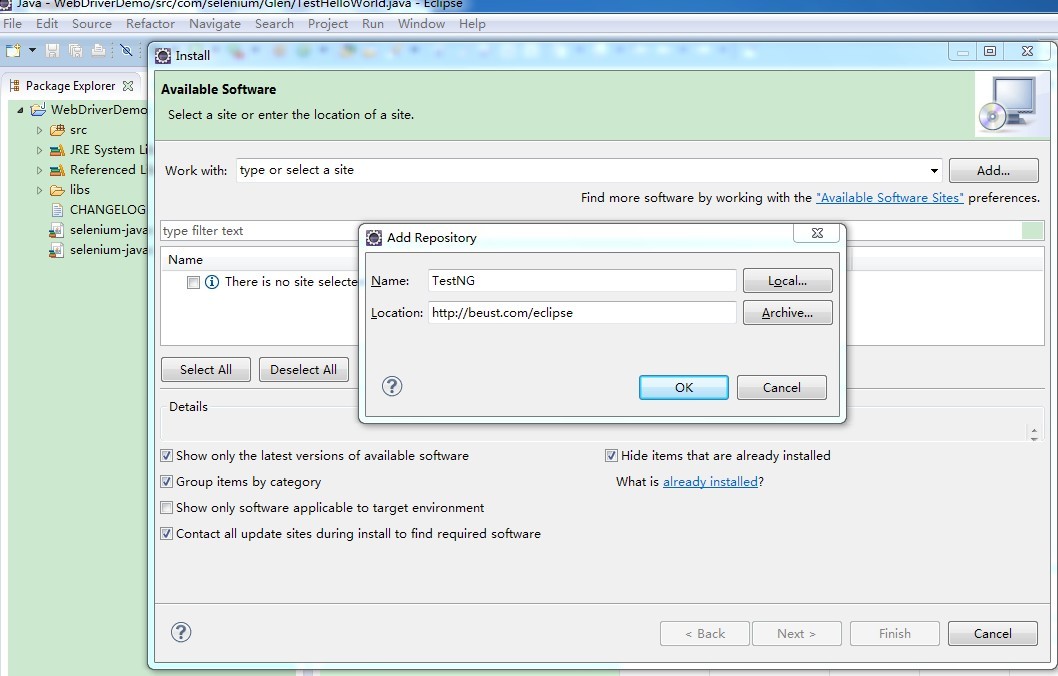
2、然后选中TestNG,单击Next安装

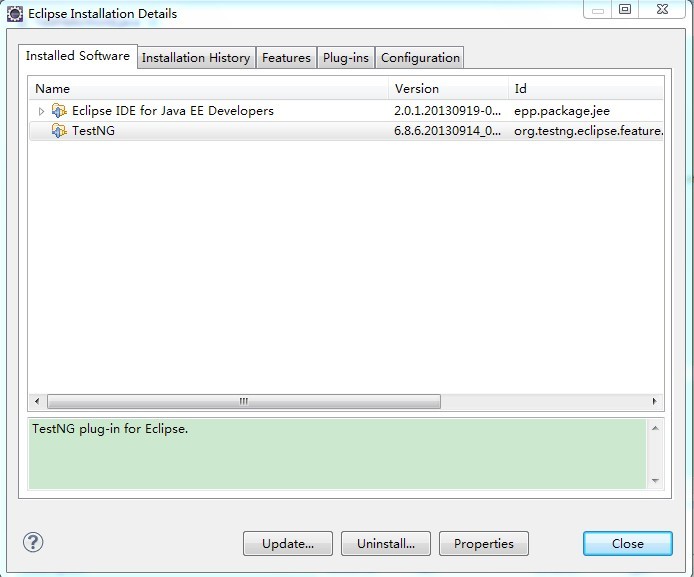
3、安装好TestNG后重启eclipse查看是否安装好,Help-->About Eclipse-->Installation Details,如图:
二、使用TestNG来运行单个测试案例:
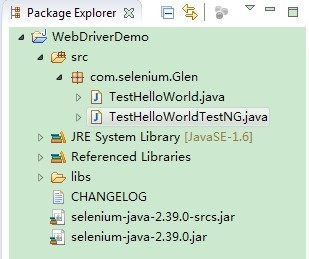
1、新建TestHelloWorldTestNG.java类,目录结构如下:
2、测试代码:

 1 package com.selenium;

 2

 3 import org.openqa.selenium.By;

 4 import org.openqa.selenium.WebDriver;

 5 import org.openqa.selenium.WebElement;

 6 import org.openqa.selenium.firefox.*;

 7 import org.testng.annotations.*;

 8 import org.testng.Assert;

 9

10

11 public class TestHelloWorldTestNG {

12

13     WebDriver driver;

14     @Test

15     public void helloWorld() throws Exception {

16         //如果火狐浏览器没有默认安装在C盘,需要制定其路径

17         //System.setProperty("webdriver.firefox.bin", "D:/Program Files/Mozilla firefox/firefox.exe");

18         driver = new FirefoxDriver();

19         driver.get("http://www.baidu.com/");

20

21         driver.manage().window().maximize();

22

23         WebElement txtbox = driver.findElement(By.name("wd"));

24         txtbox.sendKeys("Glen");

25

26         WebElement btn = driver.findElement(By.id("su"));

27         btn.click();

28

29         String expectedTitle = "Glen_百度搜索";

30         String actualTitle = driver.getTitle();

31

32         Assert.assertEquals(actualTitle,expectedTitle);

33     }

34

35     @AfterTest

36     public void tearDown(){

37         driver.quit();

38     }

39

40 }
3、然后右键Run As-->TestNG Test,运行结果如下:
[TestNG] Running:

  C:\Users\Administrator\AppData\Local\Temp\testng-eclipse-332204777\testng-customsuite.xml

PASSED: helloWorld

===============================================

    Default test

    Tests run: 1, Failures: 0, Skips: 0

===============================================

===============================================

Default suite

Total tests run: 1, Failures: 0, Skips: 0

===============================================

[TestNG] Time taken by [FailedReporter passed=0 failed=0 skipped=0]: 1 ms

[TestNG] Time taken by org.testng.reporters.jq.Main@15d56d5: 34 ms

[TestNG] Time taken by org.testng.reporters.JUnitReportReporter@19106c7: 11 ms

[TestNG] Time taken by org.testng.reporters.EmailableReporter2@1632c2d: 4 ms

[TestNG] Time taken by org.testng.reporters.XMLReporter@cdedfd: 11 ms

[TestNG] Time taken by org.testng.reporters.SuiteHTMLReporter@13caecd: 22 ms
三、使用TestNG来运行多个测试案例:
1、增加一个失败的测试类TestHelloWorldTestNG_Fail.java:
 1 package com.selenium;

 2

 3 import org.openqa.selenium.By;

 4 import org.openqa.selenium.WebDriver;

 5 import org.openqa.selenium.WebElement;

 6 import org.openqa.selenium.firefox.*;

 7 import org.testng.annotations.*;

 8 import org.testng.Assert;

 9

10

11 public class TestHelloWorldTestNG_Fail {

12

13     WebDriver driver;

14     @Test

15     public void helloWorld() throws Exception {

16         //如果火狐浏览器没有默认安装在C盘,需要制定其路径

17         //System.setProperty("webdriver.firefox.bin", "D:/Program Files/Mozilla firefox/firefox.exe");

18         driver = new FirefoxDriver();

19         driver.get("http://www.baidu.com/");

20

21         driver.manage().window().maximize();

22

23         WebElement txtbox = driver.findElement(By.name("wd"));

24         txtbox.sendKeys("Glen");

25

26         WebElement btn = driver.findElement(By.id("su"));

27         btn.click();

28

29         String expectedTitle = "Glen_百度";

30         String actualTitle = driver.getTitle();

31

32         Assert.assertEquals(actualTitle,expectedTitle);

33     }

34

35     @AfterTest

36     public void tearDown(){

37         driver.quit();

38     }

39

40 }
2、在项目下新建一个Suite.xml文件:
<suite name="seleniumcn.cn.demo">

    <test name="test_seleniumcn" >

        <classes>

            <class name="com.selenium.TestHelloWorldTestNG"/>

            <class name="com.selenium.TestHelloWorldTestNG_Fail"/>

        </classes>

    </test>

</suite>
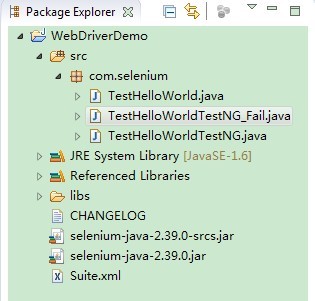
3、目录结构:
4、右键Suite.xml文件,Run As->TestNG Suite,如此就会运行suite.xml文件中所有的案例。
[TestNG] Running:

  F:\workspace\WebDriverDemo\Suite.xml

===============================================

seleniumcn.cn.demo

Total tests run: 2, Failures: 1, Skips: 0

===============================================
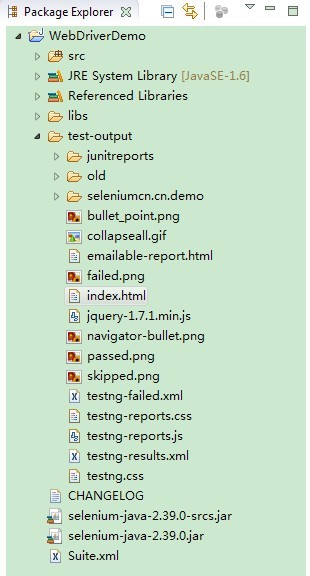
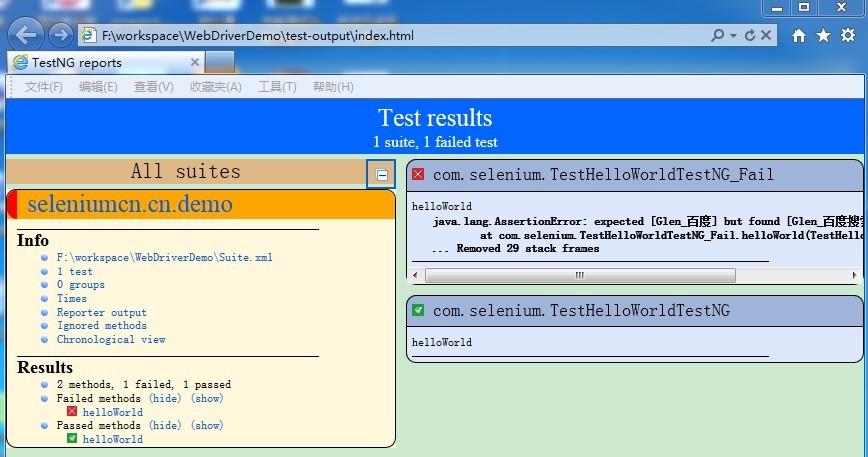
5、右键WebDriverDemo刷新项目,目录中会新增加一个test.output文件夹,打开 index.html可以看一个简单的报告。
目录:
报告:
Selenium2(webdriver)入门之TestNG的使用的更多相关文章
- Selenium2(webdriver)入门之TestNG的安装与简单使用
上一篇已经搭建好了Eclipse+selenium2的环境,这一篇主要记录下TestNG的使用. 一.在Eclipse中安装TestNG 1.打开eclipse-->help-->Inst ...
- webdriver入门-Java
webdriver入门-Java 如何用webdriver打开一个浏览器,我们常用的浏览器有firefox和IE两种,firefox是selenium支持得比较成熟的浏览器,很多新的特性都会在fi ...
- selenium2 Webdriver + Java 自动化测试实战和完全教程
selenium2 Webdriver + Java 自动化测试实战和完全教程一.快速开始 博客分类: Selenium-webdriverselenium webdriver 学习selenium ...
- selenium2 WebDriver 在asp.net项目中的应用
selenium2 WebDriver是一款跨平台的 自动化测试工具,它可以操纵浏览器,模拟用户行为,非常方便用户进行自动化测试. .net项目使用它,首先要通过 Visual Studio 的 nu ...
- Parallel WebDriver executions using TestNG
In this post, we will see how does one make use of TestNG to kick off parallel UI tests using WebDri ...
- selenium2(WebDriver) API
selenium2(WebDriver) API 作者:Glen.He出处:http://www.cnblogs.com/puresoul/ 1.1 下载selenium2.0的包 官方downl ...
- python selenium webdriver入门基本操作
python selenium webdriver入门基本操作 未经作者允许,禁止转载! from selenium import webdriver import time driver=webdr ...
- Selenium2(WebDriver)总结(二)---Firefox的firebug插件参数设置(补充)
本文是对上一节的补充:http://www.cnblogs.com/puresoul/p/4251536.html 使用Selenium2(webdriver)启动firefox且自动加载firebu ...
- Selenium2(WebDriver)总结(一)---启动浏览器、设置profile&加载插件
本文主要记录下在使用selenium2/webdriver时启动各种浏览器的方法.以及如何加载插件.定制浏览器信息(设置profile)等 环境搭建可参考我的另一篇文章:http://www.cnbl ...
随机推荐
- (转)asp.net 使用cookie完成记住密码自动登录
代码如下 复制代码 string username = this.txtUserName.Text;//用户名 string password = this.txtPassword.T ...
- Java的native关键字---JAVA下调用其他语言的关键词
今天研究Java基础类库,Object类的时候,发现了一个关键字:native 咦?这是个什么东东?它认识我,我可不认识它! 嘿嘿,没关系,baidu一下. java native关键字 一. 什么是 ...
- 本地连接速度100.0mbps变10.0mbps如何恢复
右键我的电脑--管理---设备管理器--网络适配器展开,可以看到网卡,右击属性--高级--连接速度和双工模式或(LINK SPEED)选项,选择100就好了 那么我们在选择的时候会有100M全双工 ...
- C# LINQ 基本操作实例
using System; using System.Collections.Generic; using System.Linq; using System.Text; using System.T ...
- wininet API调用,检测网络
[DllImport("wininet")] private extern static bool InternetGetConnectedState(out int ...
- sql server备份相关
本文转载自http://dreamfire.blog.51cto.com/418026/152075/ 感谢作者的分享!! 数据库没有备份---应如何还原丢失的数据 环境描述: 某公司装了一台 ...
- telnet简单操作 模拟请求
telnet简单操作 模拟请求 一: 二: 三: 按照以上操作即可!
- Intellij idea 12和设置快捷键修改(加快项目的开发速度与养成良好习惯)
1.为了养成良好的代码习惯idead中的javascript jSLint能显示不良的代码设置如下 2.Intellij idea 12每一次修改,保存生成都要按ctrl+shift+F9非常影 ...
- Windows Server 2012从Evaluation版转成正式版
步骤 运行->CMD(管理员)->输入DISM /online /Get-CurrentEdition 看你的Edition ID是什么,如果是Evaluation的话,例如Standar ...
- Android webview 应用
现在在android把一个网站打包成apk 是很简单的事,不懂一点代码的都可以去百度生成一个apk,app.当然样式就不是你所能控制的. 今天我就介绍一下 android 的 webview 在And ...