
Selenium2(webdriver)入门之TestNG的安装与简单使用
上一篇已经搭建好了Eclipse+selenium2的环境,这一篇主要记录下TestNG的使用。
一、在Eclipse中安装TestNG
1、打开eclipse-->help-->Install New Software-->Add,输入Name和Location后,点击OK。
TestNG官方下载地址:http://testng.org/doc/download.html
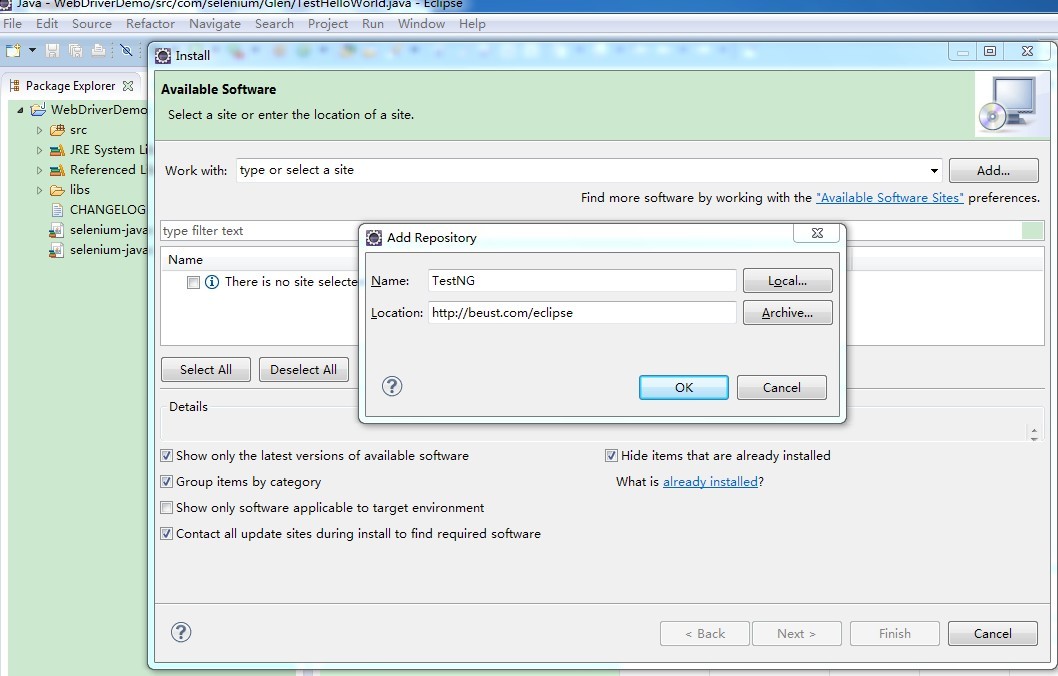
2、然后选中TestNG,单击Next安装

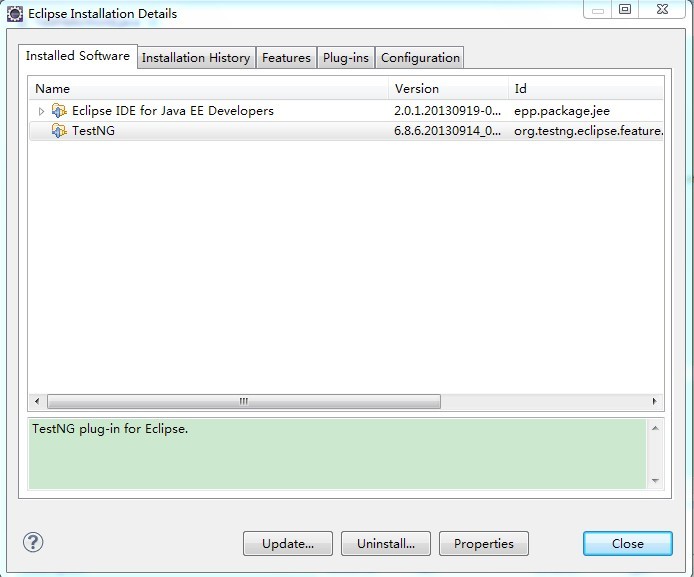
3、安装好TestNG后重启eclipse查看是否安装好,Help-->About Eclipse-->Installation Details,如图:
二、使用TestNG来运行单个测试案例:
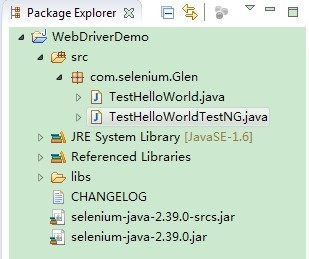
1、新建TestHelloWorldTestNG.java类,目录结构如下:
2、测试代码:
 package com.selenium;

 import org.openqa.selenium.By;

 import org.openqa.selenium.WebDriver;

 import org.openqa.selenium.WebElement;

 import org.openqa.selenium.firefox.*;

 import org.testng.annotations.*;

 import org.testng.Assert;

 public class TestHelloWorldTestNG {

     WebDriver driver;

     @Test

     public void helloWorld() throws Exception {

         //如果火狐浏览器没有默认安装在C盘,需要制定其路径

         //System.setProperty("webdriver.firefox.bin", "D:/Program Files/Mozilla firefox/firefox.exe");

         driver = new FirefoxDriver();

         driver.get("http://www.baidu.com/");

         driver.manage().window().maximize();

         WebElement txtbox = driver.findElement(By.name("wd"));

         txtbox.sendKeys("Glen");

         WebElement btn = driver.findElement(By.id("su"));

         btn.click();

         String expectedTitle = "Glen_百度搜索";

         String actualTitle = driver.getTitle();

         Assert.assertEquals(actualTitle,expectedTitle);

     }

     @AfterTest

     public void tearDown(){

         driver.quit();

     }

 }
3、然后右键Run As-->TestNG Test,运行结果如下:
[TestNG] Running:

  C:\Users\Administrator\AppData\Local\Temp\testng-eclipse-332204777\testng-customsuite.xml

PASSED: helloWorld

===============================================

    Default test

    Tests run: 1, Failures: 0, Skips: 0

===============================================

===============================================

Default suite

Total tests run: 1, Failures: 0, Skips: 0

===============================================

[TestNG] Time taken by [FailedReporter passed=0 failed=0 skipped=0]: 1 ms

[TestNG] Time taken by org.testng.reporters.jq.Main@15d56d5: 34 ms

[TestNG] Time taken by org.testng.reporters.JUnitReportReporter@19106c7: 11 ms

[TestNG] Time taken by org.testng.reporters.EmailableReporter2@1632c2d: 4 ms

[TestNG] Time taken by org.testng.reporters.XMLReporter@cdedfd: 11 ms

[TestNG] Time taken by org.testng.reporters.SuiteHTMLReporter@13caecd: 22 ms
三、使用TestNG来运行多个测试案例:
1、增加一个失败的测试类TestHelloWorldTestNG_Fail.java:
 package com.selenium;

 import org.openqa.selenium.By;

 import org.openqa.selenium.WebDriver;

 import org.openqa.selenium.WebElement;

 import org.openqa.selenium.firefox.*;

 import org.testng.annotations.*;

 import org.testng.Assert;

 public class TestHelloWorldTestNG_Fail {

     WebDriver driver;

     @Test

     public void helloWorld() throws Exception {

         //如果火狐浏览器没有默认安装在C盘,需要制定其路径

         //System.setProperty("webdriver.firefox.bin", "D:/Program Files/Mozilla firefox/firefox.exe");

         driver = new FirefoxDriver();

         driver.get("http://www.baidu.com/");

         driver.manage().window().maximize();

         WebElement txtbox = driver.findElement(By.name("wd"));

         txtbox.sendKeys("Glen");

         WebElement btn = driver.findElement(By.id("su"));

         btn.click();

         String expectedTitle = "Glen_百度";

         String actualTitle = driver.getTitle();

         Assert.assertEquals(actualTitle,expectedTitle);

     }

     @AfterTest

     public void tearDown(){

         driver.quit();

     }

 }
2、在项目下新建一个Suite.xml文件:
<suite name="seleniumcn.cn.demo">

    <test name="test_seleniumcn" >

        <classes>

            <class name="com.selenium.TestHelloWorldTestNG"/>

            <class name="com.selenium.TestHelloWorldTestNG_Fail"/>

        </classes>

    </test>

</suite>
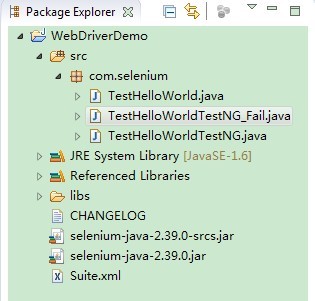
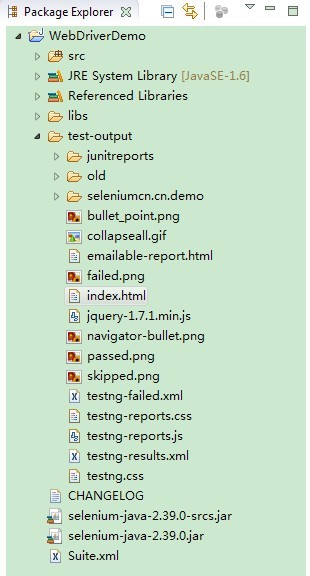
3、目录结构:
4、右键Suite.xml文件,Run As->TestNG Suite,如此就会运行suite.xml文件中所有的案例。
[TestNG] Running:

  F:\workspace\WebDriverDemo\Suite.xml

===============================================

seleniumcn.cn.demo

Total tests run: 2, Failures: 1, Skips: 0

===============================================
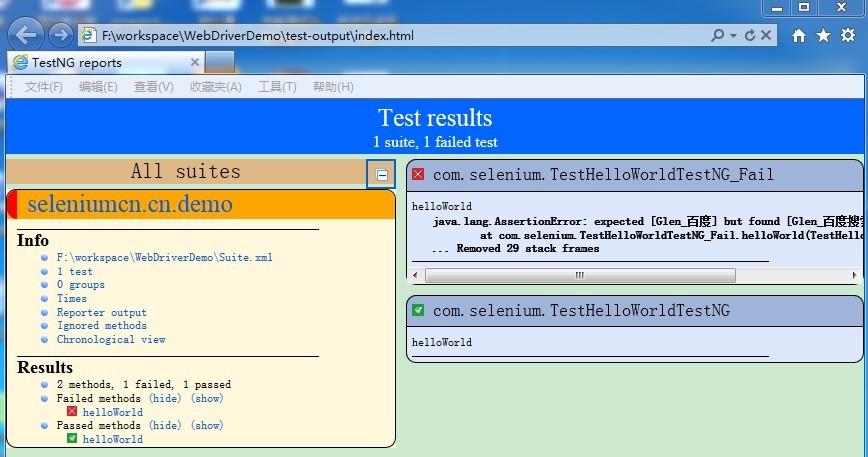
5、右键WebDriverDemo刷新项目,目录中会新增加一个test.output文件夹,打开 index.html可以看一个简单的报告。
目录:
报告:
Selenium2(webdriver)入门之TestNG的安装与简单使用的更多相关文章
- Selenium2(webdriver)入门之TestNG的使用
一.在Eclipse中安装TestNG 1.打开eclipse-->help-->Install New Software-->Add,输入Name和Location后,点击OK. ...
- CentOS7 下Docker最新入门教程 超级详细 (安装以及简单的使用)
转载https://blog.csdn.net/wzsy_ll/article/details/82866627 1.为什么使用Docker(本人) 最近总是频繁的在新服务器发布项目, 每次发布都需要 ...
- webdriver入门-Java
webdriver入门-Java 如何用webdriver打开一个浏览器,我们常用的浏览器有firefox和IE两种,firefox是selenium支持得比较成熟的浏览器,很多新的特性都会在fi ...
- selenium2 Webdriver + Java 自动化测试实战和完全教程
selenium2 Webdriver + Java 自动化测试实战和完全教程一.快速开始 博客分类: Selenium-webdriverselenium webdriver 学习selenium ...
- selenium2 WebDriver 在asp.net项目中的应用
selenium2 WebDriver是一款跨平台的 自动化测试工具,它可以操纵浏览器,模拟用户行为,非常方便用户进行自动化测试. .net项目使用它,首先要通过 Visual Studio 的 nu ...
- Selenium2(WebDriver)总结(一)---启动浏览器、设置profile&加载插件
本文主要记录下在使用selenium2/webdriver时启动各种浏览器的方法.以及如何加载插件.定制浏览器信息(设置profile)等 环境搭建可参考我的另一篇文章:http://www.cnbl ...
- Maven 入门 (1)—— 安装
Maven 入门 (1)—— 安装 http://blog.csdn.net/kakashi8841/article/details/17371837 1.下载maven安装包 http://mave ...
- 【OpenCV入门教程之一】 安装OpenCV:OpenCV 3.0 +VS 2013 开发环境配置
图片太多,具体过程参照: [OpenCV入门教程之一] 安装OpenCV:OpenCV 3.0.OpenCV 2.4.8.OpenCV 2.4.9 +VS 开发环境配置 说下我这边的设置: 选择deb ...
- 单元测试框架-TestNG的安装
一.在eclipse中安装TestNG插件 1)打开eclipse,选择help--> Install New Software
随机推荐
- 缩放到被选择的部分: ICommand Cmd = new ControlsZoomToSelectedCommandClass();
AddItem("esriControls.ControlsZoomToSelectedCommand"); //ICommand Cmd = new ControlsZoomTo ...
- 一文犀利看懂中美贸易战 z
如今的中国面对着前所未有的经济全球化的大环境.面对着如何成为创新性国家的重任. 钛媒体注:美国东部时间 7 月 6 日凌晨0:01 分,美国正式开始对 340 亿美元的中国产品加征 25% 的关税,这 ...
- Android判断用户的网络类型(2/3/4G、wifi)
很多时候需要先判断当前用户的网络,才会继续之后的一些处理逻辑.但网络类型获取这一块,我用我自己的的手机调试时遇到一些问题,这里记录一下. 一加手机一代,移动4G 网络,得到的subtype类型值为17 ...
- 实用ExtJS教程100例-001:开天辟地的Hello World
ExtJS功能繁多,要想彻底的了解确实很困难.作为初学者,如何能找到一条快速的通道呢?我觉得,如果你有Javascript的基础,那就不要惧怕ExtJS的复杂,从动手开始,遇到问题,解决问题,积累经验 ...
- Material Designer的低版本兼容实现(十一)—— Switch
5.0中的switch和之前完全不同了,漂亮不漂亮咱们另说,总之4.x上是没有这样的效果了.实现方式有两种,一种是用这个兼容包来做类似的效果,一种是用传统的checkbox来代替.我感觉兼容包的效果是 ...
- TeXLive里面集成了CTeX,Lyx是一个编辑软件
TeXLive里面集成了CTeX,LaTeX是排版引擎,CTeX和TeXLive是发行版.LaTeX是毛坯房,CTeX和TeX Live是带精装的房子.CTeX 套装是一个个人作品,存在很多问题.这些 ...
- Java调用DLL有多种方式,常用的方式有JNative、JNA、JNI等。
JNative方式调用dll JNative是一种能够使Java语言使调用DLL的一种技术,对JNI进行了封装,可能有些读者会有这样一个问题,JNative对JNI进行了封装,并且是一种跨语言的使用D ...
- 【BZOJ】【3339】Rmq Problem
离线+线段树 Orz Hzwer,引用题解: 这一题在线似乎比较麻烦 至于离线.. 首先按照左端点将询问排序 然后一般可以这样考虑 首先如何得到1-i的sg值呢 这个可以一开始扫一遍完成 接着考虑l- ...
- matlib实现梯度下降法(序一)
数据来源:http://archive.ics.uci.edu/ml/datasets/Combined+Cycle+Power+Plant 数据描述: 有四个输入特征,这些数据来自电厂,这四个特征和 ...
- windows取证
工具网站 : http://www.ntsecurity.nu/toolbox/ 命令行历史 :命令行模式 CMD 中使 doskey /history 命令可以显示前面输入的命令情况(例如使用 cl ...