
(WPF) MVVM: ComboBox Binding, XML 序列化
基本思路还是在View的Xmal里面绑定ViewModel的属性,虽然在View的后台代码中也可以实现binding,但是还是在Xmal里面相对的代码量要少一些。
此例子要实现的效果就是将一个List<Customer> 绑定到一个ComboBox,并将选择后的Customer的Age显示在一个TextBlock中。
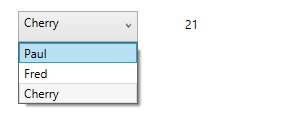
1. Model
    public class Customer

    {

        public string Name

        {

            get;

            set;

        }

        public int Age

        {

            get;

            set;

        }

    }
2. ViewModel
    public class CustomerViewModel : ViewModelBase

    {

        private List<Customer> customers;

        private Customer selectedCustomer;

        public CustomerViewModel()

        {

            this.customers = new List<Customer>()

            {

                new Customer { Name = "Paul", Age =  },

                new Customer { Name = "Fred", Age =  },

                new Customer { Name = "Cherry", Age =  },

            };

            this.selectedCustomer = new Customer();

        }

        public List<Customer> Customers

        {

            get

            {

                return this.customers;

            }

            set

            {

                if (!this.customers.Equals(value))

                {

                    this.customers = value;

                    base.OnPropertyChanged("Customers");

                }

            }

        }

        public Customer SelectedCustomer

        {

            get

            {

                return this.selectedCustomer;

            }

            set

            {

                if (!this.selectedCustomer.Equals(value))

                {

                    this.selectedCustomer = value;

                    base.OnPropertyChanged("SelectedCustomer");

                }

            }

        }

    }
3. View.
<UserControl x:Class="WpfApplication1.View.CustomerView"

             xmlns="http://schemas.microsoft.com/winfx/2006/xaml/presentation"

             xmlns:x="http://schemas.microsoft.com/winfx/2006/xaml"

             xmlns:mc="http://schemas.openxmlformats.org/markup-compatibility/2006"

             xmlns:d="http://schemas.microsoft.com/expression/blend/2008"

             xmlns:vm="clr-namespace:WpfApplication1.ViewModel"

             mc:Ignorable="d"

             Height="308.072"

             Width="457.399">

    <UserControl.DataContext>

        <vm:CustomerViewModel/>

    </UserControl.DataContext>

    <Grid>

        <ComboBox HorizontalAlignment="Left"

                  Margin="45,47,0,0"

                  VerticalAlignment="Top"

                  Width=""

                  Height=""

                  ItemsSource="{Binding Customers}"

                  SelectedItem="{Binding SelectedCustomer}"

                  DisplayMemberPath="Name"/>

        <TextBlock HorizontalAlignment="Left"

                   Margin="212,52,0,0"

                   TextWrapping="Wrap"

                   Text="{Binding SelectedCustomer.Age}"

                   VerticalAlignment="Top"

                   Height=""

                   Width="" />

    </Grid>

</UserControl>
还有其他供选择的binding方式如下:
    <TextBlock Text="Example 1" VerticalAlignment="Center"/>

            <ComboBox ItemsSource="{Binding MyStringOptions}" Grid.Column="" SelectedItem="{Binding SelectedOption1}" Margin=""/>

            <TextBlock Text="{Binding SelectedOption1}" Grid.Column="" Margin="10,5,5,0" VerticalAlignment="Center"/>

            <TextBlock Grid.Row="" Text="Example 2" VerticalAlignment="Center"/>

            <ComboBox Grid.Row="" Grid.Column="" ItemsSource="{Binding MyClassOptions}" SelectedItem="{Binding SelectedClass}" DisplayMemberPath="Name" Margin=""/>

            <TextBlock Grid.Row="" Grid.Column="" Margin="10,5,5,0" VerticalAlignment="Center"><Run Text="{Binding SelectedClass.Name}"/><Run Text=" - "/><Run Text="{Binding SelectedClass.Age}"/></TextBlock>

            <TextBlock Grid.Row="" Text="Example 3" VerticalAlignment="Center"/>

            <ComboBox Grid.Row="" Grid.Column="" ItemsSource="{Binding MyClassOptions}" SelectedValuePath="Age" SelectedValue="{Binding SelectedAge}" DisplayMemberPath="Name" Margin=""/>

            <TextBlock Grid.Row="" Grid.Column="" Margin="10,5,5,0" VerticalAlignment="Center"><Run Text="Selected age: "/><Run Text="{Binding SelectedAge}"/></TextBlock>

            <TextBlock Grid.Row="" Text="Example 4" VerticalAlignment="Center"/>

            <ComboBox Grid.Row="" Grid.Column="" ItemsSource="{Binding MyClassOptions}" SelectedValuePath="Age" SelectedValue="{Binding SelectedAge}" ItemTemplate="{StaticResource Example4ItemTemplate}" Margin=""/>

            <TextBlock Grid.Row="" Grid.Column="" Margin="10,5,5,0" VerticalAlignment="Center"><Run Text="Selected age: "/><Run Text="{Binding SelectedAge}"/></TextBlock>
再深入一步,在实际的程序中,是务必要减少那些Hardcode的,所以我们可以把数据存放在一个单独的xml文件中。
并通过对xml的文件的序列化解析,正确的获取里面的数据。
另外,还可以binding ComboBox 到 enum 和 dictionary
绑定到 Enum
http://blog.163.com/cloud_thegreat/blog/static/10367215620115233941346/
(WPF) MVVM: ComboBox Binding, XML 序列化的更多相关文章
- (WPF, MVVM) Slider Binding.
对于Button的Command的绑定可以通过实现ICommand接口来进行,但是Slider并没有Command属性. 另外如果要实现MVVM模式的话,需要将一些Method和Slider的Even ...
- (WPF, MVVM) Textbox Binding
参考:http://msdn.microsoft.com/en-us/library/system.windows.data.updatesourcetrigger(v=vs.110).aspx Te ...
- (WPF) MVVM: DataGrid Binding
Binding到DataGrid的时候,需要用到ObservableCollection. public ObservableCollection<Customer> Customers ...
- WPF XML序列化保存数据 支持Datagrid 显示/编辑/添加/删除数据
XML序列化保存数据 using System; using System.Collections.Generic; using System.Linq; using System.Text; usi ...
- wpf mvvm使用问题集锦
问题一.usercontrol1控件使用了mvvm数据绑定,usercontrol2也使用了mvvm数据绑定,则 以下是伪代码 <usercontrol2 datacontent="{ ...
- A WPF/MVVM Countdown Timer
Introduction This article describes the construction of a countdown timer application written in C# ...
- 使用Prism提供的类实现WPF MVVM点餐Demo
使用Prism提供的类实现WPF MVVM点餐Demo 由于公司开发的技术需求,近期在学习MVVM模式开发WPF应用程序.进过一段时间的学习,感受到:学习MVVM模式,最好的方法就是用MVVM做几个D ...
- WPF MVVM从入门到精通3:数据绑定
原文:WPF MVVM从入门到精通3:数据绑定 WPF MVVM从入门到精通1:MVVM模式简介 WPF MVVM从入门到精通2:实现一个登录窗口 WPF MVVM从入门到精通3:数据绑定 WPF ...
- C# WPF - MVVM实现OPC Client管理系统
前言 本文主要讲解采用WPF MVVM模式设计OPC Client的过程,算作对于WPF MVVM架构的学习记录吧!不足之处请不吝赐教,感谢! 涉及知识点 C#基础 Xaml基础 命令.通知和数据绑定 ...
随机推荐
- linux文件系统---10
进入 Linux 根目录(即“/”, Linux 文件系统的入口, 也是处于最高一级的目录),运行“ls –l”命令,可以看到 Linux 系统包含以下目录. 1./bin 包含基本命令,如 ls.c ...
- HTML---常见标签与插入背景音乐;
插入背景音乐 (一).基本语法: embed src=url 说明:embed可以用来插入各种多媒体,格式可以是 Midi.Wav.AIFF.AU.MP3等等, Netscape及新版的IE 都支持 ...
- 工作中遇到的问题--Hibernate一对多保存简化Service层代码
在创建一方的entity是添加一个增加多方的方法: package com.sim.mfg.data.domain; import java.io.Serializable;import java.u ...
- HDU 5957 Query on a graph
HDU 5957 Query on a graph 2016ACM/ICPC亚洲区沈阳站 题意 \(N(N \le 10^5)\)个点,\(N\)条边的连通图. 有\(M \le 10^5\)操作: ...
- HDU 2096 小明A+B --- 水题
HDU 2096 /* HDU 2096 小明A+B --- 水题 */ #include <cstdio> int main() { #ifdef _LOCAL freopen(&quo ...
- Unable to get valid context for root
登陆时报以下错误Unable to get valid context for rootLast login: Wed Jul 24 02:06:01 2013 from 10.64.41.3 单机模 ...
- hdu3594 强连通(仙人掌图)
题意:给定一张有向图,问是否是仙人掌图.仙人掌图的定义是,首先,这张图是一个强连通分量,其次所有边在且仅在一个环内. 首先,tarjan可以判强连通分量是否只有一个.然后对于所有边是否仅在一个环内,我 ...
- 最长不下降子序列的O(n^2)算法和O(nlogn)算法
一.简单的O(n^2)的算法 很容易想到用动态规划做.设lis[]用于保存第1~i元素元素中最长不下降序列的长度,则lis[i]=max(lis[j])+1,且num[i]>num[j],i&g ...
- Windows Phone使用总结(长期更新)
[感受和经历] 1,型号,撸妹640XL: 2,经历,去银行办卡,当然各种潜规则要我装APP,然后小妹夺我手机要帮我安装,拿过去之后又还给我了--哈哈哈哈,不过乐极生悲,我以为能成功躲过去了,发现中国 ...
- CUDA中的流与事件
流:CUDA流很像CPU的线程,一个CUDA流中的操作按顺序进行,粗粒度管理多个处理单元的并发执行. 通俗的讲,流用于并行运算,比如处理同一副图,你用一个流处理左边半张图片,再用第二个流处理右边半张图 ...