
C#写日志工具类(新版)
源码:https://gitee.com/s0611163/LogUtil
昨天打算把我以前写的一个C#写日志工具类放到GitHub上,却发现了一个BUG,当然,已经修复了。
然后写Demo对比了NLog和log4net,发现我这个LogUtil比它们性能低了不止一个数量级(后来发现是通过共用Mutex修复BUG导致的)。工作多年,平时都是用别人写的库,自己写的很少。因为当初自己没有时间研究log4net或NLog,并且写个简单的日志工具类自己也有能力实现,所以就自己写了LogUtil自己用。修修改改了很多次了,居然还是有BUG。因为用了多线程和锁,导致BUG很隐蔽,而且性能比较差(后来发现是通过共用Mutex修复BUG导致的)。代码写的很挫,逻辑复杂,更容易出BUG。用NLog或log4net它不香吗?但又心有不甘,而且对于自己写的一些小的程序,可能第三方日志类库的dll比自己的程序都大,所以也有必要自己写一个,以便平时写各种Demo用。
之前写的很挫,逻辑很复杂的日志工具类:https://www.cnblogs.com/s0611163/p/4023859.html
日志类型LogType类:


using System;

using System.Collections.Generic;

using System.Linq;

using System.Text;

using System.Threading.Tasks;

namespace Utils

{

    /// <summary>

    /// 日志类型

    /// </summary>

    public enum LogType

    {

        Debug,

        Info,

        Error

    }

}
当前日志写入流LogStream类:
using System;

using System.Collections.Generic;

using System.IO;

using System.Linq;

using System.Text;

using System.Threading.Tasks;

namespace Utils

{

    internal class LogStream

    {

        public FileStream CurrentFileStream { get; set; }

        public StreamWriter CurrentStreamWriter { get; set; }

        public int CurrentArchiveIndex { get; set; }

        public long CurrentFileSize { get; set; }

        public string CurrentDateStr { get; set; }

        public string CurrentLogFilePath { get; set; }

        public string CurrentLogFileDir { get; set; }

    }

}
LogWriter类:
using System;

using System.Collections.Concurrent;

using System.Collections.Generic;

using System.IO;

using System.Linq;

using System.Reflection;

using System.Text;

using System.Text.RegularExpressions;

using System.Threading;

using System.Threading.Tasks;

namespace Utils

{

    internal class LogWriter

    {

        #region 字段属性

        private LogType _logType;

        private string _basePath;

        private int _fileSize = 10 * 1024 * 1024; //日志分隔文件大小

        private LogStream _currentStream = new LogStream();

        private string _dateFormat = "yyyyMMdd"; //日志文件名日期格式化

        private string _rootFolder = "Log"; //日志文件夹名称

        private object _lockWriter = new object();

        #endregion

        #region LogWriter

        public LogWriter(LogType logType)

        {

            _logType = logType;

            Init();

        }

        #endregion

        #region Init

        /// <summary>

        /// 初始化

        /// </summary>

        private void Init()

        {

            //初始化 _basePath

            InitBasePath();

            //创建目录

            CreateLogDir();

            //更新日志写入流

            UpdateCurrentStream();

        }

        #endregion

        #region 初始化 _basePath

        /// <summary>

        /// 初始化 _basePath

        /// </summary>

        private void InitBasePath()

        {

            UriBuilder uri = new UriBuilder(Assembly.GetExecutingAssembly().CodeBase);

            _basePath = Path.GetDirectoryName(Uri.UnescapeDataString(uri.Path));

        }

        #endregion

        #region 初始化 _currentArchiveIndex

        /// <summary>

        /// 初始化 _currentArchiveIndex

        /// </summary>

        private void InitCurrentArchiveIndex()

        {

            Regex regex = new Regex(_currentStream.CurrentDateStr + "_*(\\d*).txt");

            string[] fileArr = Directory.GetFiles(_currentStream.CurrentLogFileDir, _currentStream.CurrentDateStr + "*");

            foreach (string file in fileArr)

            {

                Match match = regex.Match(file);

                if (match.Success)

                {

                    string str = match.Groups[1].Value;

                    if (!string.IsNullOrWhiteSpace(str))

                    {

                        int temp = Convert.ToInt32(str);

                        if (temp > _currentStream.CurrentArchiveIndex)

                        {

                            _currentStream.CurrentArchiveIndex = temp;

                        }

                    }

                    else

                    {

                        _currentStream.CurrentArchiveIndex = 0;

                    }

                }

            }

        }

        #endregion

        #region 初始化 _currentFileSize

        /// <summary>

        /// 初始化 _currentFileSize

        /// </summary>

        private void InitCurrentFileSize()

        {

            FileInfo fileInfo = new FileInfo(_currentStream.CurrentLogFilePath);

            _currentStream.CurrentFileSize = fileInfo.Length;

        }

        #endregion

        #region CreateLogDir()

        /// <summary>

        /// 创建日志目录

        /// </summary>

        private void CreateLogDir()

        {

            string logDir = Path.Combine(_basePath, _rootFolder + "\\" + _logType.ToString());

            if (!Directory.Exists(logDir))

            {

                Directory.CreateDirectory(logDir);

            }

        }

        #endregion

        #region CreateStream

        /// <summary>

        /// 创建日志写入流

        /// </summary>

        private void CreateStream()

        {

            _currentStream.CurrentFileStream = new FileStream(_currentStream.CurrentLogFilePath, FileMode.Append, FileAccess.Write, FileShare.ReadWrite);

            _currentStream.CurrentStreamWriter = new StreamWriter(_currentStream.CurrentFileStream, Encoding.UTF8);

        }

        #endregion

        #region CloseStream

        /// <summary>

        /// 关闭日志写入流

        /// </summary>

        private void CloseStream()

        {

            if (_currentStream.CurrentStreamWriter != null)

            {

                _currentStream.CurrentStreamWriter.Close();

            }

            if (_currentStream.CurrentFileStream != null)

            {

                _currentStream.CurrentFileStream.Close();

            }

        }

        #endregion

        #region 拼接日志内容

        /// <summary>

        /// 拼接日志内容

        /// </summary>

        private static string CreateLogString(LogType logType, string log)

        {

            return string.Format(@"{0} {1} {2}", DateTime.Now.ToString("yyyy-MM-dd HH:mm:ss.fff"), ("[" + logType.ToString() + "]").PadRight(7, ' '), log);

        }

        #endregion

        #region 写文件

        /// <summary>

        /// 写文件

        /// </summary>

        private void WriteFile(string log)

        {

            try

            {

                lock (_lockWriter)

                {

                    //判断是否更新Stream

                    string dateStr = DateTime.Now.ToString(_dateFormat);

                    if (_currentStream.CurrentDateStr != dateStr)

                    {

                        _currentStream.CurrentDateStr = dateStr;

                        UpdateCurrentStream();

                    }

                    //判断是否创建Archive

                    int byteCount = Encoding.UTF8.GetByteCount(log);

                    _currentStream.CurrentFileSize += byteCount;

                    if (_currentStream.CurrentFileSize >= _fileSize)

                    {

                        _currentStream.CurrentFileSize = 0;

                        CreateArchive();

                    }

                    //日志内容写入文件

                    _currentStream.CurrentStreamWriter.WriteLine(log);

                    _currentStream.CurrentStreamWriter.Flush();

                }

            }

            catch (Exception ex)

            {

                Console.WriteLine(ex.Message + "\r\n" + ex.StackTrace);

            }

        }

        #endregion

        #region CreateArchive

        /// <summary>

        /// 创建日志存档

        /// </summary>

        private void CreateArchive()

        {

            string fileName = Path.GetFileNameWithoutExtension(_currentStream.CurrentLogFilePath);

            CloseStream(); //关闭日志写入流

            File.Move(_currentStream.CurrentLogFilePath, Path.Combine(_currentStream.CurrentLogFileDir, fileName + "_" + (++_currentStream.CurrentArchiveIndex) + ".txt")); //存档

            CreateStream(); //创建日志写入流

        }

        #endregion

        #region UpdateCurrentStream

        /// <summary>

        /// 更新日志写入流

        /// </summary>

        private void UpdateCurrentStream()

        {

            try

            {

                //关闭日志写入流

                CloseStream();

                //创建新的日志路径

                _currentStream.CurrentDateStr = DateTime.Now.ToString(_dateFormat);

                _currentStream.CurrentLogFileDir = Path.Combine(_basePath, _rootFolder + "\\" + _logType.ToString());

                _currentStream.CurrentLogFilePath = Path.Combine(_currentStream.CurrentLogFileDir, _currentStream.CurrentDateStr + ".txt");

                //创建日志写入流

                CreateStream();

                //初始化 _currentArchiveIndex

                InitCurrentArchiveIndex();

                //初始化 _currentFileSize

                InitCurrentFileSize();

            }

            catch (Exception ex)

            {

                Console.WriteLine(ex.Message + "\r\n" + ex.StackTrace);

            }

        }

        #endregion

        #region 写日志

        /// <summary>

        /// 写日志

        /// </summary>

        /// <param name="log">日志内容</param>

        public void WriteLog(string log)

        {

            try

            {

                log = CreateLogString(_logType, log);

                WriteFile(log);

            }

            catch (Exception ex)

            {

                Console.WriteLine(ex.Message + "\r\n" + ex.StackTrace);

            }

        }

        #endregion

    }

}
静态类LogUtil类:
using System;

using System.Collections.Concurrent;

using System.Collections.Generic;

using System.IO;

using System.Linq;

using System.Reflection;

using System.Text;

using System.Text.RegularExpressions;

using System.Threading;

using System.Threading.Tasks;

namespace Utils

{

    /// <summary>

    /// 写日志类

    /// </summary>

    public class LogUtil

    {

        #region 字段

        private static LogWriter _infoWriter = new LogWriter(LogType.Info);

        private static LogWriter _debugWriter = new LogWriter(LogType.Debug);

        private static LogWriter _errorWriter = new LogWriter(LogType.Error);

        #endregion

        #region 写操作日志

        /// <summary>

        /// 写操作日志

        /// </summary>

        public static void Log(string log)

        {

            _infoWriter.WriteLog(log);

        }

        #endregion

        #region 写调试日志

        /// <summary>

        /// 写调试日志

        /// </summary>

        public static void Debug(string log)

        {

            _debugWriter.WriteLog(log);

        }

        #endregion

        #region 写错误日志

        public static void Error(Exception ex, string log = null)

        {

            Error(string.IsNullOrEmpty(log) ? ex.Message + "\r\n" + ex.StackTrace : (log + ":") + ex.Message + "\r\n" + ex.StackTrace);

        }

        /// <summary>

        /// 写错误日志

        /// </summary>

        public static void Error(string log)

        {

            _errorWriter.WriteLog(log);

        }

        #endregion

    }

}
测试代码(LogUtil、NLog、log4net写日志性能对比):
using NLog;

using System;

using System.Collections.Concurrent;

using System.Collections.Generic;

using System.ComponentModel;

using System.Data;

using System.Diagnostics;

using System.Drawing;

using System.IO;

using System.Linq;

using System.Reflection;

using System.Text;

using System.Threading;

using System.Threading.Tasks;

using System.Windows.Forms;

using Utils;

namespace LogUtilTest

{

    public partial class Form1 : Form

    {

        private Logger _log = NLog.LogManager.GetCurrentClassLogger();

        private log4net.ILog _log2 = null;

        private int n = 300000;

        public Form1()

        {

            InitializeComponent();

            ThreadPool.SetMinThreads(20, 20);

            UriBuilder uri = new UriBuilder(Assembly.GetExecutingAssembly().CodeBase);

            string path = Path.GetDirectoryName(Uri.UnescapeDataString(uri.Path));

            FileInfo configFile = new FileInfo(Path.Combine(path, "log4net.config"));

            log4net.Config.XmlConfigurator.Configure(configFile);

            _log2 = log4net.LogManager.GetLogger(typeof(Form1));

        }

        #region Log

        private void Log(string log)

        {

            if (!this.IsDisposed)

            {

                if (this.InvokeRequired)

                {

                    this.BeginInvoke(new Action(() =>

                    {

                        textBox1.AppendText(DateTime.Now.ToString("HH:mm:ss.fff") + " " + log + "\r\n\r\n");

                    }));

                }

                else

                {

                    textBox1.AppendText(DateTime.Now.ToString("HH:mm:ss.fff") + " " + log + "\r\n\r\n");

                }

            }

        }

        #endregion

        private void button1_Click(object sender, EventArgs e)

        {

            LogUtil.Log("测试写 Info 日志");

            LogUtil.Debug("测试写 Debug 日志");

            LogUtil.Error("测试写 Error 日志");

        }

        private void button2_Click(object sender, EventArgs e)

        {

            Task.Run(() =>

            {

                Log("==== 开始 ========");

                Stopwatch stopwatch = new Stopwatch();

                stopwatch.Start();

                List<Task> taskList = new List<Task>();

                Task tsk = null;

                int taskCount = 0;

                tsk = Task.Run(() =>

                {

                    for (int i = 0; i < n; i++)

                    {

                        LogUtil.Log("测试日志 " + i.ToString("000000"));

                        Interlocked.Increment(ref taskCount);

                    }

                });

                taskList.Add(tsk);

                tsk = Task.Run(() =>

                {

                    for (int i = 0; i < n; i++)

                    {

                        LogUtil.Debug("测试日志 " + i.ToString("000000"));

                        Interlocked.Increment(ref taskCount);

                    }

                });

                taskList.Add(tsk);

                tsk = Task.Run(() =>

                {

                    for (int i = 0; i < n; i++)

                    {

                        LogUtil.Error("测试日志 " + i.ToString("000000"));

                        Interlocked.Increment(ref taskCount);

                    }

                });

                taskList.Add(tsk);

                Task.WaitAll(taskList.ToArray());

                Log("Task Count=" + taskCount);

                Log("==== 结束 " + ",耗时:" + stopwatch.Elapsed.TotalSeconds.ToString("0.000") + " 秒 ========");

                stopwatch.Stop();

            });

        }

        //对比NLog

        private void button3_Click(object sender, EventArgs e)

        {

            Task.Run(() =>

            {

                Log("==== 开始 ========");

                Stopwatch stopwatch = new Stopwatch();

                stopwatch.Start();

                List<Task> taskList = new List<Task>();

                Task tsk = null;

                int taskCount = 0;

                tsk = Task.Run(() =>

                {

                    for (int i = 0; i < n; i++)

                    {

                        _log.Info("测试日志 " + i.ToString("000000"));

                        Interlocked.Increment(ref taskCount);

                    }

                });

                taskList.Add(tsk);

                tsk = Task.Run(() =>

                {

                    for (int i = 0; i < n; i++)

                    {

                        _log.Debug("测试日志 " + i.ToString("000000"));

                        Interlocked.Increment(ref taskCount);

                    }

                });

                taskList.Add(tsk);

                tsk = Task.Run(() =>

                {

                    for (int i = 0; i < n; i++)

                    {

                        _log.Error("测试日志 " + i.ToString("000000"));

                        Interlocked.Increment(ref taskCount);

                    }

                });

                taskList.Add(tsk);

                Task.WaitAll(taskList.ToArray());

                Log("Task Count=" + taskCount);

                Log("==== 结束 " + ",耗时:" + stopwatch.Elapsed.TotalSeconds.ToString("0.000") + " 秒 ========");

                stopwatch.Stop();

            });

        }

        //对比log4net

        private void button4_Click(object sender, EventArgs e)

        {

            Task.Run(() =>

            {

                Log("==== 开始 ========");

                Stopwatch stopwatch = new Stopwatch();

                stopwatch.Start();

                List<Task> taskList = new List<Task>();

                Task tsk = null;

                int taskCount = 0;

                tsk = Task.Run(() =>

                {

                    for (int i = 0; i < n; i++)

                    {

                        _log2.Info("测试日志 " + i.ToString("000000"));

                        Interlocked.Increment(ref taskCount);

                    }

                });

                taskList.Add(tsk);

                tsk = Task.Run(() =>

                {

                    for (int i = 0; i < n; i++)

                    {

                        _log2.Debug("测试日志 " + i.ToString("000000"));

                        Interlocked.Increment(ref taskCount);

                    }

                });

                taskList.Add(tsk);

                tsk = Task.Run(() =>

                {

                    for (int i = 0; i < n; i++)

                    {

                        _log2.Error("测试日志 " + i.ToString("000000"));

                        Interlocked.Increment(ref taskCount);

                    }

                });

                taskList.Add(tsk);

                Task.WaitAll(taskList.ToArray());

                Log("Task Count=" + taskCount);

                Log("==== 结束 " + ",耗时:" + stopwatch.Elapsed.TotalSeconds.ToString("0.000") + " 秒 ========");

                stopwatch.Stop();

            });

        }

    }

}
log4net.config配置文件:
<?xml version="1.0" encoding="utf-8"?>
<log4net>
<!-- 日志文件配置-->
<root>
<level value="ALL"/>
<!--按文件存储日志-->
<appender-ref ref="DebugAppender"/>
<appender-ref ref="InfoAppender"/>
<appender-ref ref="ErrorAppender" />
</root>
<appender name="ErrorAppender" type="log4net.Appender.RollingFileAppender">
<param name="File" value=".\\Logs\\Error\\" />
<!--日志记录的存在路-->
<param name="AppendToFile" value="true" />
<!--为true就表示日志会附加到文件,为false,则会重新创建一个新文件-->
<param name="MaxSizeRollBackups" value="100" />
<!--创建最大文件数-->
<param name="maximumFileSize" value="10MB" />
<!--文件大小-->
<param name="StaticLogFileName" value="false" />
<!--是否指定文件名-->
<param name="DatePattern" value="yyyy-MM-dd".log""/>
<!--文件格式-->
<param name="RollingStyle" value="Composite" />
<!--创建新文件的方式,可选为Size(按文件大小),Date(按日期),Once(每启动一次创建一个文件),Composite(按日期及文件大小),默认为Composite-->
<layout type="log4net.Layout.PatternLayout">
<!--输出内容布局-->
<param name="ConversionPattern" value="%date [%thread] %-5level %logger [%property{NDC}] - %message%newline" />
<!--method会影响性能-->
</layout>
<filter type="log4net.Filter.LevelRangeFilter">
<param name="LevelMin" value="ERROR" />
<param name="LevelMax" value="ERROR" />
</filter>
</appender>
<appender name="InfoAppender" type="log4net.Appender.RollingFileAppender">
<param name="File" value=".\\Logs\\Info\\" />
<param name="AppendToFile" value="true" />
<param name="MaxSizeRollBackups" value="100" />
<param name="maximumFileSize" value="10MB" />
<param name="StaticLogFileName" value="false" />
<param name="DatePattern" value="yyyy-MM-dd".log"" />
<param name="RollingStyle" value="Composite" />
<layout type="log4net.Layout.PatternLayout">
<param name="ConversionPattern" value="%date [%thread] %-5level %logger [%property{NDC}] - %message%newline" />
</layout>
<filter type="log4net.Filter.LevelRangeFilter">
<param name="LevelMin" value="INFO" />
<param name="LevelMax" value="INFO" />
</filter>
</appender>
<appender name="DebugAppender" type="log4net.Appender.RollingFileAppender">
<param name="File" value=".\\Logs\\Debug\\" />
<param name="AppendToFile" value="true" />
<param name="MaxSizeRollBackups" value="100" />
<param name="maximumFileSize" value="10MB" />
<param name="StaticLogFileName" value="false" />
<param name="DatePattern" value="yyyy-MM-dd".log"" />
<param name="RollingStyle" value="Composite" />
<layout type="log4net.Layout.PatternLayout">
<param name="ConversionPattern" value="%date [%thread] %-5level %logger [%property{NDC}] - %message%newline" />
</layout>
<filter type="log4net.Filter.LevelRangeFilter">
<param name="LevelMin" value="DEBUG" />
<param name="LevelMax" value="DEBUG" />
</filter>
</appender>
</log4net>
NLog.config配置文件:
<?xml version="1.0" encoding="utf-8" ?>

<nlog xmlns="http://www.nlog-project.org/schemas/NLog.xsd"

      xmlns:xsi="http://www.w3.org/2001/XMLSchema-instance"

      xsi:schemaLocation="http://www.nlog-project.org/schemas/NLog.xsd NLog.xsd"

      autoReload="true"

      throwExceptions="false"

      internalLogLevel="Off"

      internalLogFile="d:\nlog\nlog-internal.log">

  <!-- optional, add some variables

  https://github.com/nlog/NLog/wiki/Configuration-file#variables

  -->

  <!--<variable name="myvar" value="myvalue"/>-->

  <variable name="logDir" value="${basedir}/nlog"/>

  <variable name="logFileName" value="${date:format=yyyyMMdd}.txt"/>

  <variable name="logArchiveFileName" value="${date:format=yyyyMMdd}_{#}.txt"/>

  <variable name="logLayout" value="${date:format=yyyy-MM-dd HH\:mm\:ss.fff} [${level}] ${message}"/>

  <!--

  See https://github.com/nlog/nlog/wiki/Configuration-file

  for information on customizing logging rules and outputs.

   -->

  <targets>

    <!--

    add your targets here

    See https://github.com/nlog/NLog/wiki/Targets for possible targets.

    See https://github.com/nlog/NLog/wiki/Layout-Renderers for the possible layout renderers.

    -->

    <!--

    Write events to a file with the date in the filename.

    <target xsi:type="File" name="f" fileName="${basedir}/logs/${shortdate}.log"

            layout="${longdate} ${uppercase:${level}} ${message}" />

    -->

    <target xsi:type="File" name="info"

            layout="${logLayout}"

            fileName="${logDir}/info/${logFileName}"

            archiveFileName="${logDir}/info/${logArchiveFileName}"

            archiveAboveSize="10485760"

            archiveNumbering="Sequence"

            maxArchiveFiles="100"

            concurrentWrites="true"

            keepFileOpen="true"

            openFileCacheTimeout="30"

            encoding="UTF-8" />

    <target xsi:type="File" name="debug"

            layout="${logLayout}"

            fileName="${logDir}/debug/${logFileName}"

            archiveFileName="${logDir}/debug/${logArchiveFileName}"

            archiveAboveSize="10485760"

            archiveNumbering="Sequence"

            maxArchiveFiles="100"

            concurrentWrites="true"

            keepFileOpen="true"

            openFileCacheTimeout="30"

            encoding="UTF-8" />

    <target xsi:type="File" name="error"

            layout="${logLayout}"

            fileName="${logDir}/error/${logFileName}"

            archiveFileName="${logDir}/error/${logArchiveFileName}"

            archiveAboveSize="10485760"

            archiveNumbering="Sequence"

            maxArchiveFiles="100"

            concurrentWrites="true"

            keepFileOpen="true"

            openFileCacheTimeout="30"

            encoding="UTF-8" />

  </targets>

  <rules>

    <!-- add your logging rules here -->

    <!--

    Write all events with minimal level of Debug (So Debug, Info, Warn, Error and Fatal, but not Trace)  to "f"

    <logger name="*" minlevel="Debug" writeTo="f" />

    -->

    <logger name="*" minlevel="Info" maxlevel="Info" writeTo="info" />

    <logger name="*" minlevel="Debug" maxlevel="Debug" writeTo="debug" />

    <logger name="*" minlevel="Error" maxlevel="Error" writeTo="error" />

  </rules>

</nlog>
测试截图:
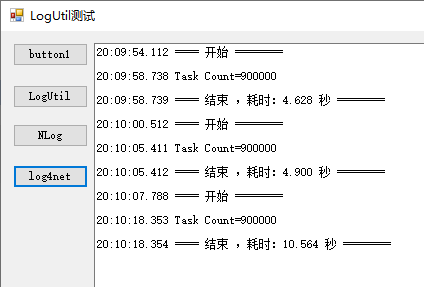
写Info、Debug、Error日志各30万行,LogUtil耗时4.628秒,NLog耗时4.900秒,log4net耗时10.564秒,硬盘是固态硬盘。
说明:
该版本不支持多进程并发。
支持多进程并发的LogWriter版本(注意:代码中要加上 _currentStream.CurrentFileStream.Seek(0, SeekOrigin.End); 这句,不然不支持多进程并发):
using System;

using System.Collections.Concurrent;

using System.Collections.Generic;

using System.IO;

using System.Linq;

using System.Reflection;

using System.Text;

using System.Text.RegularExpressions;

using System.Threading;

using System.Threading.Tasks;

namespace Utils

{

    /// <summary>

    /// 支持多进程并发写日志的LogWriter版本

    /// </summary>

    internal class LogWriterUseMutex

    {

        #region 字段属性

        private LogType _logType;

        private string _basePath;

        private int _fileSize = 10 * 1024 * 1024; //日志分隔文件大小

        private LogStream _currentStream = new LogStream();

        private string _dateFormat = "yyyyMMdd"; //日志文件名日期格式化

        private string _rootFolder = "Log"; //日志文件夹名称

        private Mutex _mutex;

        #endregion

        #region LogWriter

        public LogWriterUseMutex(LogType logType)

        {

            _logType = logType;

            _mutex = new Mutex(false, "Mutex.LogWriter." + logType.ToString() + ".7693FFAD38004F6B8FD31F6A8B4CE2BD");

            Init();

        }

        #endregion

        #region Init

        /// <summary>

        /// 初始化

        /// </summary>

        private void Init()

        {

            //初始化 _basePath

            InitBasePath();

            //创建目录

            CreateLogDir();

            //更新日志写入流

            UpdateCurrentStream();

        }

        #endregion

        #region 初始化 _basePath

        /// <summary>

        /// 初始化 _basePath

        /// </summary>

        private void InitBasePath()

        {

            UriBuilder uri = new UriBuilder(Assembly.GetExecutingAssembly().CodeBase);

            _basePath = Path.GetDirectoryName(Uri.UnescapeDataString(uri.Path));

        }

        #endregion

        #region 初始化 _currentArchiveIndex

        /// <summary>

        /// 初始化 _currentArchiveIndex

        /// </summary>

        private void InitCurrentArchiveIndex()

        {

            Regex regex = new Regex(_currentStream.CurrentDateStr + "_*(\\d*).txt");

            string[] fileArr = Directory.GetFiles(_currentStream.CurrentLogFileDir, _currentStream.CurrentDateStr + "*");

            foreach (string file in fileArr)

            {

                Match match = regex.Match(file);

                if (match.Success)

                {

                    string str = match.Groups[1].Value;

                    if (!string.IsNullOrWhiteSpace(str))

                    {

                        int temp = Convert.ToInt32(str);

                        if (temp > _currentStream.CurrentArchiveIndex)

                        {

                            _currentStream.CurrentArchiveIndex = temp;

                        }

                    }

                    else

                    {

                        _currentStream.CurrentArchiveIndex = 0;

                    }

                }

            }

        }

        #endregion

        #region 初始化 _currentFileSize

        /// <summary>

        /// 初始化 _currentFileSize

        /// </summary>

        private void InitCurrentFileSize()

        {

            FileInfo fileInfo = new FileInfo(_currentStream.CurrentLogFilePath);

            _currentStream.CurrentFileSize = fileInfo.Length;

        }

        #endregion

        #region CreateLogDir()

        /// <summary>

        /// 创建日志目录

        /// </summary>

        private void CreateLogDir()

        {

            string logDir = Path.Combine(_basePath, _rootFolder + "\\" + _logType.ToString());

            if (!Directory.Exists(logDir))

            {

                Directory.CreateDirectory(logDir);

            }

        }

        #endregion

        #region CreateStream

        /// <summary>

        /// 创建日志写入流

        /// </summary>

        private void CreateStream()

        {

            _currentStream.CurrentFileStream = new FileStream(_currentStream.CurrentLogFilePath, FileMode.Append, FileAccess.Write, FileShare.ReadWrite);

            _currentStream.CurrentStreamWriter = new StreamWriter(_currentStream.CurrentFileStream, Encoding.UTF8);

        }

        #endregion

        #region CloseStream

        /// <summary>

        /// 关闭日志写入流

        /// </summary>

        private void CloseStream()

        {

            if (_currentStream.CurrentStreamWriter != null)

            {

                _currentStream.CurrentStreamWriter.Close();

            }

            if (_currentStream.CurrentFileStream != null)

            {

                _currentStream.CurrentFileStream.Close();

            }

        }

        #endregion

        #region 拼接日志内容

        /// <summary>

        /// 拼接日志内容

        /// </summary>

        private static string CreateLogString(LogType logType, string log)

        {

            return string.Format(@"{0} {1} {2}", DateTime.Now.ToString("yyyy-MM-dd HH:mm:ss.fff"), ("[" + logType.ToString() + "]").PadRight(7, ' '), log);

        }

        #endregion

        #region 写文件

        /// <summary>

        /// 写文件

        /// </summary>

        private void WriteFile(string log)

        {

            try

            {

                _mutex.WaitOne();

                //判断是否更新Stream

                string dateStr = DateTime.Now.ToString(_dateFormat);

                if (_currentStream.CurrentDateStr != dateStr)

                {

                    _currentStream.CurrentDateStr = dateStr;

                    UpdateCurrentStream();

                }

                //判断是否创建Archive

                int byteCount = Encoding.UTF8.GetByteCount(log);

                _currentStream.CurrentFileSize += byteCount;

                if (_currentStream.CurrentFileSize >= _fileSize)

                {

                    _currentStream.CurrentFileSize = 0;

                    CreateArchive();

                }

                //日志内容写入文件

                _currentStream.CurrentFileStream.Seek(0, SeekOrigin.End);

                _currentStream.CurrentStreamWriter.WriteLine(log);

                _currentStream.CurrentStreamWriter.Flush();

            }

            catch (Exception ex)

            {

                Console.WriteLine(ex.Message + "\r\n" + ex.StackTrace);

            }

            finally

            {

                _mutex.ReleaseMutex();

            }

        }

        #endregion

        #region CreateArchive

        /// <summary>

        /// 创建日志存档

        /// </summary>

        private void CreateArchive()

        {

            string fileName = Path.GetFileNameWithoutExtension(_currentStream.CurrentLogFilePath);

            CloseStream(); //关闭日志写入流

            File.Move(_currentStream.CurrentLogFilePath, Path.Combine(_currentStream.CurrentLogFileDir, fileName + "_" + (++_currentStream.CurrentArchiveIndex) + ".txt")); //存档

            CreateStream(); //创建日志写入流

        }

        #endregion

        #region UpdateCurrentStream

        /// <summary>

        /// 更新日志写入流

        /// </summary>

        private void UpdateCurrentStream()

        {

            try

            {

                //关闭日志写入流

                CloseStream();

                //创建新的日志路径

                _currentStream.CurrentDateStr = DateTime.Now.ToString(_dateFormat);

                _currentStream.CurrentLogFileDir = Path.Combine(_basePath, _rootFolder + "\\" + _logType.ToString());

                _currentStream.CurrentLogFilePath = Path.Combine(_currentStream.CurrentLogFileDir, _currentStream.CurrentDateStr + ".txt");

                //创建日志写入流

                CreateStream();

                //初始化 _currentArchiveIndex

                InitCurrentArchiveIndex();

                //初始化 _currentFileSize

                InitCurrentFileSize();

            }

            catch (Exception ex)

            {

                Console.WriteLine(ex.Message + "\r\n" + ex.StackTrace);

            }

        }

        #endregion

        #region 写日志

        /// <summary>

        /// 写日志

        /// </summary>

        /// <param name="log">日志内容</param>

        public void WriteLog(string log)

        {

            try

            {

                log = CreateLogString(_logType, log);

                WriteFile(log);

            }

            catch (Exception ex)

            {

                Console.WriteLine(ex.Message + "\r\n" + ex.StackTrace);

            }

        }

        #endregion

    }

}
多进程并发的版本,性能差一些。
有BUG,File.Move这行代码多进程并发会异常,因文件一直是打开状态的,所以这种实现方式可能无法解决这个BUG。
总结:
新版本比旧版本代码逻辑更简单,代码组织更合理。
一个方法的代码行数不宜太长,逻辑要简单,这样不容易出BUG;单线程相比多线程,不容易出BUG。
自己写的代价很大,花了整整一天时间,用来练手没问题,但是不经过一两个项目的实际使用以验证没有BUG的话,你敢用吗?
C#写日志工具类(新版)的更多相关文章
- C#写日志工具类
代码: using System; using System.Collections.Generic; using System.IO; using System.Linq; using System ...
- Android开发调试日志工具类[支持保存到SD卡]
直接上代码: package com.example.callstatus; import java.io.File; import java.io.FileWriter; import java.i ...
- Log 日志工具类 保存到文件 MD
Markdown版本笔记 我的GitHub首页 我的博客 我的微信 我的邮箱 MyAndroidBlogs baiqiantao baiqiantao bqt20094 baiqiantao@sina ...
- Android utils 之 日志工具类
工具类 在开发的过程中,我们时常会对代码执行特定的处理,而这部分处理在代码中可能多次用到,为了代码的统一性.规范性等,通过建工具类的方式统一处理.接下来我会罗列各种工具类. 日志工具类 在utils文 ...
- 30行自己写并发工具类(Semaphore, CyclicBarrier, CountDownLatch)是什么体验?
30行自己写并发工具类(Semaphore, CyclicBarrier, CountDownLatch)是什么体验? 前言 在本篇文章当中首先给大家介绍三个工具Semaphore, CyclicBa ...
- 自写Date工具类
以前写项目的时候总是在使用到了时间的转换的时候才在工具类中添加一个方法,这样很容易导致代码冗余以及转换的方法注释不清晰导致每次使用都要重新看一遍工具类.因此整理出经常使用的一些转换,用作记录,以便以后 ...
- 002-基本业务搭建【日志,工具类dbutils,dbcp等使用】
一.需求分析 1.1.概述 1.用户进入“客户管理”,通过列表方式查看用户: 2.客户名称,模糊查询用户列表 3.客户名称,可查看客户详细信息 4.新增.编辑.删除功能等 二.系统设计 需要对原始需求 ...
- Delphi 写日志的类
unit uProgLog; interface uses Windows, SysUtils, SyncObjs; const C_LOG_LEVEL_TRACE = $; C_LOG_LEVEL_ ...
- logger日志工具类
日志工厂类 package cn.itcast.utils; import java.util.logging.FileHandler; import java.util.logging.Handle ...
- Java 基于log4j的日志工具类
对log4j日志类进行了简单封装,使用该封装类的优势在于以下两点: 1.不必在每个类中去创建对象,直接类名 + 方法即可 2.可以很方便的打印出堆栈信息 package com.tradeplatfo ...
随机推荐
- 七天.NET 8操作SQLite入门到实战 - 第五天引入SQLite-net ORM并封装常用方法(SQLiteHelper)
前言 上一章节我们搭建好了EasySQLite的前后端框架,今天我们的主要任务是在后端框架中引入SQLite-net ORM并封装常用方法(SQLiteHelper). 七天.NET 8操作SQLit ...
- Protobuf的使用,结合idea
安装Protobuf并配置idea Protocol Buffers(又名 protobuf)是 Google 的中立语言, 平台中立.可扩展的结构化数据序列化机制. 官网: https://gith ...
- Rong晔大佬教程学习(2):取指
1.rvseed_defines.v(定义了一些参数,没有实际意义) 该文件定义了一些基本参数,在后续的代码中都会调用该文件 // simulation clock period `define SI ...
- 【UniApp】-uni-app-网络请求
前言 经过上个章节的介绍,大家可以了解到 uni-app-pinia存储数据的基本使用方法 那本章节来给大家介绍一下 uni-app-网络请求 的基本使用方法 步入正题 首先我们打开官方文档,我先带着 ...
- Oracle-Rman备份全解析
RMAN备份数据库物理文件到备份集(backupset)中.在创建备份集时,仅备份已经使用的数据库(不备份空闲的数据块),而且还可以采用压缩功能. RMAN恢复时指当数据库出现介质失败时,使用RMAN ...
- intel 虚拟化 VT-d VT-x VT-c 的区别
intel 虚拟化 VT-d VT-x VT-c 有什么区别,各是什么意思,有什么作用 简单描述理解 VT-d VT-x VT-c VT-d 英文全程为 Virtualization Technolo ...
- linux文件和文件夹的筛选、查找及用户和组管理命令
1.列出当前系统上所有已经登陆的用户的用户名, 注意:同一个用户登录多次,则只显示一次即可. 查看系统用户的命令为: (1)getent passwd 查看系统上的所有用户信息 (2)w 查看登录用户 ...
- vue常用函数
this.$router.back(); //回退上一页面
- DevOps|我们需要什么样的产研项目管理工具
上一篇文章<DevOps|产研运协作工具链上的皇冠-项目管理工具>主要讲了项目管理工具对软件研发的重要性,本篇文章主要想讲清楚我们需要什么样的项目管理工具,项目管理工具必须具备的功能有哪些 ...
- antd ui的from使用问题
select 的allowClear失效问题 select的value与allowClear同时使用会导致allowClear失效 解决方法 from包装一层,通过const [form] = For ...