
libgdx摄像头的移动
要知道,做一个游戏,摄像头是必不可少的。接下来,我将讲解libgdx里面摄像头的移动
2d摄像头OrthographicCamera也叫做正交相机
结果展示:
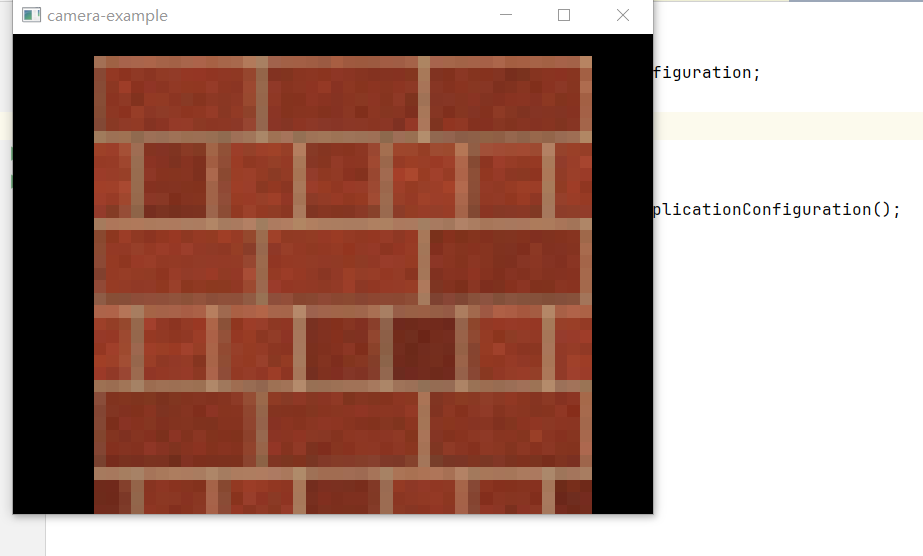
按上下左右是可以移动的
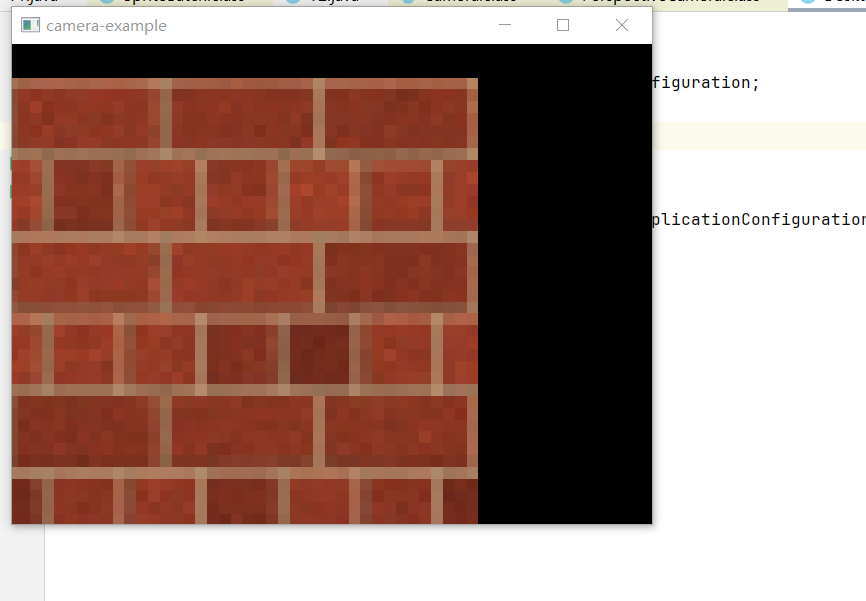
OrthographicCamera camera的使用:
完整代码:
package com.brentaureli.mariobros.cam;

import com.badlogic.gdx.ApplicationListener;

import com.badlogic.gdx.Gdx;

import com.badlogic.gdx.Input;

import com.badlogic.gdx.graphics.GL20;

import com.badlogic.gdx.graphics.OrthographicCamera;

import com.badlogic.gdx.graphics.Texture;

import com.badlogic.gdx.graphics.g2d.Sprite;

import com.badlogic.gdx.graphics.g2d.SpriteBatch;

import com.badlogic.gdx.math.MathUtils;

import static com.badlogic.gdx.Gdx.gl;

public class T1 implements ApplicationListener {

    private OrthographicCamera camera;

    private float VIEWPORT_WIDTH=100f;

    private float VIEWPORT_HEIGHT=100f;

    private SpriteBatch batch;

    private Sprite sprite;

    @Override

    public void create() {

        sprite=new Sprite(new Texture(Gdx.files.internal("block.png")));

        sprite.setSize(VIEWPORT_WIDTH,VIEWPORT_HEIGHT);

        sprite.setPosition(0, 0);

        float w = Gdx.graphics.getWidth();

        float h = Gdx.graphics.getHeight();

        camera=new OrthographicCamera(100,100*h/w);

        camera.position.set(15f,11.25f,0);

        camera.update();

        batch=new SpriteBatch();

    }

    @Override

    public void resize(int width, int height) {

        //调整窗口,相机位置不变

        camera.viewportWidth = 30f;

        camera.viewportHeight = 30f * height / width;

        camera.update();

    }

    @Override

    public void render() {

        handleInput();

        resetCamera();

        camera.update();

        batch.setProjectionMatrix(camera.combined);

        Gdx.gl.glClear(GL20.GL_COLOR_BUFFER_BIT);

        batch.begin();

        sprite.draw(batch);

        batch.end();

    }

    private void resetCamera() {

        if (Gdx.input.isKeyPressed(Input.Keys.R)) {

            camera.position.set(camera.viewportWidth / 2f, camera.viewportHeight / 2f, 0);

            camera.zoom = 1;

            camera.rotate(0, 0, 0, 1);

        }

    }

    private void handleInput() {

        //放大相机

        if (Gdx.input.isKeyPressed(Input.Keys.A)) {

            camera.zoom += 0.02;

        }

        //缩小相机

        if (Gdx.input.isKeyPressed(Input.Keys.Q)) {

            camera.zoom -= 0.02;

        }

        //左移相机

        if (Gdx.input.isKeyPressed(Input.Keys.LEFT)) {

            camera.translate(-3, 0, 0);

        }

        //右移相机

        if (Gdx.input.isKeyPressed(Input.Keys.RIGHT)) {

            camera.translate(3, 0, 0);

        }

        //下移相机

        if (Gdx.input.isKeyPressed(Input.Keys.DOWN)) {

            camera.translate(0, -3, 0);

        }

        //上移相机

        if (Gdx.input.isKeyPressed(Input.Keys.UP)) {

            camera.translate(0, 3, 0);

        }

    }

    @Override

    public void pause() {

    }

    @Override

    public void resume() {

    }

    @Override

    public void dispose() {

        sprite.getTexture().dispose();

        batch.dispose();

    }

}
主类完整代码:
package com.brentaureli.mariobros.desktop;

import com.badlogic.gdx.backends.lwjgl3.Lwjgl3Application;

import com.badlogic.gdx.backends.lwjgl3.Lwjgl3ApplicationConfiguration;

import com.brentaureli.mariobros.cam.T1;

public class DesktopLauncher {

	public static void main (String[] arg) {

		Lwjgl3ApplicationConfiguration config = new Lwjgl3ApplicationConfiguration();

		config.setForegroundFPS(60);

		config.setTitle("camera-example");

		new Lwjgl3Application(new T1(), config);

	}

}
先设置了一个背景
private Sprite sprite;

sprite=new Sprite(new Texture(Gdx.files.internal("block.png")));

sprite.setSize(VIEWPORT_WIDTH,VIEWPORT_HEIGHT);

sprite.setPosition(0, 0);
设置了背景的图片,背景的大小,背景位置。
接下来的代码:
 float w = Gdx.graphics.getWidth();

 float h = Gdx.graphics.getHeight();

 camera=new OrthographicCamera(100,100*h/w);

 camera.position.set(15f,11.25f,0);

 camera.update();

 batch=new SpriteBatch();
设置了camera的范围,camera的位置 camera.update();这个是每次更新camera的位置呀什么的都要进行一次更新。然后就是new了一个缓冲。
接下来的代码:
        //调整窗口,相机位置不变

        camera.viewportWidth = 30f;

        camera.viewportHeight = 30f * height / width;

        camera.update();
就是单纯的再调试了一下窗口。
接下来的代码:
private void handleInput() {

        //放大相机

        if (Gdx.input.isKeyPressed(Input.Keys.A)) {

            camera.zoom += 0.02;

        }

        //缩小相机

        if (Gdx.input.isKeyPressed(Input.Keys.Q)) {

            camera.zoom -= 0.02;

        }

        //左移相机

        if (Gdx.input.isKeyPressed(Input.Keys.LEFT)) {

            camera.translate(-3, 0, 0);

        }

        //右移相机

        if (Gdx.input.isKeyPressed(Input.Keys.RIGHT)) {

            camera.translate(3, 0, 0);

        }

        //下移相机

        if (Gdx.input.isKeyPressed(Input.Keys.DOWN)) {

            camera.translate(0, -3, 0);

        }

        //上移相机

        if (Gdx.input.isKeyPressed(Input.Keys.UP)) {

            camera.translate(0, 3, 0);

        }

    }
添加了一下键盘输入的按键,camera.zoom += 0.02;就是将摄像的范围扩大同理camera.zoom -= 0.02;就是减少,而 camera.translate就是移动位置。
接下来的代码:
 private void resetCamera() {

        if (Gdx.input.isKeyPressed(Input.Keys.R)) {

            camera.position.set(camera.viewportWidth / 2f, camera.viewportHeight / 2f, 0);

            camera.zoom = 1;

            camera.rotate(0, 0, 0, 1);

        }

    }
就是单纯的按r重置摄像头
然后就是:
        camera.update();

        batch.setProjectionMatrix(camera.combined);

        Gdx.gl.glClear(GL20.GL_COLOR_BUFFER_BIT);

        batch.begin();

        sprite.draw(batch);

        batch.end();
将摄像头进行更新,然后 batch.setProjectionMatrix(camera.combined);这个,这个可以说是固定搭配,就是配置一下摄像头。
        batch.begin();

        sprite.draw(batch);

        batch.end();
缓存区打开,然后画图,end方法结尾。这算是固定搭配。
3D摄像头PerspectiveCamera也叫做透视相机
完整代码:
package com.brentaureli.mariobros.cam;

import com.badlogic.gdx.ApplicationListener;

import com.badlogic.gdx.Gdx;

import com.badlogic.gdx.graphics.GL20;

import com.badlogic.gdx.graphics.PerspectiveCamera;

import com.badlogic.gdx.graphics.Texture;

import com.badlogic.gdx.graphics.VertexAttributes;

import com.badlogic.gdx.graphics.g3d.Material;

import com.badlogic.gdx.graphics.g3d.Model;

import com.badlogic.gdx.graphics.g3d.ModelBatch;

import com.badlogic.gdx.graphics.g3d.ModelInstance;

import com.badlogic.gdx.graphics.g3d.attributes.TextureAttribute;

import com.badlogic.gdx.graphics.g3d.utils.FirstPersonCameraController;

import com.badlogic.gdx.graphics.g3d.utils.ModelBuilder;

import static com.badlogic.gdx.Gdx.gl;

public class T2 implements ApplicationListener {

    private PerspectiveCamera camera;

    private FirstPersonCameraController cameraController;

    private ModelBatch batch;

    private ModelBuilder builder;

    private Texture texture;

    private Model model;

    private  ModelInstance instance;

    @Override

    public void create() {

        camera=new PerspectiveCamera(70, Gdx.graphics.getWidth(),Gdx.graphics.getHeight());

        camera.position.set(0,0,0);

        camera.near=0.1f;

        camera.far=1000f;

        camera.update();

        cameraController=new FirstPersonCameraController(camera);

        Gdx.input.setInputProcessor(cameraController);

        cameraController.update();

        batch=new ModelBatch();

        builder=new ModelBuilder();

        texture=new Texture(Gdx.files.internal("block.png"));

        Material material=new Material(new TextureAttribute(TextureAttribute.Diffuse,texture));

        int attributes= VertexAttributes.Usage.Position|VertexAttributes.Usage.TextureCoordinates;

        model= builder.createBox(3, 3, 3, material, attributes);

        instance= new ModelInstance(model);

        instance.transform.setToTranslation(0,0,-5);

    }

    @Override

    public void resize(int width, int height) {

        camera.viewportWidth=width;

        camera.viewportHeight=height;

        camera.update();

        cameraController.update();

    }

    @Override

    public void render() {

       gl.glClear(GL20.GL_COLOR_BUFFER_BIT|GL20.GL_DEPTH_BUFFER_BIT);

       camera.update();

       cameraController.update();

       batch.begin(camera);

       batch.render(instance);

       batch.end();

    }

    @Override

    public void pause() {

    }

    @Override

    public void resume() {

    }

    @Override

    public void dispose() {

    }

}
主类就换个类名就行了,接下来是结果展示图:
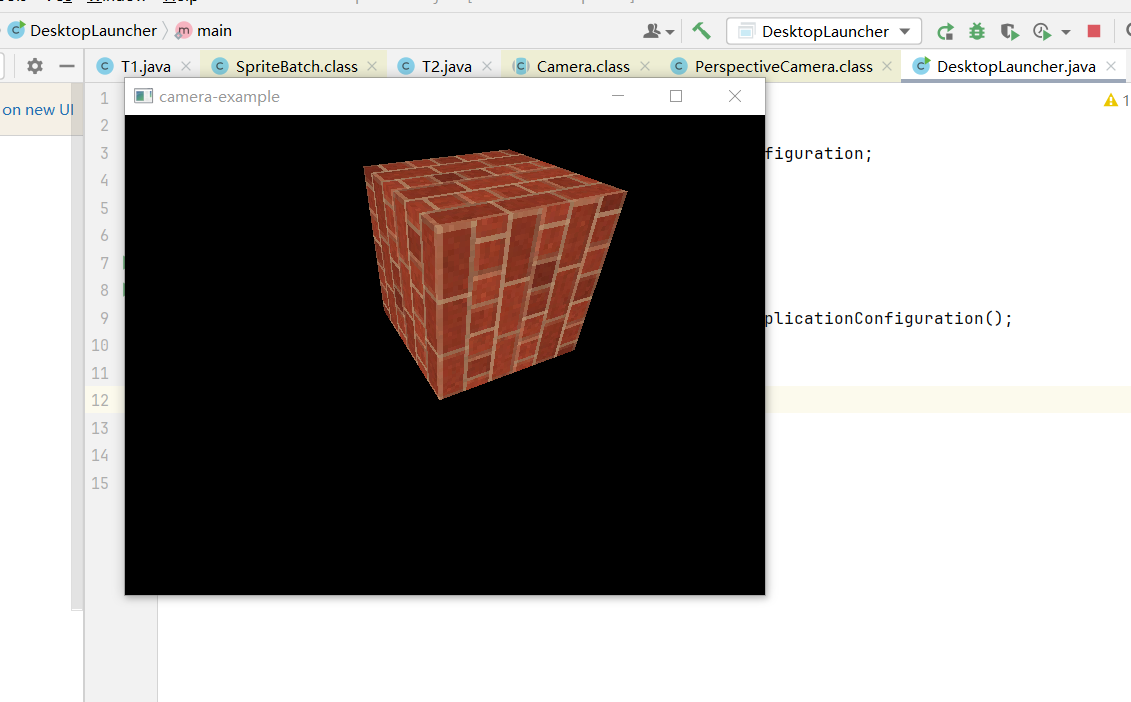
按wsad可以上下左右移动。
由于篇幅可能过长,下一章也许会讲。
libgdx摄像头的移动的更多相关文章
- 在DevExpress中使用CameraControl控件进行摄像头图像采集
在我们以前的项目了,做摄像头的图片采集,我们一般还是需要做一个封装处理的,在较新版本的DevExpress控件里面,增加了一个CameraControl控件,可以直接调用摄像头显示的,因此也可以做头像 ...
- ubuntu-Linux系统读取USB摄像头数据(gspca)
将摄像头图像保存为jpg格式.摄像头需要是gspca免驱的.uvc若用uvc格式的需要在图像中插入Huffman表.否则无法正常显示. 程序代码: #include <stdio.h> # ...
- ubuntu-Linux系统读取USB摄像头数据(uvc)
这几天在做小车的过程中,需要用到图像采集.我想现在用的摄像头是UVC免驱的.根据国嵌的教程中有一个gspca摄像头的程序.我发现把gspca的采集程序用到uvc上时,在显示图像的时候提示没有huffm ...
- C# 使用AForge调用笔记本摄像头拍照
vs2012 winform 连接摄像头设备,这里需要引入 代码: using AForge; using AForge.Controls; using AForge.Imaging; using ...
- Opencv摄像头实时人脸识别
Introduction 网上存在很多人脸识别的文章,这篇文章是我的一个作业,重在通过摄像头实时采集人脸信息,进行人脸检测和人脸识别,并将识别结果显示在左上角. 利用 OpenCV 实现一个实时的人脸 ...
- Opencv VideoCapture实时捕捉摄像头信息
#include "opencv2/highgui/highgui.hpp" #include <iostream> using namespace cv; using ...
- Unity打开摄像头占满全屏
Unity打开摄像头占满全屏 AR项目需求,Unity打开摄像头作为背景渲染占满全屏~ Unity对设备硬件操作的API并不是太友好~打开一个摄像头,渲染到屏幕上也都得自己写,虽然步骤少,提取摄像头t ...
- Vuforia unity开发摄像头问题
Vuforia unity开发摄像头问题 项目一直在赶进度,写博的时间越来越少了~从事Unity开发也快两个月了,AR方向~ 使用的是高通家的SDK Vuforia...从工程融合一直到对unity和 ...
- HTML5网页打开摄像头,并拍照
谷歌提高了安全要求,要摄像头必须用https 效果图:
- 摄像头拍照,PHP输入流php://input的使用分析
在做一个摄像头拍照然后上传的功能,php中使用php://input来获取内容.于是就了解了下php://input. 从官网信息来看,php://input是一个只读信息流,当请求方式是post的, ...
随机推荐
- C#结合OpenCVSharp4图片相似度识别
OpenCVSharp4图片相似度识别 需求背景:需要计算两个图片的相似度,然后将相似的图片进行归纳 1. 图片相似度算法 由于我是CRUD后端仔,对图像处理没什么概念.因此网上调研了几种相似度算法分 ...
- redisson分布式锁的应用——秒杀、超卖 简单例子(分布式锁相关)
1.常见的分布式事务锁 1.数据库级别的锁 乐观锁,给予加入版本号实现 悲观锁,基于数据库的for update实现 2.Redis,基于SETNX.EXPIRE实现 3.Zookeeper,基于In ...
- 【matplotlib基础】--样式表
Matplotlib库 由于诞生的比较早,所以其默认的显示样式很难符合现在的审美,这也是它经常为人诟病的地方. 不过,经过版本更迭之后,现在 Matplotlib 已经内置了很多样式表,通过使用不同的 ...
- docker入门加实战——docker安装并配置阿里云加速
docker入门加实战--docker安装并配置阿里云加速 为什么要学习docker 在开发和部署项目的过程中,经常会遇到如下问题: 软件安装包名字复杂,不知道去哪里找 安装软件和部署项目步骤复杂,容 ...
- CF1746F Kazaee
prologue 数组范围一定要看好了开,不然容易我一样,调试调了一页多. 还有就是不要傻乎乎地只跑一次和哈希,因为和哈希(从下面地佬的题解中才知道)它其实算作是一种 trick(类比SA(Stimu ...
- Java核心知识体系5:反射机制详解
Java核心知识体系1:泛型机制详解 Java核心知识体系2:注解机制详解 Java核心知识体系3:异常机制详解 Java核心知识体系4:AOP原理和切面应用 1 介绍 无论是那种语言体系,反射都是必 ...
- splay + 垃圾回收 知识点与例题的简要讲解
splay 简要讲解 前置芝士:普通二叉树 splay tree是一个越处理越灵活的数据结构,通过splay(伸展)操作,使整棵树的单次查询时间复杂度接近于O(log n),整棵树的高度也接近于log ...
- .Net Core 3.1 服务端配置跨域
一.在Startup.cs 的 ConfigureServices 配置好跨域策略 原文链接:https://www.jianshu.com/p/534b9a6a6ed5 public void Co ...
- 快速教程|如何在 AWS EC2上使用 Walrus 部署 GitLab
Walrus 是一款基于平台工程理念的开源应用管理平台,致力于解决应用交付领域的深切痛点.借助 Walrus 将云原生的能力和最佳实践扩展到非容器化环境,并支持任意应用形态统一编排部署,降低使用基础设 ...
- 使用Jenkins构建镜像:将应用打包成镜像
学习某册子的CICD,记录使用Jenkins构建镜像的过程. 使用Jenkins集成Git来构建Docker镜像,为后面的部署准备镜像资源. 1. 安装Nodejs环境 如果想要安装Node环境,有以 ...