
.NET Core使用微软官方类库实现汉字转拼音
一、NuGet包
拼音:Install-Package PinYinConverterCore
简体-繁体互转:Install-Package TraditionalChineseToSimplifiedConverter
二、C#代码
    class Program

    {

        static void Main(string[] args)

        {

            string Name= "刘大大";

            Console.WriteLine($"{Name}\n全拼:{GetPinyin(Name)},\n首拼:{GetFirstPinyin(Name)},\n繁体字:{GetTraditional(Name)},\n简体字:{GetSimplified(GetTraditional(Name))}");

            Console.ReadKey();

        }

        /// <summary>

        /// 汉字转化为拼音

        /// </summary>

        /// <param name="str">汉字</param>

        /// <returns>全拼</returns>

        public static string GetPinyin(string str)

        {

            string r = string.Empty;

            foreach (char obj in str)

            {

                try

                {

                    ChineseChar chineseChar = new ChineseChar(obj);

                    string t = chineseChar.Pinyins[].ToString();

                    r += t.Substring(, t.Length - );

                }

                catch

                {

                    r += obj.ToString();

                }

            }

            return r;

        }

        /// <summary>

        /// 汉字转化为拼音首字母

        /// </summary>

        /// <param name="str">汉字</param>

        /// <returns>首字母</returns>

        public static string GetFirstPinyin(string str)

        {

            string r = string.Empty;

            foreach (char obj in str)

            {

                try

                {

                    ChineseChar chineseChar = new ChineseChar(obj);

                    string t = chineseChar.Pinyins[].ToString();

                    r += t.Substring(, );

                }

                catch

                {

                    r += obj.ToString();

                }

            }

            return r;

        }

        // <summary>

        /// 简体转换为繁体

        /// </summary>

        /// <param name="str">简体字</param>

        /// <returns>繁体字</returns>

        public static string GetTraditional(string str)

        {

            string r = string.Empty;

            r = ChineseConverter.Convert(str, ChineseConversionDirection.SimplifiedToTraditional);

            return r;

        }

        /// <summary>

        /// 繁体转换为简体

        /// </summary>

        /// <param name="str">繁体字</param>

        /// <returns>简体字</returns>

        public static string GetSimplified(string str)

        {

            string r = string.Empty;

            r = ChineseConverter.Convert(str, ChineseConversionDirection.TraditionalToSimplified);

            return r;

        }

        #endregion

    }

}
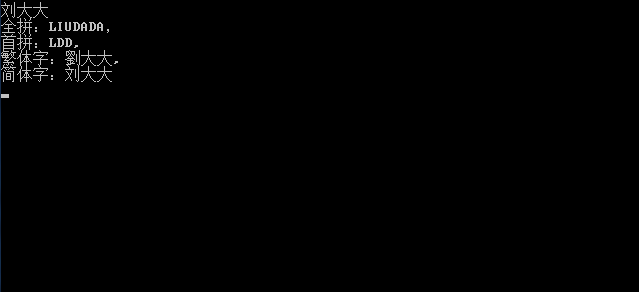
运行结果
.NET Core使用微软官方类库实现汉字转拼音的更多相关文章
- [转]使用微软的官方类库CHSPinYinConv获得汉字拼音
原文链接:http://outofmemory.cn/code-snippet/4392/ms-CHSPinYinConv-convert-hanzi-to-pinyin 微软为中文,日文以及韩文提供 ...
- 微软官方实例 RazorPagesMovie 在 asp.net core 2.1 版本下的实战
微软官方实例 RazorPagesMovie 在 asp.net core 2.1 版本下的实战 友情提示: 操作系统: MacOS 10.13.5 dotnet core: version 2.1. ...
- 微软官方NET Core 2.0
NET Core 2.0 微软官方发布的.NET Core 2.0相关的博客: Announcing .NET Standard 2.0 Announcing .NET Core 2.0 F# and ...
- 一大波开发者福利来了,一份微软官方Github上发布的开源项目清单等你签收
目录 微软Github开源项目入口 微软开源项目受欢迎程度排名 Visual Studio Code TypeScript RxJS .NET Core 基础类库 CNTK Microsoft cal ...
- Win10微软官方最终正式版ISO镜像文件
Win10微软官方最终正式版ISO镜像文件 据说Windows 10是微软发布的最后一个Windows版本,下一代Windows将作为Update形式出现.Windows 10将发布7个发行版本,分别 ...
- 微软官方SqlHelper类 数据库辅助操作类
数据库操作类真的没有必要自己去写,因为成熟的类库真的非常完善了,拿来直接用就好,省时省力. 本文就为大家介绍微软官方的程序PetShop4.0中的SqlHelper类,先来做一下简单的介绍,PetSh ...
- 温故知新,微软官方推荐的Visual Studio源代码管理之Git Ignore清单,开启新项目必备宝书
什么是Git Ignore清单 https://git-scm.com/docs/gitignore 简单来说,在Git进行源代码管理中,我们可以通过建立.gitignore来实现一个忽略的黑名单管理 ...
- Windows7微软官方原版镜像系统文件
Windows7微软官方原版镜像系统 Windows 7 是由微软公司(Microsoft)开发的操作系统,核心版本号为Windows NT 6.1.Windows 7可供家庭及 商业工作环境.笔记本 ...
- Windows7下的免费虚拟机(微软官方虚拟机)
前言: 不是说windows7自带的虚拟机最好用,而是他是正式版的,免费的,只要你是windows7用户,就可以免费使用: 其实我最推荐的还是Vmware: 微软为什么提供免费的虚拟机呢? 因为vis ...
随机推荐
- 新手自定义view练习实例之(一) 泡泡弹窗
转载请注明出处:http://blog.csdn.net/wingichoy/article/details/50455412 本系列是为新手准备的自定义view练习项目(大牛请无视),相信在学习过程 ...
- centos6.2安装桌面环境 与中文支持
yum groupinstall "X Window System" //安装Xorgyum groupinstall "Desktop" //安装GNOMEy ...
- java工具类(六)根据经纬度计算距离
Java实现根据经纬度计算距离 在项目开发过程中,需要根据两地经纬度坐标计算两地间距离,所用的工具类如下: Demo1: public static double getDistatce(double ...
- Linux常用命令(第二版) --网络通信命令
网络通信命令 1.write /usr/bin/write 格式: write [用户名] #用于向用户发送信息,前提是这个用户已经登录到了这台服务器主机,不然的话,也没有办法给他留言,所以,writ ...
- 文件lseek操作产生空洞文件的方法
在文件操作过程中,lseek操作可以偏移到文件的任意位置. 在UNIX文件操作中,文件位移量可以大于文件的当前长度,在这种情况下,对该文件的下一次写将延长该文件,并在文件中构成一个空洞,这一点是允许的 ...
- ibatis中多表联接查询
目前,我在做项目的时候,用到了spring + struts2 +ibatis 框架.平时用到的都是一张简单的表,来进行数据的增.删.改.查.而现在突然需要用到其它的一张表,或多张表进行联接查询 ...
- TCP的核心系列 — SACK和DSACK的实现(七)
我们发送重传包时,重传包也可能丢失,如果没有检查重传包是否丢失的机制,那么只能依靠超时来恢复了. 37版本把检查重传包是否丢失的部分独立出来,这就是tcp_mark_lost_retrans(). 在 ...
- 软件工程师 Book
一.软件工程师 --Clean Code<代码整洁之道> --Implementation Patterns<实现模式> --Code Complete<代码大全& ...
- C++实现双链表
#include <iostream> using namespace std ; #define NR(x) (sizeof(x)/sizeof(x[0])) class node { ...
- 关于linux内核驱动开发中Makefile编译的问题
obj-y:打个比方,我要编译的是hello.c这个文件,obj-y就会把hello.c或者hello.c编译生成的hello.s文件链接到内核中去. obj-m:打个比方,我要编译的是hello.c ...