
关于在windows10中的vmware9.0里面安装的ubuntukylin15.04和windows共享目录的一些反思
关于在windows10中的vmware9.0里面安装的ubuntukylin15.04和windows共享目录的一些反思
一、遇到的问题
如题目所说,在windows的虚拟机中和windows共享目录,其中虚拟机中安装的系统是ubuntukylin15.04,可以在网上找到如下做法,
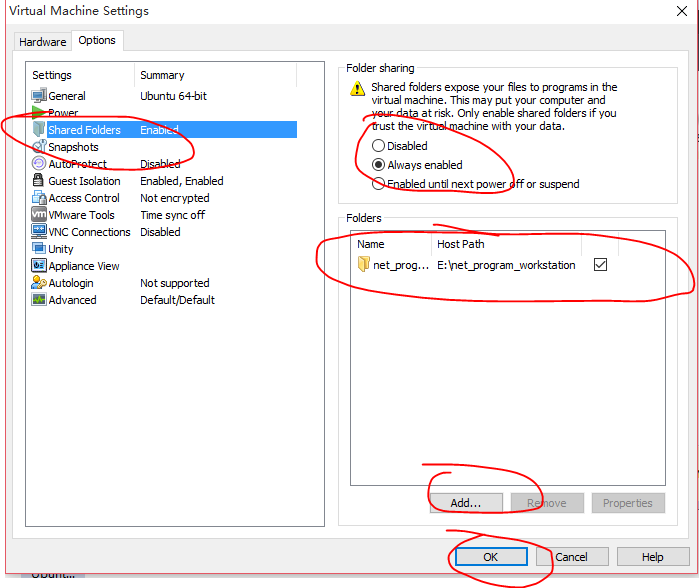
1.1、首先是在vmware中设置共享虚拟目录,这一点非常简单,只需要在vmware中设置就可以了,把权限设置为共享可读写。
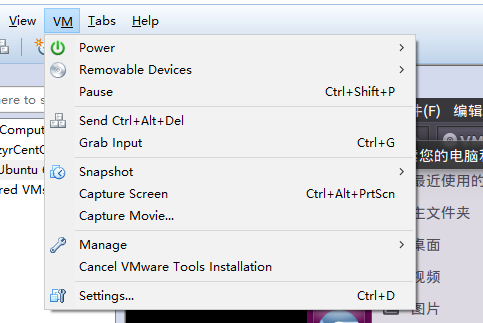
1.2、之后打开linux系统,并且在vmware中的vm菜单项中有一个install vmware tools或者是reinstall vmware tools,如果是后者说明我们已经安装了,或者安装的不成功也会出现,不管怎么样我们在linux打开的情况下,使用该操作,系统会提示我们是否同意通过光驱的方式让vmware tools的安装包嵌入进我们的linux文件系统中,我们点击同意,之后我们可以在文件系统中找到vmware tools这个目录项,之后,我们打开该目录项,可以看到有两个文件,一个是manifest.txt,另一个就是我们的vmwaretool的安装包。

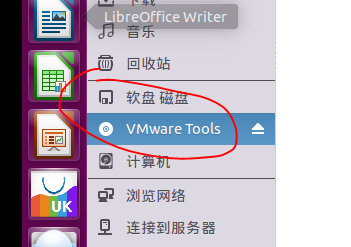
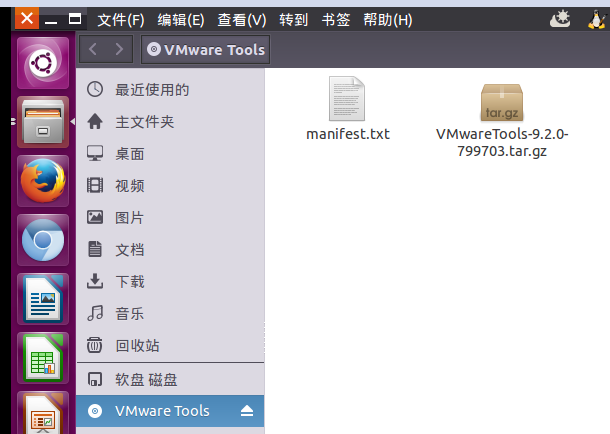
在这里我们要非常注意,我们这种方式使用的是虚拟光驱来查看的文件,我们不能再光驱上对文件进行修改或者解压,这一点非常重要,那怎么办呢,我们要解压并安装该文件,那就只能使用命令将这个文件拷到我们自己的文件系统中,这样就可以解压缩了,或者直接解压缩到文件系统的某一目录中,使用的命令为:tar -zxf VMwareTools-9.2.0-799703.tar.gz -C /media/VMware,这样我们就可以在/media/VMware中得到想要的解压文件了,这个VMware文件夹也是我们自己创建的,很简单。可以看到解压后的文件夹,然我们打开看一下。其中的一个目录下的vmhgfs.tar我们以后会非常的感兴趣!
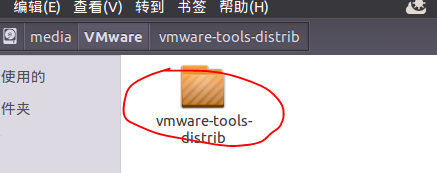
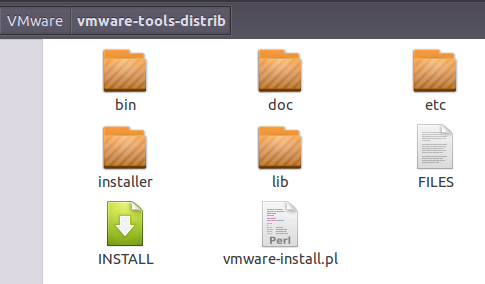
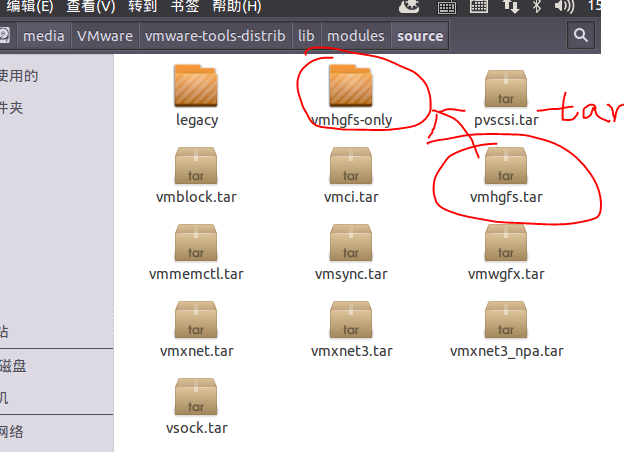
1.3,然后我们安装这个软件,只需运行vmware-install.pl即可。
 root@zyr-virtual-machine:/media/VMware# cd ./vmware-tools-distrib/

 root@zyr-virtual-machine:/media/VMware/vmware-tools-distrib# dir

 bin  doc  etc  FILES  INSTALL  installer  lib  vmware-install.pl

 root@zyr-virtual-machine:/media/VMware/vmware-tools-distrib# ./vmware-install.pl
下面是安装过程:
 root@zyr-virtual-machine:/media/VMware/vmware-tools-distrib# ./vmware-install.pl

 The installer found the following conflicting packages installed on the system and will now remove them:

 open-vm-tools

 (正在读取数据库 ... 系统当前共安装有 159148 个文件和目录。)

 正在卸载 open-vm-tools (2:9.4.6-1770165-8ubuntu1) ...

 正在处理用于 man-db (2.7.0.2-5) 的触发器 ...

 正在处理用于 libc-bin (2.21-0ubuntu4) 的触发器 ...

 Creating a new VMware Tools installer database using the tar4 format.

 Installing VMware Tools.

 The file /etc/vmware-tools/suspend-vm-default that this program was about to

 install already exists. Overwrite? [yes] y

 The file /etc/vmware-tools/poweroff-vm-default that this program was about to

 install already exists. Overwrite? [yes] yes

 The file /etc/vmware-tools/scripts/vmware/network that this program was about

 to install already exists. Overwrite? [yes] yes

 The file /etc/vmware-tools/poweron-vm-default that this program was about to

 install already exists. Overwrite? [yes]

 The file /etc/vmware-tools/statechange.subr that this program was about to

 install already exists. Overwrite? [yes]

 The file /etc/vmware-tools/resume-vm-default that this program was about to

 install already exists. Overwrite? [yes]

 In which directory do you want to install the binary files?

 [/usr/bin]

 What is the directory that contains the init directories (rc0.d/ to rc6.d/)?

 [/etc]

 What is the directory that contains the init scripts?

 [/etc/init.d]

 In which directory do you want to install the daemon files?

 [/usr/sbin]

 In which directory do you want to install the library files?

 [/usr/lib/vmware-tools]

 The path "/usr/lib/vmware-tools" does not exist currently. This program is

 going to create it, including needed parent directories. Is this what you want?

 [yes]

 yes

 In which directory do you want to install the documentation files?

 [/usr/share/doc/vmware-tools]

 The path "/usr/share/doc/vmware-tools" does not exist currently. This program

 is going to create it, including needed parent directories. Is this what you

 want? [yes]

 The installation of VMware Tools 9.2.0 build-799703 for Linux completed

 successfully. You can decide to remove this software from your system at any

 time by invoking the following command: "/usr/bin/vmware-uninstall-tools.pl".

 Before running VMware Tools for the first time, you need to configure it by

 invoking the following command: "/usr/bin/vmware-config-tools.pl". Do you want

 this program to invoke the command for you now? [yes]

 The file /etc/pam.d/vmtoolsd that this program was about to install already

 exists.  Overwrite? [yes]

 Initializing...

 Making sure services for VMware Tools are stopped.

 Stopping VMware Tools services in the virtual machine:

    Guest operating system daemon:                                      done

    Unmounting HGFS shares:                                             done

    Guest filesystem driver:                                            done

 Stopping Thinprint services in the virtual machine:

    Stopping Virtual Printing daemon:                                   done

 update-rc.d: warning: start and stop actions are no longer supported; falling back to defaults

 update-rc.d: warning: start and stop actions are no longer supported; falling back to defaults

 The VMware FileSystem Sync Driver (vmsync) allows external third-party backup

 software that is integrated with vSphere to create backups of the virtual

 machine. Do you wish to enable this feature? [no]

 The module vmci has already been installed on this system by another installer

 or package and will not be modified by this installer.  Use the flag

 --clobber-kernel-modules=vmci to override.

 The module vsock has already been installed on this system by another installer

 or package and will not be modified by this installer.  Use the flag

 --clobber-kernel-modules=vsock to override.

 The module vmxnet3 has already been installed on this system by another

 installer or package and will not be modified by this installer.  Use the flag

 --clobber-kernel-modules=vmxnet3 to override.

 The module pvscsi has already been installed on this system by another

 installer or package and will not be modified by this installer.  Use the flag

 --clobber-kernel-modules=pvscsi to override.

 The module vmmemctl has already been installed on this system by another

 installer or package and will not be modified by this installer.  Use the flag

 --clobber-kernel-modules=vmmemctl to override.

 The VMware Host-Guest Filesystem allows for shared folders between the host OS

 and the guest OS in a Fusion or Workstation virtual environment.  Do you wish

 to enable this feature? [yes]

 The module vmhgfs has already been installed on this system by another

 installer or package and will not be modified by this installer.  Use the flag

 --clobber-kernel-modules=vmhgfs to override.

 The module vmxnet has already been installed on this system by another

 installer or package and will not be modified by this installer.  Use the flag

 --clobber-kernel-modules=vmxnet to override.

 The vmblock enables dragging or copying files between host and guest in a

 Fusion or Workstation virtual environment.  Do you wish to enable this feature?

 [yes]

 !!! [EXPERIMENTAL] !!!

 VMware automatic kernel modules enables automatic building and installation of

 VMware kernel modules at boot that are not already present.  By selecting yes,

 you will be enabling this experimental feature.  You can always disable this

 feature by re-running vmware-config-tools.pl.

 Would you like to enable VMware automatic kernel modules?

 [no]

 Thinprint provides driver-free printing. Do you wish to enable this feature?

 [yes]

 Disabling timer-based audio scheduling in pulseaudio.

 Detected X server version 1.17.1

 Distribution provided drivers for Xorg X server are used.

 Skipping X configuration because X drivers are not included.

 Creating a new initrd boot image for the kernel.

 update-initramfs: Generating /boot/initrd.img-3.19.0-15-generic

    Checking acpi hot plug                                              done

 Starting VMware Tools services in the virtual machine:

    Switching to guest configuration:                                   done

    Blocking file system:                                               done

    Guest operating system daemon:                                      done

    Starting Virtual Printing daemon:                                   done

 The configuration of VMware Tools 9.2.0 build-799703 for Linux for this running

 kernel completed successfully.

 You must restart your X session before any mouse or graphics changes take

 effect.

 You can now run VMware Tools by invoking "/usr/bin/vmware-toolbox-cmd" from the

 command line.

 To enable advanced X features (e.g., guest resolution fit, drag and drop, and

 file and text copy/paste), you will need to do one (or more) of the following:

 1. Manually start /usr/bin/vmware-user

 2. Log out and log back into your desktop session; and,

 3. Restart your X session.

 Enjoy,

 --the VMware team

 Found VMware Tools CDROM mounted at /media/zyr/VMware Tools. Ejecting device

 /dev/sr0 ...

 umount: /media/zyr/VMware Tools: target is busy

 (In some cases useful info about processes that

 use the device is found by lsof(8) or fuser(1).)

 /usr/bin/eject:卸载 `/media/zyr/VMware Tools'失败

 Eject Failed:  If possible manually eject the Tools installer from the guest

 cdrom mounted at /media/zyr/VMware Tools before canceling tools install on the

 host.
vmwaretools安装过程
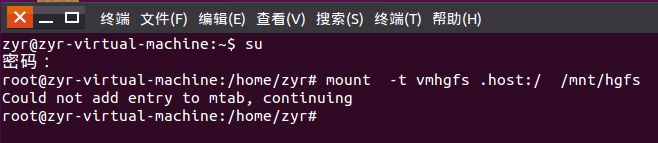
1.4、安装完成之后,我们按理说就可以用了,但是比我们想象的复杂,首先我们需要使用mount将我们的Windows上面的共享文件夹目录挂载到Linux中的某一个文件夹下面,这样我们才能找到并使用,使用命令 mount -t vmhgfs .host:/ /mnt/hgfs,可是是是往往不如人意,想必大家还知道我刚才说的vmhgfs.tar,在这里我们运行这条命令,结果为Error: cannot canonicalize mount point: No such file or directory。这是因为我们还没创建hgfs,我们创建mkdir /mnt/hgfs,然后再运行 mount -t vmhgfs .host:/ /mnt/hgfs命令,结果为Error: cannot mount filesystem: No such device,这一下可怎么办,刚刚的是小问题,可是现在的却是大问题呀,没有vmhgfs这样的文件系统,很多人都放弃了试了好多次,网上有人说使用mount -t vmhgfs-fuse .host:/ /mnt/hgfs,或者先安装sudo apt-get install open-vm-dkms,然后再使用上一条命令,可是我的网上库里面根本没有open-vm-dkms文件,有一个open-vm-tools-dkms文件,我使用之后提示下面信息,说明已经存在了并且安装了,所以这些措施根本就没有用,我又在网上看到了什么版本冲突了,什么漏洞了,需要打补丁之类的,搞得我很郁闷,难不成还要重装系统不成?!后来我又尝试了很久还是不行,基本上也没办法了,就把虚拟机关闭又重启了一次,然后打开,还是什么都没有,我又尝试着使用了一遍mount -t vmhgfs .host:/ /mnt/hgfs命令,看到出错的信息变了,变成了下面的提示Could not add entry to mtab, continuing,然后我又查了一些资料,还是无解,并且运行了vmware-hgfsclient,也能正常显示我的共享目录,如下图所示。不甘心之下我在被mount的目录看了一下,没想到竟然成功了,我看到了共享的文件。
root@zyr-virtual-machine:/# sudo apt-get install open-vm-tools-dkms

正在读取软件包列表... 完成

正在分析软件包的依赖关系树

正在读取状态信息... 完成

open-vm-tools-dkms 已经是最新的版本。

下列软件包是自动安装的并且现在不需要了:

  libdumbnet1 zerofree

使用'apt-get autoremove'来卸载它(它们)。

升级了 0 个软件包,新安装了 0 个软件包,要卸载 0 个软件包,有 343 个软件包未被升级。

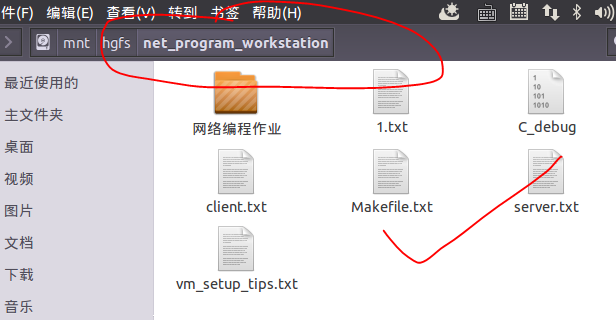
到了这里我都要感激涕零了,总算功夫不负有心人,搞了一下午的时间,还是让我误打误撞的解决了问题,实在是这个功能对我太重要了呀,我的作业要在上面完成,并且取出来呢,哈哈~~~心情大好之下,我知道这种机制是不长久的,因为每次开虚拟机的时候都要使用一下mount命令,最好的办法是在系统的启动文件中加入这一语句,这样我们就可以高枕无忧了!!!!!!使用sudo gedit /etc/init.d/rc.local,在其中加入,保存并退出。
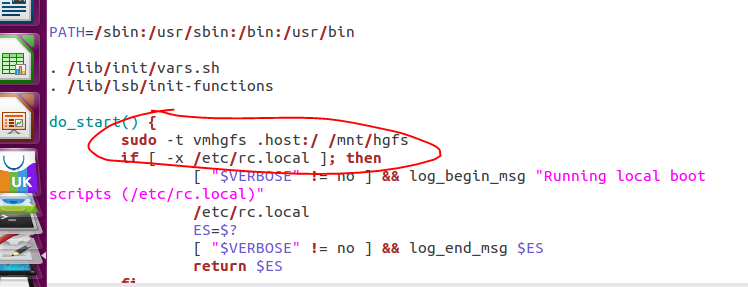
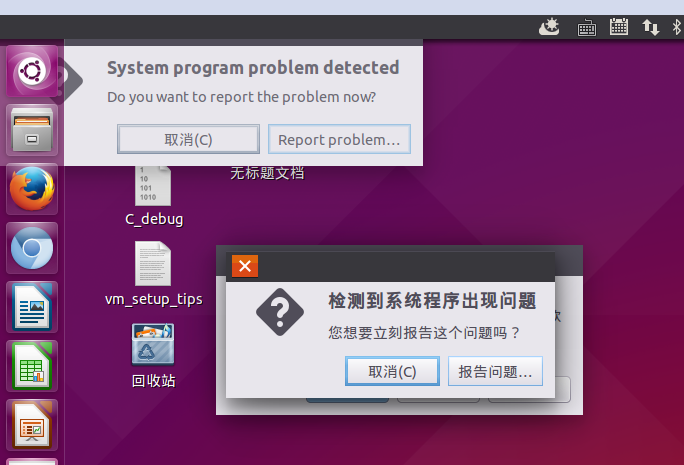
可是在我的电脑上这样做了之后,系统也出现了异常,打开之后发现并没有什么改变,还是没有加载进文件系统中,所以我又使用了在/etc/init.d/open-vm-tools末尾增加一行: sudo mount -t vmhgfs .host:/ /mnt/hgfs ,保存并重启系统还是不行,所以最好不要这样做。最好的办法就是在关闭虚拟机上面的该Linux系统的时候,将关闭命令使用suspend,这样虚拟机自动保存上次状态,即使关闭虚拟机状态也不会变,这样我们就不需要重复设置了!
二、总结
其实对于这种问题,我想两个操作系统应该将操作简化才对,不过考虑到两者的商业因素等原因,我们也只能多花一点时间去解决这些不兼容的问题了~~~
关于在windows10中的vmware9.0里面安装的ubuntukylin15.04和windows共享目录的一些反思的更多相关文章
- MySQL 8.0.20 安装教程图文详解(windows 64位)
MySQL 8.0.20 安装教程图文详解(windows 64位) 更新时间:2020年05月09日 15:09:04 转载 作者:瘦肉粥不加糖 这篇文章主要介绍了MySQL 8.0. ...
- Windows10中的IIS10.0安装php manager和IIS URL 重写2.0组件的方法
Windows10中自带的Server:Microsoft-IIS/10.0,然后这个10却让原本支持组件无法安装了,php manager组件安装时提示“必须安装IIS7以上才可以安装”.那是不是真 ...
- Windows10下mysql 8.0.19 安装配置方法图文教程
第一步 下载安装包: 官网 毕竟是甲骨文公司的产品,去官网下真的慢! 这里有两个供选择的,我建议选第一个(因为我先下了第二个,结果失败了,不知道为什么总是出错.) 下载完自行选择路径解压就可以了. 第 ...
- VirtualBox中的Linux读取Windows共享目录
1.安装VirtualBox的增强功能.菜单 -> 设备 -> 安装增强功能此时在Linux中会载入安装包,用管理员权限运行安装即可. 2.在VirtualBox设置共享目录.设置 -&g ...
- Ubuntu中Qt5.7.0的安装及opencv2.4.13配置
去官网下载qt-opensource-linux-x64-5.7.0.run,到"下载"目录 Ctrl+Alt+T打开终端 cd /home/jv/下载sudo mv qt-ope ...
- [转]Windows10中Virtualbox没办法选择和安装64位的Linux系统
本文转自:https://blog.csdn.net/strivenoend/article/details/78290325 明明在公司的WIN7系统中使用Virtualbox就可以安装64位的Ub ...
- Linux 中 java 访问 windows共享目录
有两个方案: 1.将windows共享目录,挂载到linux系统下,通过使用本地目录访问windows共享目录 2.通过samba的java实现包,不过需要开个windows共享目录的账户 http ...
- VMware10中的CentOS6.5命令行安装VMwaretools工具启用windows与虚拟机中Linux系统的共享目录
VMware10中的CentOS6.5命令行安装VMwaretools工具启用windows与虚拟机中Linux系统的共享目录 一.描述 系统描述:win7旗舰版64位系统+VMware Workst ...
- Windows10中的IIS10安装php manager和IIS URL Rewrite 2.0组件的方法
Windows10中自带的Server:Microsoft-IIS/10.0,然后这个10却让原本支持组件无法安装了,php manager组件安装时提示“必须安装IIS7以上才可以安装”.那是不是真 ...
随机推荐
- jdk源码->集合->HashSet
类的属性 public class HashSet<E> extends AbstractSet<E> implements Set<E>, Cloneable, ...
- eclipse中注释的代码依然会执行的解决方法
问题: eclipse中注释的代码在debug的时候居然还能执行.那一刻内心是崩溃的.. 解决方案: 项目重编译显示都正常,并没有报错,然后发现项目编译后,WEB-INF/lib/classes中的c ...
- Spark 读写hive 表
spark 读写hive表主要是通过sparkssSession 读表的时候,很简单,直接像写sql一样sparkSession.sql("select * from xx") 就 ...
- Ajax 基础笔记
Ajax内容: 同步交互与异步交互 同步交互:客户端向服务器端发送请求,服务器端向客户端进行响应,这个过程中客户端不能做其他事情 异步交互:客户端向服务器端发送请求,服务器端向客户端进行响应,这个过程 ...
- NetworkManager 冲突
今天看centos7的视频的时候发现视频里总是配置ip失败,明明什么都对的,没有错误 至少在逻辑上是没有的 情况发生 1.centos7会自动启动这个服务,NetworkManager服务,重启后ip ...
- 关于MyEclipse启动报错:Error starting static Resources;下面伴随Failed to start component [StandardServer[8005]]; A child container failed during start.的错误提示解决办法.
最后才发现原因是Tomcat的server.xml配置文件有问题:apache-tomcat-7.0.67\conf的service.xml下边多了类似与 <Host appBase=" ...
- Tomcat修改端口号(7.0 version)
目的:有时端口号可能其他服务占用,就需要修改一下Tomcat的端口号,避免冲突. 自我总结,有什么需要改正的地方,请大家补充,感激不尽! 找到Tomcat的的配置文件server.xml 路径:%to ...
- 深入理解JAVA虚拟机之JVM性能篇---基础知识点(运行时数据区域)
一. 运行数据区域划分 各个数据区域功能如下: 1. 程序计数器: 较小的一块内存空间,可以看做是当前线程所执行的字节码的行号指示器,每条线程都有一个独立的程序计数器,各条线程之间计数器互不影响,独立 ...
- 豆瓣爬虫小记(lowB版)
爬虫小记 学习玩python正则之后,想利用正则知识学学网络爬虫. 需求分析 按照自己平时浏览的网页,留意下哪个网页的信息对自己有价值,分析要爬取哪些网页信息.这里我先爬取简单的静态网页,豆瓣网经典电 ...
- CentOS安装scp命令
scp这东西应该属于openssh-clients这个包,运行: yum -y install openssh-clients 再运行scp就可以了,再次运行: .txt 注意,scp 命令操作的两端 ...