
💈 线程间互访助手类 (EN)
Conmajia © 2012, 2018
Published on August 5th, 2012
Updated on February 2nd, 2019
Introduction
While working on background threads, you may encounter updating values of frontend GUI controls. Then you probably will face one particular problem: invalid operation between threads. As shown in figure 1, this issue throws an InvalidOperationException. It occurs every time when accesses properties/methods from other threads but the one which owns them.
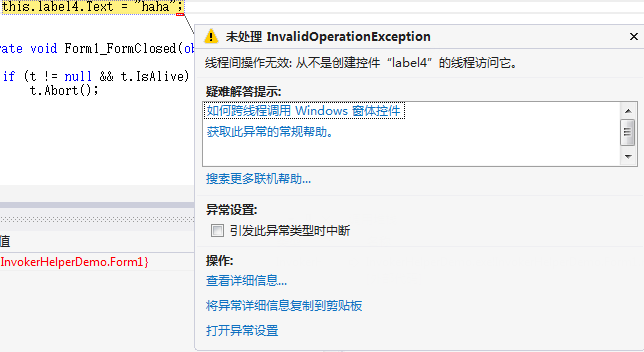
In .NET Framework, version 2.0 as I refer, every Control class contains an InvokeRequired property and an Invoke method to accomplish cross-thread operations. Some typical call code is listed below.
public void DoWork() {

    if (control.InvokeRequired) {

        control.Invoke(DoWork);

    }

    else {

        // do work

    }

}
My Approach
I wrote a helper class InvokeHelper which granted me the power to access assets between different threads. The class has 3 methods:
Invoke()- to call methods of a control.
InvokeHelper.Invoke(<control>, "<method>"[, <param1>[,<param2>,...]]);
Get()- to get properties of a control.
InvokeHelper.Get(<control>, "<property>");
Set()- to set properties of a control.
InvokeHelper.Set(<control>, "<property>", <value>);
Demonstration
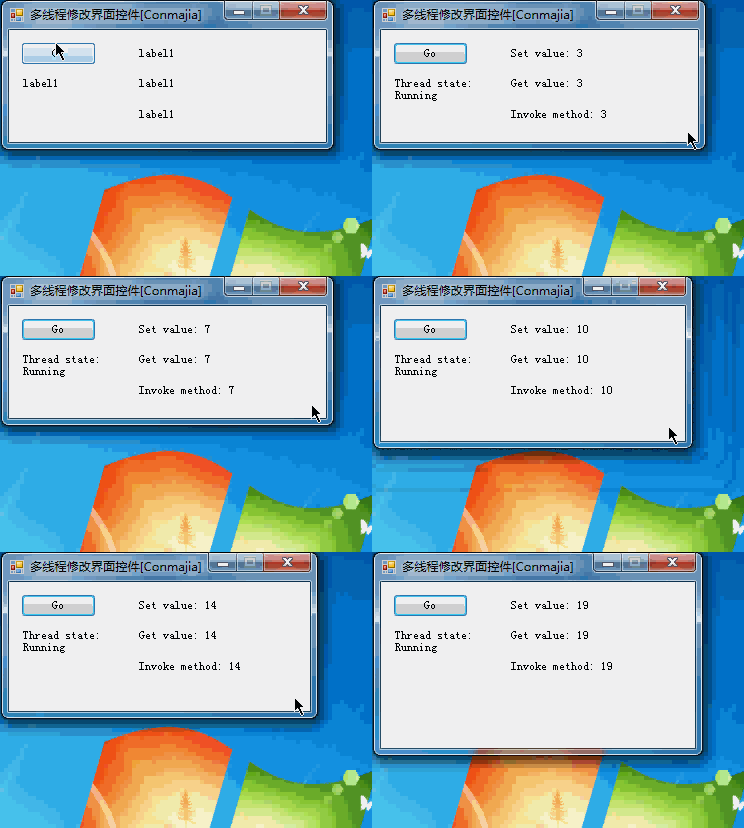
In the demo, I used a forever looping background thread (t) to show how the InvokeHelper helps threads to interact. Thread t updates the frontend thread (the GUI) every 500 milliseconds.
Thread t;

private void button1_Click(object sender, EventArgs e) {

    if(t == null) {

        t = new Thread(multithread);

        t.Start();

        label4.Text = string.Format("Thread state:\n{0}", t.ThreadState.ToString());

    }

}

public void DoWork(string msg) {

    this.label3.Text = string.Format("Invoke method: {0}", msg);

}

int count = 0;

void multithread() {

    while(true) {

        InvokeHelper.Set(this.label1, "Text", string.Format("Set value: {0}", count));

        InvokeHelper.Set(this.label1, "Tag", count);

        string value = InvokeHelper.Get(this.label1, "Tag")

            .ToString();

        InvokeHelper.Set(this.label2, "Text", string.Format("Get value: {0}", value));

        InvokeHelper.Invoke(this, "DoWork", value);

        Thread.Sleep(500);

        count++;

    }

}
Results shown in animated figure 2. Obviously, the frontend is not blocked despite t never stops.
InvokeHelper Demonstration (animation)Other Approaches
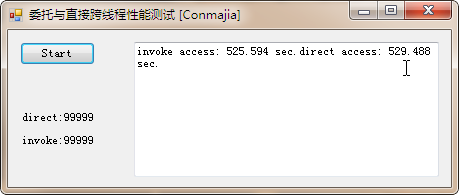
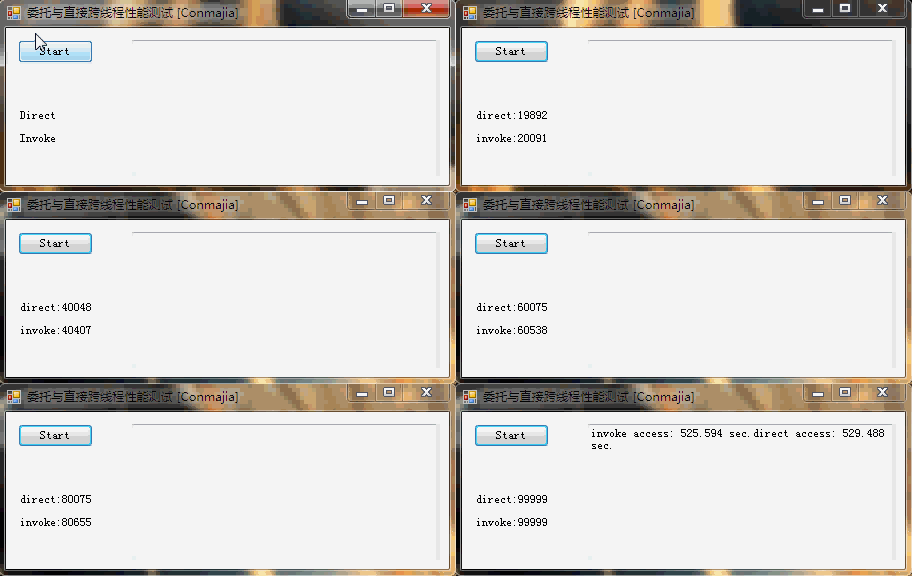
There is a built-in option in the VisualStudio IDE that disables the cross-thread access check: CheckForIllegalCrossThreadCalls. I found it slightly slower than my helper class. Figure 3 shows the test result.
CheckForIllegalCrossThreadCallsThe whole procedure of the test is recorded in figure 4. (The video lasts for 8'51")
CheckForIllegalCrossThreadCalls (8'51")Appendix
Source code of the InvokeHelper is listed below. Zipped .NET project files: Download
public class InvokeHelper {

  private delegate object MethodInvoker(Control control, string methodName, params object[] args);

  private delegate object PropertyGetInvoker(Control control, object noncontrol, string propertyName);

  private delegate void PropertySetInvoker(Control control, object noncontrol, string propertyName, object value);

  private static PropertyInfo GetPropertyInfo(Control control, object noncontrol, string propertyName) {

    if (control != null && !string.IsNullOrEmpty(propertyName)) {

      PropertyInfo pi = null;

      Type t = null;

      if (noncontrol != null) t = noncontrol.GetType();

      else t = control.GetType();

      pi = t.GetProperty(propertyName);

      if (pi == null) throw new InvalidOperationException(string.Format("Can't find property {0} in {1}.", propertyName, t.ToString()));

      return pi;

    } else throw new ArgumentNullException("Invalid argument.");

  }

  public static object Invoke(Control control, string methodName, params object[] args) {

    if (control != null && !string.IsNullOrEmpty(methodName))

      if (control.InvokeRequired) return control.Invoke(new MethodInvoker(Invoke), control, methodName, args);

      else {

        MethodInfo mi = null;

        if (args != null && args.Length > 0) {

          Type[] types = new Type[args.Length];

          for (int i = 0; i
References
- Sergiu Josan, Making Controls Thread-safely, May 2009
- vicoB, Extension of safeInvoke, July 2010
The End. \(\Box\)
💈 线程间互访助手类 (EN)的更多相关文章
- Java:多线程,使用同步锁(Lock)时利用Condition类实现线程间通信
如果程序不使用synchronized关键字来保证同步,而是直接使用Lock对象来保证同步,则系统中不存在隐式的同步监视器,也就不能用wait().notify().notifyAll()方法进行线程 ...
- 并发工具类(四)线程间的交换数据 Exchanger
前言 JDK中为了处理线程之间的同步问题,除了提供锁机制之外,还提供了几个非常有用的并发工具类:CountDownLatch.CyclicBarrier.Semphore.Exchanger.Ph ...
- Java并发工具类之线程间数据交换工具Exchanger
Exchanger是一个用于线程间协做的工具类,主要用于线程间的数据交换.它提供了一个同步点,在这个同步点,两个线程可以彼此交换数据.两个线程通过exchange方法交换数据,如果一个线程执行exch ...
- Java并发工具类(四):线程间交换数据的Exchanger
简介 Exchanger(交换者)是一个用于线程间协作的工具类.Exchanger用于进行线程间的数据交换.它提供一个同步点,在这个同步点两个线程可以交换彼此的数据.这两个线程通过exchange方法 ...
- Object类中wait带参方法和notifyAll方法和线程间通信
notifyAll方法: 进入到Timed_Waiting(计时等待)状态有两种方式: 1.sleep(long m)方法,在毫秒值结束之后,线程睡醒,进入到Runnable或BLocked状态 2. ...
- Object类中wait代餐方法和notifyAll方法和线程间通信
Object类中wait代餐方法和notifyAll方法 package com.yang.Test.ThreadStudy; import lombok.SneakyThrows; /** * 进入 ...
- Disruptor——一种可替代有界队列完成并发线程间数据交换的高性能解决方案
本文翻译自LMAX关于Disruptor的论文,同时加上一些自己的理解和标注.Disruptor是一个高效的线程间交换数据的基础组件,它使用栅栏(barrier)+序号(Sequencing)机制协调 ...
- 0038 Java学习笔记-多线程-传统线程间通信、Condition、阻塞队列、《疯狂Java讲义 第三版》进程间通信示例代码存在的一个问题
调用同步锁的wait().notify().notifyAll()进行线程通信 看这个经典的存取款问题,要求两个线程存款,两个线程取款,账户里有余额的时候只能取款,没余额的时候只能存款,存取款金额相同 ...
- 线程间通信 GET POST
线程间通信有三种方法:NSThread GCD NSOperation 进程:操作系统里面每一个app就是一个进程. 一个进程里面可以包含多个线程,并且我们每一个app里面有且仅有一 ...
随机推荐
- ArrayList和Vector区别及源码
本文基于jdk1.7 1.ArrayList 类图来自:作者 Java3y 源码分析: 1.1 属性 1.2 构造方法 Arrays.copyOf源码: 1.3 trimToSize方法, 修改当前 ...
- json与javabean之间的转化
接着上一个http://www.cnblogs.com/ya-qiang/p/9009134.html随笔,继续介绍json与java对象之间的转化 一.java普通对象和json字符串的互转 jav ...
- js面试题1
1.介绍js的基本数据类型 Undefined.Null.Boolean.Number.String 2.js有哪些内置对象? 数据封装类对象:Object.Array.Boolean.Number ...
- 微服务(入门四):identityServer的简单使用(客户端授权)
IdentityServer简介(摘自Identity官网) IdentityServer是将符合规范的OpenID Connect和OAuth 2.0端点添加到任意ASP.NET核心应用程序的中间件 ...
- Jenkins配置从节点
配置从节点步骤 在Master的站点上创建节点配置信息 在Slave访问Jenkins站点,然后下载运行服务Slave端必须安装Jdk 两种运行方式: windows 服务 运行jar包 成功后的节点 ...
- 那些年我们一起踩过的Dubbo"坑"
前言 微服务架构在如今的9102年已经不是什么新鲜的话题了,但是怎么做好微服务架构,却又是一个永恒的话题.比如服务粒度的划分,怎么控制好粗细?服务划分后,对于项目的部署会有什么改变?... 这会是一 ...
- 【野草】SQL Server之索引解析(一)
1.写在前面 微软专门给出SQL Server设计思路及实现路线,从7大体系结构阐述是如何实现,通过了解这些,我们就可以总结出数据库设计原则.编程中sql写法及注意事项,从而优化我们的系统性能,本系列 ...
- Dotspatial 要素重叠部分去除
private void toolStripButton32_Click(object sender, EventArgs e) { /重叠部分去除操作——测试成功 if (mapMain.Layer ...
- 使用拷贝的方式(adb push) 绕过Android系统和adb install直接安装APK
某些情况下定制的Android系统为了限制用户安装应用,例如电视盒子,车载中控等,通过修改代码屏蔽了正常安装应用的方式 本文探讨如何在 adb shell 具有读写data分区目录的权限前提下,通过a ...
- 用samba来创建windows下的文件共享
前言 Samba是一个能让Linux系统应用Microsoft网络通讯协议的软件,而SMB是Server Message Block的缩写,即为服务器消息块 ,SMB主要是作为Microsoft的网络 ...