
Kafka connect in practice(3): distributed mode mysql binlog ->kafka->hive
In the previous post Kafka connect in practice(1): standalone, I have introduced about the basics of kafka connect configuration and demonstrate a local standalone demo. In this post we will show the knowledge about distributed data pull an sink. To start, do make sure the kafka broker and zookeeper have been started!
1. configuration
vim $KAFKA_HOME/bin/connect-distributed.properties
set contents of this file as:
# These are defaults. This file just demonstrates how to override some settings.

#A list of host/port pairs to use for establishing the initial connection to the Kafka cluster.

#The client will make use of all servers irrespective of which servers are specified here for bootstrapping—

#this list only impacts the initial hosts used to discover the full set of servers.

#This list should be in the form host1:port1,host2:port2,....

#Since these servers are just used for the initial connection to discover the full cluster membership

#(which may change dynamically), this list need not contain the full set of servers (you may want more than one, though,

#in case a server is down).

#notes: this configuration is required.

bootstrap.servers=localhost:

# unique name for the cluster, used in forming the Connect cluster group.

#Note that this must not conflict with consumer group IDs.

#notes: this configuration is required.

group.id=connect-cluster

# The converters specify the format of data in Kafka and how to translate it into Connect data. Every Connect user will

# need to configure these based on the format they want their data in when loaded from or stored into Kafka

#Converter class for key Connect data. This controls the format of the data that will be written to Kafka for source connectors or read from Kafka for sink connectors.

#Popular formats include Avro and JSON.

#notes: this configuration is required.

key.converter=org.apache.kafka.connect.json.JsonConverter

#Converter class for value Connect data. This controls the format of the data that will be written to

#Kafka for source connectors or read from Kafka for sink connectors. Popular formats include Avro and JSON.

#notes: this configuration is required.

value.converter=org.apache.kafka.connect.json.JsonConverter

# Converter-specific settings can be passed in by prefixing the Converter's setting with the converter we want to apply

# it to,

#if we want to see the schema of the message ,we can turn on the *.converter.schemas.enable

#vice, if we don't wana to see the schema of the message, we should turn of the *.converter.schemas.enable

# generally speaking, if dev and testing env, we can turn the following attributes on for tracking consideration,

# and turned off in production consideration for network and disk capacity usage.

key.converter.schemas.enable=false

value.converter.schemas.enable=false

#The name of the topic where connector and task configuration offsets are stored. This must be the same for all workers with

#the same group.id. Kafka Connect will upon startup attempt to automatically create this topic with multiple partitions and

#a compacted cleanup policy to avoid losing data, but it will simply use the topic if it already exists. If you choose to

#create this topic manually, always create it as a compacted, highly replicated (3x or more) topic with a large number of

#partitions (e.g.,  or , just like Kafka's built-in __consumer_offsets topic) to support large Kafka Connect clusters.

offset.storage.topic=connect-offsets

#The replication factor used when Connect creates the topic used to store connector offsets. This should always be at least

#  for a production system, but cannot be larger than the number of Kafka brokers in the cluster.

offset.storage.replication.factor=

#The number of partitions used when Connect creates the topic used to store connector offsets. A large value (e.g.,  or ,

#just like Kafka's built-in __consumer_offsets topic) is necessary to support large Kafka Connect clusters.

offset.storage.partitions=

#The name of the topic where connector and task configuration data are stored. This must be the same for all workers with

#the same group.id. Kafka Connect will upon startup attempt to automatically create this topic with a single-partition and

#ompacted cleanup policy to avoid losing data, but it will simply use the topic if it already exists. If you choose to create

#this topic manually, always create it as a compacted topic with a single partition and a high replication factor (3x or more).

config.storage.topic=connect-configs

#The replication factor used when Kafka Connects creates the topic used to store connector and task configuration data.

#This should always be at least  for a production system, but cannot be larger than the number of Kafka brokers in the cluster.

config.storage.replication.factor=

config.storage.partitions=

#The name of the topic where connector and task configuration status updates are stored. This must be the same for all workers with

#the same group.id. Kafka Connect will upon startup attempt to automatically create this topic with multiple partitions and a compacted

#cleanup policy to avoid losing data, but it will simply use the topic if it already exists. If you choose to create this topic manually,

#always create it as a compacted, highly replicated (3x or more) topic with multiple partitions.

status.storage.topic=connect-status

#The replication factor used when Connect creates the topic used to store connector and task status updates. This should always be at least

#for a production system, but cannot be larger than the number of Kafka brokers in the cluster.

status.storage.replication.factor=

#The number of partitions used when Connect creates the topic used to store connector and task status updates.

status.storage.partitions=

# Flush much faster than normal, which is useful for testing/debugging

offset.flush.interval.ms=

# These are provided to inform the user about the presence of the REST host and port configs

# Hostname & Port for the REST API to listen on. If this is set, it will bind to the interface used to listen to requests.

#Hostname for the REST API. If this is set, it will only bind to this interface.

#notes: this configuration is optional

rest.host.name=localhost

#Port for the REST API to listen on.

#notes: this configuration is optional

rest.port=

# The Hostname & Port that will be given out to other workers to connect to i.e. URLs that are routable from other servers.

#rest.advertised.host.name=

#rest.advertised.port=

rest.advertised.host.name=127.0.0.1

rest.advertised.port=

# Set to a list of filesystem paths separated by commas (,) to enable class loading isolation for plugins

# (connectors, converters, transformations). The list should consist of top level directories that include

# any combination of:

# a) directories immediately containing jars with plugins and their dependencies

# b) uber-jars with plugins and their dependencies

# c) directories immediately containing the package directory structure of classes of plugins and their dependencies

# Note: symlinks will be followed to discover dependencies or plugins.

plugin.path=/home/lenmom/workspace/software/kafka_2.-2.1./connect

#Converter class for internal key Connect data that implements the Converter interface. Used for converting data like offsets and configs.

#notes: this configuration is optional

internal.value.converter=org.apache.kafka.connect.json.JsonConverter

#Converter class for offset value Connect data that implements the Converter interface. Used for converting data like offsets and configs.

#notes: this configuration is optional

internal.key.converter=org.apache.kafka.connect.json.JsonConverter

#notes: this configuration is optional

task.shutdown.graceful.timeout.ms=

#notes: this configuration is optional

offset.flush.timeout.ms=
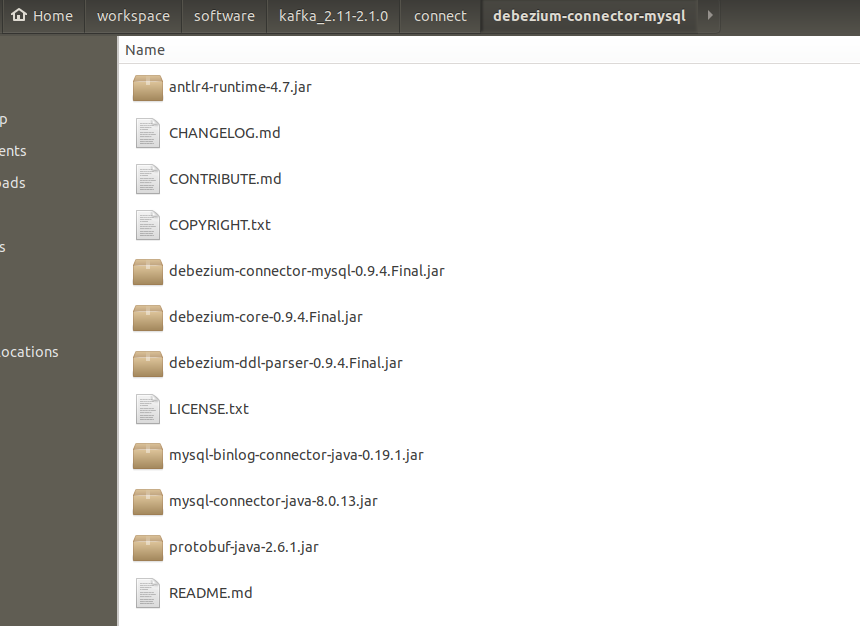
2. download a debezium-connector-mysql plugin tarbar and unzip it into the the folder defined at the end of connect-distributed.properties
2. start mysql server with bin-log enabled
for detail please refer my previous blog post mysql 5.7 enable binlog
3. start the kafka connect distributed
sh $KAFKA_HOME/connect-distributed.sh   $KAFKA_HOME/config/connect-distributed.properties

#or start in background

#sh $KAFKA_HOME/connect-distributed.sh  --daemon  $KAFKA_HOME/config/connect-distributed.properties
it starts with the following screenshot.
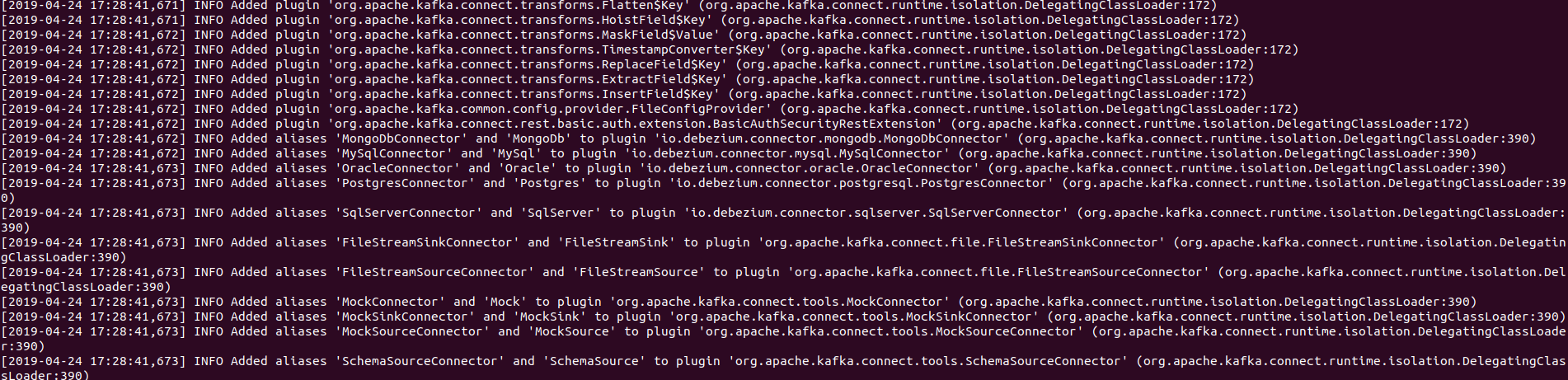
be aware that the INFO Added aliases 'MySqlConnector' and 'MySql' to plugin 'io.debezium.connector.mysql.MySqlConnector' (org.apache.kafka.connect.runtime.isolation.DelegatingClassLoader:390), our target plugin has been loaded by the kafka connect distributed.
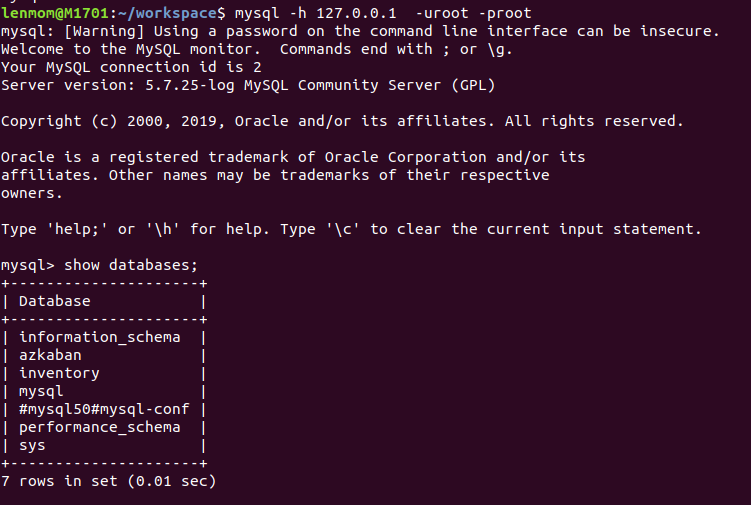
4. create a the demo database in mysql
# In production you would almost certainly limit the replication user must be on the follower (slave) machine,

# to prevent other clients accessing the log from other machines. For example, 'replicator'@'follower.acme.com'.

#

# However, this grant is equivalent to specifying *any* hosts, which makes this easier since the docker host

# is not easily known to the Docker container. But don't do this in production.

#

GRANT REPLICATION SLAVE, REPLICATION CLIENT ON *.* TO 'replicator' IDENTIFIED BY 'replpass';

GRANT SELECT, RELOAD, SHOW DATABASES, REPLICATION SLAVE, REPLICATION CLIENT  ON *.* TO 'debezium' IDENTIFIED BY 'dbz';

# Create the database that we'll use to populate data and watch the effect in the binlog

DROP DATABASE if exists inventory;

CREATE DATABASE if not exists inventory;

GRANT ALL PRIVILEGES ON inventory.* TO 'root'@'%';

# Switch to this database

USE inventory;

# Create and populate our products using a single insert with many rows

CREATE TABLE products (

  id INTEGER NOT NULL AUTO_INCREMENT PRIMARY KEY,

  name VARCHAR() NOT NULL,

  description VARCHAR(),

  weight FLOAT

);

ALTER TABLE products AUTO_INCREMENT = ;

INSERT INTO products

VALUES (default,"scooter","Small 2-wheel scooter",3.14),

       (default,"car battery","12V car battery",8.1),

       (default,"12-pack drill bits","12-pack of drill bits with sizes ranging from #40 to #3",0.8),

       (default,"hammer","12oz carpenter's hammer",0.75),

       (default,"hammer","14oz carpenter's hammer",0.875),

       (default,"hammer","16oz carpenter's hammer",1.0),

       (default,"rocks","box of assorted rocks",5.3),

       (default,"jacket","water resistent black wind breaker",0.1),

       (default,"spare tire","24 inch spare tire",22.2);

# Create and populate the products on hand using multiple inserts

CREATE TABLE products_on_hand (

  product_id INTEGER NOT NULL PRIMARY KEY,

  quantity INTEGER NOT NULL,

  FOREIGN KEY (product_id) REFERENCES products(id)

);

INSERT INTO products_on_hand VALUES (,);

INSERT INTO products_on_hand VALUES (,);

INSERT INTO products_on_hand VALUES (,);

INSERT INTO products_on_hand VALUES (,);

INSERT INTO products_on_hand VALUES (,);

INSERT INTO products_on_hand VALUES (,);

INSERT INTO products_on_hand VALUES (,);

INSERT INTO products_on_hand VALUES (,);

INSERT INTO products_on_hand VALUES (,);

# Create some customers ...

CREATE TABLE customers (

  id INTEGER NOT NULL AUTO_INCREMENT PRIMARY KEY,

  first_name VARCHAR() NOT NULL,

  last_name VARCHAR() NOT NULL,

  email VARCHAR() NOT NULL UNIQUE KEY

) AUTO_INCREMENT=;

INSERT INTO customers

VALUES (default,"Sally","Thomas","sally.thomas@acme.com"),

       (default,"George","Bailey","gbailey@foobar.com"),

       (default,"Edward","Walker","ed@walker.com"),

       (default,"Anne","Kretchmar","annek@noanswer.org");

# Create some veyr simple orders

CREATE TABLE orders (

  order_number INTEGER NOT NULL AUTO_INCREMENT PRIMARY KEY,

  order_date DATE NOT NULL,

  purchaser INTEGER NOT NULL,

  quantity INTEGER NOT NULL,

  product_id INTEGER NOT NULL,

  FOREIGN KEY order_customer (purchaser) REFERENCES customers(id),

  FOREIGN KEY ordered_product (product_id) REFERENCES products(id)

) AUTO_INCREMENT = ;

INSERT INTO orders

VALUES (default, '2016-01-16', , , ),

       (default, '2016-01-17', , , ),

       (default, '2016-02-19', , , ),

       (default, '2016-02-21', , , );
5. Register a mysql connector using kafka connector rest api
5.1 check connector version
curl -H "Accept:application/json" localhost:/
output
{"version":"2.1.0","commit":"809be928f1ae004e","kafka_cluster_id":"NGQRxNZMSY6Q53ktQABHsQ"}
5.2 get current connector list
lenmom@M1701:~/$ curl -H "Accept:application/json" localhost:/connectors/

[]
the ouput indicates there's no connector in the distributed connector.
5.3 registet a mysql connector instance to in the distributed connector
$ curl -i -X POST -H "Accept:application/json" -H "Content-Type:application/json" localhost:/connectors/ -d '{ "name": "inventory-connector", "config": { "connector.class": "io.debezium.connector.mysql.MySqlConnector", "tasks.max": "1", "database.hostname": "127.0.0.1", "database.port": "3306", "database.user": "root", "database.password": "root", "database.server.id": "184054", "database.server.name": "127.0.0.1", "database.whitelist": "inventory", "database.history.kafka.bootstrap.servers": "127.0.0.1:9092", "database.history.kafka.topic": "dbhistory.inventory" } }'
the formated content describes as follows for readable consideration
{

  "name": "inventory-connector",

  "config": {

    "connector.class": "io.debezium.connector.mysql.MySqlConnector",

    "tasks.max": "",

    "database.hostname": "127.0.0.1",

    "database.port": "",

    "database.user": "root",

    "database.password": "root",

    "database.server.id": "",

    "database.server.name": "127.0.0.1",

    "database.whitelist": "inventory",

    "database.history.kafka.bootstrap.servers": "127.0.0.1:9092",

    "database.history.kafka.topic": "schema-changes.inventory"

  }

}
the response of the post request show as follows:
HTTP/1.1  Created

Date: Tue,  apr  16:: GMT

Location: http://localhost:8083/connectors/inventory-connector

Content-Type: application/json

Content-Length:

Server: Jetty(9.2..v20160210)

{

  "name": "inventory-connector",

  "config": {

    "connector.class": "io.debezium.connector.mysql.MySqlConnector",

    "tasks.max": "",

    "database.hostname": "mysql",

    "database.port": "",

    "database.user": "root",

    "database.password": "root",

    "database.server.id": "",

    "database.server.name": "127.0.0.1",

    "database.whitelist": "inventory",

    "database.history.kafka.bootstrap.servers": "127.0.0.1:9092",

    "database.history.kafka.topic": "dbhistory.inventory",

    "name": "inventory-connector"

  },

  "tasks": []

}

5.4 get connector using curl again, there should exist a connector since we have just registered one.
curl -H "Accept:application/json" localhost:/connectors/
output
["inventory-connector"]

5.5 get connector detail
curl -i -X GET -H "Accept:application/json" localhost:/connectors/inventory-connector
output
HTTP/1.1  OK

Date: Wed,  Apr  :: GMT

Content-Type: application/json

Content-Length:

Server: Jetty(9.4..v20180830)

{

  "name": "inventory-connector",

  "config": {

    "connector.class": "io.debezium.connector.mysql.MySqlConnector",

    "database.user": "root",

    "database.server.id": "",

    "tasks.max": "",

    "database.history.kafka.bootstrap.servers": "127.0.0.1:9092",

    "database.history.kafka.topic": "dbhistory.inventory",

    "database.server.name": "127.0.0.1",

    "database.port": "",

    "database.hostname": "127.0.0.1",

    "database.password": "root",

    "name": "inventory-connector",

    "database.whitelist": "inventory"

  },

  "tasks": [

    {

      "connector": "inventory-connector",

      "task":

    }

  ],

  "type": "source"

}

the "task":0 indicate there is one task with id 0.
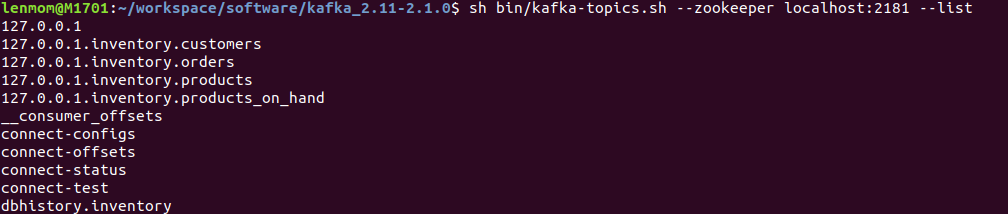
5.5 list the kafka topics
sh $KAFKA_HOME/bin/kafka-topics.sh --zookeeper localhost: --list
output
127.0.0.1

127.0.0.1.inventory.customers

127.0.0.1.inventory.orders

127.0.0.1.inventory.products

127.0.0.1.inventory.products_on_hand

__consumer_offsets

connect-configs

connect-offsets

connect-status

connect-test

dbhistory.inventory
and this indicate the mysql connector has started watching the mysql data changes and begin to push the changed data to kafka broker.
5.6 abserve the data in the kafka topic
sh $KAFKA_HOME/bin/kafka-console-consumer.sh --bootstrap-server localhost: --topic 127.0.0.1.inventory.customers --from-beginning # all the data changes for table customers in database inventory would be listed
output:
{"before":null,"after":{"id":,"first_name":"Sally","last_name":"Thomas","email":"sally.thomas@acme.com"},"source":{"version":"0.9.4.Final","connector":"mysql","name":"127.0.0.1","server_id":,"ts_sec":,"gtid":null,"file":"mysql-bin.000012","pos":,"row":,"snapshot":true,"thread":null,"db":"inventory","table":"customers","query":null},"op":"c","ts_ms":}

{"before":null,"after":{"id":,"first_name":"George","last_name":"Bailey","email":"gbailey@foobar.com"},"source":{"version":"0.9.4.Final","connector":"mysql","name":"127.0.0.1","server_id":,"ts_sec":,"gtid":null,"file":"mysql-bin.000012","pos":,"row":,"snapshot":true,"thread":null,"db":"inventory","table":"customers","query":null},"op":"c","ts_ms":}

{"before":null,"after":{"id":,"first_name":"Edward","last_name":"Walker","email":"ed@walker.com"},"source":{"version":"0.9.4.Final","connector":"mysql","name":"127.0.0.1","server_id":,"ts_sec":,"gtid":null,"file":"mysql-bin.000012","pos":,"row":,"snapshot":true,"thread":null,"db":"inventory","table":"customers","query":null},"op":"c","ts_ms":}

{"before":null,"after":{"id":,"first_name":"Anne","last_name":"Kretchmar","email":"annek@noanswer.org"},"source":{"version":"0.9.4.Final","connector":"mysql","name":"127.0.0.1","server_id":,"ts_sec":,"gtid":null,"file":"mysql-bin.000012","pos":,"row":,"snapshot":true,"thread":null,"db":"inventory","table":"customers","query":null},"op":"c","ts_ms":}
let's take a record as formated as example,say the first one.
{

  "before": null,

  "after": {

    "id": ,

    "first_name": "Sally",

    "last_name": "Thomas",

    "email": "sally.thomas@acme.com"

  },

  "source": {

    "version": "0.9.4.Final",

    "connector": "mysql",

    "name": "127.0.0.1",

    "server_id": ,

    "ts_sec": ,

    "gtid": null,

    "file": "mysql-bin.000012",

    "pos": ,

    "row": ,

    "snapshot": true,

    "thread": null,

    "db": "inventory",

    "table": "customers",

    "query": null

  },

  "op": "c",

  "ts_ms":

}
the op field indicate the data change type:
- c: insert a record into the database. if c, the before element would be null.
- d: delete a record in the database. if d, the after element would be null
- u:update a record in the database. the before element indicate the data in the database when the update take action, and the after element indicate the data after the update take action.
let's do some update and delete operations in mysql database to see the changed data captured in kafka.
mysql> select * from customers;

+------+------------+-----------+-----------------------+

| id   | first_name | last_name | email                 |

+------+------------+-----------+-----------------------+

|  | Sally      | Thomas    | sally.thomas@acme.com |

|  | George     | Bailey    | gbailey@foobar.com    |

|  | Edward     | Walker    | ed@walker.com         |

|  | Anne       | Kretchmar | annek@noanswer.org    |

+------+------------+-----------+-----------------------+

 rows in set (0.00 sec)

mysql> update customers set first_name='1234' where id=1004;

Query OK,  row affected (0.01 sec)

Rows matched:   Changed:   Warnings:

mysql> delete from customers where id=1004;

Query OK,  row affected (0.01 sec)

mysql> select * from customers;

+------+------------+-----------+-----------------------+

| id   | first_name | last_name | email                 |

+------+------------+-----------+-----------------------+

|  | Sally      | Thomas    | sally.thomas@acme.com |

|  | George     | Bailey    | gbailey@foobar.com    |

|  | Edward     | Walker    | ed@walker.com         |

+------+------------+-----------+-----------------------+

 rows in set (0.00 sec)
as it shows, we first update the record with id=1004 field first_name to 1234, and then delete the record.
kafka record:
{"before":null,"after":{"id":,"first_name":"Sally","last_name":"Thomas","email":"sally.thomas@acme.com"},"source":{"version":"0.9.4.Final","connector":"mysql","name":"127.0.0.1","server_id":,"ts_sec":,"gtid":null,"file":"mysql-bin.000012","pos":,"row":,"snapshot":true,"thread":null,"db":"inventory","table":"customers","query":null},"op":"c","ts_ms":}

{"before":null,"after":{"id":,"first_name":"George","last_name":"Bailey","email":"gbailey@foobar.com"},"source":{"version":"0.9.4.Final","connector":"mysql","name":"127.0.0.1","server_id":,"ts_sec":,"gtid":null,"file":"mysql-bin.000012","pos":,"row":,"snapshot":true,"thread":null,"db":"inventory","table":"customers","query":null},"op":"c","ts_ms":}

{"before":null,"after":{"id":,"first_name":"Edward","last_name":"Walker","email":"ed@walker.com"},"source":{"version":"0.9.4.Final","connector":"mysql","name":"127.0.0.1","server_id":,"ts_sec":,"gtid":null,"file":"mysql-bin.000012","pos":,"row":,"snapshot":true,"thread":null,"db":"inventory","table":"customers","query":null},"op":"c","ts_ms":}

{"before":null,"after":{"id":,"first_name":"Anne","last_name":"Kretchmar","email":"annek@noanswer.org"},"source":{"version":"0.9.4.Final","connector":"mysql","name":"127.0.0.1","server_id":,"ts_sec":,"gtid":null,"file":"mysql-bin.000012","pos":,"row":,"snapshot":true,"thread":null,"db":"inventory","table":"customers","query":null},"op":"c","ts_ms":}

{"before":{"id":,"first_name":"Anne","last_name":"Kretchmar","email":"annek@noanswer.org"},"after":{"id":,"first_name":"","last_name":"Kretchmar","email":"annek@noanswer.org"},"source":{"version":"0.9.4.Final","connector":"mysql","name":"127.0.0.1","server_id":,"ts_sec":,"gtid":null,"file":"mysql-bin.000012","pos":,"row":,"snapshot":false,"thread":,"db":"inventory","table":"customers","query":null},"op":"u","ts_ms":}

{"before":{"id":,"first_name":"","last_name":"Kretchmar","email":"annek@noanswer.org"},"after":null,"source":{"version":"0.9.4.Final","connector":"mysql","name":"127.0.0.1","server_id":,"ts_sec":,"gtid":null,"file":"mysql-bin.000012","pos":,"row":,"snapshot":false,"thread":,"db":"inventory","table":"customers","query":null},"op":"d","ts_ms":}

null
there's two more record in the kafka related topic.
update:
{

  "before": {

    "id": ,

    "first_name": "Anne",

    "last_name": "Kretchmar",

    "email": "annek@noanswer.org"

  },

  "after": {

    "id": ,

    "first_name": "",

    "last_name": "Kretchmar",

    "email": "annek@noanswer.org"

  },

  "source": {

    "version": "0.9.4.Final",

    "connector": "mysql",

    "name": "127.0.0.1",

    "server_id": ,

    "ts_sec": ,

    "gtid": null,

    "file": "mysql-bin.000012",

    "pos": ,

    "row": ,

    "snapshot": false,

    "thread": ,

    "db": "inventory",

    "table": "customers",

    "query": null

  },

  "op": "u",

  "ts_ms":

}
delete:
{

  "before": {

    "id": ,

    "first_name": "",

    "last_name": "Kretchmar",

    "email": "annek@noanswer.org"

  },

  "after": null,

  "source": {

    "version": "0.9.4.Final",

    "connector": "mysql",

    "name": "127.0.0.1",

    "server_id": ,

    "ts_sec": ,

    "gtid": null,

    "file": "mysql-bin.000012",

    "pos": ,

    "row": ,

    "snapshot": false,

    "thread": ,

    "db": "inventory",

    "table": "customers",

    "query": null

  },

  "op": "d",

  "ts_ms":

}

if we stop the mysql connector or restart kafka broker, we should see the data still exist in the kafka since it persistent message offsets and data in kafka's specific topic we configed in connect-distributed.properties
6. register hdfs connector plugin in distributed connect
cd $KAFKA_HOME/connect                           # goto kafka connect plugin folder

wget https://d1i4a15mxbxib1.cloudfront.net/api/plugins/confluentinc/kafka-connect-hdfs/versions/5.2.1/confluentinc-kafka-connect-hdfs-5.2.1.zip   #download the hdfs plugin

unzip confluentinc-kafka-connect-hdfs-5.2..zip  # unzip the hdfs plugin to the connect plugin folder

rm -f confluentinc-kafka-connect-hdfs-5.2..zip
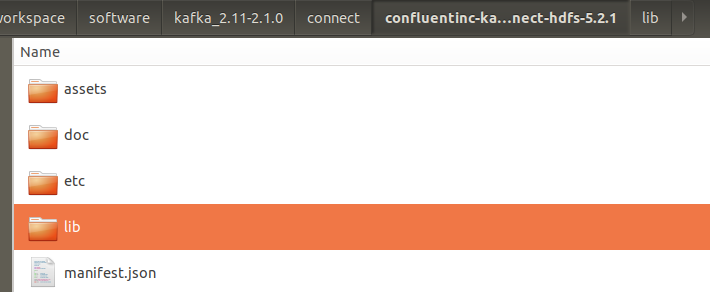
7. restart the kafka connect distributed server to reload the hdfs plugin
if in temimal ,we can use just crtl + c to stop it, and if in background mode, we can get the process id using lsof -i:8083 and then kill -9 {processid just queryed}, as list below.
lenmom@M1701:~/workspace$ lsof -i:

COMMAND  PID   USER   FD   TYPE  DEVICE SIZE/OFF NODE NAME

java     lenmom  314u  IPv6       0t0  TCP localhost: (LISTEN)

lenmom@M1701:~/workspace$ kill
and then restart the connct distributed using command:
sh $KAFKA_HOME/connect-distributed.sh $KAFKA_HOME/config/connect-distributed.properties
then we can find the hdfs connect plugin has been load in the output terminal
[-- ::,] INFO Registered loader: PluginClassLoader{pluginLocation=file:/home/lenmom/workspace/software/kafka_2.-2.1./connect/confluentinc-kafka-connect-hdfs-5.2./} (org.apache.kafka.connect.runtime.isolation.DelegatingClassLoader:)

[-- ::,] INFO Added plugin 'io.confluent.connect.hdfs.tools.SchemaSourceConnector' (org.apache.kafka.connect.runtime.isolation.DelegatingClassLoader:)

[-- ::,] INFO Added plugin 'io.confluent.connect.hdfs.HdfsSinkConnector' (org.apache.kafka.connect.runtime.isolation.DelegatingClassLoader:)

[-- ::,] INFO Added plugin 'io.confluent.connect.storage.tools.SchemaSourceConnector' (org.apache.kafka.connect.runtime.isolation.DelegatingClassLoader:)
Kafka connect in practice(3): distributed mode mysql binlog ->kafka->hive的更多相关文章
- Streaming data from Oracle using Oracle GoldenGate and Kafka Connect
This is a guest blog from Robin Moffatt. Robin Moffatt is Head of R&D (Europe) at Rittman Mead, ...
- Kafka connect快速构建数据ETL通道
摘要: 作者:Syn良子 出处:http://www.cnblogs.com/cssdongl 转载请注明出处 业余时间调研了一下Kafka connect的配置和使用,记录一些自己的理解和心得,欢迎 ...
- kafka connect 使用说明
KAFKA CONNECT 使用说明 一.概述 kafka connect 是一个可扩展的.可靠的在kafka和其他系统之间流传输的数据工具.简而言之就是他可以通过Connector(连接器)简单.快 ...
- kafka connect简介以及部署
https://blog.csdn.net/u011687037/article/details/57411790 1.什么是kafka connect? 根据官方介绍,Kafka Connect是一 ...
- Kafka Connect简介
Kafka Connect简介 http://colobu.com/2016/02/24/kafka-connect/#more Kafka 0.9+增加了一个新的特性Kafka Connect,可以 ...
- 使用kafka connect,将数据批量写到hdfs完整过程
版权声明:本文为博主原创文章,未经博主允许不得转载 本文是基于hadoop 2.7.1,以及kafka 0.11.0.0.kafka-connect是以单节点模式运行,即standalone. 首先, ...
- 1.3 Quick Start中 Step 7: Use Kafka Connect to import/export data官网剖析(博主推荐)
不多说,直接上干货! 一切来源于官网 http://kafka.apache.org/documentation/ Step 7: Use Kafka Connect to import/export ...
- Apache Kafka Connect - 2019完整指南
今天,我们将讨论Apache Kafka Connect.此Kafka Connect文章包含有关Kafka Connector类型的信息,Kafka Connect的功能和限制.此外,我们将了解Ka ...
- Kafka Connect HDFS
概述 Kafka 的数据如何传输到HDFS?如果仔细思考,会发现这个问题并不简单. 不妨先想一下这两个问题? 1)为什么要将Kafka的数据传输到HDFS上? 2)为什么不直接写HDFS而要通过Kaf ...
随机推荐
- SQL动态长度行列转置
一,案列问题描述: 某销售系统中,注册的用户会在随后的月份中购物下单,需要按月统计注册的用户中各个月下单的金额.源数据表如下: FM::注册月份,CM: 下单月份, AMT:下单金额 期望得到如下统计 ...
- 最基础的 swift 语言
import Foundation //打印函数 print("Hello, World!") //不用加分号, 字符串就是"", 不用加@ print(&qu ...
- centos下源码编译安装MySQL
解压下载的软件压缩包 tar xzvf mysql-5.1.63.tar.gz 进入解压的目录 cd mysql-5.1.63/ 安装需要的依赖包 yum install gcc gcc-c++ ...
- UT源码 105032014098
package exam1; import java.util.Scanner; public class test01 { static String nextDate(int year,int m ...
- 关于Mysql的主从
mysql 主从同步异常原因及恢复: 1,auto.cnf 配置问题 这个问题是在部署主从复制的时候,可能会遇到 [1]报错 Last_IO_Error: Fatal error: The sla ...
- TensorFlow - 在 windows 系统上安装
安装方式: 1.pip (将介绍) 2.Anaconda 我采用的是本地 pip 方式 需提前安装 Python - Python 3.5.x > TF 只支持 Python 3.5.x 版本, ...
- jvm各区域OutOfMemory测试方法
1.堆溢出 VM options:-Xmx9999k -Xmn3333k public class HeapOverMemory { public static void main(String[] ...
- numpy用法
NumPy中创建特殊值 np.nan np.inf nan表示数据空缺 inf表示无穷 参考:https://www.cnblogs.com/haoxi/p/9175781.html
- PythonStudy——PyCharm使用技巧 Column Selection Mode(列选择模式)
PyCharm的Column Selection Mode提供了列选择功能. 使用: 在当前文件右键->Column Selection Mode->用鼠标垂直选择文本 快捷键:Alt + ...
- C#中的参数和调用方式(可选参数、具名参数、可空参数)
具名参数 和 可选参数 是 C# framework 4.0 出来的新特性. 一. 常规方法定义及调用 public void Demo1(string x, int y) { //do someth ...