
spark2.4.0+hadoop2.8.3全分布式集群搭建
集群环境
hadoop-2.8.3搭建详细请查看hadoop系列文章
scala-2.11.12环境请查看scala系列文章
jdk1.8.0_161
spark-2.4.0-bin-hadoop2.7
192.168.217.201 hadoop1.org.cn hadoop1
192.168.217.202 hadoop2.org.cn hadoop2
192.168.217.203 hadoop3.org.cn hadoop3
spark2.4.0完全分布式环境搭建
下载安装包
http://spark.apache.org/downloads.html
解压安装包
tar zxf spark--bin-hadoop2..tgz -C /usr/hdp/
环境配置
# SET SPARK_HOME
export SPARK_HOME=/usr/hdp/spark--bin-hadoop2.
export PATH=$PATH:$SPARK_HOME/bin
配置文件修改
备注:一下文件都在spark安装的conf文件目录下
文件spark-env.sh
cp spark-env.sh.template spark-env.sh
然后修改spark-env.sh,修改的内容如下:
#!/usr/bin/env bash

#
# Licensed to the Apache Software Foundation (ASF) under one or more
# contributor license agreements.  See the NOTICE file distributed with
# this work for additional information regarding copyright ownership.
# The ASF licenses this file to You under the Apache License, Version 2.0
# (the "License"); you may not use this file except in compliance with
# the License.  You may obtain a copy of the License at
#
#    http://www.apache.org/licenses/LICENSE-2.0
#
# Unless required by applicable law or agreed to in writing, software
# distributed under the License is distributed on an "AS IS" BASIS,
# WITHOUT WARRANTIES OR CONDITIONS OF ANY KIND, either express or implied.
# See the License for the specific language governing permissions and
# limitations under the License.
#

# This file is sourced when running various Spark programs.
# Copy it as spark-env.sh and edit that to configure Spark for your site.

# Options read when launching programs locally with
# ./bin/run-example or ./bin/spark-submit
# - HADOOP_CONF_DIR, to point Spark towards Hadoop configuration files
# - SPARK_LOCAL_IP, to set the IP address Spark binds to on this node
# - SPARK_PUBLIC_DNS, to set the public dns name of the driver program

# Options read by executors and drivers running inside the cluster
# - SPARK_LOCAL_IP, to set the IP address Spark binds to on this node
# - SPARK_PUBLIC_DNS, to set the public DNS name of the driver program
# - SPARK_LOCAL_DIRS, storage directories to use on this node for shuffle and RDD data
# - MESOS_NATIVE_JAVA_LIBRARY, to point to your libmesos.so if you use Mesos

# Options read in YARN client/cluster mode
# - SPARK_CONF_DIR, Alternate conf dir. (Default: ${SPARK_HOME}/conf)
# - HADOOP_CONF_DIR, to point Spark towards Hadoop configuration files
# - YARN_CONF_DIR, to point Spark towards YARN configuration files when you use YARN
# - SPARK_EXECUTOR_CORES, Number of cores ).
# - SPARK_EXECUTOR_MEMORY, Memory per Executor (e.g. 1000M, 2G) (Default: 1G)
# - SPARK_DRIVER_MEMORY, Memory for Driver (e.g. 1000M, 2G) (Default: 1G)

# Options for the daemons used in the standalone deploy mode
# - SPARK_MASTER_HOST, to bind the master to a different IP address or hostname
# - SPARK_MASTER_PORT / SPARK_MASTER_WEBUI_PORT, to use non-default ports for the master
# - SPARK_MASTER_OPTS, to set config properties only for the master (e.g. "-Dx=y")
# - SPARK_WORKER_CORES, to set the number of cores to use on this machine
# - SPARK_WORKER_MEMORY, to set how much total memory workers have to give executors (e.g. 1000m, 2g)
# - SPARK_WORKER_PORT / SPARK_WORKER_WEBUI_PORT, to use non-default ports for the worker
# - SPARK_WORKER_DIR, to set the working directory of worker processes
# - SPARK_WORKER_OPTS, to set config properties only for the worker (e.g. "-Dx=y")
# - SPARK_DAEMON_MEMORY, to allocate to the master, worker and history server themselves (default: 1g).
# - SPARK_HISTORY_OPTS, to set config properties only for the history server (e.g. "-Dx=y")
# - SPARK_SHUFFLE_OPTS, to set config properties only for the external shuffle service (e.g. "-Dx=y")
# - SPARK_DAEMON_JAVA_OPTS, to set config properties for all daemons (e.g. "-Dx=y")
# - SPARK_DAEMON_CLASSPATH, to set the classpath for all daemons
# - SPARK_PUBLIC_DNS, to set the public dns name of the master or workers

# Generic options for the daemons used in the standalone deploy mode
# - SPARK_CONF_DIR      Alternate conf dir. (Default: ${SPARK_HOME}/conf)
# - SPARK_LOG_DIR       Where log files are stored.  (Default: ${SPARK_HOME}/logs)
# - SPARK_PID_DIR       Where the pid file is stored. (Default: /tmp)
# - SPARK_IDENT_STRING  A string representing this instance of spark. (Default: $USER)
# - SPARK_NICENESS      The scheduling priority )
# - SPARK_NO_DAEMONIZE  Run the proposed command in the foreground. It will not output a PID file.
# Options for native BLAS, like Intel MKL, OpenBLAS, and so on.
# You might ).
# - MKL_NUM_THREADS=        Disable multi-threading of Intel MKL
# - OPENBLAS_NUM_THREADS=   Disable multi-threading of OpenBLAS
export JAVA_HOME=/opt/jdk1..0_161
export SCALA_HOME=/usr/scala/scala-
export HADOOP_HOME=/usr/hdp/hadoop-
export HADOOP_CONF_DIR=/usr/hdp/hadoop-/etc/hadoop
export SPARK_MASTER_HOST=hadoop1
export SPAKR_MASTER_IP=192.168.217.201
export SPARK_LOCAL_IP=192.168.217.201
export SPARK_WORKER_MEMORY=1g
export SPARK_WORKER_CORES=
export SPARK_HOME=/usr/hdp/spark--bin-hadoop2.
文件slaves
cp slaves.template slaves
然后编辑slaves文件,添加的内容如下:
hadoop1
hadoop2
hadoop3
文件的复制
将spark整个的目录复制到另外两个节点上面。
scp -r spark--bin-hadoop2./ root@192.168.217.202:/usr/hdp/
scp -r spark--bin-hadoop2./ root@192.168.217.203:/usr/hdp
文件复制之后,在其他的两个节点上面添加spark的环境变量,同时,修改spark-env.sh文件,将export SPARK_LOCAL_IP=192.168.217.201的IP修改为该节点的IP地址。
集群启动
启动hadoop整个的集群,然后进入到spark的sbin目录下,执行start-all.sh脚本。
[root@hadoop1 hdp]# jps
 NameNode
 ResourceManager
 SecondaryNameNode
 Master
 Jps
 Worker

[root@hadoop2 conf]# jps
 Jps
 DataNode
 Worker
 NodeManager

[root@hadoop3 ~]# jps
 DataNode
 Jps
 Worker
 NodeManager
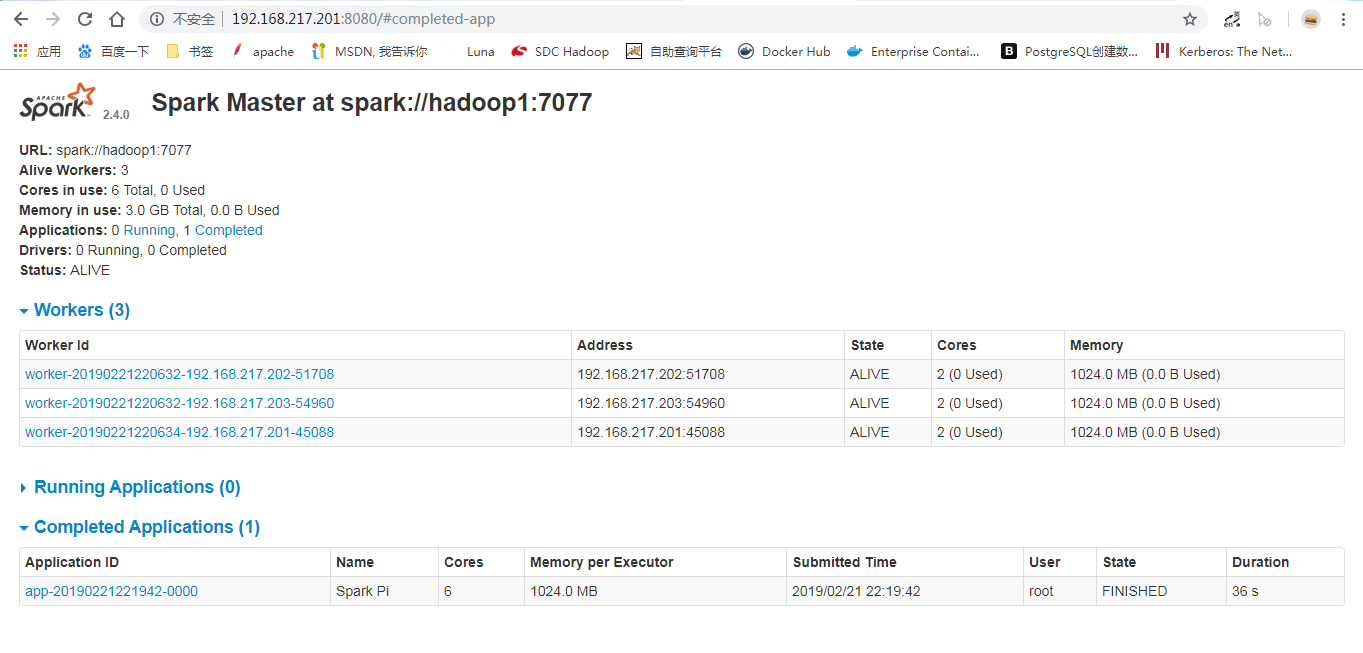
此时访问相关的页面:
坚壁清野
spark2.4.0+hadoop2.8.3全分布式集群搭建的更多相关文章
- 不在折腾----hadoop-2.4.1完全分布式集群搭建
前言 * hadoop2.0已经发布了稳定版本了,增加了很多特性,比如HDFS HA.YARN等.最新的hadoop-2.4.1又增加了YARN HA * 注意:apache提供的hadoop-2.4 ...
- Hadoop(三)手把手教你搭建Hadoop全分布式集群
前言 上一篇介绍了伪分布式集群的搭建,其实在我们的生产环境中我们肯定不是使用只有一台服务器的伪分布式集群当中的.接下来我将给大家分享一下全分布式集群的搭建! 其实搭建最基本的全分布式集群和伪分布式集群 ...
- Hadoop(三)搭建Hadoop全分布式集群
原文地址:http://www.cnblogs.com/zhangyinhua/p/7652686.html 阅读目录(Content) 一.搭建Hadoop全分布式集群前提 1.1.网络 1.2.安 ...
- Hadoop上路-01_Hadoop2.3.0的分布式集群搭建
一.配置虚拟机软件 下载地址:https://www.virtualbox.org/wiki/downloads 1.虚拟机软件设定 1)进入全集设定 2)常规设定 2.Linux安装配置 1)名称类 ...
- 超详细从零记录Hadoop2.7.3完全分布式集群部署过程
超详细从零记录Ubuntu16.04.1 3台服务器上Hadoop2.7.3完全分布式集群部署过程.包含,Ubuntu服务器创建.远程工具连接配置.Ubuntu服务器配置.Hadoop文件配置.Had ...
- 分布式实时日志系统(四) 环境搭建之centos 6.4下hbase 1.0.1 分布式集群搭建
一.hbase简介 HBase是一个开源的非关系型分布式数据库(NoSQL),它参考了谷歌的BigTable建模,实现的编程语言为 Java.它是Apache软件基金会的Hadoop项目的一部分,运行 ...
- CentOS7.5搭建Hadoop2.7.6完全分布式集群
一 完全分布式集群搭建 Hadoop官方地址:http://hadoop.apache.org/ 1 准备3台客户机 1.2 关闭防火墙,设置静态IP,主机名 关闭防火墙,设置静态IP,主机名此处略 ...
- Hadoop完全分布式集群搭建
Hadoop的运行模式 Hadoop一般有三种运行模式,分别是: 单机模式(Standalone Mode),默认情况下,Hadoop即处于该模式,使用本地文件系统,而不是分布式文件系统.,用于开发和 ...
- hbase完整分布式集群搭建
简介: hadoop的单机,伪分布式,分布式安装 hadoop2.8 集群 1 (伪分布式搭建 hadoop2.8 ha 集群搭建 hbase完整分布式集群搭建 hadoop完整集群遇到问题汇总 Hb ...
随机推荐
- vs编码对编译的影响(UTF-8 no BOM编译通不过)
VS的编译器对Unicode源代码支持如下: UTF-16 little endian with or without byte order mark (BOM). UTF-16 big endian ...
- redis scan删除key的方法封装
/** * @desc 迭代式的删除redis key * 用法: * $redis = BaseService::S()->getRedisConfig(\Yii::$app->redi ...
- DEV中的TreeList控件应用的一个小效果实现——个人总结
我使用最多的DEV控件就是这个TreeList啦,当然用好它很不简单,如果用好它,能做出很精彩的树形层次结构图.TreeList控件很强大,以至于你看DEV自带的DEMO,也得浪费你很长时间应用.DE ...
- ES6新增的数据类型Map和Set。
Javascript的默认对象表示方式 {} ,即一组键值对. 但是Javascript的对象有个小问题,就是键必须是字符串.但实际上Number或者其他数据类型作为键也是非常合理的. 为了解决这个问 ...
- VS2015 加快编译速度
在使用VS2015 编译的时候,每次修改工程中的某一个文件,启动调试时,往往都是整个工程都需要重新编译一遍.由于这个工程代码量太大,每次编译完成都需要将近10分钟左右的时间编译.最烦人的时候是当编译完 ...
- linux 线程同步
参考链接:https://blog.csdn.net/daaikuaichuan/article/details/82950711#font_size5font_2 一,互斥锁 #include &l ...
- 使用VISIO远程服务器上的ORACLE数据库,反向生成数据库实体关系图
反向即根据已有的数据库,生成ER图,很多工具都可以实现这一过程,如visio,powerdesigner等,下面文章记录一下我使用VISIO生成远程服务器上的一个数据库ER图过程,供以后自己参考. 1 ...
- javascript多语言设定方式
1.控件文字语言设定 1.1 设定两个结构变量,定义好每一个控件需要用到的值,称它字典对象 var languagecn = { 1089: "夹柄不到位", 1090: &quo ...
- 使用iptables基于MAC地址进行访控
近日完成一台基于CentOS的SVN服务器配置,由于该服务器上的文件非常重要,仅部分用户需要访问,最后决定采用iptables来做访控,并且是根据MAC地址来限制,为了便于后期维护,防火墙的配置是通过 ...
- Nuget调用简单封装.
1. 项目引用Dapper作为直接访问, 为了使用方便, 封装一下.达到效果: - 数据库连接配置在webconfig.xml中. - 常用调用方法封装. 调用: //可以采用单例模式. //全局实 ...