
PHPWord插件详解
一下载PHPWorld并配置项目
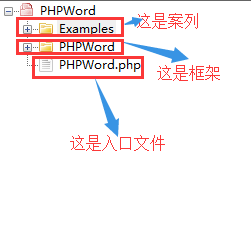
1.PHPWord框架文件如下:
二使用word模板并使用PHPWord生成doc文件
例如:源代码如下:
<?php
require_once '../PHPWord.php';

$PHPWord = new PHPWord();

$document = $PHPWord->loadTemplate('Template.docx');

$document->setValue('Value1', 'Sun');
$document->setValue('Value2', 'Mercury');
$document->setValue('Value3', 'Venus');
$document->setValue('Value4', 'Earth');
$document->setValue('Value5', 'Mars');
$document->setValue('Value6', 'Jupiter');
$document->setValue('Value7', 'Saturn');
$document->setValue('Value8', 'Uranus');
$document->setValue('Value9', 'Neptun');
$document->setValue('Value10', 'Pluto');

$document->setValue('weekday', date('l'));
$document->setValue('time', date('H:i'));

$document->save('Solarsystem.docx');
?>
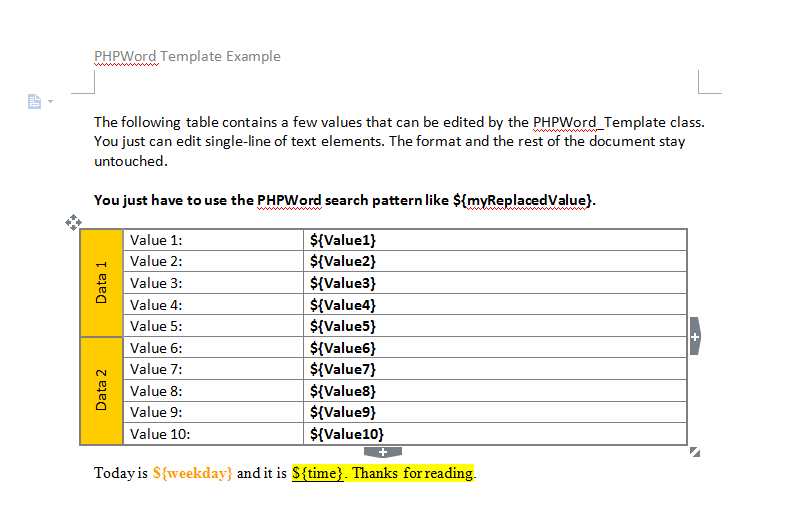
模板文件Template.docx如下:
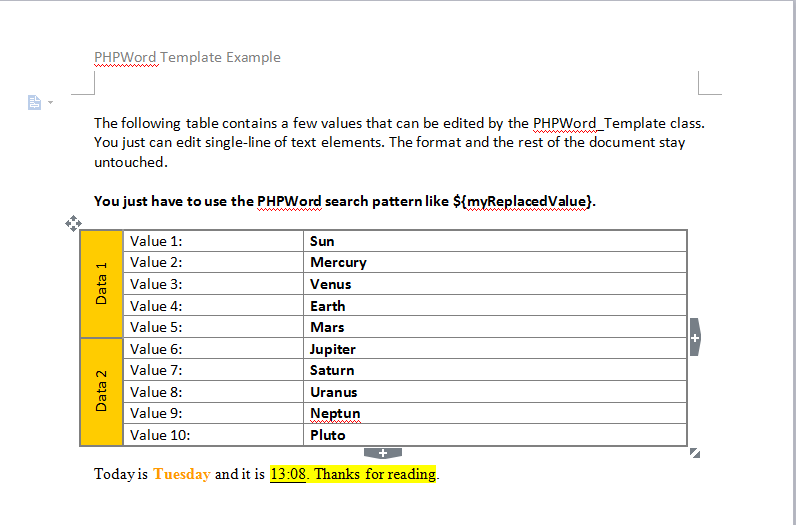
运行代码生成的文件如下:
三使用PHPWord生成各种内容的doc文件
1.生成基本表格
<?php
require_once '../PHPWord.php';

// New Word Document
$PHPWord = new PHPWord();

// New portrait section
$section = $PHPWord->createSection();

// Add table
$table = $section->addTable();

for($r = 1; $r <= 10; $r++) { // Loop through rows
	// Add row
	$table->addRow();

	for($c = 1; $c <= 5; $c++) { // Loop through cells
		// Add Cell
		$table->addCell(1750)->addText("Row $r, Cell $c");
	}
}

// Save File
$objWriter = PHPWord_IOFactory::createWriter($PHPWord, 'Word2007');
$objWriter->save('BasicTable.docx');
?>
2.生成高级表格
<?php
require_once '../PHPWord.php';

// New Word Document
$PHPWord = new PHPWord();

// New portrait section
$section = $PHPWord->createSection();

// Define table style arrays
$styleTable = array('borderSize'=>6, 'borderColor'=>'006699', 'cellMargin'=>80);
$styleFirstRow = array('borderBottomSize'=>18, 'borderBottomColor'=>'0000FF', 'bgColor'=>'66BBFF');

// Define cell style arrays
$styleCell = array('valign'=>'center');
$styleCellBTLR = array('valign'=>'center', 'textDirection'=>PHPWord_Style_Cell::TEXT_DIR_BTLR);

// Define font style for first row
$fontStyle = array('bold'=>true, 'align'=>'center');

// Add table style
$PHPWord->addTableStyle('myOwnTableStyle', $styleTable, $styleFirstRow);

// Add table
$table = $section->addTable('myOwnTableStyle');

// Add row
$table->addRow(900);

// Add cells
$table->addCell(2000, $styleCell)->addText('Row 1', $fontStyle);
$table->addCell(2000, $styleCell)->addText('Row 2', $fontStyle);
$table->addCell(2000, $styleCell)->addText('Row 3', $fontStyle);
$table->addCell(2000, $styleCell)->addText('Row 4', $fontStyle);
$table->addCell(500, $styleCellBTLR)->addText('Row 5', $fontStyle);

// Add more rows / cells
for($i = 1; $i <= 10; $i++) {
	$table->addRow();
	$table->addCell(2000)->addText("Cell $i");
	$table->addCell(2000)->addText("Cell $i");
	$table->addCell(2000)->addText("Cell $i");
	$table->addCell(2000)->addText("Cell $i");

	$text = ($i % 2 == 0) ? 'X' : '';
	$table->addCell(500)->addText($text);
}

// Save File
$objWriter = PHPWord_IOFactory::createWriter($PHPWord, 'Word2007');
$objWriter->save('AdvancedTable.docx');
?>
3.生成页眉和页脚
<?php
require_once '../PHPWord.php';

// New Word Document
$PHPWord = new PHPWord();

// New portrait section
$section = $PHPWord->createSection();

// Add header
$header = $section->createHeader();
$table = $header->addTable();
$table->addRow();
$table->addCell(4500)->addText('This is the header.');
$table->addCell(4500)->addImage('_earth.jpg', array('width'=>50, 'height'=>50, 'align'=>'right'));

// Add footer
$footer = $section->createFooter();
$footer->addPreserveText('Page {PAGE} of {NUMPAGES}.', array('align'=>'center'));

// Write some text
$section->addTextBreak();
$section->addText('Some text...');

// Save File
$objWriter = PHPWord_IOFactory::createWriter($PHPWord, 'Word2007');
$objWriter->save('HeaderFooter.docx');
?>
4.生成图片
<?php
require_once '../PHPWord.php';

// New Word Document
$PHPWord = new PHPWord();

// New portrait section
$section = $PHPWord->createSection();

// Add image elements
$section->addImage('_mars.jpg');
$section->addTextBreak(2);

$section->addImage('_earth.JPG', array('width'=>210, 'height'=>210, 'align'=>'center'));
$section->addTextBreak(2);

$section->addImage('_mars.jpg', array('width'=>100, 'height'=>100, 'align'=>'right'));

// Save File
$objWriter = PHPWord_IOFactory::createWriter($PHPWord, 'Word2007');
$objWriter->save('Image.docx');
?>
5.生成超链接
<?php
require_once '../PHPWord.php';

// New Word Document
$PHPWord = new PHPWord();

// New portrait section
$section = $PHPWord->createSection();

// Add hyperlink elements
$section->addLink('http://www.google.com', 'Best search engine', array('color'=>'0000FF', 'underline'=>PHPWord_Style_Font::UNDERLINE_SINGLE));
$section->addTextBreak(2);

$PHPWord->addLinkStyle('myOwnLinkStyle', array('bold'=>true, 'color'=>'808000'));
$section->addLink('http://www.bing.com', null, 'myOwnLinkStyle');
$section->addLink('http://www.yahoo.com', null, 'myOwnLinkStyle');

// Save File
$objWriter = PHPWord_IOFactory::createWriter($PHPWord, 'Word2007');
$objWriter->save('Link.docx');
?>
6.生成 列表
<?php
require_once '../PHPWord.php';

// New Word Document
$PHPWord = new PHPWord();

// New portrait section
$section = $PHPWord->createSection();

// Add listitem elements
$section->addListItem('List Item 1', 0);
$section->addListItem('List Item 2', 0);
$section->addListItem('List Item 3', 0);
$section->addTextBreak(2);

// Add listitem elements
$section->addListItem('List Item 1', 0);
$section->addListItem('List Item 1.1', 1);
$section->addListItem('List Item 1.2', 1);
$section->addListItem('List Item 1.3 (styled)', 1, array('bold'=>true));
$section->addListItem('List Item 1.3.1', 2);
$section->addListItem('List Item 1.3.2', 2);
$section->addTextBreak(2);

// Add listitem elements
$listStyle = array('listType'=>PHPWord_Style_ListItem::TYPE_NUMBER);
$section->addListItem('List Item 1', 0, null, $listStyle);
$section->addListItem('List Item 2', 0, null, $listStyle);
$section->addListItem('List Item 3', 0, null, $listStyle);
$section->addTextBreak(2);

// Add listitem elements
$PHPWord->addFontStyle('myOwnStyle', array('color'=>'FF0000'));
$PHPWord->addParagraphStyle('P-Style', array('spaceAfter'=>95));
$listStyle = array('listType'=>PHPWord_Style_ListItem::TYPE_NUMBER_NESTED);
$section->addListItem('List Item 1', 0, 'myOwnStyle', $listStyle, 'P-Style');
$section->addListItem('List Item 2', 0, 'myOwnStyle', $listStyle, 'P-Style');
$section->addListItem('List Item 3', 1, 'myOwnStyle', $listStyle, 'P-Style');
$section->addListItem('List Item 4', 1, 'myOwnStyle', $listStyle, 'P-Style');
$section->addListItem('List Item 5', 2, 'myOwnStyle', $listStyle, 'P-Style');
$section->addListItem('List Item 6', 1, 'myOwnStyle', $listStyle, 'P-Style');
$section->addListItem('List Item 7', 0, 'myOwnStyle', $listStyle, 'P-Style');

// Save File
$objWriter = PHPWord_IOFactory::createWriter($PHPWord, 'Word2007');
$objWriter->save('ListItem.docx');
?>
7.生成水印
<?php
require_once '../PHPWord.php';

// New Word Document
$PHPWord = new PHPWord();

// New portrait section
$section = $PHPWord->createSection();

// Create header
$header = $section->createHeader();

// Add a watermark to the header
$header->addWatermark('_earth.jpg', array('marginTop'=>200, 'marginLeft'=>55));

$section->addText('The header reference to the current section includes a watermark image.');

// Save File
$objWriter = PHPWord_IOFactory::createWriter($PHPWord, 'Word2007');
$objWriter->save('Watermark.docx');
?>
8.嵌入xls表格
<?php
require_once '../PHPWord.php';

// New Word Document
$PHPWord = new PHPWord();

// New portrait section
$section = $PHPWord->createSection();

// Add text elements
$section->addText('You can open this OLE object by double clicking on the icon:');
$section->addTextBreak(2);

// Add object
$section->addObject('_sheet.xls');

// Save File
$objWriter = PHPWord_IOFactory::createWriter($PHPWord, 'Word2007');
$objWriter->save('Object.docx');
?>
9.生成块
<?php
require_once '../PHPWord.php';

// New Word Document
$PHPWord = new PHPWord();

// New portrait section
$section = $PHPWord->createSection(array('borderColor'=>'00FF00', 'borderSize'=>12));
$section->addText('I am placed on a default section.');

// New landscape section
$section = $PHPWord->createSection(array('orientation'=>'landscape'));
$section->addText('I am placed on a landscape section. Every page starting from this section will be landscape style.');
$section->addPageBreak();
$section->addPageBreak();

// New portrait section
$section = $PHPWord->createSection(array('marginLeft'=>600, 'marginRight'=>600, 'marginTop'=>600, 'marginBottom'=>600));
$section->addText('This section uses other margins.');

// Save File
$objWriter = PHPWord_IOFactory::createWriter($PHPWord, 'Word2007');
$objWriter->save('Section.docx');
?>
PHPWord插件详解的更多相关文章
- Uploadify 上传文件插件详解
Uploadify 上传文件插件详解 Uploadify是JQuery的一个上传插件,实现的效果非常不错,带进度显示.不过官方提供的实例时php版本的,本文将详细介绍Uploadify在Aspnet中 ...
- Google自写插件详解
谷歌插件详解,跳转至个人主页查看. GoogleExtension
- Maven系列第6篇:生命周期和插件详解,此篇看过之后在maven的理解上可以超越同级别90%的人!
maven系列目标:从入门开始开始掌握一个高级开发所需要的maven技能. 这是maven系列第6篇. 整个maven系列的内容前后是有依赖的,如果之前没有接触过maven,建议从第一篇看起,本文尾部 ...
- ThreeJS系列1_CinematicCameraJS插件详解
ThreeJS系列1_CinematicCameraJS插件详解 接着上篇 ThreeJS系列1_CinematicCameraJS插件介绍 看属性的来龙去脉 看方法作用 通过调整属性查看效果 总结 ...
- JQuery自定义插件详解之Banner图滚动插件
前 言 JRedu JQuery是什么相信已经不需要详细介绍了.作为时下最火的JS库之一,JQuery将其"Write Less,Do More!"的口号发挥的极致.而帮助J ...
- Web自动化框架LazyUI使用手册(3)--单个xpath抓取插件详解(selenium元素抓取,有此插件,便再无所求!)
概述 前面的一篇博文粗略介绍了基于lazyUI的第一个demo,本文将详细描述此工具的设计和使用. 元素获取插件:LazyUI Elements Extractor,作为Chrome插件,用于抓取页面 ...
- maven生命周期和插件详解
生命周期 什么是生命周期? maven的生命周期就是对所有的构建过程进行抽象和统一.maven从大量项目和构建工具中总结了一套高度完善的.易扩展的生命周期.这个生命周期包含项目的清理.初始化.编译.测 ...
- Java框架-MyBatis三剑客之MyBatis Generator(mybatis-generator MBG插件)详解
生成器设计思路: 连接数据库 -> 获取表结构 -> 生成文件 1 下载与安装 官网文档入口 最方便的 maven 插件使用方式 贴至pom 文件 2 新建配置文件 填充配置信息(官网示例 ...
- maven打包插件详解
maven-jar-plugin插件的使用及详解 该插件的xml配置及详解如下: <plugin> <groupId>org.apache.maven.plugins</ ...
随机推荐
- Spring Cloud Config(配置中心)
每天学习一点点 编程PDF电子书.视频教程免费下载:http://www.shitanlife.com/code 一.简介 Spring Cloud Config为分布式系统中的外部配置提供服务器和客 ...
- app前端代码打包步骤
一.搭建项目环境 1.安装node.js 在网上找到nodejs压缩包,下载解压后安装node-v8.9.3-x64.msi文件. 安装完毕后,在windows的cmd控制台输入node -v或nod ...
- Vim 去除因为 Unix 和 Windows 换行符不同带来的 ^M 问题
由于各操作系统对换行符的处理不同, Unix: \n Windows : \r\n Mac : \r 所以有时 Vim 打开的文件会有如下情况: 解决方法为:在 Vim 中执行命令 :%s/\r//g ...
- 手动安装 Eclipse 插件 Viplugin
对 Vimer 来说,切换到 Eclipse 环境,传统的码code方式明显降低效率,Viplugin 是一款类 Vi 模拟器,能实现 Vi 的基本编辑功能. 安装方法 (适用于Windows 和 L ...
- 初学Python——软件目录结构规范
为什么要设计好目录结构? 可读性高: 不熟悉这个项目的代码的人,一眼就能看懂目录结构,知道程序启动脚本是哪个,测试目录在哪儿,配置文件在哪儿等等.从而非常快速的了解这个项目. 可维护性高: 定义好组织 ...
- 修改tomcat JVM 大小
参考:https://blog.csdn.net/mynamepg/article/details/80591348 1.Xms表示初始分配给jvm的内存大小,-Xmx表示最大可分配给jvm的内存大小 ...
- 总结一下linux中的分段机制
本文为原创,转载请注明:http://www.cnblogs.com/tolimit/ 这篇文章主要说一下linux对于分段机制的处理,虽然都说linux不使用分段机制,但是分段机制属于CPU的一个功 ...
- Recurrent Neural Network[SRU]
0.背景 对于如机器翻译.语言模型.观点挖掘.问答系统等都依赖于RNN模型,而序列的前后依赖导致RNN并行化较为困难,所以其计算速度远没有CNN那么快.即使不管训练的耗时程度,部署时候只要模型稍微大点 ...
- BZOJ3561 DZY Loves Math VI 莫比乌斯反演
传送门 看到\(gcd\)相关先推式子(默认\(N \leq M\)): \(\begin{align*} \sum\limits_{i=1}^N \sum\limits_{j=1}^M (lcm(i ...
- 朱晔和你聊Spring系列S1E5:Spring WebFlux小探
阅读PDF版本 本文会来做一些应用对比Spring MVC和Spring WebFlux,观察线程模型的区别,然后做一下简单的压力测试. 创建一个传统的Spring MVC应用 先来创建一个新的web ...