
安装elasticsearch 5.x, 6.x 常见问题(坑)的解决
本人在elasticsearch 5.x, 6.x 安装过程中遇到了一些问题:
警告提示
[2016-11-06T16:27:21,712][WARN ][o.e.b.JNANatives ] unable to install syscall filter:

java.lang.UnsupportedOperationException: seccomp unavailable: requires kernel 3.5+ with CONFIG_SECCOMP and CONFIG_SECCOMP_FILTER compiled in

at org.elasticsearch.bootstrap.Seccomp.linuxImpl(Seccomp.java:349) ~[elasticsearch-5.0.0.jar:5.0.0]

at org.elasticsearch.bootstrap.Seccomp.init(Seccomp.java:630) ~[elasticsearch-5.0.0.jar:5.0.0]
报了一大串错误,其实只是一个警告。使用心得linux版本,就不会出现此类问题了。
ERROR: bootstrap checks failed
max file descriptors [4096] for elasticsearch process likely too low,

increase to at least [65536]

max number of threads [1024] for user [lishang] likely too low,

 increase to at least [2048]

max virtual memory areas vm.max_map_count [65530] likely too low,

increase to at least [262144]
解决:切换到root用户,编辑limits.conf 添加类似如下内容
vi /etc/security/limits.conf
添加如下内容:
* soft nofile

* hard nofile

* soft nproc

* hard nproc
对于第二条错误同意需要切换到root用户,进入limits.d目录下修改配置文件。
vi /etc/security/limits.d/90-nproc.conf
修改如下内容:
* soft nproc 1024

#修改为

* soft nproc 4096
第三条错误需要切换到root用户修改配置sysctl.conf
vi /etc/sysctl.conf
添加下面配置:
vm.max_map_count=
并执行命令:
sysctl -p
然后,重新启动elasticsearch,即可启动成功。
启动问题
**1、Java HotSpot(TM) 64-Bit Server VM warning: INFO: os::commit_memory(0x0000000085330000, 2060255232, 0) failed; error='Cannot allocate memory' (errno=12)**
由于elasticsearch5.0默认分配jvm空间大小为2g,修改jvm空间分配
# vim config/jvm.options

-Xms2g

-Xmx2g

修改为

-Xms512m

-Xmx512m
2、max number of threads [1024] for user [elasticsearch] is too low, increase to at least [2048]修改 /etc/security/limits.d/90-nproc.conf
*          soft    nproc

*          soft    nproc
3、max virtual memory areas vm.max_map_count [65530] is too low, increase to at least [262144]
修改/etc/sysctl.conf配置文件,
cat /etc/sysctl.conf | grepmax_map_count
如果不存在则添加
echo "vm.max_map_count=655360" >>/etc/sysctl.conf
4、max file descriptors [65535] for elasticsearch process likely too low, increase to at least [65536]
需要执行下面的命令
ulimit -n 65536
5. ERROR: bootstrap checks failed
system call filters failed to install; check the logs and fix your configuration or disable system call filters at your own risk
原因:
这是在因为Centos6不支持SecComp,而ES5.2.0默认bootstrap.system_call_filter为true进行检测,所以导致检测失败,失败后直接导致ES不能启动。
解决:
在elasticsearch.yml中配置bootstrap.system_call_filter为false,注意要在Memory下面:
bootstrap.memory_lock: false

bootstrap.system_call_filter: false
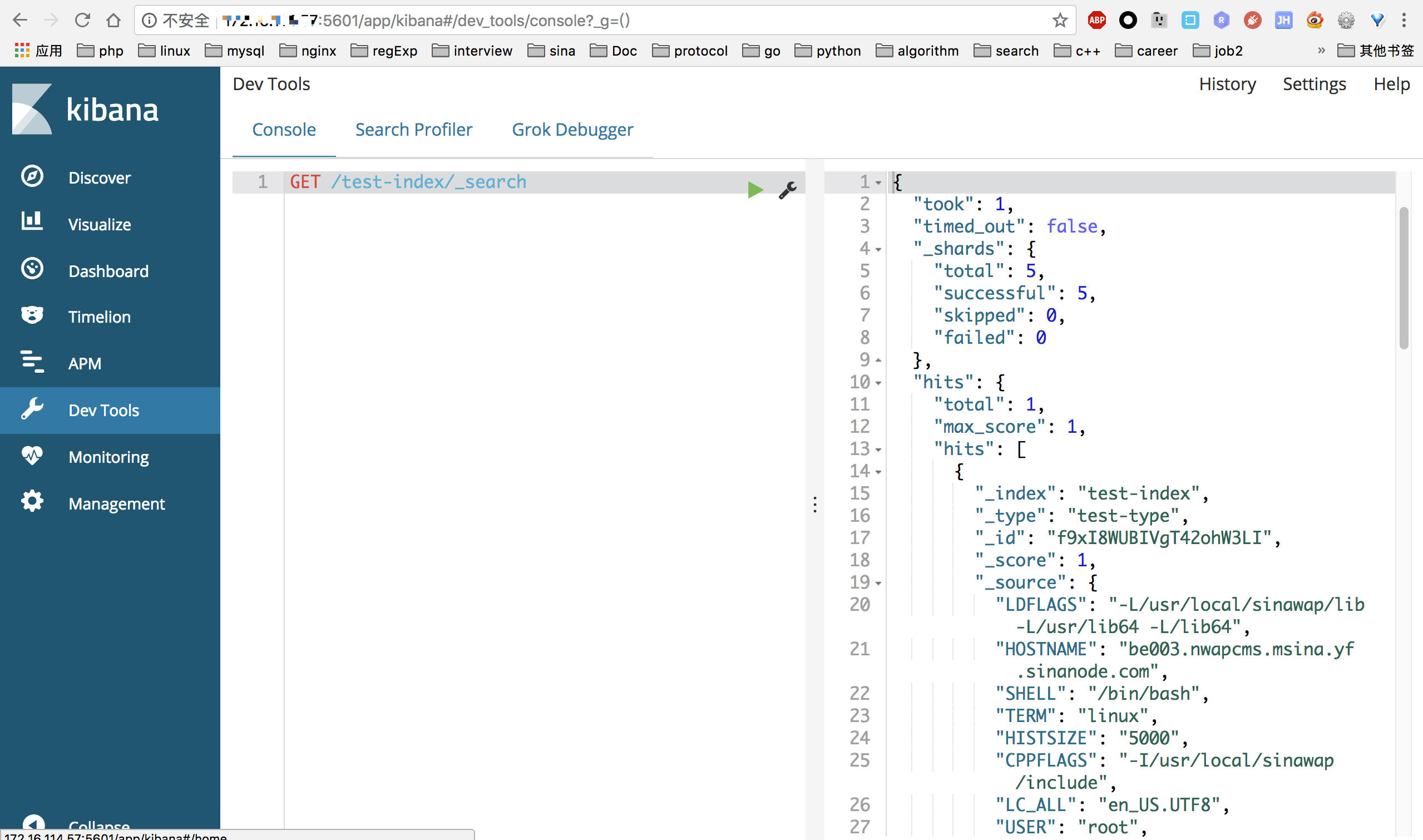
成功的画面:
安装elasticsearch 5.x, 6.x 常见问题(坑)的解决的更多相关文章
- 安装ElasticSearch遇到的深坑
实验需要ES,安装过程中遇到一些奇葩的问题,记录下.下面介绍下安装步骤: 第一步:安装java ES是运行在java虚拟机上面的,所以首先需要安装java环境,安装过程不再赘述,唯一需要注意的是ES对 ...
- ELK学习笔记(一)安装Elasticsearch、Kibana、Logstash和X-Pack
最近在学习ELK的时候踩了不少的坑,特此写个笔记记录下学习过程. 日志主要包括系统日志.应用程序日志和安全日志.系统运维和开发人员可以通过日志了解服务器软硬件信息.检查配置过程中的错误及错误发生的原因 ...
- centos6.6安装Elasticsearch
1. 安装jar8 yum list java-1.8* sudo yum install java-1.8.0-openjdk* -y java --version 2. 安装elasticsear ...
- [踩过的坑]Elasticsearch.Net 官网示例的坑
经过昨天的ElasticSearch 安装,服务以及可以启动了,接下来就可以开发了,找到了官网提供的API以及示例,Es 官方提供的.net 客户端有两个版本一个低级版本: [Elasticsearc ...
- Linux安装Elasticsearch
本文介绍Linux环境如何安装Elasticsearch. 本文环境是在腾讯云服务器CentOS7.2搭建的,JDK1.8,elasticsearch-5.4.2. 1 安装JDK 网上教程很多,也可 ...
- ELK日志框架(1):安装Elasticsearch组建单服务器多节点集群
ELK简介 最近有个需求搭建一套日志系统用于集成几个业务系统的日志提供快速的检索功能,目前是用Log4net存数据库+Error级别发邮件方式,也算简单暴力好用,但历史日志的模糊查询确实很慢,所以使用 ...
- CENTOS安装ElasticSearch(转)
From: https://my.oschina.net/topeagle/blog/591451?fromerr=mzOr2qzZ CENTOS安装ElasticSearch ElasticSear ...
- Windows下安装ElasticSearch及工具
转载自个人主页 前言 什么是ElasticSearch 官网如是介绍:Elasticsearch 是一个分布式.可扩展.实时的搜索与数据分析引擎. 它能从项目一开始就赋予你的数据以搜索.分析和探索的能 ...
- 【最新】docker 安装elasticsearch + kibana步骤【第一篇_elasticsearch】
最近在用docker 安装elasticsearch + kibana 遇到了很多坑,最后成功安装elasticsearch + kibana (6.8.1)版本 安装了一下午,现总结过程中遇到 ...
随机推荐
- Keil5创建GPIO
软件仿真如下图 Main.c内容 #include "stm32f10x.h" int main(void) { GPIO_InitTypeDef GPIO_InitStructu ...
- getnameinfo函数
一.函数原型 #include <netdb.h> int getnamefo(const struct sockaddr *sockaddr, socklen_t addrlen, ch ...
- Centos下查看mysql的版本
判断是否安装了mysql 输入 whereis mysql 如果安装了会显示mysql的安装所在路径 方法1:使用mysql -v命令查看: 1 2 3 4 [root@yeebian mysql ...
- request和reponse
- PHP cURL实现模拟登录与采集使用方法详解教程
来源:http://www.zjmainstay.cn/php-curl 本文将通过案例,整合浏览器工具与PHP程序,教你如何让数据 唾手可得 . 对于做过数据采集的人来说,cURL一定不会陌生.虽然 ...
- luogu P4899 [IOI2018] werewolf 狼火
传送门 首先很显然,从人形起点出发能到的点和狼形能到终点的点都是一个联通块,如果能从起点到终点则说明这两个联通块有交 这个时候可以请出我们的克鲁斯卡尔重构树,即对原图分别建两棵重构树,一棵边权为两端点 ...
- 数组去重的4种方法(Which one is the fastest???嘻嘻嘻....)
<!DOCTYPE html> <html lang="en"> <head> <meta charset="UTF-8&quo ...
- Django REST framework 第四章 Authentication
到目前为止,撰写的API没有任何限制关于谁能更新.删除snippet. 我们更想要一些高级行为来确保: 1.代码段总是跟创建者有关联 2.只要认证通过的用户才能创建 3.只有创建者有权限更新或者删除 ...
- 【blog】Hibernate5如何设置SQLite的方言(待更新...)
参考链接 Hibernate3.Hibernate4.Hibernate5 hibernate5连接sqlite (目前参考的是这个方法)
- Linux中的libc和glibc
现在centos6.8-x64系统里的c标准库已经成了glibc,glibc取代了libc,c标准库的位置在/lib64/libc.so.6 以下为转载 一.libc库 Linux平台提供的C标准库包 ...