
android开发学习---开发一个简易的短信发送器
一.需求:
开发一个简易的短信发送器,输入:对方手机号码,短信内容,点击发送按钮,短信发送成功,对方手机成功收到短信.
其中要求短信内容过长时可以自动拆分,长度英文是160个英文,中文是70个,中英混合时以70个为准.
当手机号码和短信内容为空时要有提示.
二.实现:
1.实现的效果图
1)5554的模拟器给5558的模拟器发送短信
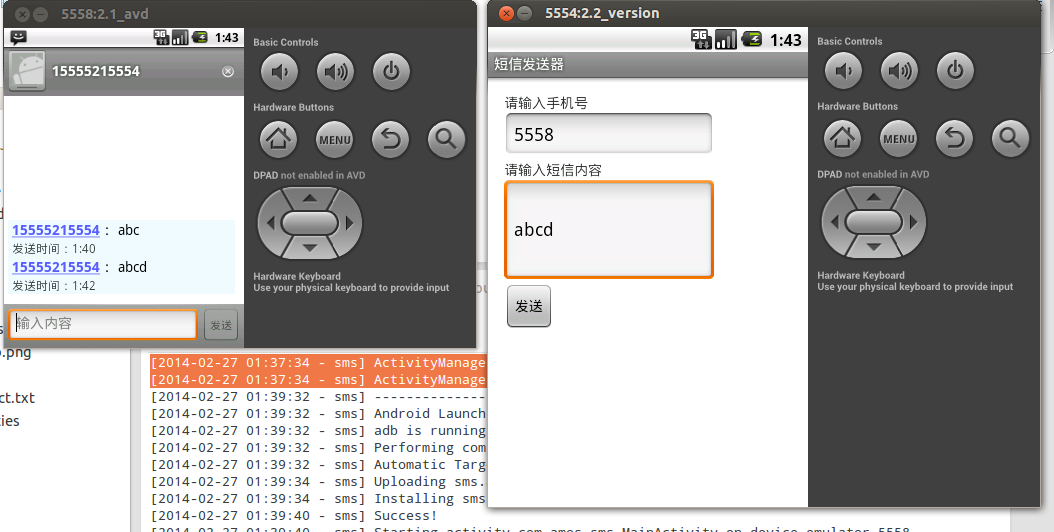
2)当短信内容过长时,自动实现拆分
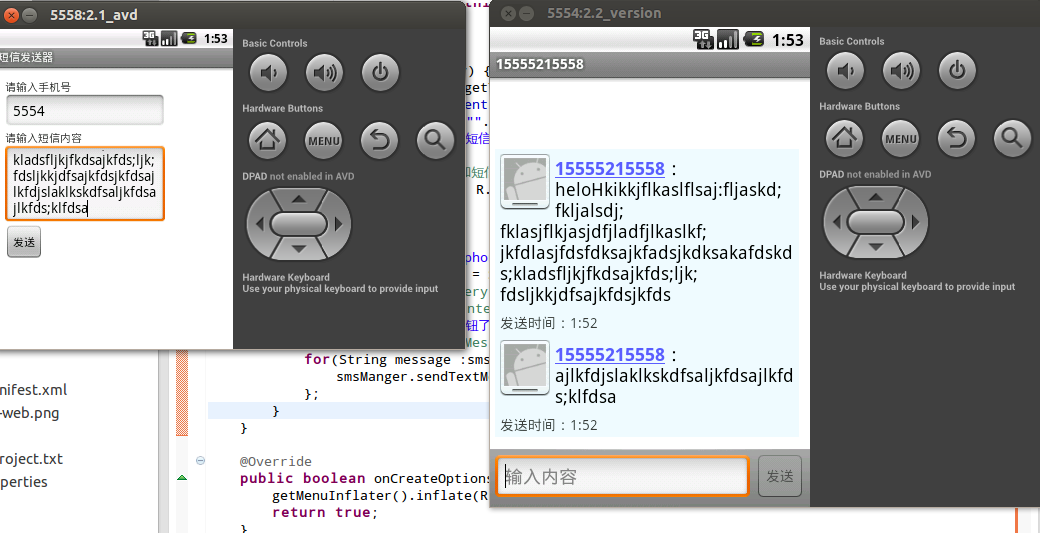
2.实现的步骤
1).建立新的工程
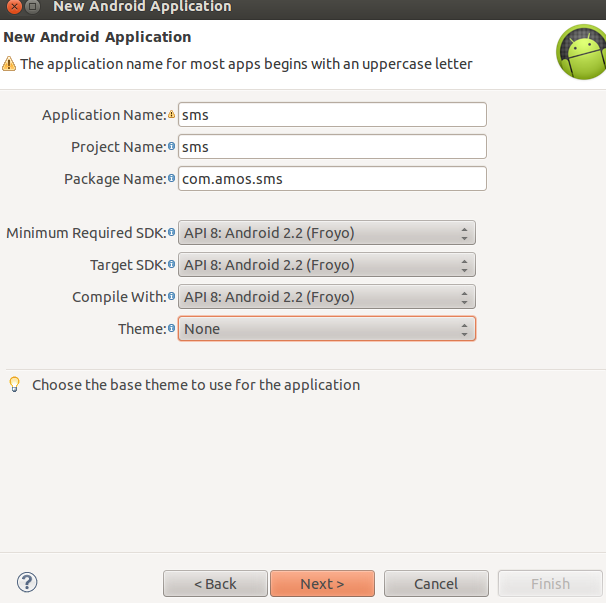
2).实现代码
实现的页面布局,/sms/res/layout/activity_main.xml,这里要特别注意定义的onClick方法send_sms
<RelativeLayout xmlns:android="http://schemas.android.com/apk/res/android"

    xmlns:tools="http://schemas.android.com/tools"

    android:layout_width="wrap_content"

    android:layout_height="wrap_content"

    android:paddingBottom="@dimen/activity_vertical_margin"

    android:paddingLeft="@dimen/activity_horizontal_margin"

    android:paddingRight="@dimen/activity_horizontal_margin"

    android:paddingTop="@dimen/activity_vertical_margin"

    tools:context=".MainActivity" >

    <TextView

        android:id="@+id/textView1"

        android:layout_width="wrap_content"

        android:layout_height="wrap_content"

        android:text="@string/input_phone" />

    <TextView

        android:id="@+id/textView2"

        android:layout_width="wrap_content"

        android:layout_height="wrap_content"

        android:layout_alignLeft="@+id/et_phone"

        android:layout_below="@+id/et_phone"

        android:text="@string/input_sms" />

    <EditText

        android:id="@+id/et_content"

        android:layout_width="wrap_content"

        android:layout_height="wrap_content"

        android:layout_alignLeft="@+id/textView2"

        android:layout_alignRight="@+id/et_phone"

        android:layout_below="@+id/textView2"

        android:lines="4"

        android:ems="10" />

    <Button

        android:id="@+id/bt_send"

        android:layout_width="wrap_content"

        android:layout_height="wrap_content"

        android:layout_alignLeft="@+id/et_content"

        android:layout_below="@+id/et_content"

        android:text="@string/send"

        android:onClick="send_sms"/>

    <EditText

        android:id="@+id/et_phone"

        android:layout_width="wrap_content"

        android:inputType="phone"

        android:layout_height="wrap_content"

        android:layout_alignParentLeft="true"

        android:layout_below="@+id/textView1"

        android:ems="10" />

</RelativeLayout>
变量配置:/sms/res/values/strings.xml,每次定义新的变量时,保存时gen目录下的R.java都会自动生成对其值的引用
<?xml version="1.0" encoding="utf-8"?>

<resources>

    <string name="app_name">短信发送器</string>

    <string name="action_settings">Settings</string>

    <string name="input_phone">请输入手机号</string>

    <string name="input_sms">请输入短信内容</string>

    <string name="send">发送</string>

    <string name="error_message">对方手机号码和短信内容都是必填的!</string>

</resources>
/sms/AndroidManifest.xml 这里涉及到用户权限问题和sdk最低版本的支持问题.
<?xml version="1.0" encoding="utf-8"?>

<manifest xmlns:android="http://schemas.android.com/apk/res/android"

    package="com.amos.sms"

    android:versionCode="1"

    android:versionName="1.0" >

    <uses-sdk

        android:minSdkVersion="4"

        android:targetSdkVersion="4" />

    <uses-permission android:name="android.permission.SEND_SMS"/>

    <application

        android:allowBackup="true"

        android:icon="@drawable/ic_launcher"

        android:label="@string/app_name"

        android:theme="@style/AppTheme" >

        <activity

            android:name="com.amos.sms.MainActivity"

            android:label="@string/app_name" >

            <intent-filter>

                <action android:name="android.intent.action.MAIN" />

                <category android:name="android.intent.category.LAUNCHER" />

            </intent-filter>

        </activity>

    </application>

</manifest>
MainActivity.java实现短信发送核心代码就在这里,当手机和短信其中有一个为空时提示信息是由Toast类实现的.
SMSManager类实现了短信的发送和短信的拆分.所示综合来看,都是在调用google开发的API.
package com.amos.sms;

import android.app.Activity;

import android.os.Bundle;

import android.telephony.SmsManager;

import android.util.Log;

import android.view.Menu;

import android.view.View;

import android.widget.EditText;

import android.widget.Toast;

public class MainActivity extends Activity {

    private EditText et_phone;// 文本输入框中的手机号码

    private EditText et_content;// 文本输入框中的短信内容

    private String tag = "MainActivity";

    @Override

    protected void onCreate(Bundle savedInstanceState) {

        super.onCreate(savedInstanceState);

        setContentView(R.layout.activity_main);

        et_phone = (EditText) this.findViewById(R.id.et_phone);

        et_content = (EditText) this.findViewById(R.id.et_content);

    }

    public void send_sms(View v) {

        String phone = et_phone.getText().toString();

        String content = et_content.getText().toString();

        if ("".equals(phone) || "".equals(content)) {

            Log.e(tag, "手机号或者短信内容为空!" + " phone:" + phone + "  content:" + content);

            // 提示用户输入手机号码和短信内容

            Toast.makeText(this, R.string.error_message, Toast.LENGTH_LONG).show();

            return;

        } else {

            System.out.println("phone:" + phone + "  content:" + content);

            SmsManager smsManger = SmsManager.getDefault();

            // sentIntent, deliveryIntent

            // 延期的意图,这里sentIntent是发送报告,运营商返回的信息短信的发送报告等;deliveryIntent表示短信的返回报告

            Log.w(tag, "点击发送按钮了");

            // smsManger.sendTextMessage(phone, null, content, null, null);

            for (String message : smsManger.divideMessage(content)) {

                smsManger.sendTextMessage(phone, null, message, null, null);

            }

        }

    }

    @Override

    public boolean onCreateOptionsMenu(Menu menu) {

        getMenuInflater().inflate(R.menu.main, menu);

        return true;

    }

}
3.实现过程中遇到的问题及解决方法
1).程序编译出现了问题,运行不了,报了下面的提示信息:
[2014-02-26 22:33:14 - Dex Loader] Unable to execute dex: java.nio.BufferOverflowException. Check the Eclipse log for stack trace.

[2014-02-26 22:33:14 - sms] Conversion to Dalvik format failed: Unable to execute dex: java.nio.BufferOverflowException. Check the Eclipse log for stack trace.
遇到上面的问题,在网上搜索了好一会才找到答案,是编译器的版本控制问题,将项目的支持的最低sdkversion降低到低于所使用的模拟器即可.如下所示:
<uses-sdk
android:minSdkVersion="4"
android:targetSdkVersion="4" />
2).permission权限问题
02-27 00:43:43.533: E/AndroidRuntime(381): at com.android.internal.os.ZygoteInit.main(ZygoteInit.java:626)
02-27 00:43:43.533: E/AndroidRuntime(381): at dalvik.system.NativeStart.main(Native Method)
02-27 00:43:43.533: E/AndroidRuntime(381): Caused by: java.lang.reflect.InvocationTargetException
02-27 00:43:43.533: E/AndroidRuntime(381): at com.amos.sms.MainActivity.send_sms(MainActivity.java:39)
02-27 00:43:43.533: E/AndroidRuntime(381): at java.lang.reflect.Method.invokeNative(Native Method)
02-27 00:43:43.533: E/AndroidRuntime(381): at java.lang.reflect.Method.invoke(Method.java:521)
02-27 00:43:43.533: E/AndroidRuntime(381): at android.view.View$1.onClick(View.java:2067)
02-27 00:43:43.533: E/AndroidRuntime(381): ... 11 more
02-27 00:43:43.533: E/AndroidRuntime(381): Caused by: java.lang.SecurityException: Sending SMS message: User 10038 does not have android.permission.SEND_SMS.
02-27 00:43:43.533: E/AndroidRuntime(381): at android.os.Parcel.readException(Parcel.java:1247)
02-27 00:43:43.533: E/AndroidRuntime(381): at android.os.Parcel.readException(Parcel.java:1235)
02-27 00:43:43.533: E/AndroidRuntime(381): at com.android.internal.telephony.ISms$Stub$Proxy.sendText(ISms.java:369)
02-27 00:43:43.533: E/AndroidRuntime(381): at android.telephony.SmsManager.sendTextMessage(SmsManager.java:87)
02-27 00:43:43.533: E/AndroidRuntime(381): ... 15 more
这个权限问题是因为本项目涉及到用户安全以及隐私问题,短信的发送,所以需要赋一个权限给项目.
这里在AndroidManifest.xml中Permissions-->add --->User Permission ---> android.permission.SEND_SMS -->save即可.
3).linux下找不到AVD Manager
在eclipse中的window→Customize Perspective→Command Groups availability→Available command groups→勾選Android SDK and AVD Manager
4).如何下载sdk源码 (sdk api source code)
http://grepcode.com/project/repository.grepcode.com/java/ext/com.google.android/android/
通过上面链接可以直接下载sdk各版本的源码jar文件.
4.本文源码
https://github.com/amosli/android.git 分支为sms
android开发学习---开发一个简易的短信发送器的更多相关文章
- Android_简易的短信发送器
这个随笔将介绍如何完成一个简单的第三方的短信发送器(不打开短信界面,调用android的api完成功能) 1.首先,我们来做布局 由于我这里写的是一个简易的,,短信发送,所以只是一个LinearLay ...
- android开发学习:打电话和发短信
1.新建一个android项目 File--New--Other--android application project 填写application name(就是应用的名字.比方:天天酷跑) 填写 ...
- Android学习4—短信发送器的实现
界面预览: 由图中可以看出,此APP需要的组件有:两个TextView,一个用于显示手机号码的标题,另一个用于显示短信内容的标题. ...
- IOS 开发,调用打电话,发短信,打开网址
IOS 开发,调用打电话,发短信,打开网址 1.调用 自带mail [[UIApplication sharedApplication] openURL:[NSURL URLWithString: ...
- Android Studio精彩案例(五)《JSMS短信验证码功能实现》
转载本专栏文章,请注明出处,尊重原创 .文章博客地址:道龙的博客 很多应用刚打开的时候,让我们输入手机号,通过短信验证码来登录该应用.那么,这个场景是怎么实现的呢?其实是很多开放平台提供了短信验证功能 ...
- 无废话Android之常见adb指令、电话拨号器、点击事件的4种写法、短信发送器、Android 中各种布局(1)
1.Android是什么 手机设备的软件栈,包括一个完整的操作系统.中间件.关键的应用程序,底层是linux内核,安全管理.内存管理.进程管理.电源管理.硬件驱动 2.Dalvik VM 和 JVM ...
- Android实战--短信发送器
首先设计界面 <LinearLayout xmlns:android="http://schemas.android.com/apk/res/android" xmlns:t ...
- Android项目——短信发送器
因为应用要使用手机的短信服务,所以要在清单文件AndroidManifest.xml中添加短信服务权限: <?xml version="1.0" encoding=" ...
- android短信发送器源代码
Activity类: import java.util.List;import android.app.Activity;import android.app.PendingIntent;import ...
随机推荐
- layer.tips定义弹出的宽度
layer.tips('xxx', '.onlinetest', { tips: [1, '#3595CC'], area: ['500px', 'auto'], time: 4000 });
- 对Kalman(卡尔曼)滤波器的理解@@zz
1.简介(Brief Introduction) 在学习卡尔曼滤波器之前,首先看看为什么叫“卡尔曼”.跟其他著名的理论(例如傅立叶变换,泰勒级数等等)一样,卡尔曼也是一个人的名字,而跟他们不同的是,他 ...
- Android中使用Handler以及CountDownTimer实现包括倒计时的闪屏页面
上一篇博文<Android中Handler使用浅析>通过实现倒计时闪屏页面的制作引出了Handler的用法以及实现原理,博文末尾也提到了实现过程中的Bug,有兴趣的朋友能够点击链接回去看看 ...
- Unable to create new web application
When I try to create a new web application, it just shows message as 'This should'nt take too long ...
- This is a bug I believe, and it took me 2-3 days to figure it out. Please do the following to get it working,
This is a bug I believe, and it took me 2-3 days to figure it out. Please do the following to get it ...
- CodeForces 569B Inventory 货物编号
原题: http://codeforces.com/contest/569/problem/B 题目: Inventory time limit per test1 second memory lim ...
- 推荐一些socket工具,TCP、UDP调试、抓包工具
还记得我在很久很久以前和大家推荐的Fiddler和Charles debugger么?他们都是HTTP的神器级调试工具,非常非常的好用.好工具能让你事半功倍,基本上,我是属于彻头彻尾的工具控. 假如有 ...
- Unity3D 导入Xcode 工程后。编译很慢
Unity3D 导入Xcode 工程后.编译很慢 选择Targets-->Build options -->debug information format 然后选择DWARF 这样再次 ...
- OS 获取用户相册。保存图片。编辑图片为圆形
// // ViewController.m // YunPhoto // // Created by qingyun on 3/4/14. // Copyright (c) 2014 qingyun ...
- JavaScript 之 JavaScript 对象
重新看JavaScript对象,参考资料: RUNOOB.COM:http://www.runoob.com/jsref/jsref-fromcharcode.html: CodePlayer:htt ...