
UITableView简述
原帖:http://blog.csdn.net/totogo2010/article/details/7642908
Table View简单描述:
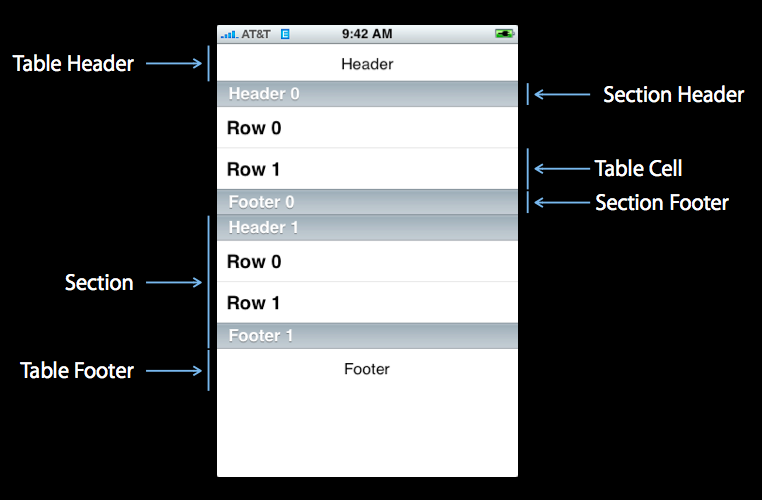
在iPhone和其他iOS的很多程序中都会看到Table View的出现,除了一般的表格资料展示之外,设置的属性资料往往也用到Table View,Table View主要分为以下两种:

- Plain:这是普通的列表风格
- Grouped :这是分块风格。
 :
:
1、新建项目
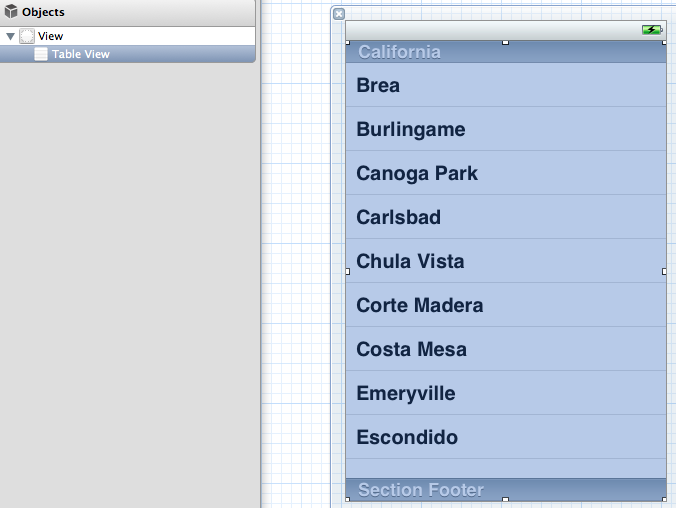
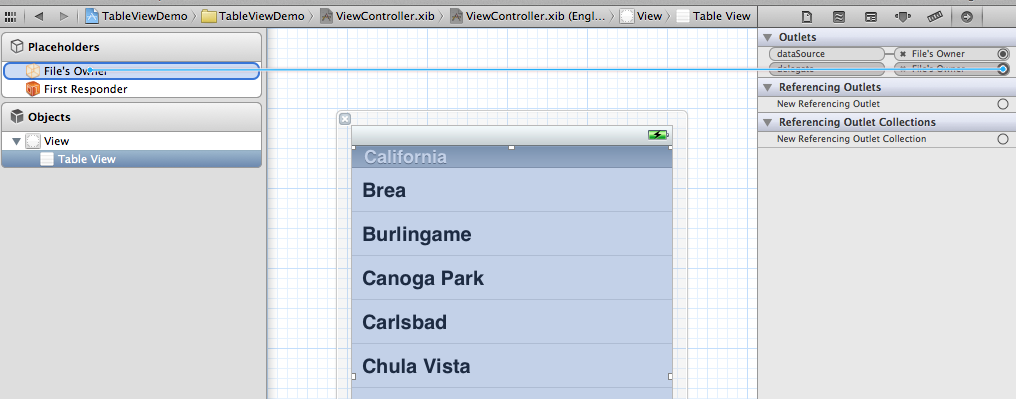
- #import <UIKit/UIKit.h>
- @interface ViewController : UIViewController<UITableViewDelegate, UITableViewDataSource>
- @property (strong, nonatomic) NSArray *list;
- @end
5、打开.m文件,添加:
- @synthesize list = _list;

这是发现有两个警告,提示未完成的实现,这提示的是UITableViewDelegate, UITableViewDataSource这个两个头文件里的协议的方法未实现。待会我们去实现它。
- - (void)viewDidLoad
- {
- [super viewDidLoad];
- // Do any additional setup after loading the view, typically from a nib.
- NSArray *array = [[NSArray alloc] initWithObjects:@"美国", @"菲律宾",
- @"黄岩岛", @"中国", @"泰国", @"越南", @"老挝",
- @"日本" , nil];
- self.list = array;
- }
- - (void)viewDidUnload
- {
- [super viewDidUnload];
- // Release any retained subviews of the main view.
- self.list = nil;
- }
7、生成row
- - (UITableViewCell *)tableView:(UITableView *)tableView
- cellForRowAtIndexPath:(NSIndexPath *)indexPath {
- static NSString *TableSampleIdentifier = @"TableSampleIdentifier";
- UITableViewCell *cell = [tableView dequeueReusableCellWithIdentifier:
- TableSampleIdentifier];
- if (cell == nil) {
- cell = [[UITableViewCell alloc]
- initWithStyle:UITableViewCellStyleDefault
- reuseIdentifier:TableSampleIdentifier];
- }
- NSUInteger row = [indexPath row];
- cell.textLabel.text = [self.list objectAtIndex:row];
- return cell;
- }
UITableViewCell *cell = [tableView dequeueReusableCellWithIdentifier: TableSampleIdentifier];
这个语句根据标识符TableSampleIdentifier寻找当前可以重用的UITableViewCell。当某行滑出当前可见区域后,我们重用它所对应的UITableViewCell对象,那么就可以节省内存和资源。
注意参数(NSIndexPath *)indexPath,它将行号row和部分号section合并了,通过[indexPath row];获取行号。之后给cell设置其文本:
cell.textLabel.text = [self.list objectAtIndex: row];
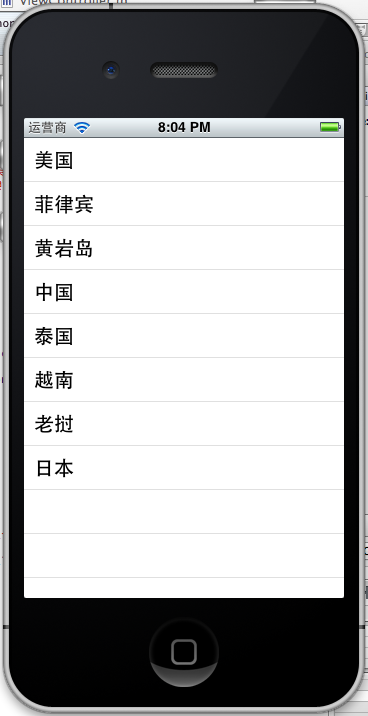
8、现在一个简单的TableView就弄好看,运行下看效果
 、、
、、- NSUInteger row = [indexPath row];
- cell.textLabel.text = [self.list objectAtIndex:row];
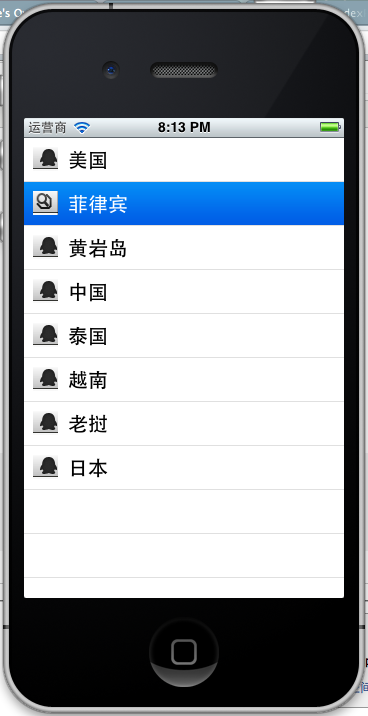
- UIImage *image = [UIImage imageNamed:@"qq"];
- cell.imageView.image = image;
- UIImage *highLighedImage = [UIImage imageNamed:@"youdao"];
- cell.imageView.highlightedImage = highLighedImage;
- return cell;
效果如下:
UITableViewCellStyleDefault
UITableViewCellStyleSubtle
UITableViewCellStyleValue1
UITableViewCellStyleValue2
cell.detailTextLabel.text =@"打打打打";
return cell;

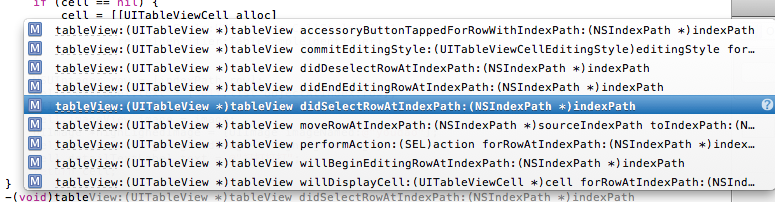
-(void)tableView:(UITableView *)tableView didSelectRowAtIndexPath:(NSIndexPath *)indexPath
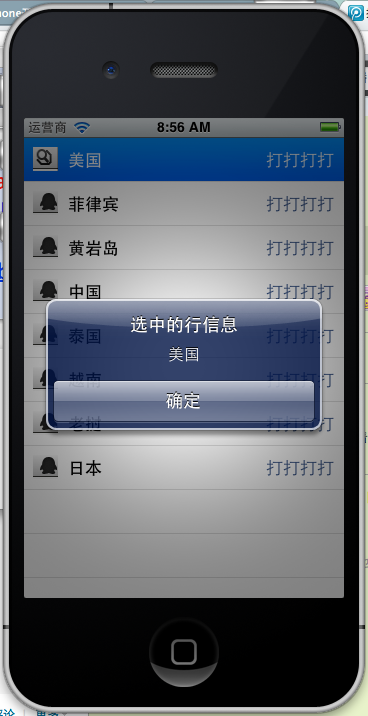
选中是做个提示,提示选中了那个信息,代码实现如下:
- -(void)tableView:(UITableView *)tableView didSelectRowAtIndexPath:(NSIndexPath *)indexPath{
- NSString *rowString = [self.list objectAtIndex:[indexPath row]];
- UIAlertView * alter = [[UIAlertView alloc] initWithTitle:@"选中的行信息" message:rowString delegate:self cancelButtonTitle:@"确定" otherButtonTitles:nil, nil];
- [alter show];
- }
效果:
UITableView简述的更多相关文章
- 给iOS开发新手送点福利,简述UITableView的属性和用法
UITableView UITableView内置了两种样式:UITableViewStylePlain,UITableViewStyleGrouped <UITableViewDataSo ...
- iOS UITableView 与 UITableViewController
很多应用都会在界面中使用某种列表控件:用户可以选中.删除或重新排列列表中的项目.这些控件其实都是UITableView 对象,可以用来显示一组对象,例如,用户地址薄中的一组人名.项目地址. UITab ...
- UITableView(二)
#import "ViewController.h" @interface ViewController () @end @implementation ViewControlle ...
- 简述 OAuth 2.0 的运作流程
本文将以用户使用 github 登录网站留言为例,简述 OAuth 2.0 的运作流程. 假如我有一个网站,你是我网站上的访客,看了文章想留言表示「朕已阅」,留言时发现有这个网站的帐号才能够留言,此时 ...
- JavaScript单线程和浏览器事件循环简述
JavaScript单线程 在上篇博客<Promise的前世今生和妙用技巧>的开篇中,我们曾简述了JavaScript的单线程机制和浏览器的事件模型.应很多网友的回复,在这篇文章中将继续展 ...
- iOS: 在UIViewController 中添加Static UITableView
如果你直接在 UIViewController 中加入一个 UITableView 并将其 Content 属性设置为 Static Cells,此时 Xcode 会报错: Static table ...
- iOS 编辑UITableView(根据iOS编程编写)
上个项目我们完成了 JXHomepwner 简单的应用展示,项目地址.本节我们需要在上节项目基础上,增加一些响应用户操作.包括添加,删除和移动表格. 编辑模式 UITableView 有一个名为 e ...
- Design Patterns Simplified - Part 3 (Simple Factory)【设计模式简述--第三部分(简单工厂)】
原文链接:http://www.c-sharpcorner.com/UploadFile/19b1bd/design-patterns-simplified-part3-factory/ Design ...
- 使用Autolayout实现UITableView的Cell动态布局和高度动态改变
本文翻译自:stackoverflow 有人在stackoverflow上问了一个问题: 1 如何在UITableViewCell中使用Autolayout来实现Cell的内容和子视图自动计算行高,并 ...
随机推荐
- apiCloud检出代码出现以下图示错误:
问题如下: Initialized empty Git repository in H:/simlpe/.git/ 已经在 H:\simlpe 完成必要的项目初始化工作正在尝试从代码服务器获取数据.. ...
- MVC ---- ckeditor 批量绑定 blur 事件
在项目遇到个问题,就是把循环出来的ckeditor 批量添加 blur 事件,折腾了2天 终于搞定 @{ ].Rows) { <table class="ui-jqgrid-btabl ...
- vijos1904 学姐的幸运数字
本文版权归ljh2000和博客园共有,欢迎转载,但须保留此声明,并给出原文链接,谢谢合作. 本文作者:ljh2000 作者博客:http://www.cnblogs.com/ljh2000-jump/ ...
- ASP.NET MVC实现网站验证码功能
网站添加验证码,主要为防止机器人程序批量注册,或对特定的注册用户用特定程序暴力破解方式,以进行不断的登录.灌水等危害网站的操作.验证码被广泛应用在注册.登录.留言等提交信息到服务器端处理的页面中. 在 ...
- Selenium库的使用
一.什么是Selenium selenium 是一套完整的web应用程序测试系统,包含了测试的录制(selenium IDE),编写及运行(Selenium Remote Control)和测试的并行 ...
- 查找并替换字符串 Find And Replace in String
2018-07-29 17:08:15 问题描述: 问题求解: 字符串替换的问题有个技巧就是从右向左进行替换,这样的话,左边的index就不需要考虑变动了. public String findRep ...
- 敏感性、特异性、假阳性、假阴性(sensitivity and specificity)
医学.机器学习等等,在统计结果时时长会用到这两个指标来说明数据的特性. 定义 敏感性:在金标准判断有病(阳性)人群中,检测出阳性的几率.真阳性.(检测出确实有病的能力) 特异性:在金标准判断无病(阴性 ...
- protected 与 internal
protected:在当前类的“内部” 和 派生子类的“内部” 可访问(注意:实例对象不可访问 或者说 访问不到):如果静态,则在当前类内部和派生子类内部 具有“全局效果” internal:在 ...
- python模块——re模块(简单的计算器功能实现_eval版)
#!/usr/bin/env python # -*- coding:utf-8 -*- __author__ = "loki" # Usage: Make a Diy Calcu ...
- HDU-3729 二分匹配 匈牙利算法
题目大意:学生给出其成绩区间,但可能出现矛盾情况,找出合理组合使没有说谎的人尽可能多,并按maximum lexicographic规则输出组合. //用学生去和成绩匹配,成绩区间就是学生可以匹配的成 ...