
使用Spring框架入门三:基于XML配置的AOP的使用
一、引入Jar包
        <!--测试1使用-->

        <dependency>

            <groupId>org.springframework</groupId>

            <artifactId>spring-context</artifactId>

            <version>5.0.5.RELEASE</version>

        </dependency>

        <!--测试2、3、4、5、6使用-->

        <dependency>

            <groupId>org.springframework</groupId>

            <artifactId>spring-aop</artifactId>

            <version>5.0.5.RELEASE</version>

        </dependency>

        <!--测试Aop使用-->

        <!-- https://mvnrepository.com/artifact/org.aspectj/aspectjweaver -->

        <dependency>

            <groupId>org.aspectj</groupId>

            <artifactId>aspectjweaver</artifactId>

            <version>1.9.1</version>

        </dependency>
注意,如果不引入aspectjweaver包,会报找不到类的错误。
二、测试步骤
1、新建切入点类(JoinPoint):
package aoptest1;

public class MyWorker {

    public void aopPointMethod1() {

        System.out.println("this is aopPointMethod1 executed.");

    }

}
2、建立增强类(Advice)
package aoptest1;

import org.aspectj.lang.ProceedingJoinPoint;

public class MyWorkerExtension {

    public void aopInspectAtBefore() {

        System.out.println("this is aopInspectAtBefore method execute.");

    }

    public void aopInspectAtAfter() {

        System.out.println("this is aopInspectAtAfter method execute.");

    }

    public void aopAround(ProceedingJoinPoint proceedingJoinPoint) {

        try {

            System.out.println("aopAround1");

            proceedingJoinPoint.proceed();

            System.out.println("aopAround2");

        } catch (Throwable throwable) {

            throwable.printStackTrace();

        }

    }

}
3、建立配置文件在resources下:applicationContextAopTest1.xml
<?xml version="1.0" encoding="UTF-8"?>

<beans xmlns="http://www.springframework.org/schema/beans"

       xmlns:xsi="http://www.w3.org/2001/XMLSchema-instance"

       xmlns:context="http://www.springframework.org/schema/context"

       xmlns:aop="http://www.springframework.org/schema/aop"

       xsi:schemaLocation="http://www.springframework.org/schema/beans

       http://www.springframework.org/schema/beans/spring-beans.xsd

       http://www.springframework.org/schema/context

       http://www.springframework.org/schema/context/spring-context.xsd

       http://www.springframework.org/schema/aop

       http://www.springframework.org/schema/aop/spring-aop.xsd">

    <context:component-scan base-package="aoptest1"/>

    <!--配置实体-->

    <bean id="myworker1" class="aoptest1.MyWorker"/>

    <bean id="myworkerExtension1" class="aoptest1.MyWorkerExtension"/>

    <!--配置AOP-->

    <aop:config>

        <!--配置切入点-->

        <aop:pointcut expression="execution(* aoptest1.MyWorker.aopPointMethod1(..))" id="aopPointMethod1PointCut"/>

        <!--配置切面-->

        <aop:aspect ref="myworkerExtension1">

            <aop:before method="aopInspectAtBefore" pointcut-ref="aopPointMethod1PointCut"/>

            <aop:after method="aopInspectAtAfter" pointcut-ref="aopPointMethod1PointCut"/>

            <aop:around method="aopAround" pointcut-ref="aopPointMethod1PointCut"/>

        </aop:aspect>

    </aop:config>

</beans>
4、测试
import aoptest1.MyWorker;

import org.junit.Test;

import org.springframework.context.ApplicationContext;

import org.springframework.context.support.ClassPathXmlApplicationContext;

public class AopTest {

    @Test

    public void aopTest1() {

        ApplicationContext context = new ClassPathXmlApplicationContext("applicationContextAopTest1.xml");

        MyWorker mywoker = context.getBean(MyWorker.class);

        mywoker.aopPointMethod1();

    }

}
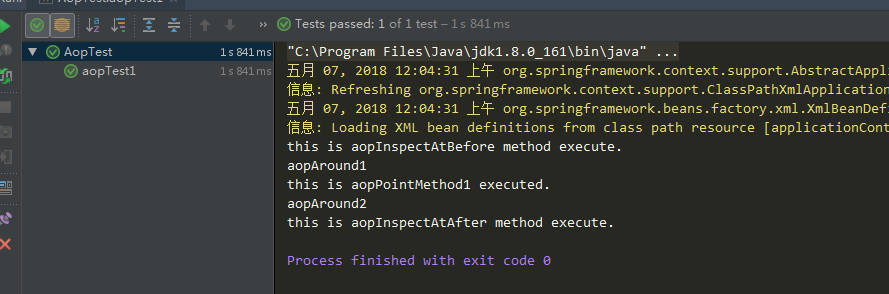
5、测试结果
this is aopInspectAtBefore method execute.

aopAround1

this is aopPointMethod1 executed.

aopAround2

this is aopInspectAtAfter method execute.
使用Spring框架入门三:基于XML配置的AOP的使用的更多相关文章
- Spring框架入门之基于xml文件配置bean详解
关于Spring中基于xml文件配置bean的详细总结(spring 4.1.0) 一.Spring中的依赖注入方式介绍 依赖注入有三种方式 属性注入 构造方法注入 工厂方法注入(很少使用,不推荐,本 ...
- Spring框架入门之基于Java注解配置bean
Spring框架入门之基于Java注解配置bean 一.Spring bean配置常用的注解 常用的有四个注解 Controller: 用于控制器的注解 Service : 用于service的注解 ...
- Spring3.0 入门进阶(三):基于XML方式的AOP使用
AOP是一个比较通用的概念,主要关注的内容用一句话来说就是"如何使用一个对象代理另外一个对象",不同的框架会有不同的实现,Aspectj 是在编译期就绑定了代理对象与被代理对象的关 ...
- spring框架之AspectJ的XML方式完成AOP的开发
1. 步骤一:创建JavaWEB项目,引入具体的开发的jar包 * 先引入Spring框架开发的基本开发包 * 再引入Spring框架的AOP的开发包 * spring的传统AOP的开发的包 * sp ...
- Spring使用AspectJ注解和XML配置实现AOP
本文演示的是Spring中使用AspectJ注解和XML配置两种方式实现AOP 下面是使用AspectJ注解实现AOP的Java Project首先是位于classpath下的applicationC ...
- 基于XML配置的AOP实现日志打印
Spring中可以使用注解或XML文件配置的方式实现AOP.1.导入jar包 com.springsource.net.sf.cglib -2.2.0.jar com.springsource.org ...
- Spring依赖注入:基于xml配置
基础接口 BeanFactory.ApplicationContext. BeanFactory用于创建并管理.获取各种类的对象. ApplicationContext从BeanFactory派生而来 ...
- 一步一步深入spring(6)--使用基于XML配置的spring实现的AOP
上节我们提到了使用基于注解实现的AOP,这节我们将用基于xml配置的方式来实现的AOP. 1.首先建立一个类,作为切面类,这个类主要用来实现注解中各种通知要实现的方法. package com.yan ...
- Spring3.2 中 Bean 定义之基于 XML 配置方式的源码解析
Spring3.2 中 Bean 定义之基于 XML 配置方式的源码解析 本文简要介绍了基于 Spring 的 web project 的启动流程,详细分析了 Spring 框架将开发人员基于 XML ...
随机推荐
- ZServer4D开源项目
ZServer4D开源项目 ZServer4D 是一套从商业项目剥离而出的云服务器中间件,可以承载百万级的分布式负载服务,并且支持IoT及内网穿透. 作者将它开源了 https://github.co ...
- 【elasticsearch】关于elasticSearch的基础概念了解【转载】
转载原文:https://www.cnblogs.com/chenmc/p/9516100.html 该作者本系列文章,写的很详尽 ================================== ...
- jQuery Ajax 上传文件改进
如果用户取消上传后 背景 提示自动消失了.... 修正Bug.... 同时也更新了不同上传类型的提示字体大小... 2017-05-26 增加了鼠标释放提示 先看之前的效果: 再看现在的效果: 升级 ...
- 解决html5 audio iphone,ipd,safari不能自动播放问题
html audio 在iPhone,ipd,safari浏览器不能播放是有原因滴 (在safri on ios里面明确指出等待用户的交互动作后才能播放media,也就是说如果你没有得到用户的acti ...
- NSObject的hash方法
NSObject的hash方法 说明 本示例仅仅演示一个对象什么时候执行hash方法. 细节 1. 必要的Model类,重载了hash方法用以反映Hash方法是否被调用了 2. 测试 // // Vi ...
- JavaScript中 location.host 与 location.hostname 的区别
JavaScript 中,大多数情况下,我们不会发现 location.host 与 location.hostname 的区别,因为大多数情况下,我们的网页用的是 80 端口. 他们的区别: loc ...
- 获得assets文件夹中文件内容
/** * @param fileName * @return assets中文件的字符串 */ public String getFromAssets(Context context, String ...
- 《Python自然语言处理》
<Python自然语言处理> 基本信息 作者: (美)Steven Bird Ewan Klein Edward Loper 出版社:人民邮电出版社 ISBN:97871153 ...
- Java的并发编程中的多线程问题到底是怎么回事儿?
在我之前的一篇<再有人问你Java内存模型是什么,就把这篇文章发给他.>文章中,介绍了Java内存模型,通过这篇文章,大家应该都知道了Java内存模型的概念以及作用,这篇文章中谈到,在Ja ...
- [Link]Hive资料整理
Hive SQL的编译过程 Hive学习分享 IBM Hive