
PCL点云变换与移除NaN
对点云的操作可以直接应用变换矩阵,即旋转,平移,尺度,3D的变换就是要使用4*4 的矩阵,例如:
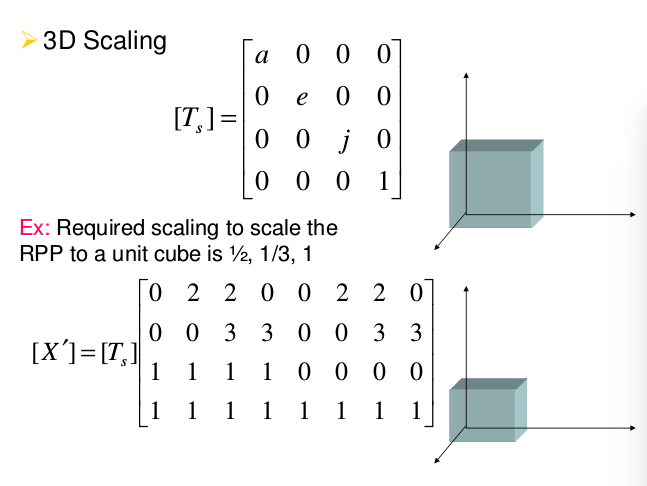


等等模型
在这里直接使用程序开实现一个点云的旋转,新建文件matrix.cpp
#include <iostream>

#include <pcl/io/pcd_io.h>

#include <pcl/io/ply_io.h>

#include <pcl/point_cloud.h>

#include <pcl/console/parse.h>

#include <pcl/common/transforms.h>

#include <pcl/visualization/pcl_visualizer.h>

// 命令行的帮助提示

void showHelp(char * program_name)

{

  std::cout << std::endl;

  std::cout << "Usage: " << program_name << " cloud_filename.[pcd|ply]" << std::endl;

  std::cout << "-h:  Show this help." << std::endl;

}

int main (int argc, char** argv)

{

  if (pcl::console::find_switch (argc, argv, "-h") || pcl::console::find_switch (argc, argv, "--help")) {

    showHelp (argv[]);

    return ;

  }

  // 读取文件

  std::vector<int> filenames;

  bool file_is_pcd = false;

  filenames = pcl::console::parse_file_extension_argument (argc, argv, ".ply");

  if (filenames.size () != )  {

    filenames = pcl::console::parse_file_extension_argument (argc, argv, ".pcd");

    if (filenames.size () != ) {

      showHelp (argv[]);

      return -;

    } else {

      file_is_pcd = true;

    }

  }

 //载入文件

  pcl::PointCloud<pcl::PointXYZ>::Ptr source_cloud (new pcl::PointCloud<pcl::PointXYZ> ());

  if (file_is_pcd) {

    if (pcl::io::loadPCDFile (argv[filenames[]], *source_cloud) < )  {

      std::cout << "Error loading point cloud " << argv[filenames[]] << std::endl << std::endl;

      showHelp (argv[]);

      return -;

    }

  } else {

    if (pcl::io::loadPLYFile (argv[filenames[]], *source_cloud) < )  {

      std::cout << "Error loading point cloud " << argv[filenames[]] << std::endl << std::endl;

      showHelp (argv[]);

      return -;

    }

  }

  /* Reminder: how transformation matrices work :

           |-------> This column is the translation

    | 1 0 0 x |  \

    | 0 1 0 y |   }-> The identity 3x3 matrix (no rotation) on the left

    | 0 0 1 z |  /

    | 0 0 0 1 |    -> We do not use this line (and it has to stay 0,0,0,1)

    METHOD #1: Using a Matrix4f

    This is the "manual" method, perfect to understand but error prone !

  */

  Eigen::Matrix4f transform_1 = Eigen::Matrix4f::Identity();

  // Define a rotation matrix 定义旋转的角度  再有角度计算出旋转矩阵

  float theta = M_PI/; // The angle of rotation in radians

  transform_1 (,) = cos (theta);

  transform_1 (,) = -sin(theta);

  transform_1 (,) = sin (theta);

  transform_1 (,) = cos (theta);

  //    (row, column)

  // Define a translation of 2.5 meters on the x axis.

  transform_1 (,) = 2.5;//意思就是在第一行第四个元素的值为2.5,也就是在x轴的平移为2.5

  // Print the transformation  打印出这个变换矩阵

  printf ("Method #1: using a Matrix4f\n");

  std::cout << transform_1 << std::endl;

  /*  METHOD #2: Using a Affine3f  第二种方案

    This method is easier and less error prone  更简单的方案

  */

  Eigen::Affine3f transform_2 = Eigen::Affine3f::Identity();

  // Define a translation of 2.5 meters on the x axis.

  transform_2.translation() << 2.5, 0.0, 0.0;

  // The same rotation matrix as before; theta radians arround Z axis

  transform_2.rotate (Eigen::AngleAxisf (theta, Eigen::Vector3f::UnitZ()));

  // Print the transformation

  printf ("\nMethod #2: using an Affine3f\n");

  std::cout << transform_2.matrix() << std::endl;

  // Executing the transformation

  pcl::PointCloud<pcl::PointXYZ>::Ptr transformed_cloud (new pcl::PointCloud<pcl::PointXYZ> ());

  // 你可以使用 transform_1 或者 transform_2;效果都是一样的

  pcl::transformPointCloud (*source_cloud, *transformed_cloud, transform_2);

  // 可视化的

  printf(  "\nPoint cloud colors :  white  = original point cloud\n"

      "                        red  = transformed point cloud\n");

  pcl::visualization::PCLVisualizer viewer ("Matrix transformation example");

   // 为点云设置RGB的值

  pcl::visualization::PointCloudColorHandlerCustom<pcl::PointXYZ> source_cloud_color_handler (source_cloud, , , );

  // We add the point cloud to the viewer and pass the color handler

  viewer.addPointCloud (source_cloud, source_cloud_color_handler, "original_cloud");

  pcl::visualization::PointCloudColorHandlerCustom<pcl::PointXYZ> transformed_cloud_color_handler (transformed_cloud, , , ); // Red

  viewer.addPointCloud (transformed_cloud, transformed_cloud_color_handler, "transformed_cloud");

  viewer.addCoordinateSystem (1.0, );

  viewer.setBackgroundColor(0.05, 0.05, 0.05, ); //设置背景颜色

  viewer.setPointCloudRenderingProperties (pcl::visualization::PCL_VISUALIZER_POINT_SIZE, , "original_cloud");

  viewer.setPointCloudRenderingProperties (pcl::visualization::PCL_VISUALIZER_POINT_SIZE, , "transformed_cloud");

  //viewer.setPosition(800, 400); // Setting visualiser window position

  while (!viewer.wasStopped ()) { // Display the visualiser until 'q' key is pressed

    viewer.spinOnce ();

  }

  return ;

}
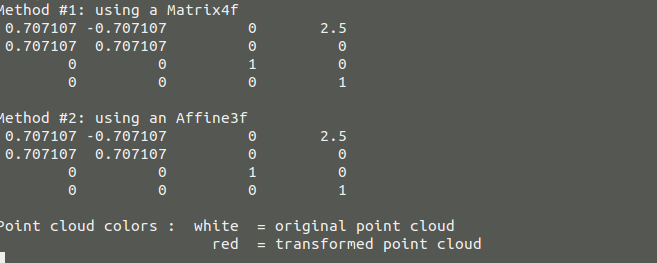
编译后我们随便找一个PCD文件查看效果,也可以该程序的参数,查看不同的参数的结果
命令窗口打印的结果
可视化的结果

(2)移除 NaNs:
从传感器获得的点云可能包含几种测量误差和/或不准确。其中之一是在一些点的坐标中存在NaN(不是数)值,正如你在下面的文件中看到的那样:
# .PCD v0.7 - Point Cloud Data file format

VERSION 0.7

FIELDS x y z rgba

SIZE 4 4 4 4

TYPE F F F U

COUNT 1 1 1 1

WIDTH 640

HEIGHT 480

VIEWPOINT 0 0 0 1 0 0 0

POINTS 307200

DATA ascii

nan nan nan 10135463

nan nan nan 10398635

nan nan nan 10070692

nan nan nan 10268071

...
点云对象的成员函数有称为“is_dense()”,如果所有的点都有效的返回true是为有限值。一个NaNs表明测量传感器距离到该点的距离值是有问题的,可能是因为传感器太近或太远,或者因为表面反射。那么当存在无效点云的NaNs值作为算法的输入的时候,可能会引起很多问题,比如“"Assertion `point_representation_->isValid (point) && "Invalid (NaN, Inf) point coordinates given to radiusSearch!"' failed."”如果发生这样的错误就要移除这些点,那么下面就是为了解决移除无效点的程序
#include <pcl/io/pcd_io.h>

#include <pcl/filters/filter.h>

#include <iostream>

#include <pcl/visualization/cloud_viewer.h>

int main(int argc,char** argv)

{

if(argc !=)

 {

  std::cout <<"\tUsage: "<<argv[] <<"<input cloud> <output cloud>" <<std::endl;

  return  -;

 }

//object for string the point cloud

pcl::PointCloud<pcl::PointXYZRGBA>::Ptr cloud(new pcl::PointCloud<pcl::PointXYZRGBA>);

//read a PCDfile from disk

if(pcl::io::loadPCDFile<pcl::PointXYZRGBA>(argv[],*cloud) !=)

{

 return -;

}

//the mapping tells you to that points of the oldcloud the new ones correspond

//but we  will not use it

std::vector<int> mapping;

pcl::removeNaNFromPointCloud(*cloud, *cloud, mapping);

//pcl::removeNaNFromPointCloud(*cloud, *cloud, mapping);

//save it back

pcl::io::savePCDFileASCII(argv[],*cloud);

pcl::visualization::CloudViewer viewer(argv[]);

         viewer.showCloud(cloud);

        while (!viewer.wasStopped())

    {

        // Do nothing but wait.

    }

}
然后可以显示移除NaNs点后的可视图,

这张点云是我自己用kinect 生成的点云,在没有移除NaNs的时候可以先读取以下,显示他的点云数值在命令窗口,你会发现会有很多的NaNs的无效点,经过
移除这些点之后在read一些打印处的结果就不会存在NaNs的无效点,这样在后期的使用算法的时候就不会出现错误了。

这种方法的问题是它不会保持点云仍然是有序点云。所有的点云都存储一个“宽度”和“高度”变量。在无序点云,总数为宽度相同,而高度设置为1。在有序的点云(像从相机拍摄像传感器如Kinect或Xtion的),宽度和高度都相同的像素的图像分辨率传感器的工作。点云分布在深度图像的行中,每一个点对应一个像素。成员函数”isorganized()”如果高度大于1时返回真。
由于移除NaNs无效点会改变点云的点的数量,它不再能保持组织与原来的宽高比,所以函数将设置高度1。这不是一个大问题,只有少数的PCL的算法工作明确要求是有序的点云(大多这样情况下会使用在优化上),但你必须考虑其中的影响。
暂时就到这里了。。。。。。
微信公众号号可扫描二维码一起共同学习交流

PCL点云变换与移除NaN的更多相关文章
- PCL点云配准(1)
在逆向工程,计算机视觉,文物数字化等领域中,由于点云的不完整,旋转错位,平移错位等,使得要得到的完整的点云就需要对局部点云进行配准,为了得到被测物体的完整数据模型,需要确定一个合适的坐标系,将从各个视 ...
- PCL点云库:ICP算法
ICP(Iterative Closest Point迭代最近点)算法是一种点集对点集配准方法.在VTK.PCL.MRPT.MeshLab等C++库或软件中都有实现,可以参见维基百科中的ICP Alg ...
- PCL点云配准(2)
(1)正态分布变换进行配准(normal Distributions Transform) 介绍关于如何使用正态分布算法来确定两个大型点云之间的刚体变换,正态分布变换算法是一个配准算法,它应用于三维点 ...
- PCL中点云数据格式之间的转化
(1) 关于pcl::PCLPointCloud2::Ptr和pcl::PointCloud<pcl::PointXYZ>两中数据结构的区别 pcl::PointXYZ::PointXYZ ...
- PCL点云库中的坐标系(CoordinateSystem)
博客转载自:https://blog.csdn.net/qq_33624918/article/details/80488590 引言 世上本没有坐标系,用的人多了,便定义了坐标系统用来定位.地理坐标 ...
- Windows下安装PCL点云库
原文链接:http://blog.csdn.net/u012337034/article/details/38270109 简介: 在Windows下安装PCL点云库的方法大概有两种: ...
- Windows 8 64位系统 在VS2010 32位软件上 搭建 PCL点云库 开发环境
Windows 8 64位系统 在VS2010 32位软件上 搭建 PCL点云库 开发环境 下载PCL For windows 软件包 到这个网站下载PCL-All-In-One Installer: ...
- PCL学习之:将超声数据按照PCL点云方式发布出去
前言:基于2D激光雷达的机器人,想让它跑自动导航,众所周知有2个比较明显的缺陷,1,那就是普通的激光雷达无法对玻璃或是镜面物体有反映; 2,机器人避障时只能对某一个平面的物体有反映,超过或者低于这个平 ...
- PCL点云库:对点云进行变换(Using a matrix to transform a point cloud)
点云数据可以用ASCII码的形式存储在PCD文件中(关于该格式的描述可以参考链接:The PCD (Point Cloud Data) file format).为了生成三维点云数据,在excel中用 ...
随机推荐
- HTC T329手机如何删除系统自带的软件?HTC一键解锁、获取ROOT权限、豌豆荚删除系统软件
手头一部HTC T329T手机,机上默认装载的软件实在太多了,居然占用了4页.用360手机卫士并不能删除系统软件(不能获取ROOT权限).查网上查询,总结要删除系统软件步骤如下(本人不刷机,只是想删除 ...
- Vivado中debug用法
Vivado和ISE相比ChipScope已经大幅改变,很多人都不习惯.在ISE中称为ChipScope而Vivado中就称为in system debug.下面就介绍Vivado中如何使用debug ...
- Xilinx FPGA用户约束文件(转自xilinx ISE 开发指南
FPGA设计中的约束文件有3类:用户设计文件(.UCF文件).网表约束文件(.NCF文件)以及物理约束文件(.PCF文件),可以完成时序约束.管 脚约束以及区域约束.3类约束文件的关系为:用户在设计输 ...
- PostgreSQL 保存json,jsonb类型
PostgresQL 字符串隐式转换JSON脚本: -- 隐式将varchar转换为json CREATE OR REPLACE FUNCTION json_in_varchar(varchar) R ...
- 高级数据库及一步一步搭建versant数据库
总的来说,高级数据库课程分为分布式数据库和面向对象数据库两块.分布式数据库介绍了分布式数据库的方方面面,包括数据库系统的设计.查询处理优化.事务管理和恢复.并发控制.可靠性.安全性与目录管理等.面向对 ...
- 运行Virtualbox去安装系统时出错:Failed to open a session for the virtual machine,Unable to load R3 module xxxx/VBoxDD.DLL(VBoxDD)
貌似看到不少人(1,2,3),在使用Virtualbox去安装系统时,都遇到这个错误: 比如这里遇到的: 截图: 和另外这里的截图: 加文字描述: Failed to open a session f ...
- 【Android】LayoutInflater
LayoutInflater的作用 LayoutInflater的作用类似于findViewById(). 不同点是: LayoutInflater是用来找res/layout/下的xml布局文件,并 ...
- 【转】MySQL中information_schema是什么
大家在安装或使用MYSQL时,会发现除了自己安装的数据库以外,还有一个information_schema数据库. information_schema数据库是做什么用的呢,使用WordPress博客 ...
- django配置超级管理员
Admin站点管理: 概述: 内容发布:负责添加,修改,删除内容的 公告访问 配置Admin应用: 在settings.py文件中的INSTALLED_APPS中添加'django.contrib.a ...
- mysql性能优化(一)
随着项目的上线,关注开始关注服务器的运维和优化,其中后端数据库状态查看和参数调优是比不可少的一步,可能用到的两个小工具: mysqltuner.pl tuning-primer.sh 参考: [1] ...