
Change position in observation
HTML
<!DOCTYPE HTML>

<HTML>

<head>

    <meta charset="    UTF-8">

    <title>position</title>

    <link rel="stylesheet" type="text/css" href="indextype.css">

</head>

<body>

    </form>

    <div class="box" id="one">One</div>

    <div class="box" id="two">Two</div>

    <div class="box" id="three">Three</div>

    <div class="box" id="four">Four</div>

    <br>

</body>

</HTML>
CSS
.box {

  display: inline-block;

  width: 100px;

  height: 100px;

  background: red;

  color: white;

}

#two {

  /*position:static;*/

  top: 20px;

  left: 20px;

  background: blue;

}
CSS代码,当改变position的值时:
0 没position时:
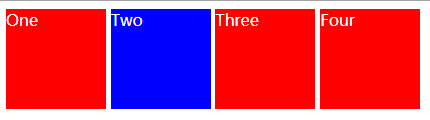
1 
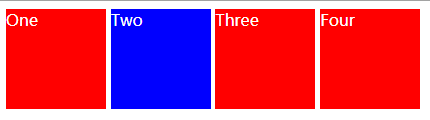
This is the default value.
2 
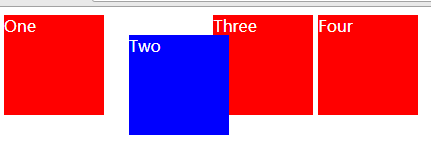
The element is positioned according to the normal flow of the document, and then offset relative to itself based on the values of top, right, bottom, and left. The offset does not affect the position of any other elements; thus, the space given for the element in the page layout is the same as if position were static.
元素根据文档的正常流进行定位,然后根据顶部、右侧、底部和左侧的值相对于自身进行偏移。偏移量不影响任何其他元素的位置;因此,页面布局中元素的空间与静态位置相同。
3 
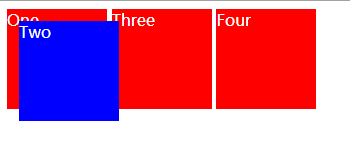
The element is removed from the normal document flow, and no space is created for the element in the page layout. It is positioned relative to the initial containing block established by the viewport,
4 
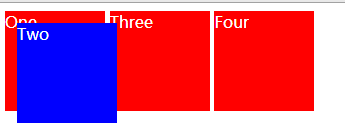
The element is removed from the normal document flow, and no space is created for the element in the page layout. It is positioned relative to its closest positioned ancestor, if any; otherwise, it is placed relative to the initial containing block. Its final position is determined by the values of top, right, bottom, and left.
5
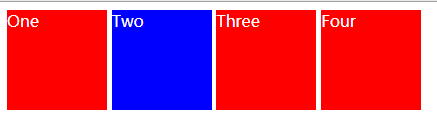
The element is positioned according to the normal flow of the document, and then offset relative to its nearest scrolling ancestor and containing block (nearest block-level ancestor), including table-related elements, based on the values of top, right, bottom, and left. The offset does not affect the position of any other elements.
由于有些效果一样,于是我增加网页显示的长度,出现了其他的效果,
我把box加在在以前写过的html后面,出现了下面的效果:
传视频在博客上,利用优酷的话,要先认证。我还在认证,过几天再传视频的效果图啦。
0000
<!DOCTYPE html>     <!--浏览器得知自己的处理内容是html-->

<!--<!DOCTYPE html>-->

 <!--注释-->

<!--<html lang="en">

    <!--文档中html部分的开始,en英语zh中文-->

<html>

<head>    <!--提供有关文档的内容和注释信息的-->

    <meta charset="UTF-8">        <!--一种编码方式-->

    <title>blogs</title>    <!--head里面必须有title元素-->

    <link rel="stylesheet" type="text/css" href="indextype.css">>

</head>

<body>

    <!--hypertext reference-->

    <a href="https://www.cnblogs.com/" target="_blank">blogs a</a>

    <a href="https://www.cnblogs.com/"> blogs b</a>

    <a href="https://www.cnblogs.com/" target="_self">blogs c</a>

***************************************

    <!--bold type-->

    <b>blogs</b>

    <!--emphasis-->

    <em>blogs</em>

    <!--下划线-->

    <u>blogs</u>

    <!--中间横线-->

    <s>blogs</s>

    <hl>

        啦啦啦啦啦啦啦啦

    </hl>

******************************************

    <table  border="1px" align="center">

        <thead>

        <tr>    <!--加粗居中-->

            <th>用户名</th>

            <th>性别</th>

            <th>密码</th>

        </tr>

        </thead>

        <tbody>

        <tr>

            <td>Admin</td>

            <td>man</td>

            <td>123</td>

        </tr>

        <tr>

            <td>Admin12334567</td>

            <td>man</td>

            <td>123</td>

        </tr>

        </tbody>

        <tfoot>

        <tr>

            <td>用户名</td>

            <td>性别</td>

            <td>密码</td>

        </tr>

        </tfoot>

    </table>

<br>        <!--换行-->

<table border="1px">

    <tr>

        <th rowspan="2">444</th>    <!--行row-->

        <th>444</th>

        <th>444444</th>

        <th>444</th>

    </tr>

    <tr>

        <td colspan="2">sdsd</td> <!--合并列单元格column -->

        <td>sdss</td>

    </tr>

    <tr>

        <td>sdsds</td>

        <td>sdsd</td>

        <td>sdsd</td>

        <td>sdsd</td>

    </tr>

</table>

******************************

<ol>

    <li>a</li>

    <li>a</li>

    <li>a</li>

</ol>

<ol reversed>

    <li>a</li>

    <li>a</li>

    <li>a</li>

</ol>

<ol type="a"><!--a A I -->

    <li>a</li>

    <li>a</li>

    <li>a</li>

</ol>

<ol>

    <li>何将用户选择的内</li>

    <ol type="a">

    <li>他们会提到Flash</li>

    <li>中关键技术的支持的改进</li>

    </ol>

</ol>

<ul>

    <li>a</li>

    <li>a</li>

    <li>a</li>

</ul>

********************************************************************************

<!--        表单        -->

<for method="get" action="6htmlform.php">

    <input type="text">

    <!--=<input>-->

    <br><br>

    <input type="text" value="blogs"><!--占位符-->

    <br><br>

    <input type="text" placeholder="blogs"><!--不占文本框内-->

    <br><br>

    <input type="text" placeholder="blogs" maxlength="8"><!--最大能输入的字符-->

    <br><br>

    <input type="text" placeholder="blogs" size="50"><!--拓宽单行文本框-->

    <br><br>

    <input type="text" value="blogs" readonly><!--只读-->

    <br><br>

    <input type="password" placeholder="密码">

    <textarea rows="20">aaaaaaaaaaadddddddddddddddggggggggggggggggggggggggaaa</textarea>

    <input type=button value="按钮">

    <button>按钮</button>         <!--js合作并且作为绑定事件的-->

    <input type="submit" value="提交"><!--提交表单-->

    <!--button>input button>input submit-->

    <input type="rang" min="-100" max="200" step="100">

    <input type="rang" min="-100" max="200" step="100" value="-100"><!--数字滑动-->

    <input type="number" min="-100" max="200"  value="-100"><!--手动输入数字-->

    <input type="checkbox">选择1<!--选择1-->

    <input type="radio">选择2

    你喜欢什么?

    <br>

    <input type="radio" name="d" checked>苹果

    <input type="radio" name="d">葡萄

    <input type="radio" name="d">琵琶

    <select>

        <option>苹果</option>

        <option>苹果2</option>

        <option>苹果3</option>

    </select>

    <input type="text" list="datalist111">

    <datalist id="datalist111">

        <option>苹果</option>

        <option>苹果2</option>

        <option>苹果3</option>

    </datalist>

    <br>

    <br>

    <br>

    <br>

    <br>

    <br>

    <br>

    <br>

    <br>

    <!--<input type ="email">

    <input type="tel">

    <input type="url">

    <input type="date">

    <input type="color">

    <input type="hidden" value="123">-->

    <input type="image" src="111.png" witn="80px"><!--图片按钮-->

    <input type="file" multiple><--上传多个文件-->

    <br>

    <br>

    <div class="box" id="one">One</div>

    <div class="box" id="two">Two</div>

    <div class="box" id="three">Three</div>

    <div class="box" id="four">Four</div>

    <br>

    <br>

    <br>

    <br>

    <!--

<div class="wrapper">

  <div class="one">One</div>

  <div class="two">Two</div>

  <div class="three">Three</div>

  <div class="four">Four</div>

  <div class="five">Five</div>

  <div class="six">Six</div>

</div>-->

</body>

</html>

</form>
Change position in observation的更多相关文章
- 使用CSS3动画属性实现360°无限循环旋转【代码片段】
使用CSS3的animation动画属性实现360°无限循环旋转. 代码片段: <div id="test"> <img src="/CSS3/img/ ...
- transitionend的运用案例
transitionend事件代表着过渡动画结束后 原生的绑定方法 obj.addEventListener('transitionEnd', function(){ //do soming }) 我 ...
- matlab文件操作及读txt文件(fopen,fseek,fread,fclose)
文件操作是一种重要的输入输出方式,即从数据文件读取数据或将结果写入数据文件.MATLAB提供了一系列低层输入输出函数,专门用于文件操作. 1.文件的打开与关闭 1)打开文件 在读写文件之前,必须先用f ...
- u11-nav02
header:before, header:after ,.navigation:before, .navigation:after,.nav-row:before, .nav-row:after,. ...
- new-nav-css
header:before, header:after ,.navigation:before, .navigation:after,.nav-row:before, .nav-row:after,. ...
- u1-nav-css
header:before, header:after ,.navigation:before, .navigation:after,.nav-row:before, .nav-row:after,. ...
- nav ccsss
/*header: Navigation public style*/header:before, header:after ,.navigation:before, .navigation:afte ...
- G-nav-03
/*dele masthead.css style*/.masthead .navigation .btn.btn-masthead.btn-apply:after { content: ''; di ...
- Android viewPage notifyDataSetChanged无刷新
转载 http://www.67tgb.com/?p=624 最近项目结束,搞了一次代码分享.其中一位同学分享了一下自己在解决问题过程中的一些心得体会,感觉受益匪浅.整理出来,分享给大家. 建议使用自 ...
随机推荐
- CF979E
非常好的dp,非常考dp的能力 很显然是个计数问题,那么很显然要么是排列组合,要么是递推,这道题很显然递推的面更大一些. 那么我们来设计一下状态: 设状态f[i][j][k][p]表示目前到了第i个点 ...
- Linux基础三:linux目录结构和目录文件的浏览、管理及维护
目录文件的浏览.管理及维护(一) 1.Linux文件系统的层次结构 1)Linux文件系统的树状结构:在Linux或UNIX操作系统中,所有的文件和目录都被组织成一个以根节点开始的倒置的树状结构. 2 ...
- HDU 1166 敌兵布阵(线段树/树状数组模板题)
敌兵布阵 Time Limit: 2000/1000 MS (Java/Others) Memory Limit: 65536/32768 K (Java/Others) Total Submi ...
- Cookie中设置了 HttpOnly,Secure 属性,有效的防止XSS攻击,X-Frame-Options 响应头避免点击劫持
属性介绍: 1) secure属性当设置为true时,表示创建的 Cookie 会被以安全的形式向服务器传输(ssl),即 只能在 HTTPS 连接中被浏览器传递到服务器端进行会话验证, 如果是 HT ...
- mysql8.0.11绿色版安装教程
解压到安装目录 在根目录建立data文件夹 建立my.ini文件 代码如下 # Other default tuning values # MySQL Server Instance Configur ...
- C#搭建Oauth2.0认证流程以及代码示例
我认为对于一个普遍问题,必有对应的一个简洁优美的解决方案.当然这也许只是我的一厢情愿,因为根据宇宙法则,所有事物总归趋于混沌,而OAuth协议就是混沌中的产物,不管是1...0a还是2.,单看版本号就 ...
- 【AtCoder】AGC014
AGC014 链接 A - Cookie Exchanges 发现两个数之间的差会逐渐缩小,所以只要不是三个数都相同,那么log次左右一定会得到答案 #include <bits/stdc++. ...
- 如何访问https的网站?-【httpclient】
备注:本处代码使用groovy和httpclient4.3作为例子进行讲述 在普通方式下,当使用httpclient进行访问某个网站时,大致使用如下的代码进行访问: CloseableHttpClie ...
- zabbix通过自动发现tomcat应用端口监控连接数
192.168.10.98上 netstat -anp | wc -l netstat -anp|grep 8094 | grep ESTABLISHED | wc -l netstat -anp|g ...
- vsftp为不同用户设置不同的ftp的根目录
需求 要求ftp登录后的根目录是/var/test/,但是又不能影响其他用户的登录路径,因为有些程序是直接在根目录进行操作的,而没有目录切换的过程.操作过程新建用户 useradd test1user ...