
SpringSecurity初步理解
Authenticating a User with LDAP
首先创建一个简单的web控制器
 package hello;

 import org.springframework.web.bind.annotation.GetMapping;

 import org.springframework.web.bind.annotation.RestController;

 @RestController

 public class HomeController {

     @GetMapping("/")

     public String index() {

         return "Welcome to the home page!";

     }

 }
老生常谈,用到springboot,肯定少不了它的启动类
package hello;

import org.springframework.boot.SpringApplication;

import org.springframework.boot.autoconfigure.SpringBootApplication;

@SpringBootApplication

public class Application {

    public static void main(String[] args) {

        SpringApplication.run(Application.class, args);

    }

}
SpringSecurity需要用到的maven依赖如下图
<dependencies>

    <dependency>

        <groupId>org.springframework.boot</groupId>

        <artifactId>spring-boot-starter-web</artifactId>

    </dependency>

    <dependency>

        <groupId>org.springframework.boot</groupId>

        <artifactId>spring-boot-starter-security</artifactId>

    </dependency>

    <dependency>

        <groupId>org.springframework.ldap</groupId>

        <artifactId>spring-ldap-core</artifactId>

    </dependency>

    <dependency>

        <groupId>org.springframework.security</groupId>

        <artifactId>spring-security-ldap</artifactId>

    </dependency>

    <dependency>

        <groupId>com.unboundid</groupId>

        <artifactId>unboundid-ldapsdk</artifactId>

    </dependency>

    <dependency>

        <groupId>org.springframework.boot</groupId>

        <artifactId>spring-boot-starter-test</artifactId>

        <scope>test</scope>

    </dependency>

    <dependency>

        <groupId>org.springframework.security</groupId>

        <artifactId>spring-security-test</artifactId>

        <scope>test</scope>

    </dependency>

</dependencies>
开始做详细的安全认证,安全认证的思路是这样的“
创建一个类并继承WebSecurityConfigurerAdapter这个方法,并在之类中重写configure的3个方法,
其中3个方法中参数包括为
HttpSecurity(HTTP请求安全处理),AuthenticationManagerBuilder(身份验证管理生成器)和WebSecurity(WEB安全)。

如下代码
 package com.ssm.demo.com.ssm.Hello;

 import org.springframework.context.annotation.ComponentScan;

 import org.springframework.context.annotation.Configuration;

 import org.springframework.security.config.annotation.authentication.builders.AuthenticationManagerBuilder;

 import org.springframework.security.config.annotation.web.builders.HttpSecurity;

 import org.springframework.security.config.annotation.web.configuration.WebSecurityConfigurerAdapter;

 import org.springframework.security.crypto.password.LdapShaPasswordEncoder;

 /**

  *

  创建一个类并继承WebSecurityConfigurerAdapter这个方法,并在之类中重写configure的3个方法,

  其中3个方法中参数包括为

  HttpSecurity(HTTP请求安全处理),AuthenticationManagerBuilder(身份验证管理生成器)和WebSecurity(WEB安全)。

  */

 @Configuration

 @ComponentScan

 public class WebSecurityConfig extends WebSecurityConfigurerAdapter {

     /**

      * http请求安全处理

      * @param http

      * @throws Exception

      */

     @Override

     protected void configure(HttpSecurity http) throws Exception {

         //http.authorizeRequests()这里的意思是通过方法来开始请求权限配置,

         //fullyAuthenticated()意为用户完全认证可以访问

         //and()是返回一个securityBuilder对象,formLogin()和httpBasic()是授权的两种方式

         http.authorizeRequests().anyRequest().fullyAuthenticated().and().formLogin();

     }

     /**

      * 身份验证管理生成器

      * @param auth

      * @throws Exception

      */

     @Override

     protected void configure(AuthenticationManagerBuilder auth) throws Exception {

         auth.ldapAuthentication().userDnPatterns("uid={0},ou=people").groupSearchBase("ou=groups").contextSource().

                 url("ldap://localhost:8389/dc=springframework,dc=org").and().passwordCompare().passwordEncoder(new LdapShaPasswordEncoder())

                 .passwordAttribute("userPassword");

     }

 }
设置用户数据,使用到LDAP服务器(ldif文件),
在yml中添加LDAP服务的代理
server:

  servlet:

    context-path: /llh

  port: 8082

spring:

  datasource:

    url: jdbc:mysql://127.0.0.1:3306/depot?useUnicode=true&characterEncoding=utf8

    username: root

    password: 123456

  servlet:

    multipart:

      max-file-size: 128KB

      max-request-size: 128KB

  ldap:

    embedded:

      ldif: classpath:test-server.ldif

      base-dn: dc=springframework,dc=org

      port: 8389
resource文件夹下面创建一个test-server.ldif文件
 dn: dc=springframework,dc=org

 objectclass: top

 objectclass: domain

 objectclass: extensibleObject

 dc: springframework

 dn: ou=groups,dc=springframework,dc=org

 objectclass: top

 objectclass: organizationalUnit

 ou: groups

 dn: ou=subgroups,ou=groups,dc=springframework,dc=org

 objectclass: top

 objectclass: organizationalUnit

 ou: subgroups

 dn: ou=people,dc=springframework,dc=org

 objectclass: top

 objectclass: organizationalUnit

 ou: people

 dn: ou=space cadets,dc=springframework,dc=org

 objectclass: top

 objectclass: organizationalUnit

 ou: space cadets

 dn: ou=\"quoted people\",dc=springframework,dc=org

 objectclass: top

 objectclass: organizationalUnit

 ou: "quoted people"

 dn: ou=otherpeople,dc=springframework,dc=org

 objectclass: top

 objectclass: organizationalUnit

 ou: otherpeople

 dn: uid=ben,ou=people,dc=springframework,dc=org

 objectclass: top

 objectclass: person

 objectclass: organizationalPerson

 objectclass: inetOrgPerson

 cn: Ben Alex

 sn: Alex

 uid: ben

 userPassword: {SHA}nFCebWjxfaLbHHG1Qk5UU4trbvQ=

 dn: uid=bob,ou=people,dc=springframework,dc=org

 objectclass: top

 objectclass: person

 objectclass: organizationalPerson

 objectclass: inetOrgPerson

 cn: Bob Hamilton

 sn: Hamilton

 uid: bob

 userPassword: bobspassword

 dn: uid=joe,ou=otherpeople,dc=springframework,dc=org

 objectclass: top

 objectclass: person

 objectclass: organizationalPerson

 objectclass: inetOrgPerson

 cn: Joe Smeth

 sn: Smeth

 uid: joe

 userPassword: joespassword

 dn: cn=mouse\, jerry,ou=people,dc=springframework,dc=org

 objectclass: top

 objectclass: person

 objectclass: organizationalPerson

 objectclass: inetOrgPerson

 cn: Mouse, Jerry

 sn: Mouse

 uid: jerry

 userPassword: jerryspassword

 dn: cn=slash/guy,ou=people,dc=springframework,dc=org

 objectclass: top

 objectclass: person

 objectclass: organizationalPerson

 objectclass: inetOrgPerson

 cn: slash/guy

 sn: Slash

 uid: slashguy

 userPassword: slashguyspassword

 dn: cn=quote\"guy,ou=\"quoted people\",dc=springframework,dc=org

 objectclass: top

 objectclass: person

 objectclass: organizationalPerson

 objectclass: inetOrgPerson

 cn: quote\"guy

 sn: Quote

 uid: quoteguy

 userPassword: quoteguyspassword

 dn: uid=space cadet,ou=space cadets,dc=springframework,dc=org

 objectclass: top

 objectclass: person

 objectclass: organizationalPerson

 objectclass: inetOrgPerson

 cn: Space Cadet

 sn: Cadet

 uid: space cadet

 userPassword: spacecadetspassword

 dn: cn=developers,ou=groups,dc=springframework,dc=org

 objectclass: top

 objectclass: groupOfUniqueNames

 cn: developers

 ou: developer

 uniqueMember: uid=ben,ou=people,dc=springframework,dc=org

 uniqueMember: uid=bob,ou=people,dc=springframework,dc=org

 dn: cn=managers,ou=groups,dc=springframework,dc=org

 objectclass: top

 objectclass: groupOfUniqueNames

 cn: managers

 ou: manager

 uniqueMember: uid=ben,ou=people,dc=springframework,dc=org

 uniqueMember: cn=mouse\, jerry,ou=people,dc=springframework,dc=org

 dn: cn=submanagers,ou=subgroups,ou=groups,dc=springframework,dc=org

 objectclass: top

 objectclass: groupOfUniqueNames

 cn: submanagers

 ou: submanager

 uniqueMember: uid=ben,ou=people,dc=springframework,dc=org
这时候就可以启动springboot的启动类,键入地址:http://127.0.0.1:8082/llh/,发现已经被拦截下来了,并且重定向到了Spring Security提供的登录页面
,见下图: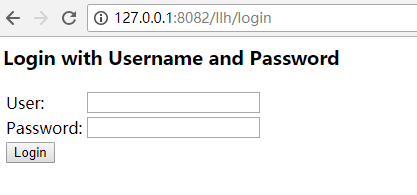
输入用户名:ben,密码:benspassword,即可登录。
SpringSecurity初步理解的更多相关文章
- javascript 原型及原型链的初步理解
最近折腾了好久,终于是把js里面的原型和原型链做了个初步的理解: 在这里,我打个比喻: 我(child),我妈constructor(构造函数)生了我:别人问我老妈跟谁生的我,于是此时我妈会指向我爸爸 ...
- Spring学习笔记--环境搭建和初步理解IOC
Spring框架是一个轻量级的框架,不依赖容器就能够运行,像重量级的框架EJB框架就必须运行在JBoss等支持EJB的容器中,核心思想是IOC,AOP,Spring能够协同Struts,hiberna ...
- Graph Cuts初步理解
一些知识点的初步理解_8(Graph Cuts,ing...) Graph cuts是一种十分有用和流行的能量优化算法,在计算机视觉领域普遍应用于前背景分割(Image segmentation).立 ...
- 非常易于理解‘类'与'对象’ 间 属性 引用关系,暨《Python 中的引用和类属性的初步理解》读后感
关键字:名称,名称空间,引用,指针,指针类型的指针(即指向指针的指针) 我读完后的理解总结: 1. 我们知道,python中的变量的赋值操作,变量其实就是一个名称name,赋值就是将name引用到一个 ...
- springBoot(1)---springboot初步理解
springboot初步理解 在没有用SpringBoot之前,我们用spring和springMVC框架,但是你要做很多比如: (1)配置web.xml,加载spring和spring mvc 2) ...
- Mysql加锁过程详解(7)-初步理解MySQL的gap锁
Mysql加锁过程详解(1)-基本知识 Mysql加锁过程详解(2)-关于mysql 幻读理解 Mysql加锁过程详解(3)-关于mysql 幻读理解 Mysql加锁过程详解(4)-select fo ...
- 关于THINKPHP5模型关联的初步理解
初步理解的意思是,使用最常用的关联模型,然后可以正常运行 还是打个比方 文章表 和文章分类表 一个文章分类可以有多个文章 所以 文章分类模型和文章建立 hasMany的关联 而文章和文章分类表则 ...
- spfa+差分约束系统(C - House Man HDU - 3440 )+对差分约束系统的初步理解
题目链接:https://cn.vjudge.net/contest/276233#problem/C 题目大意:有n层楼,给你每个楼的高度,和这个人单次的最大跳跃距离m,两个楼之间的距离最小是1,但 ...
- Android-自定义控件-继承View与ViewGroup的初步理解
继承View需要走的流程是: 1.构造实例化, public ChildView(Context context, @Nullable AttributeSet attrs) 2.测量自身的高和宽on ...
随机推荐
- 原生JS强大DOM选择器querySelector与querySelectorAll
在传统的 JavaScript 开发中,查找 DOM 往往是开发人员遇到的第一个头疼的问题,原生的 JavaScript 所提供的 DOM 选择方法并不多,仅仅局限于通过 tag, name, id ...
- 数组去重(ES5、ES6)
对象赋值思想:(接收后台数据绘制统计图用到了该想法) // ES5 /** * 数组.字符串去重 * @param {[string/array]} [数组] * @return {[array]} ...
- 【代码笔记】Web-ionic-卡片
一,效果图. 二,代码. <!DOCTYPE html> <html> <head> <meta charset="utf-8"> ...
- 安卓开发_浅谈Action Bar
一.Action Bar 导航栏.是3.0之后出现的. 所以注意使用的时候清单文件要设置下 android:minSdkVersion="11"(至少11) 但如果使用v4包,则不 ...
- 利用python实现简单词频统计、构建词云
1.利用jieba分词,排除停用词stopword之后,对文章中的词进行词频统计,并用matplotlib进行直方图展示 # coding: utf-8 import codecs import ma ...
- Django 知识总结(一)
Django已经学过的知识点: 1. Urls.py 路由系统: 正则 分组匹配 --> 位置参数 分组命名匹配 --> 关键字参数 分级路由 include 给路由起别名 name=&q ...
- 简单整理关于C#和Java的区别
相信每个程序猿都有自己最喜欢的编程语言,然而对于编程语言似乎形成一条独特的鄙视链,就如Java和C#常常两边的开发者都是相互鄙视,然后他们一起共同鄙视全世界最好的编程语言——PHP 哈哈,但是其实我想 ...
- oracle 数据库 导出与导入 expdb和impdb使用方法 (服务器本机)
expdb 与exp 导出数据有区异,exp 无法导出空值表,用于客户端,expdb 只用于服务器端.备份出来的数据可再远程传输到另外一台linux 实现异地备份! 一 关于expdp和impdp ...
- HDU ACM 2066 一个人的旅行
一个人的旅行 Time Limit: 1000/1000 MS (Java/Others) Memory Limit: 32768/32768 K (Java/Others)Total Subm ...
- Hadoop2.7.6_04_HDFS的Shell操作与常见问题
1. HDFS的shell操作 1.1. 支持的命令及参数 [yun@mini05 zhangliang]$ hadoop fs Usage: hadoop fs [generic options] ...