
Python中使用RabbitMQ
一 RabbitMQ简介
RabbitMQ是一个在AMQP基础上完整的,可复用的企业消息系统。他遵循Mozilla Public License开源协议。
MQ全称为Message Queue, 消息队列(MQ)是一种应用程序对应用程序的通信方法。应用程序通过读写出入队列的消息(针对应用程序的数据)来通信,而无需专用连接来链接它们。消 息传递指的是程序之间通过在消息中发送数据进行通信,而不是通过直接调用彼此来通信,直接调用通常是用于诸如远程过程调用的技术。排队指的是应用程序通过 队列来通信。队列的使用除去了接收和发送应用程序同时执行的要求。
二 安装RabbitMQ
Linux系统
yum install rabbitmq-server
启动服务
service rabbitmq-server start 默认端口5672
Python环境安装pika模块
pip install pika
查看当前有多少个队列并且队列中有多少消息
rabbitmqctl list_queues
三 一个简易的生产者消费者模型
生产者:
import pika

connection = pika.BlockingConnection(

    pika.ConnectionParameters('192.168.0.108')

)

channel = connection.channel()  # 声明一个管道

# 声明queue

channel.queue_declare(queue='hello queue2', durable=True)  # durable 持久化队列

channel.basic_publish(

    exchange='',

    routing_key='hello queue2',  # queue名字

    body='Hello World!',  # 消息内容

    properties=pika.BasicProperties(

        delivery_mode=2  # 使队列中的消息持久化

    )

)

print("[x] Sent 'Hello World!'")

connection.close()
消费者:
import pika

connection = pika.BlockingConnection(pika.ConnectionParameters('192.168.0.108'))

channel = connection.channel()

channel.queue_declare(queue='hello queue')

def callback(ch, method, properties, body):

    print('ch', ch)  # 管道的内存对象地址

    print('me', method)

    print('pro', properties)

    print('body', body)  # 消息内容

    print("[x] Received %r" % body)

    ch.basic_ack(delivery_tag=method.delivery_tag)  # 向生产者发送确认消息

channel.basic_qos(prefetch_count=1)  # 处理完当前这条信息再发送下一条消息,公平消息机制,这样就不会因为某些处理速度慢的机器一直收到消息而处理不完

channel.basic_consume(  # 消费信息

    callback,  # 如果收到消息,就调用CALLBACK函数来处理消息

    queue='hello queue',

    no_ack=True)

print('[*] Waiting for message. to exit press CTRL+C')

# 开始收消息

channel.start_consuming()
1、acknowledgment 消息不丢失
no-ack = False,如果消费者遇到情况(its channel is closed, connection is closed, or TCP connection is lost)挂掉了,那么,RabbitMQ会重新将该任务添加到队列中。
RabbitMQ是默认开启自动应答的,这样当rabbitMQ将消息发给消费者,就会从内存中将消息删除,这样会带来一个问题,如果消费者未处理完消息而宕机,那么消息就会丢失。所以,我们将自动应答关闭,当rabbitMQ收到消费者处理完消息的回应后才会从内存中删除消息。
import pika

connection = pika.BlockingConnection(pika.ConnectionParameters(

        host='10.211.55.4'))

channel = connection.channel()

channel.queue_declare(queue='hello')

def callback(ch, method, properties, body):

    print(" [x] Received %r" % body)

    import time

    time.sleep(10)

    print 'ok'

    ch.basic_ack(delivery_tag = method.delivery_tag)

channel.basic_consume(callback,

                      queue='hello',

                      no_ack=False)

print(' [*] Waiting for messages. To exit press CTRL+C')

channel.start_consuming()
消费者
2、durable 消息不丢失
rabbitMQ默认将消息存储在内存中,若rabbitMQ宕机,那么所有数据就会丢失,所以在声明队列的时候可以声明将数据持久化,但是如果已经声明了一个未持久化的队列,那么不能修改,只能将这个队列删除或重新声明一个持久化数据。
#!/usr/bin/env python

import pika

connection = pika.BlockingConnection(pika.ConnectionParameters(host='10.211.55.4'))

channel = connection.channel()

# make message persistent

channel.queue_declare(queue='hello', durable=True)

channel.basic_publish(exchange='',

                      routing_key='hello',

                      body='Hello World!',

                      properties=pika.BasicProperties(

                          delivery_mode=2, # make message persistent

                      ))

print(" [x] Sent 'Hello World!'")

connection.close()
生产者
#!/usr/bin/env python

# -*- coding:utf-8 -*-

import pika

connection = pika.BlockingConnection(pika.ConnectionParameters(host='10.211.55.4'))

channel = connection.channel()

# make message persistent

channel.queue_declare(queue='hello', durable=True)

def callback(ch, method, properties, body):

    print(" [x] Received %r" % body)

    import time

    time.sleep(10)

    print 'ok'

    ch.basic_ack(delivery_tag = method.delivery_tag)

channel.basic_consume(callback,

                      queue='hello',

                      no_ack=False)

print(' [*] Waiting for messages. To exit press CTRL+C')

channel.start_consuming()
消费者
3、消息获取顺序
默认消息队列里的数据是按照顺序被消费者拿走,例如:消费者1 去队列中获取 奇数 序列的任务,消费者2去队列中获取 偶数 序列的任务。
channel.basic_qos(prefetch_count=1) 表示谁来谁取,不再按照奇偶数排列, 处理完当前这条信息再发送下一条消息,公平消息机制,这样就不会因为某些处理速度慢的机器一直收到消息而处理不完
import pika

connection = pika.BlockingConnection(pika.ConnectionParameters('192.168.0.108'))

channel = connection.channel()

channel.queue_declare(queue='hello queue')

def callback(ch, method, properties, body):

    print('ch', ch)  # 管道的内存对象地址

    print('me', method)

    print('pro', properties)

    print('body', body)  # 消息内容

    print("[x] Received %r" % body)

    ch.basic_ack(delivery_tag=method.delivery_tag)  # 向生产者发送确认消息

channel.basic_qos(prefetch_count=1)  # 处理完当前这条信息再发送下一条消息,公平消息机制,这样就不会因为某些处理速度慢的机器一直收到消息而处理不完

channel.basic_consume(  # 消费信息

    callback,  # 如果收到消息,就调用CALLBACK函数来处理消息

    queue='hello queue',

    no_ack=True)

print('[*] Waiting for message. to exit press CTRL+C')

# 开始收消息

channel.start_consuming()
消费者
四 消息发布与订阅
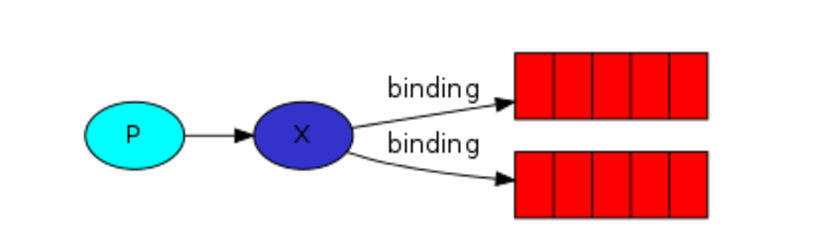
之前的例子基本都是1对1的消息发送和接收,即消息只能发送到指定的queue里,但有些时候你想让你的消息被所有的Queue收到,类似广播的效果,这时候就要用到exchange了
Exchange在定义的时候是有类型的,以决定到底哪些Queue符合条件。
fanout:所有bind到此exchange的queue都可以接收消息
direct:通过routingKey和exchage决定的那个唯一的queue可接收消息
topic:所有符合routingKey(此时可以说一个表达式)的routingKey所bind的queue可以接收消息
表达式符号说明:#代表一个或多个字符, *代表任何字符
例: #.a会匹配a.a, aa.a, aaa.a等
*.a会匹配a.a, b.a, c.a 等
注意:使用RoutingKey为#, Exchange Type为topic的时候相当于fanout
headers: 通过headers来决定把消息发给哪些queue
1 fanout
RabbitMQ实现发布和订阅时,会为每一个订阅者创建一个队列,而发布者发布消息时,会将消息放置在所有相关队列中。
import pika

import sys

connection = pika.BlockingConnection(pika.ConnectionParameters(

    host='192.168.0.108'))

channel = connection.channel()

channel.exchange_declare(exchange='logs',

                         exchange_type='fanout')

message = ''.join(sys.argv[1:]) or "info: Hello World!"

channel.basic_publish(exchange='logs',

                      routing_key='',

                      body=message)

print("[x] Sent %r" % message)
生产者
import pika

connection = pika.BlockingConnection(pika.ConnectionParameters(host='192.168.0.108'))

chanel = connection.channel()

chanel.exchange_declare(exchange='logs',

                        exchange_type='fanout')

# 不指定queue名字, rabbit会随机分配一个名字,exclusive=True会在使用此queue的消费者断开后,自动将queue删除

result = chanel.queue_declare(exclusive=True)

# 拿到随机的queue名字

queue_name = result.method.queue

print(queue_name)

chanel.queue_bind(exchange='logs',

                  queue=queue_name)

def callback(ch, method, properties, body):

    print(body)

chanel.basic_consume(

    callback,

    queue=queue_name,

    no_ack=True

)

print('[*] Waiting for message. to exit press CTRL+C')

chanel.start_consuming()
消费者
2 direct模式
之前事例,发送消息时明确指定某个队列并向其中发送消息,RabbitMQ还支持根据关键字发送,即:队列绑定关键字,发送者将数据根据关键字发送到消息exchange,exchange根据 关键字 判定应该将数据发送至指定队列。

import pika

import sys

connection = pika.BlockingConnection(pika.ConnectionParameters(host='192.168.0.108'))

chanel = connection.channel()

chanel.exchange_declare(exchange='direct_logs',

                        exchange_type='direct')

severity = sys.argv[1] if len(sys.argv) > 1 else 'info'

message = ' '.join(sys.argv[2:]) or 'Hello World'

chanel.basic_publish(

    exchange='direct_logs',

    routing_key=severity,

    body=message

)

print("[x] Sent %r:%r" % (severity, message))

connection.close()
生产者
import pika

import sys

connection = pika.BlockingConnection(pika.ConnectionParameters(host='192.168.0.108'))

chanel = connection.channel()

chanel.exchange_declare(exchange='logs',

                        exchange_type='fanout')

result = chanel.queue_declare(exclusive=True)

queue_name = result.method.queue

severities = sys.argv[1:]

if not severities:

    sys.stderr.write("Usage:%s [info] [warning] [error]\n" % sys.argv[0])

    sys.exit(1)

for severity in severities:

    chanel.queue_bind(exchange='direct_logs',

                      queue=queue_name,

                      routing_key=severity)

def callback(ch, method, properties, body):

    print("[x] %r:%r" % (method.routing_key, body))

chanel.basic_consume(callback,

                     queue=queue_name,

                     no_ack=True)

print('[*] Waiting for message. to exit press CTRL+C')

chanel.start_consuming()
消费者
3 topic模式
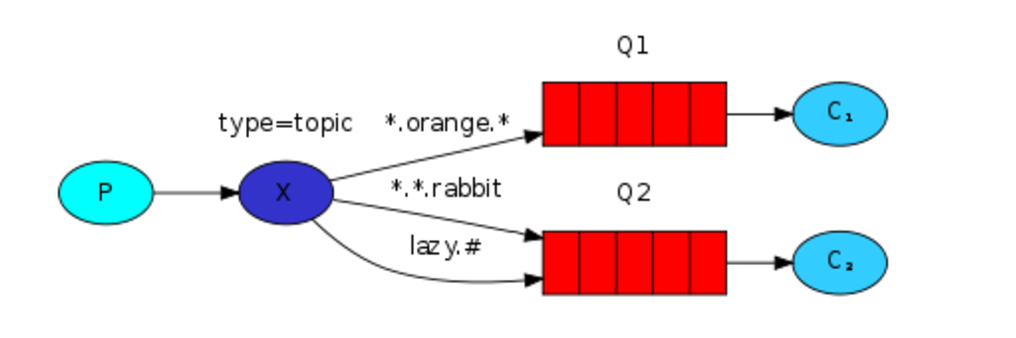
在topic类型下,可以让队列绑定几个模糊的关键字,之后发送者将数据发送到exchange,exchange将传入”路由值“和 ”关键字“进行匹配,匹配成功,则将数据发送到指定队列。
- # 表示可以匹配 0 个 或 多个 单词
- * 表示只能匹配 一个 单词
import pika

import sys

connection = pika.BlockingConnection(pika.ConnectionParameters(host='192.168.0.108'))

channel = connection.channel()

channel.exchange_declare(exchange='topic_logs',

                         exchange_type='topic')

routing_key = sys.argv[1] if len(sys.argv) > 1 else 'anonymous.info'

message = ' '.join(sys.argv[2:]) or 'Hello World'

channel.basic_publish(exchange='topic_logs',

                      routing_key=routing_key,

                      body=message)

print("[x] sent %r:%r " % (routing_key, message))

connection.close()
生产者
import pika

import sys

connection = pika.BlockingConnection(pika.ConnectionParameters(host='192.168.0.108'))

chanel = connection.channel()

chanel.exchange_declare(exchange='topic_logs',

                        exchange_type='topic')

result = chanel.queue_declare(exclusive=True)

queue_name = result.method.queue

binding_keys = sys.argv[1:]

if not binding_keys:

    sys.stderr.write("Usage:%s [binding_keys]\n" % sys.argv[0])

    sys.exit(1)

for severity in binding_keys:

    chanel.queue_bind(exchange='topic_logs',

                      queue=queue_name,

                      routing_key=severity)

def callback(ch, method, properties, body):

    print("[x] %r:%r" % (method.routing_key, body))

chanel.basic_consume(callback,

                     queue=queue_name,

                     no_ack=True)

print('[*] Waiting for message. to exit press CTRL+C')

chanel.start_consuming()
消费者
五 Remote procedure call (RPC)
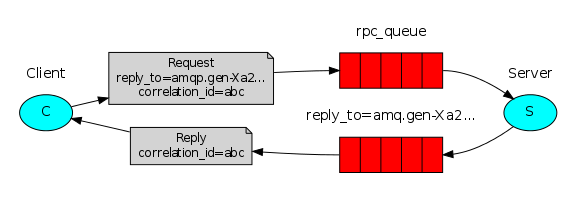
To illustrate how an RPC service could be used we're going to create a simple client class. It's going to expose a method named call which sends an RPC request and blocks until the answer is received:
fibonacci_rpc = FibonacciRpcClient()

result = fibonacci_rpc.call(4)

print("fib(4) is %r" % result)
RPC server:
import pika

import time

connection = pika.BlockingConnection(pika.ConnectionParameters(host="192.168.0.108"))

channel = connection.channel()

channel.queue_declare(queue='rpc_queue')

def fib(n):

    if n == 0:

        return 0

    elif n == 1:

        return 1

    else:

        return fib(n - 1) + fib(n - 2)

def on_request(ch, method, props, body):

    n = int(body)

    print("[.]fib(%s)" % n)

    response = fib(n)

    ch.basic_publish(exchange='',

                     routing_key=props.reply_to,

                     properties=pika.BasicProperties(correlation_id=props.correlation_id),

                     body=str(response))

    ch.basic_ack(delivery_tag=method.delivery_tag)

channel.basic_qos(prefetch_count=1)

channel.basic_consume(on_request, queue='rpc_queue')
RPC client
import pika

import uuid

class FibonacciRpcClient(object):

    def __init__(self):

        self.connection = pika.BlockingConnection(pika.ConnectionParameters(host='192.168.0.108'))

        self.channel = self.connection.channel()

        result = self.channel.queue_declare(exclusive=True)

        self.callback_queue = result.method.queue

        self.channel.basic_consume(self.on_response, no_ack=True,

                                   queue=self.callback_queue)

        self.response = None

    def on_response(self, ch, method, props, body):

        if self.corr_id == props.correlation_id:

            self.response = body

    def call(self, n):

        self.corr_id = str(uuid.uuid4())

        self.channel.basic_publish(exchange='',

                                   routing_key='rpc_queue',

                                   properties=pika.BasicProperties(

                                       reply_to=self.callback_queue,

                                       correlation_id=self.corr_id

                                   ),

                                   body=str(n)

                                   )

        while self.response is None:

            self.connection.process_data_events()

        return int(self.response)

fibonacci_rpc = FibonacciRpcClient()

print("[X]Requesting fib")

response = fibonacci_rpc.call(30)

print("[.]Got %r" % response)

print("[X] Awaiting RPC request")

channel.start_consuming()
Python中使用RabbitMQ的更多相关文章
- python中的rabbitmq
介绍 RabbitMQ是一个在AMQP基础上完整的,可复用的企业消息系统.他遵循Mozilla Public License开源协议.MQ全称为Message Queue, 消息队列(MQ)是一种应用 ...
- python中使用rabbitmq消息中间件
上周一直在研究zeromq,并且也实现了了zeromq在python和ruby之间的通信,但是如果是一个大型的企业级应用,对消息中间件的要求比较高,比如消息的持久化机制以及系统崩溃恢复等等需求,这个时 ...
- python 学习分享-rabbitmq
一.RabbitMQ 消息队列介绍 RabbitMQ也是消息队列,那RabbitMQ和之前python的Queue有什么区别么? py 消息队列: 线程 queue(同一进程下线程之间进行交互) 进程 ...
- rabbitmq(中间消息代理)在python中的使用
在之前的有关线程,进程的博客中,我们介绍了它们各自在同一个程序中的通信方法.但是不同程序,甚至不同编程语言所写的应用软件之间的通信,以前所介绍的线程.进程队列便不再适用了:此种情况便只能使用socke ...
- 二、消息队列之如何在C#中使用RabbitMQ
1.什么是RabbitMQ.详见 http://www.rabbitmq.com/. 作用就是提高系统的并发性,将一些不需要及时响应客户端且占用较多资源的操作,放入队列,再由另外一个线程,去异步处理这 ...
- 关于python中pika模块的问题
工作中经常用到rabbitmq,而用的语言主要是python,所以也就经常会用到python中的pika模块,但是这个模块的使用,也给我带了很多问题,这里整理一下关于这个模块我在使用过程的改变历程已经 ...
- 二、消息队列之如何在C#中使用RabbitMQ(转载)
二.消息队列之如何在C#中使用RabbitMQ 1.什么是RabbitMQ.详见 http://www.rabbitmq.com/. 作用就是提高系统的并发性,将一些不需要及时响应客户端且占用较多资源 ...
- python笔记-11 rabbitmq
一.理解rabbitmq的基本背景 1.理解消息队列 1.1 普通queue 在前面的博客中所提到的队列,此处均称之为普通队列 简述一下普通队列的一些分类及不足 1.1.1 基本Queue:queue ...
- 基于Python语言使用RabbitMQ消息队列(一)
介绍 RabbitMQ 是一个消息中间人(broker): 它接收并且发送消息. 你可以把它想象成一个邮局: 当你把想要寄出的信放到邮筒里时, 你可以确定邮递员会把信件送到收信人那里. 在这个比喻中, ...
随机推荐
- php执行系统命令的四个函数shell_exec, exec, passthru, system分别的使用场景
shell_exec() 通过 shell 环境执行命令,并且将完整的输出以字符串的方式返回.也就是说, PHP先运行一个shell环境, 然后让shell进程运行你的命令, 并且把所有输出已字符串形 ...
- element-ui的不稳定性
伤脑筋的版本升级 element-ui升级到2.0版本了! element-ui作为比较成熟的广为人知的前端框架,原本满怀热情的去学习,也基于element-ui搭建出了一套系统,可是它居然升级了! ...
- python读取指定字节长度的文本
软件版本 Python 2.7.13; Win 10 场景描述 1.使用python读取指定长度的文本: 2.使用python读取某一范围内的文本. Python代码 test.txt文本内包含的 ...
- 用GDB调试程序(五)
查看运行时数据——————— 在你调试程序时,当程序被停住时,你可以使用print命令(简写命令为p),或是同义命令inspect来查看当前程序的运行数据.print命令的格式是: ...
- Python笔记:深浅拷贝
1.赋值操作两者是同一数据,其内存地址一样.适用于list.dict.set数据类型. 2.copy是浅拷贝,只能拷贝嵌套数据的第一层数据,嵌套的数据与赋值操作相同,其内存地址一样,当一个被更改,其他 ...
- JS stringObject.Match()
JavaScript match() 方法 JavaScript String 对象 定义和用法 match() 方法可在字符串内检索指定的值,或找到一个或多个正则表达式的匹配. 该方法类似 inde ...
- 微信小程序版本管理
备忘录:<需要修改完善> 打开小程序开发者工具,点击版本管理,点击设置 , 通用更改码云的名字和邮箱 网络认证选择用户名和密码 把密码输入了,点击远程 添加 输入码云的https地址 和仓 ...
- 关于mysql的删除和安装
mysql删除不干净大概有两点1.文件残留 2.注册表 删除:https://www.cnblogs.com/solargen/p/6838657.html 安装:https://www.cnblog ...
- 1. jdk内存配置
-Xms256m -Xmx512m -XX:PermSize=256m -XX:MaxPermSize=512m
- Swift get和set方法以及只读属性(计算型属性,本身不保存数据,都是通过计算获得结果)
import UIKit class Person: NSObject { private var _name: String? var name: String? { get { return _n ...