
【SpringBoot】整合定时任务和异步任务
========================10、SpringBoot整合定时任务和异步任务处理 ===============================
1、SpringBoot定时任务schedule讲解
简介:讲解什么是定时任务和常见定时任务区别
1、常见定时任务 Java自带的java.util.Timer类
timer:配置比较麻烦,时间延后问题
timertask:不推荐
2、Quartz框架
配置更简单
xml或者注解
3、SpringBoot使用注解方式开启定时任务
1)启动类里面 @EnableScheduling开启定时任务,自动扫描
2)定时任务业务类 加注解 @Component被容器扫描
3)定时执行的方法加上注解 @Scheduled(fixedRate=2000) 定期执行一次
2、SpringBoot常用定时任务配置实战
简介:SpringBoot常用定时任务表达式配置和在线生成器

package net.xdclass.base_project.task;

import java.util.Date;

import org.springframework.scheduling.annotation.Scheduled;

import org.springframework.stereotype.Component;

/**

 * 功能描述:定时任务业务类

 *

 * <p> 创建时间:Apr 30, 2018 10:21:48 AM </p>

 *

 *@作者 小D课堂  小D

 */

@Component

public class TestTask {

    @Scheduled(fixedRate=2000) //两秒执行一次

    public void sum(){

        System.out.println("当前时间:"+new Date());

    }

}
Task
控制台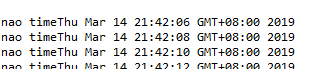
1、cron 定时任务表达式 @Scheduled(cron="*/1 * * * * *") 表示每秒
1)crontab 工具 https://tool.lu/crontab/
2、fixedRate: 定时多久执行一次(上一次开始执行时间点后xx秒再次执行;)
3、fixedDelay: 上一次执行结束时间点后xx秒再次执行
4、fixedDelayString: 字符串形式,可以通过配置文件指定
流程:新建任务类注册到context,通过@Scheduled注解自动执行
package net.xdclass.base_project.task;

import java.util.Date;

import org.springframework.scheduling.annotation.Scheduled;

import org.springframework.stereotype.Component;

/**

 * 功能描述:定时任务业务类

 *

 * <p> 创建时间:Apr 30, 2018 10:21:48 AM </p>

 *

 *@作者 小D课堂  小D

 */

@Component

public class TestTask {

    @Scheduled(fixedRateString="2000")//两秒执行一次

    //@Scheduled(cron="*/2 * * * * *")

    public void sum() throws InterruptedException{

        Thread.sleep(4000L);

        System.out.println("结束 当前时间:"+new Date());

    }

    //@Scheduled(cron="*/1 * * * * *")

    public void sum2(){

        System.out.println("cron 每秒 当前时间:"+new Date());

    }

}
task
3、SpringBoot2.x异步任务实战(核心知识)
简介:讲解什么是异步任务,和使用SpringBoot2.x开发异步任务实战
1、什么是异步任务和使用场景:适用于处理log、发送邮件、短信……等
下单接口->查库存 100
余额校验 150
风控用户100
....
2、启动类里面使用@EnableAsync注解开启功能,自动扫描
3、定义异步任务类并使用@Component标记组件被容器扫描,异步方法加上@Async(可以注解到类)
流程:新建任务类注册到context, controller成员属性注入任务类, 成员方法中执行任务类方法
注意点:
1)要把异步任务封装到类里面,不能直接写到Controller
2)增加Future<String> 返回结果 AsyncResult<String>("task执行完成");
3)如果需要拿到结果 需要判断全部的 task.isDone()
4、通过注入方式,注入到controller里面,如果测试前后区别则改为同步则把Async注释掉
package net.xdclass.base_project.task;

import java.util.concurrent.Future;

import org.springframework.scheduling.annotation.Async;

import org.springframework.scheduling.annotation.AsyncResult;

import org.springframework.stereotype.Component;

/**

 * 功能描述:异步任务业务类

 *

 * <p> 创建时间:Apr 30, 2018 11:25:15 PM </p>

 *

 *@作者 小D课堂  小D

 */

@Component

//@Async

public class AsyncTask {

    public void task1() throws InterruptedException{

        long begin = System.currentTimeMillis();

        Thread.sleep(1000L);

        long end = System.currentTimeMillis();

        System.out.println("任务1耗时="+(end-begin));

    }

    public void task2() throws InterruptedException{

        long begin = System.currentTimeMillis();

        Thread.sleep(2000L);

        long end = System.currentTimeMillis();

        System.out.println("任务2耗时="+(end-begin));

    }

    public void task3() throws InterruptedException{

        long begin = System.currentTimeMillis();

        Thread.sleep(3000L);

        long end = System.currentTimeMillis();

        System.out.println("任务3耗时="+(end-begin));

    }

    //获取异步结果

    public Future<String> task4() throws InterruptedException{

        long begin = System.currentTimeMillis();

        Thread.sleep(2000L);

        long end = System.currentTimeMillis();

        System.out.println("任务4耗时="+(end-begin));

        return new AsyncResult<String>("任务4");

    }

    public Future<String> task5() throws InterruptedException{

        long begin = System.currentTimeMillis();

        Thread.sleep(3000L);

        long end = System.currentTimeMillis();

        System.out.println("任务5耗时="+(end-begin));

        return new AsyncResult<String>("任务5");

    }

    public Future<String> task6() throws InterruptedException{

        long begin = System.currentTimeMillis();

        Thread.sleep(1000L);

        long end = System.currentTimeMillis();

        System.out.println("任务6耗时="+(end-begin));

        return new AsyncResult<String>("任务6");

    }

}
AsynTask
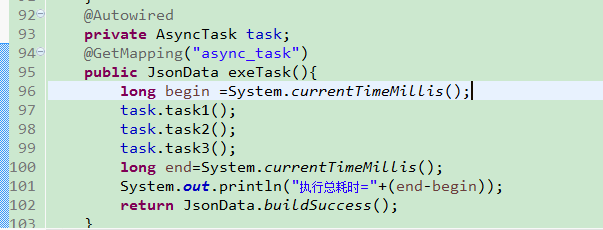
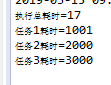
package net.xdclass.base_project.controller;

import java.util.concurrent.Future;

import net.xdclass.base_project.domain.JsonData;

import net.xdclass.base_project.task.AsyncTask;

import org.springframework.beans.factory.annotation.Autowired;

import org.springframework.web.bind.annotation.GetMapping;

import org.springframework.web.bind.annotation.RequestMapping;

import org.springframework.web.bind.annotation.RestController;

@RestController

@RequestMapping("/api/v1")

public class UserController {

    @Autowired

    private AsyncTask task;

    @GetMapping("async_task")

    public JsonData exeTask() throws InterruptedException{

        long begin = System.currentTimeMillis();

//        task.task1();

//        task.task2();

//        task.task3();

        Future<String> task4 = task.task4();

        Future<String> task5 = task.task5();

        Future<String> task6 = task.task6();

        for(;;){

            if (task4.isDone() && task5.isDone() && task6.isDone()) {

                break;

            }

        }

        long end = System.currentTimeMillis();

        long total = end-begin;

        System.out.println("执行总耗时="+total);

        return JsonData.buildSuccess(total);

    }

}
controller
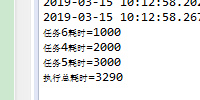 异步执行,拿回结果,
【SpringBoot】整合定时任务和异步任务的更多相关文章
- SpringBoot整合定时任务和异步任务处理 3节课
1.SpringBoot定时任务schedule讲解 定时任务应用场景: 简介:讲解什么是定时任务和常见定时任务区别 1.常见定时任务 Java自带的java.util.Timer类 ...
- SpringBoot整合定时任务和异步任务处理
SpringBoot定时任务schedule讲解 简介:讲解什么是定时任务和常见定时任务区别 1.常见定时任务 Java自带的java.util.Timer类 timer:配置比较麻烦,时间延后问题, ...
- 小D课堂 - 零基础入门SpringBoot2.X到实战_第10节 SpringBoot整合定时任务和异步任务处理_41、SpringBoot定时任务schedule讲解
笔记 1.SpringBoot定时任务schedule讲解 简介:讲解什么是定时任务和常见定时任务区别 1.常见定时任务 Java自带的java.util.Timer类 ...
- 【SpringBoot】SpringBoot2.x整合定时任务和异步任务处理
SpringBoot2.x整合定时任务和异步任务处理 一.项目环境 springboot2.x本身已经集成了定时任务模块和异步任务,可以直接使用 二.springboot常用定时任务配置 1.在启动类 ...
- SpringBoot2.x整合定时任务和异步任务处理
SpringBoot2.x整合定时任务和异步任务处理 一.项目环境 springboot2.x本身已经集成了定时任务模块和异步任务,可以直接使用 二.springboot常用定时任务配置 1.在启动类 ...
- SpringBoot整合定时任务----Scheduled注解实现(一个注解全解决)
一.使用场景 定时任务在开发中还是比较常见的,比如:定时发送邮件,定时发送信息,定时更新资源,定时更新数据等等... 二.准备工作 在Spring Boot程序中不需要引入其他Maven依赖 (因为s ...
- SpringBoot整合全局异常处理&SpringBoot整合定时任务Task&SpringBoot整合异步任务
============整合全局异常=========== 1.整合web访问的全局异常 如果不做全局异常处理直接访问如果报错,页面会报错500错误,对于界面的显示非常不友好,因此需要做处理. 全局异 ...
- SpringBoot整合定时任务异步任务
1.定时任务 1.开启定时任务 @SpringBootApplication //开启定时任务 @EnableScheduling public class SpringBootDemoApplica ...
- SpringBoot整合定时任务task
@SpringBootApplication //扫描 mybatis mapper 包路径 @MapperScan(basePackages = "com.imooc.mapper&quo ...
随机推荐
- 如何使用JavaScript UI控件(WijmoJS)构建Electron应用程序
概述 What is Electron? Electron是一个使用JavaScript.HTML和CSS构建跨平台桌面应用程序的框架. 您可以将Electron与纯JavaScript或您选择的Ja ...
- 【HNOI 2018】排列
Problem Description 给定 \(n\) 个整数 \(a_1, a_2, \ldots , a_n(0 \le a_i \le n)\),以及 \(n\) 个整数 \(w_1, w_2 ...
- The Guideline of Setting Up Samba Server on linux(Ubuntu)
The Guideline of Setting Up Samba Server on linux(Ubuntu) From terminate command window, install the ...
- css js 兼容问题
js 兼容问题 1. document.form.item 问题问题:代码中存在 document.formName.item("itemName") 这样的语句,不能在FF下运 ...
- SSH 远程登陆
2019-03-10 20:41:39 一.什么是SSH 简单说,SSH是一种网络协议,用于计算机之间的加密登录. 如果一个用户从本地计算机,使用SSH协议登录另一台远程计算机,我们就可以认为,这种登 ...
- Kali linux 2016.2(Rolling)里安装OpenVAS
不多说,直接上干货! 本博文,是在Kali 2.0 linux里,安装OpenVAS. 前言 OpenVAS是一款开放式的漏洞评估工具,主要用来检测目标网络或主机的安全性.与安全焦点的X-Scan工具 ...
- 『Numpy』内存分析_numpy.dtype解析内存数据
numpy.dtype用于自定义数据类型,实际是指导python程序存取内存数据时的解析方式. [注意],更改格式不能使用 array.dtype=int32 这样的硬性更改,会不改变内存直接该边解析 ...
- 关于contenteditable属性
今天刷刷看看,看到了发说说框,发现居然不是textarea的,百思不得其解围.后来看到contenteditable,心想应该就是这个搞怪的吧,百度了下.w3c的解释是contenteditable属 ...
- python自动化测试入门篇-postman
接口测试基础-postman 常用的接口有两种:webservice接口和http api接口. Webservice接口是走soap协议通过http传输,请求报文和返回报文都是xml格式. http ...
- linux中pam模块
https://www.cnblogs.com/ilinuxer/p/5087447.html linux中pam模块 一.pam简介 Linux-PAM(linux可插入认证模块)是一套共享库,使本 ...