
HCNA配置telnet远程管理
1、拓扑图
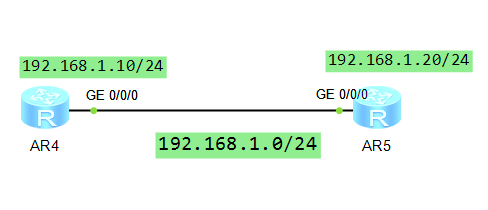
说明:通过配置最终能通过R5 用telnet协议登陆到R4上并将R4改名为R44
2、R4配置
<Huawei>sys

Enter system view, return user view with Ctrl+Z.

[Huawei]sysname R4

[R4]user-in

[R4]user-interface vty

[R4]user-interface vty

[R4-ui-vty0-]au

[R4-ui-vty0-]authentication-mode aaa

[R4-ui-vty0-]q

[R4]aaa

[R4-aaa]lo

[R4-aaa]local-user user

[R4-aaa]local-user user-telnet pass

[R4-aaa]local-user user-telnet password ci

[R4-aaa]local-user user-telnet password cipher huawei

Info: Add a new user.

[R4-aaa]lo

[R4-aaa]local-user pri

[R4-aaa]local-user user

[R4-aaa]local-user user-telnet pri

[R4-aaa]local-user user-telnet privilege le

[R4-aaa]local-user user-telnet privilege level

[R4-aaa]loc

[R4-aaa]local-user user

[R4-aaa]local-user user-telnet serv

[R4-aaa]local-user user-telnet service-type tel

[R4-aaa]local-user user-telnet service-type telnet

[R4-aaa]

[R4-aaa]

[R4-aaa]q

[R4]int

[R4]interface g

[R4]interface GigabitEthernet //

[R4-GigabitEthernet0//]ip add

[R4-GigabitEthernet0//]ip address 192.168.1.10

Dec    ::-: R4 %%01IFNET//LINK_STATE(l)[]:The line protocol IP

on the interface GigabitEthernet0// has entered the UP state.

[R4-GigabitEthernet0//]q

[R4]dis ip int

[R4]dis ip interface bre

[R4]dis ip interface bre

                     ^

Error: Wrong parameter found at '^' position.

[R4]dis ip interface bri

[R4]dis ip interface brief

*down: administratively down

^down: standby

(l): loopback

(s): spoofing

The number of interface that is UP in Physical is

The number of interface that is DOWN in Physical is

The number of interface that is UP in Protocol is

The number of interface that is DOWN in Protocol is

Interface                         IP Address/Mask      Physical   Protocol

GigabitEthernet0//              192.168.1.10/      up         up

GigabitEthernet0//              unassigned           down       down

GigabitEthernet0//              unassigned           down       down

NULL0                             unassigned           up         up(s)

[R4]

[R44]
3、R5配置并进行测试
<Huawei>sys

Enter system view, return user view with Ctrl+Z.

[Huawei]sysname R5

[R5]int

[R5]interface g

[R5]interface GigabitEthernet //

[R5-GigabitEthernet0//]ip add

[R5-GigabitEthernet0//]ip address 192.168.1.20

Dec    ::-: R5 %%01IFNET//LINK_STATE(l)[]:The line protocol IP

on the interface GigabitEthernet0// has entered the UP state.

[R5-GigabitEthernet0//]q

[R5]dis ip in

[R5]dis ip interface bri

[R5]dis ip interface brief

*down: administratively down

^down: standby

(l): loopback

(s): spoofing

The number of interface that is UP in Physical is

The number of interface that is DOWN in Physical is

The number of interface that is UP in Protocol is

The number of interface that is DOWN in Protocol is

Interface                         IP Address/Mask      Physical   Protocol

GigabitEthernet0//              192.168.1.20/      up         up

GigabitEthernet0//              unassigned           down       down

GigabitEthernet0//              unassigned           down       down

NULL0                             unassigned           up         up(s)

[R5]ping  192.168.1.10

  PING 192.168.1.10:   data bytes, press CTRL_C to break

    Reply from 192.168.1.10: bytes= Sequence= ttl= time= ms

    Reply from 192.168.1.10: bytes= Sequence= ttl= time= ms

    Reply from 192.168.1.10: bytes= Sequence= ttl= time= ms

    Reply from 192.168.1.10: bytes= Sequence= ttl= time= ms

    Reply from 192.168.1.10: bytes= Sequence= ttl= time= ms

  --- 192.168.1.10 ping statistics ---

     packet(s) transmitted

     packet(s) received

    0.00% packet loss

    round-trip min/avg/max = // ms

[R5]telnet 192.168.1.10

           ^

Error: Unrecognized command found at '^' position.

[R5]tel

[R5]telnet 192.168.1.10

           ^

Error: Unrecognized command found at '^' position.

[R5]q

<R5>tel

<R5>telnet 192.168.1.10

  Press CTRL_] to quit telnet mode

  Trying 192.168.1.10 ...

  Connected to 192.168.1.10 ...

Login authentication

Username:user-telnet

Password:

<R4>dis ip in

<R4>dis ip interface br

<R4>dis ip interface brief

*down: administratively down

^down: standby

(l): loopback

(s): spoofing

The number of interface that is UP in Physical is

The number of interface that is DOWN in Physical is

The number of interface that is UP in Protocol is

The number of interface that is DOWN in Protocol is

Interface                         IP Address/Mask      Physical   Protocol

GigabitEthernet0//              192.168.1.10/      up         up

GigabitEthernet0//              unassigned           down       down

GigabitEthernet0//              unassigned           down       down

NULL0                             unassigned           up         up(s)

<R4>sysname R44

    ^

Error: Unrecognized command found at '^' position.

<R4>sys

Enter system view, return user view with Ctrl+Z.

[R4]sysname R44

[R44]
注意:telnet只能在用户模式上用
创建用户步骤
1、system-view进入系统模式
2、user-interface vty 0 4 进入vty视图
3 、允许AAA授权,退出vty
4、进入AAA模式 进入AAA视图
5、添加用户 local-user user-telnet password ciper huawei
6、授权用户级别2+ local-user user-telnet privileges level 2
7、授权用户可用协议 local-user user-telnet service-type telnet
8、退出
9、从另外一台路由器登陆测试,前提是IP配置好互相能ping 通
HCNA配置telnet远程管理的更多相关文章
- Network基础(六):telnet远程管理
一.telnet远程管理 目标: 在企业中为方便网络管理员对Cisco设备的配置,一般需事先在Cisco交换机及路由器上开启远程管理的服务,借助网络通过telnet方式远程访问. 方案: 网络管理员通 ...
- 如何在思科交换机上配置Telnet远程登录
本地用户认证登录 如果配置本地用户认证,则需要开启本地数据库认证,这时就不需要配置相应虚拟终端认证密码了,但要至少配置一个本地用户并设置用户密码用来进行登录认证,具体配置如下: C2960#conf ...
- HCNA配置ssh远程登陆
1.拓扑图 最终实现通过AR1 来SSH登陆到AR2 上 2.配置AR2为开启SSH服务 Please press enter to start cmd line! ############## &l ...
- 【Linux远程管理】Telnet远程连接管理
Telnet,命令行界面下的远程管理工具,因为其历史非常悠久,几乎所有的操作系统都有该工具, 但是,Telnet在传输数据是是通过明文传输的,没有加密,所以现在几乎不会使用Telnet进行管理了. ( ...
- 华为S5700交换机初始化和配置SSH和TELNET远程登录方法
基础设置: 配置登陆IP地址<Quidway> system-view ...
- 锐捷交换机如何配置远程管理地址(telnet)
基本命令如下: hostname(config)#username admin password 123456 ------>telnet 登录账号为admin密码为123456 hostna ...
- h3c 交换机配置VLAN和远程管理
一.基本设置 1. console线连接成功 2. 进入系统模式 <H3C>system-view //提示符由<H3C> 变为 [H3C] 3. 更改设备名称 [H3C]sy ...
- H3C S3100交换机配置VLAN和远程管理
一.基本设置 1. console线连接成功 2. 进入系统模式 <H3C>system-view //提示符由<H3C> 变为 [H3C] 3. 更改设备名称 [H3C]sy ...
- 配置ASA防火墙 远程管理方式
受不了,asa和思科路由器 系统命令不一致,这一篇专门来写asa. 先看下版本 asa825# show version Cisco Adaptive Security ...
随机推荐
- shell编程中
1.1 条件表达式 1.1.1 文件判断 常用文件测试操作符 常用文件测试操作符 说明 -d文件,d的全拼为directory 文件存在且为目录则为真,即测试表达式成立 -f文件,f的全拼为file ...
- 6.SpringMVC2
1.视图解析 当客户端发出请求后,交由SpringMVC的DispatcherServlet处理,接着Spring会分析看哪一个HandlerMapping定义的所有请求映射中对该请求的最合理的映射, ...
- thinkphp控制器的使用
控制器的使用 2.1url如何调用控制器 以典型的URL为例 http://localhost/shop/index.php/home/index/test /*home/controller/in ...
- my08_mysqldump+binlog server备份
备份策略描述 ******************************************* mysqldump备份适用于小数据量的备份,比如100G以下的数据量,就可以使用逻辑备份 举例两个 ...
- 分治法 - Divide and Conquer
在计算机科学中,分治法是一种很重要的算法.分治法即『分而治之』,把一个复杂的问题分成两个或更多的相同或相似的子问题,再把子问题分成更小的子问题……直到最后子问题可以简单的直接求解,原问题的解即子问题的 ...
- VMware 无法连接虚拟设备ide1:0,主机上没有相对应的设备,您 要在每次开启此虚拟机时都尝试连接此虚拟设备吗?
无法连接虚拟设备ide1:0,主机上没有相对应的设备,您 要在每次开启此虚拟机时都尝试连接此虚拟设备吗? 运行VMware,出现以上错误. ide1:0一般是虚拟机的光驱,配置默认选项是“使用物理驱动 ...
- 数据结构---Java---LinkedList
public class LinkedList<E> extends AbstractSequentialList<E> implements List<E>, D ...
- bootstrap-datetimepicker:基于twitter bootstrap的日期/时间选择控件
bootstrap-datetimepicker是一个基于twitter bootstrap的简单日期/时间选择控件. <!DOCTYPE HTML> <html> <h ...
- go语言初始化内部结构体3中方式
package main import ( "fmt" ) type User struct { Id int Name string Age int } type Manger ...
- java.lang.IllegalStateException: FragmentManager is already executing transactions 及 SmartTabLayout复用
在复用 SmartTabLayout 时, 出现了标题所示的错误.首先我的场景是Activity下两个fragment :A 和 B,A中使用了SmarttabLayout和viewpager结合 ...