
Android Studio 2.0 正式版公布啦 (首次中文翻译)

Android Studio 2.0 公布了,添加了一些新特性:
1. 更加完好的 Instant Run
2. 更快的 Android Emulator
3.GPU Debugger Preview
4. 包括了 IntelliJ 15 的更新
Android Studio 2.0
原文 (翻译在往下翻)

Posted by Jamal Eason, Product Manager, Android
Android Studio 2.0 is the fastest way to build high quality, performant apps for the Android platform, including phones and tablets, Android Auto, Android Wear, and Android TV. As the official IDE from Google, Android Studio includes everything you need
to build an app, including a code editor, code analysis tools, emulators and more. This new and stable version of Android Studio has fast build speeds and a fast emulator with support for the latest Android version and Google Play Services.
Android Studio is built in coordination with the Android platform and supports all of the latest and greatest APIs. If you are developing for Android, you should be using Android Studio 2.0. It is available today as a easydownload
or update on the stable release channel.
Android Studio 2.0 includes the following new features that Android developer can use in their workflow :
- Instant Run - For every developer who loves faster build speeds. Make changes and see them appear live in your running app. With many build/run accelerations ranging from VM hot swapping to
utm_campaign=android_launch_studio_040716&utm_source=anddev&utm_medium=blog#instant-run">warm
, Instant Run will save you time every day.
swapping app resources - Android Emulator - The new emulator runs ~3x faster than Android’s previous emulator, and with ADB enhancements you can now push apps and data 10x faster to the emulator than to a physical device. Like a physical device, the official Android
emulator also includesutm_campaign=android_launch_studio_040716&utm_source=anddev&utm_medium=blog">
built-in, so you can test out more API functionality. Finally, the new emulator has rich new features to manage calls, battery, network, GPS, and more.
Google Play Services - Cloud Test Lab Integration - Write once, run anywhere. Improve the quality of your apps by quickly and easily testing on a wide range of physical Android devices in the
utm_campaign=android_launch_studio_040716&utm_source=anddev&utm_medium=blog#run-ctl">Cloud
right from within Android Studio.
Test Lab - App Indexing Code Generation & Test - Help promote the visibility your app in Google Search for your users by adding auto-generated URLS with the App Indexing feature in Android Studio. With a few click you can add indexable URL links that
you can test all within the IDE. - GPU Debugger Preview - For those of you developing OpenGL ES based games or apps, you can now see each frame and the GL state with the new GPU debugger. Uncover and diagnosis GL rendering issues by capturing and analyzing the GPU stream
from your Android device. - IntelliJ 15 Update - Android Studio is built on the world class Intellij coding platform. Check out the latest Intellij featureshere.
Deeper Dive into the New Features
Instant Run
Today, mobile platforms are centered around speed and agility. And yet, building for mobile can sometimes feel clunky and slow. Instant Run in Android Studio is our solution to keep you in a fast and fluid development flow. The feature increases your developer
productivity by accelerating your edit, build, run cycles. When you click on the Instant Run button ( ),
),
Instant Run will analyze the changes you have made and determine how it can deploy your new code in the fastest way.

New Instant Run Buttons
Whenever possible, it will inject your code changes into your running app process, avoiding re-deployment and re-installation your APK. For some types of changes, an activity or app restart is required, but your edit, build and run cycles should still be
generally much faster than before. Instant Run works with any Android Device or emulator running API 14 (Ice Cream Sandwich) or higher.
Since previewing Instant Run at the end of last year, we’ve spent countless hours incorporating your feedback and refining for the stable release. Look for even more acceleration in future releases because build speeds can never be too fast. To learn how
you can make the most out of Instant Run in your app development today, please check out our Instant Rundocumentation.
Android Emulator
The new Android Emulator is up to 3x faster in CPU, RAM, & I/O in comparison to the previous Android emulator. And when you're ready to build, ADB push speeds are a whopping10x faster! In most situations, developing on the
official Android Emulator is faster than a real device, and new features like Instant Run will work best with the new Android emulator.
In addition to speed and performance, the Android Emulator has a brand user interface and sensor controls. Enhanced since theinitial
release, with the emulator you can drag and drop APKs for quick installation, resize and rescale the window, use multi-touch actions (pinch & zoom, pan, rotate, tilt) and much more.
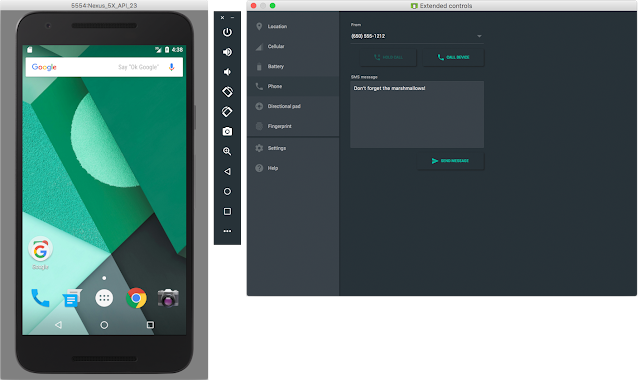
Android Emulator User Interface: Toolbar & Extend Controls Panel
Trying out the new emulator is as easy as updating your SDK Tools to 25.1.1 or higher, create a fresh Android Virtual Device using one of the recommended x86 system images and you are ready to go. Learn more about the Android Emulator by checking out thedocumentation.
Cloud Test Lab
Cloud Test Lab is a new service that allows you to test your app across a wide range of devices and device configurations at scale in the cloud. Once you complete your initial testing with your Android Emulator or Android device, Cloud Test Lab is a great
extension to your testing process that provides you to run through a collection of tests against a portfolio of physical devices hosted in Google’s data centers. Even if you do not have tests explicitly written, Cloud Test Lab can perform a basic set of tests
to ensure that your app does not crash.
The new interface in Android Studio allows you to configure the portfolio of tests you want to run on Cloud Test Lab, and allows you to also see the results of your tests. To learn more about the service go utm_campaign=android_launch_studio_040716&utm_source=anddev&utm_medium=blog#run-ctl">here
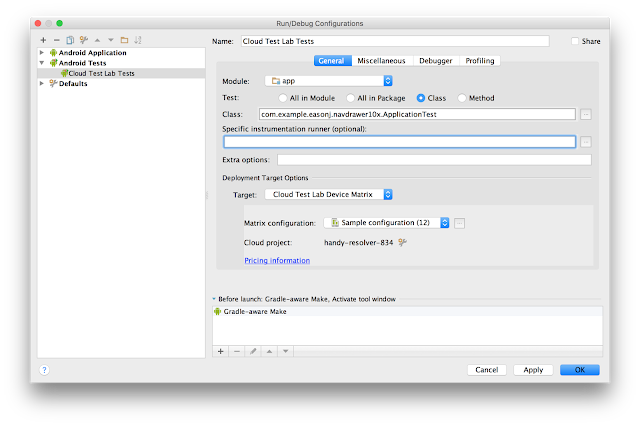
Setup for Cloud Test Lab
App Indexing
It is now easier for your users to find your app in Google Search with the utm_campaign=android_launch_studio_040716&utm_source=anddev&utm_medium=blog">
App Indexing
validate your app indexing code as shown here:
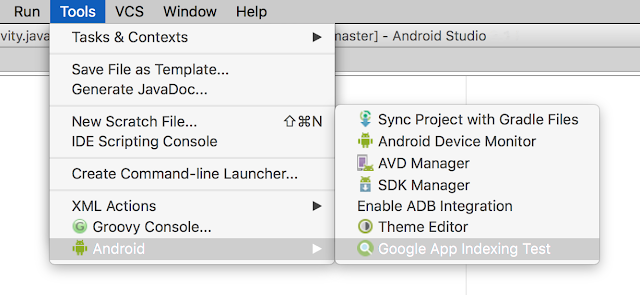
Google App Indexing Testing
Check out this link for more details about app indexing support in Android Studio.
GPU Debugger Preview
If you are developing OpenGL ES games or graphics-intensive apps, you have a new GPU debugger with Android Studio 2.0. Although the GPU debugger is a preview, you can step through your app frame by frame to identify and debug graphics rendering issues with
rich information about the GL state. For more details on how to setup your Android device and app to work with the tool, check out the tech documentationshere.
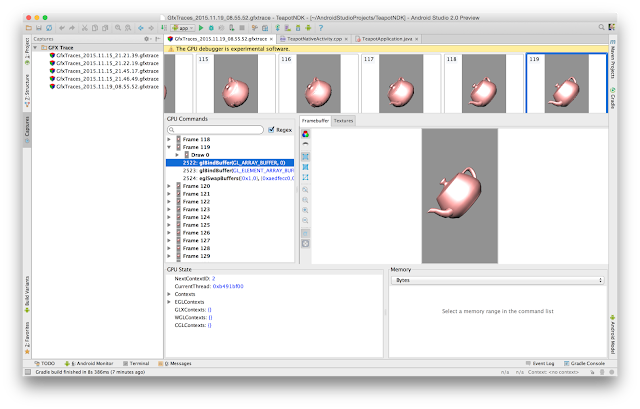
GPU Debugger Preview
What's Next
Update
If you are using a previous version of Android Studio, you can check for updates on the Beta channel from the navigation menu (Help → Check for Update [Windows/Linux] , Android Studio → Check for Updates [OS X]). If you need a new copy of Android Studio, utm_campaign=android_launch_studio_040716&utm_source=anddev&utm_medium=blog#get-as13">instructions
you can download it here. If you developing for the N Developer Preview, check out this additional setup
Set Up Instant Run & Android Emulator
After you update to or download Android Studio 2.0, you should upgrade your projects to use Instant Run, and create a fresh Android Virtual Device (AVD) for the new Android emulator and you are on your way to a fast Android development experience.
Using Instant Run is easy. For each of your existing projects you will see a quick prompt to update your project to the new gradle plugin version(com.android.tools.build:gradle:2.0.0).
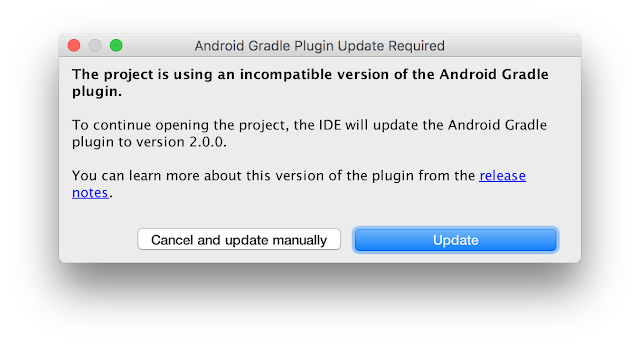
Prompt to update your gradle version in your project
For all new app projects in Android Studio 2.0, Instant Run is on by default. Check out thedocumentation
for more details.
We are already hard at work developing the next release of Android Studio. We appreciate any feedback on things you like, issues or features you would like to see. Connect with us -- the Android Studio development team -- on our newGoogle+
page or onTwitter.
首次中文翻译
公布者:
Jamal Eason, Product Manager, Android
Android Studio 2是建立高质量的最快途径,高性能的应用程序的Android平台,包含手机和平板电脑,Android Auto,Android
Wear,Android电视。从谷歌官方的Android Studio IDE。包含一切你须要建立一个应用程序,包含一个代码编辑器。代码分析工具,仿真器和很多其它。这个新的稳定版本号的安卓工作室拥有高速建立速度和一个高速的模拟器,支持最新的安卓版和谷歌播放服务。
安卓工作室是建立在与安卓平台的协调和支持全部最新和最伟大的。
假设您正在开发的安卓。您应该使用AS2.0。这是今天 作 为一个易于下载或更新的稳定释放通道。
AS2.0 包含下面新功能。安卓开发人员能够在他们的工作流程中使用:
1.执行速度快
2.Android模拟器
3. 集成云測试
4.应用程序代码自己主动生成,速度极快
5.GPU调试器预览效果更好
6.IntelliJ 15更新
Android Studio 2.0 正式版公布啦 (首次中文翻译)的更多相关文章
- Android Studio 3.0正式版填坑之路
原文:https://www.jianshu.com/p/9b25087a5d7d Android Studio 3.0启动图 序言 总看别人的文章,今天尝试着自己来写一篇.在逛论坛时候,无意间发 ...
- Android Studio 2.3 正式版新功能,你不来看看?!
2017.3.3 Google老大发布了Android Studio 2.3正式版. 在许多2.3beta版本的基础上修复了bug然后推出了正式版.提供了一些新特性,和对部分已有功能的修改完善. Bu ...
- Android Studio 2.0 Beta 5公布,修复几个与即时执行相关的严重BUG.
Android Studio 2.0 Beta 5公布,修复几个与即时执行相关的严重BUG. This build fixes a couple of important bugs related t ...
- MyEclipse 9.0 正式版公布新闻 下载
MyEclipse 9.0 正式版公布 新闻 ============================================================================ ...
- Android Studio 3.6 正式版终于发布了
Google 下载地址 百度云 下载地址 密码:epl9 如题,Android Studio 3.6 正式版终于发布了,值得兴奋呀,毕竟 3.5 大版本更新也已经差不多半年了,撒花撒花!这次更新又更新 ...
- Android Studio 1.0 (稳定版) 完全攻略
这篇博文中主要从以下几点进行叙述: 1.Android Studio安装与使用 2.Android Studio特性 3.Android Studio优点 Android Studio 安装与使用 A ...
- Android Studio 3.1 正式版
欢迎大家推荐自己在Android开发过程中用的好用的工具.学习开发教程.用到设计素材.如果你觉得本站对你有用,你可以点击底部的分享按钮,把本站分享到社交网络让你的小伙伴和更多的人知道. 或者可以考虑捐 ...
- Android Studio 2.0 稳定版新特性介绍
Android Studio 2.0 最终迎来了稳定版本号,喜大普奔. 以下这篇文章是2.0新特性的一些简介. 假设想看具体内容请看这里<Android Studio有用指南> 文章转自这 ...
- 云舒网络译:Rancher1.0正式版公布
编者注: Rancher Labs是一家容器技术基础设施提供商,总部位于美国硅谷,Rancher是一个高效易用的企业容器云平台. 云舒网络 http://www.cloudsoar.com/为Ranc ...
随机推荐
- 本地虚拟机在ubuntu系统搭建nexus服务器
本地虚拟机在ubuntu系统上搭建nexus服务器 本地虚拟机在ubuntu系统上搭建nexus服务器所需软件: 虚拟机:VM或者Oracle VM VirtualBox 系统:ubuntu-14.0 ...
- HDU 2063.过山车-Hungary(匈牙利算法)
过山车 Time Limit: 1000/1000 MS (Java/Others) Memory Limit: 32768/32768 K (Java/Others)Total Submiss ...
- King of Karaoke
King of Karaoke Time Limit: 1 Second Memory Limit: 65536 KB It's Karaoke time! DreamGrid is performi ...
- Python的程序结构[2] -> 类/Class[6] -> 内建类 map
内建类map / Built-in Type map 关于内建类 map 是一个内建的类,能够返回一个 map 的 obj.map 的第一个参数为一个可执行函数,后续参数均为可迭代对象,map 会分别 ...
- AOJ 0531:Paint Color(二维离散+imos)
[题目链接] http://judge.u-aizu.ac.jp/onlinejudge/description.jsp?id=0531 [题目大意] 给出一张图,和一些矩形障碍物,求该图没被障碍物覆 ...
- 六. 异常处理5.多重catch语句的使用
某些情况,由单个代码段可能引起多个异常.处理这种情况,你可以定义两个或更多的catch子句,每个子句捕获一种类型的异常.当异常被引发时,每一个catch子句被依次检查,第一个匹配异常类型的子句执行.当 ...
- MySQL 中的 base64 函数
1. 5.6版本及之后的版本的base64 主要就是两个mysql内部函数to_base64和from_base64,使用也很简单,如下: 5.6之前不支持 mysql> select vers ...
- Android开发之如何保证Service不被杀掉(broadcast+system/app
Android开发之如何保证Service不被杀掉(broadcast+system/app) 序言 最近项目要实现这样一个效果:运行后,要有一个service始终保持在后台运行,不管用户作出什么操作 ...
- 死磕 Fragment 的生命周期
死磕 Fragment 的生命周期 本文原创,转载请注明出处.欢迎关注我的 简书 ,关注我的专题 Android Class 我会长期坚持为大家收录简书上高质量的 Android 相关博文.本篇文章已 ...
- form的action属性作用
一.action=""和action="#".没有action属性的作用相同,都是提交到当前页面(也就是document.location.href) 二.ac ...