
Struts学习第一课 使用Filter作为控制器的MVC应用
MVC设计模式概览
实现MVC(Model,View,Controller)模式的应用程序由3大部分构成:
-模型:封装应用程序的数据和业务逻辑(POJO,Plain Old Java Object)
-视图,实现应用程序的信息显示功能(Jsp)
-控制器,接收来自用户的输入,调用模型层,,响应对应的视图组件Servlet,Filter。
下面看代码:
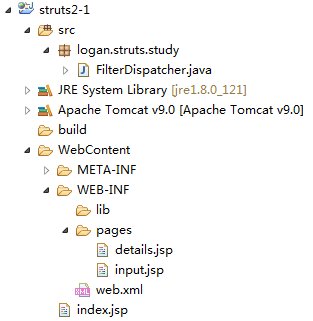
index.jsp
<%@ page language="java" contentType="text/html; charset=ISO-8859-1"

    pageEncoding="ISO-8859-1"%>

<!DOCTYPE html PUBLIC "-//W3C//DTD HTML 4.01 Transitional//EN" "http://www.w3.org/TR/html4/loose.dtd">

<html>

<head>

<meta http-equiv="Content-Type" content="text/html; charset=ISO-8859-1">

<title>Insert title here</title>

</head>

<body>

    <a href="product-input.action">Product Input</a>

</body>

</html>
web.xml
<?xml version="1.0" encoding="UTF-8"?>

<web-app xmlns:xsi="http://www.w3.org/2001/XMLSchema-instance" xmlns="http://xmlns.jcp.org/xml/ns/javaee" xsi:schemaLocation="http://xmlns.jcp.org/xml/ns/javaee http://xmlns.jcp.org/xml/ns/javaee/web-app_3_1.xsd" id="WebApp_ID" version="3.1">

  <display-name>struts2-1</display-name>

  <welcome-file-list>

    <welcome-file>index.html</welcome-file>

    <welcome-file>index.htm</welcome-file>

    <welcome-file>index.jsp</welcome-file>

    <welcome-file>default.html</welcome-file>

    <welcome-file>default.htm</welcome-file>

    <welcome-file>default.jsp</welcome-file>

  </welcome-file-list>

</web-app>
input.jsp
<%@ page language="java" contentType="text/html; charset=ISO-8859-1"

    pageEncoding="ISO-8859-1"%>

<!DOCTYPE html PUBLIC "-//W3C//DTD HTML 4.01 Transitional//EN" "http://www.w3.org/TR/html4/loose.dtd">

<html>

<head>

<meta http-equiv="Content-Type" content="text/html; charset=ISO-8859-1">

<title>Insert title here</title>

</head>

<body>

    <form action="product-save.action" method="post">

    ProductName:<input type="text" name="productName">

    <br><br>

    ProductDesc:<input type="text" name="productDesc">

    <br><br>

    ProductPrice:<input type="text" name="productPrice">

    <br><br>

    <input type="submit" value="Submit">

    <br><br>

    </form>

</body>

</html>
package logan.struts.study;

import java.io.IOException;

import javax.servlet.Filter;

import javax.servlet.FilterChain;

import javax.servlet.FilterConfig;

import javax.servlet.ServletException;

import javax.servlet.ServletRequest;

import javax.servlet.ServletResponse;

import javax.servlet.annotation.WebFilter;

import javax.servlet.http.HttpServletRequest;

/**

 * Servlet Filter implementation class FilterDispatcher

 */

@WebFilter("*.action")

public class FilterDispatcher implements Filter {

    /**

     * Default constructor.

     */

    public FilterDispatcher() {

        // TODO Auto-generated constructor stub

    }

    /**

     * @see Filter#destroy()

     */

    public void destroy() {

        // TODO Auto-generated method stub

    }

    /**

     * @see Filter#doFilter(ServletRequest, ServletResponse, FilterChain)

     */

    public void doFilter(ServletRequest request, ServletResponse response, FilterChain chain) throws IOException, ServletException {

        HttpServletRequest req = (HttpServletRequest) request;

        //1.获取servletPath

        String servletPath = req.getServletPath();

        System.out.println(servletPath);

        //2.判断servletPath,若其等于"/product-input.action"则转发到

        ///WEB-INF/pages/input.jsp

        String path = null;

        if("/product-input.action".equals(servletPath)){

            path = "/WEB-INF/pages/input.jsp";

        }

        if(path != null){

            request.getRequestDispatcher(path).forward(request, response);

            return;

        }

        chain.doFilter(request, response);

    }

    /**

     * @see Filter#init(FilterConfig)

     */

    public void init(FilterConfig fConfig) throws ServletException {

        // TODO Auto-generated method stub

    }

}
在浏览器里面输入http://localhost:8080/struts2-1/product-input.action
可以看到

添加代码如下:

Product.java
package logan.struts.study;

public class Product {

    private Integer productId;

    private String productName;

    private String productDesc;

    private double productPrice;

    public Integer getProductId() {

        return productId;

    }

    public void setProductId(Integer productId) {

        this.productId = productId;

    }

    public String getProductName() {

        return productName;

    }

    public void setProductName(String productName) {

        this.productName = productName;

    }

    public String getProductDesc() {

        return productDesc;

    }

    public void setProductDesc(String productDesc) {

        this.productDesc = productDesc;

    }

    public double getProductPrice() {

        return productPrice;

    }

    public void setProductPrice(double productPrice) {

        this.productPrice = productPrice;

    }

    public Product(Integer productId, String productName, String productDesc, double productPrice) {

        super();

        this.productId = productId;

        this.productName = productName;

        this.productDesc = productDesc;

        this.productPrice = productPrice;

    }

    public Product() {

    }

    @Override

    public String toString() {

        return "Product [productId=" + productId + ", productName=" + productName + ", productDesc=" + productDesc

                + ", productPrice=" + productPrice + "]";

    }

}
package logan.struts.study;

import java.io.IOException;

import javax.servlet.Filter;

import javax.servlet.FilterChain;

import javax.servlet.FilterConfig;

import javax.servlet.ServletException;

import javax.servlet.ServletRequest;

import javax.servlet.ServletResponse;

import javax.servlet.annotation.WebFilter;

import javax.servlet.http.HttpServletRequest;

/**

 * Servlet Filter implementation class FilterDispatcher

 */

@WebFilter("*.action")

public class FilterDispatcher implements Filter {

    /**

     * Default constructor.

     */

    public FilterDispatcher() {

        // TODO Auto-generated constructor stub

    }

    /**

     * @see Filter#destroy()

     */

    public void destroy() {

        // TODO Auto-generated method stub

    }

    /**

     * @see Filter#doFilter(ServletRequest, ServletResponse, FilterChain)

     */

    public void doFilter(ServletRequest request, ServletResponse response, FilterChain chain) throws IOException, ServletException {

        HttpServletRequest req = (HttpServletRequest) request;

        //1.获取servletPath

        String servletPath = req.getServletPath();

        System.out.println(servletPath);

        //2.判断servletPath,若其等于"/product-input.action"则转发到

        ///WEB-INF/pages/input.jsp

        String path = null;

        if("/product-input.action".equals(servletPath)){

            path = "/WEB-INF/pages/input.jsp";

        }

        //3.若其等于"/product-save.action"则

        if("/product-save.action".equals(servletPath)){

            //1).获取请求参数

            String productName = request.getParameter("productName");

            String productDesc = request.getParameter("productDesc");

            String productPrice = request.getParameter("productPrice");

            //2).把请求信息封装为一个Product对象

            Product product = new Product(null, productName, productDesc, Double.parseDouble(productPrice));

            product.setProductId(1001);

            //3).执行保存操作

            System.out.println("Save Product" + product);

            //4).把Product对象保存到request中。${param.productName} -> ${requestScope.product.productName}

            request.setAttribute("product", product);

            path = "/WEB-INF/pages/details.jsp";

        }

        if(path != null){

            request.getRequestDispatcher(path).forward(request, response);

            return;

        }

        chain.doFilter(request, response);

    }

    /**

     * @see Filter#init(FilterConfig)

     */

    public void init(FilterConfig fConfig) throws ServletException {

        // TODO Auto-generated method stub

    }

}
details.jsp
<%@ page language="java" contentType="text/html; charset=ISO-8859-1"

    pageEncoding="ISO-8859-1"%>

<!DOCTYPE html PUBLIC "-//W3C//DTD HTML 4.01 Transitional//EN" "http://www.w3.org/TR/html4/loose.dtd">

<html>

<head>

<meta http-equiv="Content-Type" content="text/html; charset=ISO-8859-1">

<title>Insert title here</title>

</head>

<body>

        productId:${requestScope.product.productId }

        <br><br>

        productName:${requestScope.product.productName }

        <br><br>

        productDesc:${requestScope.product.productDesc }

        <br><br>

        productPrice:${requestScope.product.productPrice }

        <br><br>

</body>

</html>
当提交表单时


使用Filter作为控制器的好处:
使用一个过滤器来作为控制器,可以方便的在应用程序里对所有资源(包括静态资源)进行控制访问。
<url-pattern>*.action</url-pattern>
Servlet和Filter哪个更好?
Servlet能做的Filter都能做。
Filter能做的Servlet不一定能做,例如拦截资源。
Struts学习第一课 使用Filter作为控制器的MVC应用的更多相关文章
- Magento学习第一课——目录结构介绍
Magento学习第一课--目录结构介绍 一.Magento为何强大 Magento是在Zend框架基础上建立起来的,这点保证了代码的安全性及稳定性.选择Zend的原因有很多,但是最基本的是因为zen ...
- Elasticsearch7.X 入门学习第一课笔记----基本概念
原文:Elasticsearch7.X 入门学习第一课笔记----基本概念 版权声明:本文为博主原创文章,遵循CC 4.0 BY-SA版权协议,转载请附上原文出处链接和本声明. 本文链接:https: ...
- [原创]java WEB学习笔记53:Struts2学习之路---前奏:使用 Filter 作为控制器的 MVC
本博客的目的:①总结自己的学习过程,相当于学习笔记 ②将自己的经验分享给大家,相互学习,互相交流,不可商用 内容难免出现问题,欢迎指正,交流,探讨,可以留言,也可以通过以下方式联系. 本人互联网技术爱 ...
- MFC学习-第一课 MFC运行机制
最近由于兴趣爱好,学习了孙鑫的MFC教程的第一课.看完视频了,自己便用visual studio 2010尝试了MFC编程,其中遇到了一些问题. 1.vs2010不像vs6.0那样可以新建一个空的MF ...
- python学习第一课要点记录
写在要点之前的一段话,留给将来的自己:第一次参加编程的培训班,很兴奋很激动,之前都是自己在网上找免费的视频来看,然后跟着写一些课程中的代码,都是照着模子写,没有自己过多的思考.感觉这样学不好,除了多写 ...
- python学习第一课
第一课: 1.不要使用来路不明的软件 2.下载杀毒软件 3.不懂技术的人在技术人面前会显得愈发无知 4.python无所不能 需要掌握的知识: 1.python基本语法 2.文件处理 3.函数 4.模 ...
- Asp.net MVC4高级编程学习笔记-视图学习第一课20171009
首先解释下:本文只是对Asp.net MVC4高级编程这本书学习记录的学习笔记,书本内容感觉挺简单的,但学习容易忘记,因此在边看的同时边作下了笔记,可能其它朋友看的话没有情境和逻辑顺序还请谅解! 一. ...
- Kotlin学习第一课:从对比Java开始
1. 介绍 今年初,甲骨文再次对谷歌所谓的安卓侵权使用Java提起诉讼,要求后者赔偿高达90亿美元.随后便传出谷歌因此计划将主力语言切换到苹果主导的Swift,不过这事后来没了跟进. 但谷歌在这两天的 ...
- Git速成学习第一课:创建版本库与版本回退
Git速成学习笔记整理于廖雪峰老师的官网网站:https://www.liaoxuefeng.com/ 我太困了0.0精神点再写...... /*我来啦!以后会陆续更新自己的学习笔记*/ Git是分布 ...
随机推荐
- 登陆获取shell时的配置文件加载过程
最近遇到一台ubuntu服务器登陆时默认语言环境变量变成posix问题, 导致中文显示乱码,影响程序的正常运行 # locale LANG= LANGUAGE= LC_CTYPE="POSI ...
- 关于使用unigui、webxone、mysql的几个问题
一.webxone的问题:1.目前稳定可用的版本好像是v2510:2.设计webxone应用时,窗口的“position”属性只能设置为poDesigned,而且不能动态改变窗口尺寸,否则在浏览器中显 ...
- R数据类型
2.2.1 向量向量是用于存储数值型.字符型或逻辑型数据的一维数组.执行组合功能的函数c()可用来创建向量.各类向量如下例所示: a <-c(1, 2, 5, 3, 6, -2, 4) b &l ...
- 使用virtualenv构建python虚拟环境
hb@hb-pc ~ $ virtualenv --python=python3 --no-site-packages test Running virtualenv with interpreter ...
- Confluence 6 找到未使用的空间
有时候,你希望找到你系统中没有使用的内容.有时候你也希望能够对这些内容进行更多的关注,但是如何找到一些有关长期不更新的页面,或者长期不使用的空间? View Space Activity 页面中的内容 ...
- kylin_学习_01_kylin安装部署
一.环境准备 根据官方文档,kylin是需要运行在hadoop环境下的,如下图: 1.hadoop环境搭建 参考:hadoop_学习_02_Hadoop环境搭建(单机) 2.hbase环境搭建 参考: ...
- Tomcat报错:HTTP Status 500 - Wrapper cannot find servlet class
HTTP Status 500 - Wrapper cannot find servlet class com.servlet.servlet.RegServlet or a class it dep ...
- 关于pyhton中的__xxx__格式的方法与变量的理解
python中类似__xx__的方法和变量是python系统内定义的方法和变量,都是具有特殊意义的基础变量和方法,一般不要擅自使用,除非知道自己在干什么. 具体查看python内置模块builtins ...
- 超链接向servlet传参数
超链接传参数方式如下: <a href=xxxServlet?flag=1 target=“XX”></a> 注意:target=“XX”是用来指定在什么窗体打开.xx为该窗 ...
- Python set运算 集合差集,并集,交集,list去重复
在没有发现方便的set运算之前,都是用遍历list查找两个集合的差别. 比如, 找list1和list2的差集 for i in list1: if not i in list2: print i 现 ...