
9 与python2交互
1.创建外键
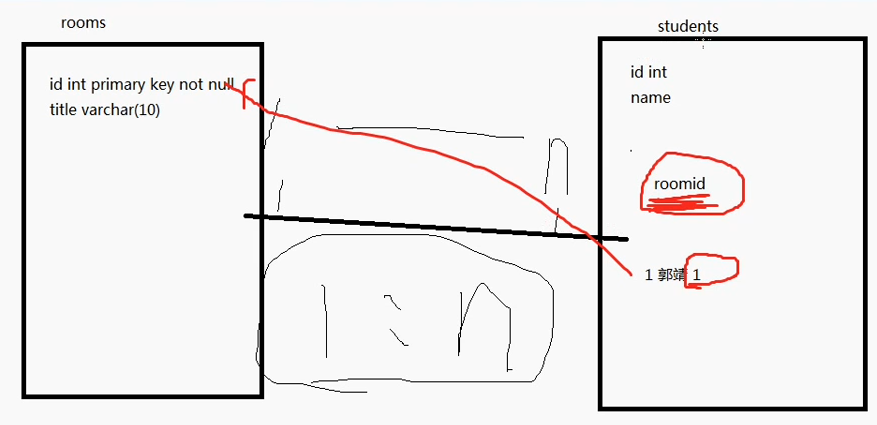
# 创建room表

mysql> create table rooms(id int primary key not null,title varchar());

Query OK,  rows affected (0.01 sec)

#创建学生表

mysql> create table stu(

    -> id int primary key auto_increment not null,

    -> name varchar(),

    -> roomid int);

#添加外键

mysql> alter table stu add constraint stu_room foreign key(roomid) references rooms(id);

#添加数据

mysql> insert into stu values(,'郭靖',);

ERROR  (): Cannot add or update a child row: a foreign key constraint fails (`py31`.`stu`, CONSTRAINT `stu_room` FOREIGN KEY (`roomid`) REFERENCES `rooms` (`id`))

mysql> insert into rooms values(,'聚义堂');
2. python2安装引入模块
python@ubuntu:~$ sudo apt-get install python-mysql   #包名错误

正在读取软件包列表... 完成

正在分析软件包的依赖关系树

正在读取状态信息... 完成

E: 无法定位软件包 python-mysql
#安装mysql模块

python@ubuntu:~$ sudo apt-get install python-mysqldb
正在读取软件包列表... 完成

正在分析软件包的依赖关系树

正在读取状态信息... 完成

python-mysqldb 已经是最新版 (1.3.7-1build2)。

下列软件包是自动安装的并且现在不需要了:

  linux-headers-4.4.0-22 linux-headers-4.4.0-22-generic linux-image-4.4.0-22-generic

  linux-image-extra-4.4.0-22-generic

使用'sudo apt autoremove'来卸载它(它们)。

升级了 0 个软件包,新安装了 0 个软件包,要卸载 0 个软件包,有 395 个软件包未被升级。
- 在文件中引入模块
import Mysqldb
3.交互类型
(1)Connection对象
- 用于建立与数据库的连接
- 创建对象:调用connect()方法
conn=connect(参数列表)
- 参数host:连接的mysql主机,如果本机是'localhost'
- 参数port:连接的mysql主机的端口,默认是3306
- 参数db:数据库的名称
- 参数user:连接的用户名
- 参数password:连接的密码
- 参数charset:通信采用的编码方式,默认是'gb2312',要求与数据库创建时指定的编码一致,否则中文会乱码
对象的方法
- close()关闭连接
- commit()事务,所以需要提交才会生效
- rollback()事务,放弃之前的操作
- cursor()返回Cursor对象,用于执行sql语句并获得结果
(2)Cursor对象
- 执行sql语句
- 创建对象:调用Connection对象的cursor()方法
cursor1=conn.cursor()
对象的方法
- close()关闭
- execute(operation [, parameters ])执行语句,返回受影响的行数
- fetchone()执行查询语句时,获取查询结果集的第一个行数据,返回一个元组
- next()执行查询语句时,获取当前行的下一行
- fetchall()执行查询时,获取结果集的所有行,一行构成一个元组,再将这些元组装入一个元组返回
- scroll(value[,mode])将行指针移动到某个位置
- mode表示移动的方式
- mode的默认值为relative,表示基于当前行移动到value,value为正则向下移动,value为负则向上移动
- mode的值为absolute,表示基于第一条数据的位置,第一条数据的位置为0
对象的属性
- rowcount只读属性,表示最近一次execute()执行后受影响的行数
- connection获得当前连接对象
4.增删改查
(1)增加
# -*- coding :utf-8 -*-

from MySQLdb import *            #导入包

try:

    conn = connect(host="localhost", port=3306, user="root", passwd="mysql", db="py31", charset="utf8")                #Connection对象

    cursor1 = conn.cursor()                                                                                            #Cursor对象

    sql = 'insert into students(name) values("alex")'            #sql语句

    cursor1.execute(sql)                                         #执行

    conn.commit()               #提交

    cursor1.close()

    conn.close()                #关闭

except Exception as e:

    print(e.message)
| 13 | alex      |       | NULL                |          |

+----+-----------+--------+---------------------+----------+
(2)修改数据
sql = 'update students set name="jack" where id=10'
(3)删除数据
sql = 'delete from students where id=9'
5.sql语句参数化
用户输入:a'or 1=1 or'

分号会影响sql语句

select * from students where name=@name
(1)参数化
# -*- coding:utf-8 -*-

from MySQLdb import *

try:

    conn = connect(host="localhost", port=3306, user="root", passwd="mysql", db="py31", charset="utf8")

    cursor1 = conn.cursor()

    name = raw_input("请输入名字:")

    p_name = [name]

    #sql = 'insert into students(name) values(%s)'%p_name

    #cursor1.execute()

    cursor1.execute('insert into students(name) values(%s)',p_name)

    conn.commit()

    cursor1.close()

    conn.close()

    print("----ok---")

except Exception as e:

    print(e.message)
| 15 | 'lala'haha |       | NULL                |          |

+----+------------+--------+---------------------+----------+
(2) 列表作为参数
# -*- coding:utf-8 -*-

from MySQLdb import *

try:

    name = raw_input("请输入名字:")

    conn = connect(host="localhost", port=3306, user="root", passwd="mysql", db="py31", charset="utf8")

    cursor1 = conn.cursor()

    sql = 'insert into students(name) values(%s)'

    cursor1.execute(sql,[name])

    conn.commit()

    cursor1.close()

    conn.close()

    print("----ok---")

except Exception as e:

    print(e.message)
6.查询
(1)查询一条学生信息
# -*- coding:utf-8 -*-

from MySQLdb import *

try:

    #name = raw_input("请输入名字:")

    conn = connect(host="localhost", port=3306, user="root", passwd="mysql", db="py31", charset="utf8")

    cursor1 = conn.cursor()

    #sql = 'insert into students(name) values("alex")'

    #sql = 'update students set name="jack" where id=10'

    #sql = 'delete from students where id=9'

    #sql = 'insert into students(name) values(%s)'

    #cursor1.execute(sql,[name])

    sql = 'select * from students where id=4'

    cursor1.execute(sql)

    result = cursor1.fetchone()

    print(result)

    cursor1.close()

    conn.close()

    print("----ok---")

except Exception as e:

    print(e.message)
(4L, u'\u5c0f\u7c73', '\x01', None, '\x00')

----ok---
(2)查询多行数据
# -*- coding:utf-8 -*-

from MySQLdb import *

try:

    #name = raw_input("请输入名字:")

    conn = connect(host="localhost", port=3306, user="root", passwd="mysql", db="py31", charset="utf8")

    cursor1 = conn.cursor()

    #sql = 'insert into students(name) values("alex")'

    #sql = 'update students set name="jack" where id=10'

    #sql = 'delete from students where id=9'

    #sql = 'insert into students(name) values(%s)'

    #cursor1.execute(sql,[name])

    sql = 'select * from students'

    cursor1.execute(sql)

    result = cursor1.fetchall()

    print(result)

    cursor1.close()

    conn.close()

    print("----ok---")

except Exception as e:

    print(e.message)
((1L, u'\u5c0f\u90ed', '\x01', datetime.datetime(1999, 9, 9, 0, 0), '\x00'), (2L, u'\u817e\u65ed', '\x01', datetime.datetime(1990, 2, 2, 0, 0), '\x00'), (3L, u'\u7f51\u6613', '\x01', None, '\x00'), (4L, u'\u5c0f\u7c73', '\x01', None, '\x00'), (6L, u'\u9177\u72d7', '\x00', datetime.datetime(2017, 2, 13, 0, 0), '\x01'), (7L, u'QQ', '\x01', None, '\x00'), (8L, u'\u817e\u8baf\u4e91', '\x01', None, '\x00'), (10L, u'jack', '\x01', None, '\x00'), (11L, u'\u5fae\u535a', '\x01', None, '\x00'), (12L, u'\u5fae\u4fe1', '\x01', None, '\x00'), (13L, u'alex', '\x01', None, '\x00'), (14L, u'lalal', '\x01', None, '\x00'), (15L, u"'lala'haha", '\x01', None, '\x00'), (16L, u"''tae", '\x01', None, '\x00'))

----ok---
(3) 格式化输出数据
   # 执行SQL语句

   cursor.execute(sql)

    # 获取所有记录列表

   results = cursor.fetchall()

    for row in results:

       fname = row[0]

       lname = row[1]

       age = row[2]

       sex = row[3]

       income = row[4]

       # 打印结果

      print "fname=%s,lname=%s,age=%d,sex=%s,income=%d" % \

              (fname, lname, age, sex, income )
9 与python2交互的更多相关文章
- python2.7入门---文件I/O&简单用户交互
这篇文章开始之前,我们先来看下python中的输出方法.最简单的输出方法是用print语句,你可以给它传递零个或多个用逗号隔开的表达式.此函数把你传递的表达式转换成一个字符串表达式,并将结果写 ...
- Centos启动Cassandra交互模式失败:No appropriate python interpreter found
在CentOS6.5安装好Cassandra后,启动交互模式: bin/sqlsh 192.168.10.154 时,报错 No appropriate python interpreter foun ...
- Python2.7.12开发环境构建(自动补全)
一.安装readline-devel包 Python的编译安装依赖于这个包 yum -y install readline-devel 二.安装Python2.7.12 Python官方网站(到此处下 ...
- Python2.4-原理之函数
此节来自于<Python学习手册第四版>第四部分 一.函数基础 函数的作用在每个编程语言中都是大同小异的,,这个表是函数的相关语句和表达式. 1.编写函数,a.def是可执行代码,pyth ...
- Python2.6-原理之类和oop(下)
来自<python学习手册第四版>第六部分 五.运算符重载(29章) 这部分深入介绍更多的细节并看一些常用的重载方法,虽然不会展示每种可用的运算符重载方法,但是这里给出的代码也足够覆盖py ...
- Python2.x和3.x主要差异总结
本文部分转载自http://my.oschina.net/chihz/blog/123437,部分来自自身修改 开始使用Python之后就到处宣扬Python如何如何好,宣传工作的一大重要诀窍就是做对 ...
- Python(文件、文件夹压缩处理模块,shelve持久化模块,xml处理模块、ConfigParser文档配置模块、hashlib加密模块,subprocess系统交互模块 log模块)
OS模块 提供对操作系统进行调用的接口 os.getcwd() 获取当前工作目录,即当前python脚本工作的目录路径 os.chdir("dirname") 改变当前脚本工作目 ...
- Python2和Python3在windows下共存
Python2.7 和 Python3不兼容,两种环境可能都会用到.ubuntu14.04中已经默认安装了这两个版本,在shell中输入python会自动进入Python2.7的交互环境,输入Pyth ...
- 4.python中的用户交互
学习完如何写'hello world'之后,我们还是不太满意,因为这样代码就写死了,以后运行的时候都只打印一局固定的话而已. 但是,我想在程序运行后,自己手动输入内容怎么办,此时就要学习如何使用用户交 ...
随机推荐
- git 因线上分支名重复导致无法拉取代码
有时 git pull 或 git fetch 时发现 git 报了个异常,说法像是无法将线上某个分支与本地分支合并,由于分支是...(很长的hash)但是分支却是...(很长的hash) 仔细查查后 ...
- C# 对XML操作-实例
using System;using System.Collections.Generic;using System.ComponentModel;using System.Data;using Sy ...
- COGS 2091. Asm.Def的打击序列
★★★ 输入文件:asm_lis.in 输出文件:asm_lis.out 简单对比时间限制:4 s 内存限制:256 MB [题目描述] 白色圆柱形的“蓝翔”号在虚空中逐渐变大,一声沉 ...
- April 29 2017 Week 17 Saturday
Every man is a poet when he is in love. 每个恋爱中的人都是诗人. It is said this saying was from Plato, the famo ...
- JavaRebel 2.0 发布,一个JVM插件
JavaRebel是一个JVM插件(-javaagent),能够即时重载java class更改,因此不需要重新部署一个应用或者重启容器,节约开发者时间. JavaRebel 2.0的新特征: 改变了 ...
- EF分组后把查询的字段具体映射到指定类里面的写法
//先做基本查询 var querySql = from l in _logClinicDataOperationRepository.Table select new LogClinicDataOp ...
- POJ-2151 Check the difficulty of problems---概率DP好题
题目链接: https://vjudge.net/problem/POJ-2151 题目大意: ACM比赛中,共M道题,T个队,pij表示第i队解出第j题的概率 问 每队至少解出一题且冠军队至少解出N ...
- CentOS 5 - 安装PHP MongoDB扩展
For driver developers and people interested in the latest bugfixes, you can compile the driver from ...
- 2017.9.21 HTML学习总结---多媒体播放系统设计
1.题目:整个页面被划分三个子窗口,上面窗口为页面功能提示区, 下左部分为不同类型播放的功能选项,下右部分为播放系统显示播放信息窗口. (1)网页设计框架: <html> <head ...
- 2017.11.4 JavaWeb-----基于JavaBean+JSP求任意两数代数和(改进的在JSP页面中无JSP脚本代码的)+网页计数器JavaBean的设计与使用
修改后的JSP中不含有JSP脚本代码这使得JSP程序的清晰性.简单 1.设计JavaBean 的Add.java 类 package beans; public class Add { private ...