
WPF用Blend写的交通信号灯
用Blend写WPF界面和Behavior特别方便,下面是我写的一个交通信号灯,用Blend写完后代码直接Copy到wpf窗体就可以了。
1.打开Blend做一个矩形和三个圆形,然后分别填充颜色,把矩形的四角编程圆角;
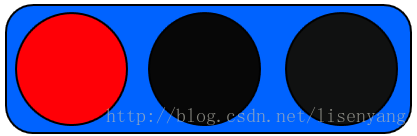
2.添加时间动画并设置动画循环显示:
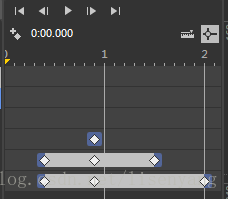
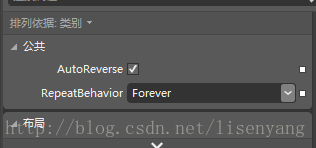
3.xaml代码如下:
<Window  x:Class="wpf红绿灯.MainWindow"

         xmlns="http://schemas.microsoft.com/winfx/2006/xaml/presentation"

         xmlns:x="http://schemas.microsoft.com/winfx/2006/xaml"

         Title="MainWindow" Height="106.879" Width="218.457">

    <Window.Resources>

        <Storyboard x:Key="Storyboard1" AutoReverse="True" RepeatBehavior="Forever">

            <ColorAnimationUsingKeyFrames Storyboard.TargetProperty="(Shape.Fill).(SolidColorBrush.Color)" Storyboard.TargetName="ellipse1">

                <EasingColorKeyFrame KeyTime="0:0:0.4" Value="sc#1, 0.004391442, 0.004024717, 0.004024717"/>

                <EasingColorKeyFrame KeyTime="0:0:0.9" Value="#FFF9FF00"/>

                <EasingColorKeyFrame KeyTime="0:0:1.5" Value="sc#1, 0.004391442, 0.004024717, 0.004024717"/>

            </ColorAnimationUsingKeyFrames>

            <ColorAnimationUsingKeyFrames Storyboard.TargetProperty="(Shape.Fill).(SolidColorBrush.Color)" Storyboard.TargetName="ellipse2">

                <EasingColorKeyFrame KeyTime="0:0:0.4" Value="#FF1B1C1B"/>

                <EasingColorKeyFrame KeyTime="0:0:0.9" Value="#FF0F0E0E"/>

                <EasingColorKeyFrame KeyTime="0:0:2" Value="#FF1DFF00"/>

            </ColorAnimationUsingKeyFrames>

            <ColorAnimationUsingKeyFrames Storyboard.TargetProperty="(Shape.Fill).(SolidColorBrush.Color)" Storyboard.TargetName="ellipse">

                <EasingColorKeyFrame KeyTime="0:0:0.9" Value="#FF0F0E0E"/>

            </ColorAnimationUsingKeyFrames>

        </Storyboard>

    </Window.Resources>

    <Window.Triggers>

        <EventTrigger RoutedEvent="FrameworkElement.Loaded">

            <BeginStoryboard Storyboard="{StaticResource Storyboard1}"/>

        </EventTrigger>

    </Window.Triggers>

    <Grid x:Name="grid">

        <Rectangle Fill="#FF0063FF" HorizontalAlignment="Left" Height="65" Margin="6,6,0,0" Stroke="Black" VerticalAlignment="Top" Width="202" RadiusY="13.394" RadiusX="13.394"/>

        <Ellipse x:Name="ellipse" Fill="#FFFF0006" HorizontalAlignment="Left" Height="57" Margin="11,10,0,0" Stroke="Black" VerticalAlignment="Top" Width="56"/>

        <Ellipse x:Name="ellipse1" Fill="#FF070707" HorizontalAlignment="Left" Height="57" Margin="77,10,0,0" Stroke="Black" VerticalAlignment="Top" Width="56"/>

        <Ellipse x:Name="ellipse2" Fill="#FF101111" HorizontalAlignment="Left" Height="57" Margin="145,10,0,0" Stroke="Black" VerticalAlignment="Top" Width="56"/>

    </Grid>

</Window>
4.最后效果如图:

下面这个是竖着的效果图:

WPF用Blend写的交通信号灯的更多相关文章
- WPF-利用Blend写的平面控制闸门开关动画
原文:WPF-利用Blend写的平面控制闸门开关动画 版权声明:本文为博主原创文章,未经博主允许不得转载. https://blog.csdn.net/yangyisen0713/article/de ...
- 用Micro:bit做交通信号灯
交通信号灯项目在控制技术中,有点像"Hello world!" 是一个入门级的范例. 对于孩子来说,交通灯跟日常生活息息相关,他们都熟悉,充分知道需要做什么这是一个让孩子开始的好项 ...
- 最新用WPF为触摸屏写了一个手写程序,双格输入的
原文:最新用WPF为触摸屏写了一个手写程序,双格输入的 双格输入可以提高手写速度,当前字写完以后可以自动识别提交,写下一个字.这样比单格手写速度提高一倍.特别适合触摸屏程序使用 界面如下: 程序如下: ...
- 【FPGA】Verilog实现交通信号灯
大二数字电路的课程设计中,有一份日常作业使用Xilinx FPGA实现简易交通信号灯,但很可惜当时时间有限,没能最终完成.正好在这一学期选修SOPC设计课程,同样采用了Xilinx FPGA,故打算重 ...
- n个并发进程共用一个公共变量Q,写出用信号灯实现n个进程互斥的程序描述,给出信号灯值得取值范围,并说明每个取值范围的物理意义。
答: var mutex: semaphore:=1; begin cobegin process i : begin // i = 1,2,……,n repeat P(mutex); 对公共变量 ...
- wpf 纯样式写按钮
<!--自定义按钮样式--> <LinearGradientBrush x:Key="LinearGradientBlueBackground" EndPoint ...
- Redux教程1:环境搭建,初写Redux
如果将React比喻成士兵的话,你的程序还需要一位将军,去管理士兵(的状态),而Redux恰好是一位好将军,简单高效: 相比起React的学习曲线,Redux的稍微平坦一些:本系列教程,将以" ...
- [Aaronyang]谈谈2015年AY对WPF全面技术总结40多篇WPF,炫到没朋友的AYUI来了
原著:AY WPF博客- 把wpf推广出去,让那些鄙视的人说不 大家好! 我是AY,首先声明,我在做一件很枯燥的事情,我是个91后程序员,每天熬夜完成计划的过着下班后的生活. 那天有 ...
- [Aaronyang] 写给自己的WPF4.5 笔记19[Visual类图文并茂讲解]
文章虽小,内容还好,且看且珍惜. aaronyang版权所有,不许转载,违者必究 当界面上使用数千个矢量图形,例如实时统计图,粒子碰撞,比如超级玛丽游戏,图像一直在绘,过量的使用WPF的元素系统和Sh ...
随机推荐
- sqlplus中怎么将你全部的操作和结果记录保存到你指定的文件里
[在sqlplus的操作中,非常多时候我们都想把自己的写的sql语句和改动日志或者结果信息做记录] [首先]肯定要正常连接到oralce数据库. [然后] 你用你指定的用户登录到oralce数据库之后 ...
- js进阶解决浏览器缓存不能自动更新的问题(在ajax的url上带上一个参数,可以是日期,或者是随机数)(随机数Math.random)(取得日期的毫秒数:new Date().getTime();)
js进阶解决浏览器缓存不能自动更新的问题(在ajax的url上带上一个参数,可以是日期,或者是随机数)(随机数Math.random)(取得日期的毫秒数:new Date().getTime();) ...
- [Angular] Providers and useFactory
// service.ts import { Injectable, Inject } from '@angular/core'; import { Http } from '@angular/htt ...
- ios开发之图层与核心动画一:图层CALayer的认识
#import "ViewController.h" @interface ViewController () @property (weak, nonatomic) IBOutl ...
- JAVA学习路线图---(JAVA1234) 分类: B1_JAVA 2013-10-05 10:22 502人阅读 评论(1) 收藏
转自:http://blog.csdn.net/pplcheer/article/details/12276999 第一阶段-Java基础 这一阶段很重要,关系到你后面阶段的学习,所以务 ...
- 【b802】火柴棒等式
Time Limit: 1 second Memory Limit: 50 MB [问题描述] 给你n根火柴棍,你可以拼出多少个形如"A+B=C"的等式?等式中的A.B.C是用火柴 ...
- ArcGIS Engine 编辑介绍
转自原文 ArcGIS Engine 编辑介绍 IWorkspaceEdit接口是ArcGIS Engine 实现空间数据编辑的重要接口,它让程序启动或者停止一个编辑流程,在这个编辑流程内,可以对数据 ...
- css 弹性盒模型Flex 布局
参考文章:http://www.runoob.com/w3cnote/flex-grammar.html Flex 布局是什么:采用Flex布局的元素,称为Flex容器(flex container) ...
- 判断系统64位(使用GetNativeSystemInfo函数,XP时代就有这个函数了)
判断系统64位 static bool IsWin64 (void) { SYSTEM_INFO si = {0}; typedef void (WINAPI *LPFN_PGNSI)(LPSYSTE ...
- java 替换json字符串中间的引号保留两边的引号,避免json校验失败
一.json概要 JSON(JavaScript Object Notation, JS 对象标记)-一种轻量级的数据交换标准(相对xml),独立于编程语言.具体以逗号分隔的key:value键值对的 ...