
bootstrap的tree使用
效果图:

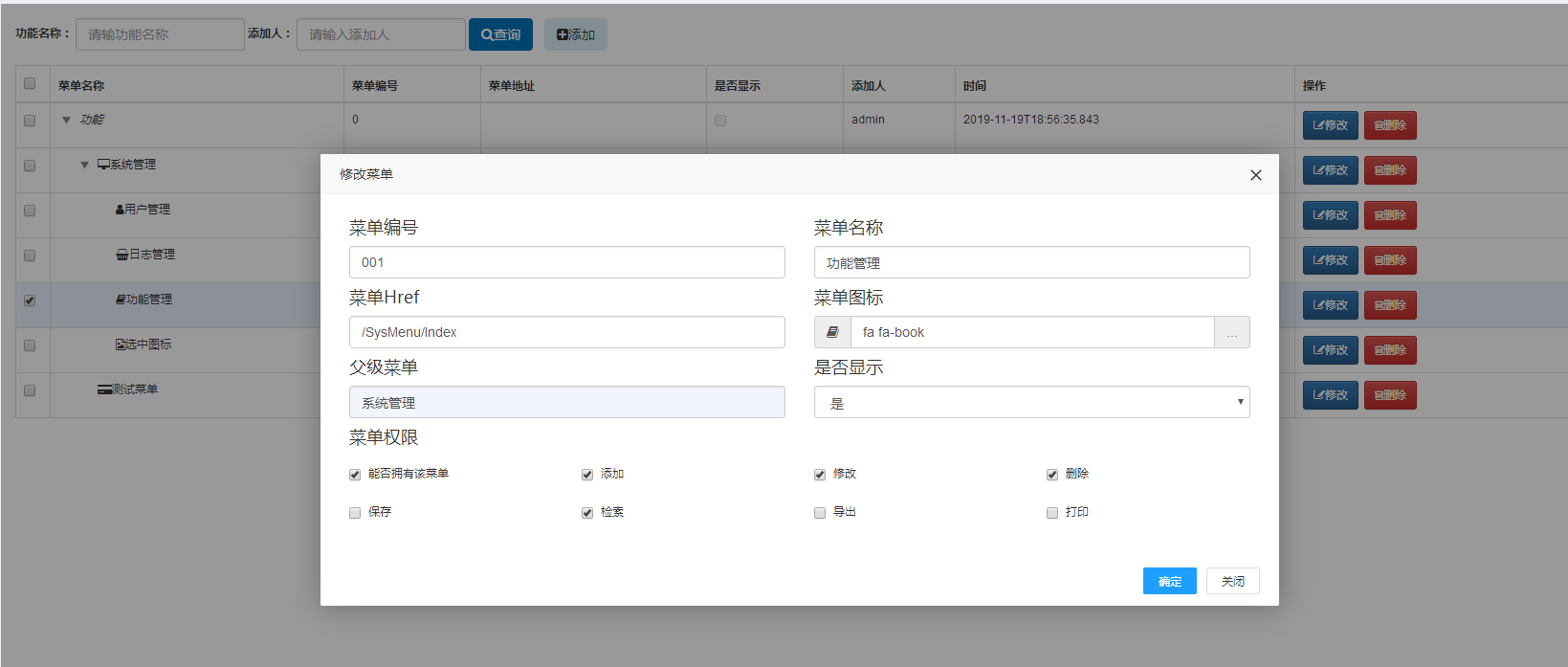
先引用,顺序很重要
<script src="~/Content/bootstrap-table/bootstrap-table.min.js"></script>

<link href="~/Content/bootstrap-table/extensions/tree-table/jquery.treetable.css" rel="stylesheet" />

<script src="~/Content/bootstrap-table/extensions/tree-table/jquery.treetable.js"></script>

<link href="~/Content/bootstrap-table/extensions/tree-table/bootstrap-table-tree-table.css" rel="stylesheet" />

<script src="~/Content/bootstrap-table/extensions/tree-table/bootstrap-table-tree-table.js"></script>
<script type="text/javascript">
$(document).ready(function () {
$("#dgvInfo").bootstrapTable({
method: "GET",
url: "@Url.Action("TreeJson")",
contentType: "application/x-www-form-urlencoded",
datatype: 'json',
undefinedText: '',
striped: false,//隔行 渐变色
classes: "table table-hover",
clickToSelect: true,
queryParams: function (params) {
return {
menu_Name: $.trim($("#menu_Name").val()),
userName: $.trim($("#userName").val())
}
},
onClickRow: function (row, dom, field) {
$("#dgvInfo").bootstrapTable('uncheckAll');
//$("#dgvInfo").bootstrapTable("checkBy", { field: "gid", values: [dom.data('index')] });
}
}); //表格 - 操作 - 事件
window.actionEvents = {
'click #update-selected': function (e, value, row, index) {
SetChildInsurMsg('修改菜单', row)
},
'click #delete-selected': function (e, value, row, index) {
$.ajax({
url: '@Url.Action("DeleteMeun")',
type: 'post',
dataType: 'json',
data: row,
success: function (data) {
console.log(data.message);
searchData();
},
error: function () {
layer.alert('发生错误', {
skin: 'layui-layer-molv',
closeBtn: 0
});
}
});
}
};
}); function funcNmStyle(value, row, index) {
return { css: { "white-space": "nowrap" } };
} function funcNmFormatter(value, row) {
return ' <i class="' + row.menu_Icon + '">' + value+'</i>';
//<a href="@Url.Action("Update")?FunctionID=' + row.gid + '">' + value + '</a>
} function Operations(value, row, index) {
var str = '<button type="button" id="update-selected" class="btn btn-primary btn-sm"><i class="fa fa-edit"></i>修改</button> <button type="button" id="delete-selected" class="btn btn-danger btn-sm"><i class="fa fa-trash-o"></i>删除</button>';
return str;
} function IsPermissionFormatter(value, row) {
var str = '<input type=checkbox class = "disabled" ' + ((row.menu_IsShow==1) ? 'checked' : '') + ' disabled></input>';
return str;
} function searchData() {
$("#dgvInfo").bootstrapTable('refresh', {
url: '@Url.Action("TreeJson")'
});
} function SetChildInsurMsg(title, rows) {
if (rows == null) {
var selectrow = $("#dgvInfo").bootstrapTable('getSelections')[0];
if (selectrow == null) {
alert("选择父菜单");
return;
}
} layer.open({
type: 2, //因为layer弹出层需要一个页面,所以是iframe弹出层,因此type: 2。
title: title,
shadeClose: true,
shade: 0.4,
area: ['60%', '60%'],
content: '@Url.Action("Info")',
btn: ['确定', '关闭'],
success: function (layero, index) {
if (rows != null) {
var body = layer.getChildFrame('body', index); //巧妙的地方在这里哦,获取layer打开页面的数据
body.contents().find("#gid").val(rows.gid);
body.contents().find("#menu_Num").val(rows.menu_Num);
body.contents().find("#menu_Name").val(rows.menu_Name);
body.contents().find("#menu_Url").val(rows.menu_Url);
body.contents().find("#menu_Icon").val(rows.menu_Icon);
body.contents().find("#menu_Iconi").addClass(rows.menu_Icon);
body.contents().find("#menu_IsShow").val(rows.menu_IsShow);
body.contents().find("#menu_ParentID").val(rows.menu_ParentID);
body.contents().find("#menu_ParentName").val(rows.menu_ParentName);
GetFunction(rows, body);
}
else {
var body = layer.getChildFrame('body', index); //巧妙的地方在这里哦
body.contents().find("#menu_ParentID").val(selectrow.gid);
body.contents().find("#menu_ParentName").val(selectrow.menu_Name);
}
},
yes: function (index) {
var res = window["layui-layer-iframe" + index].callbackdata();
var funs = window["layui-layer-iframe" + index].GetFunctions();
var obj = JSON.parse(res);
var functions = JSON.parse(funs);
if (obj.menu_Name.length > 0) {
if (rows != null) {
updatemenu(obj, functions, index)
} else {
addmenu(obj, functions, index);
}
}
else {
layer.alert('请填写必输项。', {
skin: 'layui-layer-molv',
closeBtn: 0
});
}
},
cancel: function () {
//右上角关闭回调
}
});
} //获取功能
function GetFunction(row, body) {
$.ajax({
url: '@Url.Action("GetMenuFunction")',
type: 'get',
dataType: 'json',
data: {
mid: row.gid
},
success: function (data) {
for (var i = 0; i < data.length; i++) {
body.contents().find("input[value=" + data[i].menuFunction_FunctionID + "]").attr("checked", true)
//.iCheck('check');
}
},
error: function () {
alert("发生错误!");
}
});
}; function addmenu(data, functions, index) {
$.ajax({
url: '@Url.Action("AddMenu")',
type: 'post',
dataType: 'json',
data: {
model: data,
functions: functions
},
success: function (data) {
if (data.type == 1) {
layer.close(index);
searchData();
} else {
alert(data.message);
}
},
error: function () {
alert("发生错误!");
}
});
}; function updatemenu(data, functions, index) {
$.ajax({
url: '@Url.Action("UpdateMenu")',
type: 'post',
dataType: 'json',
data: {
model: data,
functions: functions
},
success: function (data) {
if (data.type == 1) {
layer.close(index);
searchData();
} else {
alert(data.message);
}
},
error: function () {
alert("发生错误!");
}
});
};
</script>
bootstrap的tree使用的更多相关文章
- 多层json的构造,取值,还有使用bootstrap的tree view在前端展示的相关问题
bootstrap-tree view是一款非常好用的插件,它可以添加任意多层节点,效果如下所示: 使用之前需要在HTML页面添加依赖文件: <link href="bootstrap ...
- bootstrap的tree控件
地址:http://runjs.cn/detail/xtte94ls http://runjs.cn/code/xtte94ls
- 10+ 最流行的 jQuery Tree 菜单插件
jstree – jQuery Tree Plugin With HTML & JSON Data jstree is a lightweight and flexible jQuery pl ...
- Mega的简单使用
Table of Contents 1 Mega画树的简单应用 2 fas格式文件的准备 3 用生成的.meg画树 4 生出树的处理 4.1 修改内容,添加标注 4.2 导出 4.3 后面随着学习的进 ...
- Flsk-Bootstrap-2
目录 Flsk-Bootstrap-2 结构 解压Bootstrap 制作基础模板 视图函数 初始文件 启动文件 浏览器 Flsk-Bootstrap-2 参考:Flask 项目中使用 bootstr ...
- 【英文文档】 Installing Go from source Go语言官方编译指南 2019.02.27
Introduction Go is an open source project, distributed under a BSD-style license. This document expl ...
- Bootstrap树控件(Tree控件组件)使用经验分享
前言:很多时候我们在项目中需要用到树,有些树仅仅是展示层级关系,有些树是为了展示和编辑层级关系,还有些树是为了选中项然后其他地方调用选中项.不管怎么样,树控件都是很多项目里面不可或缺的组件之一.今天, ...
- 基于bootstrap样式的tree,
<!doctype html><html lang="zh"><head> <meta charset="UTF-8" ...
- BootstrapQ 包Bootstrap tree,dialog等待
官方网站:http://uikoo9.com/bootstrapQ why 事实上bootstrap已经非常好了,唯一的软肋就是js方面有些薄弱,对照easyui就知道了. 能够非常明显的知道boot ...
随机推荐
- python : takes 0 positional arguments but 1 was given
def 的要加self, https://blog.csdn.net/u010269790/article/details/78834410
- 1.0 Android基础入门教程
1.0 Android基础入门教程 分类 Android 基础入门教程 本教程于2015年7月开始撰写,耗时半年,总共148节,涵盖了Android基础入门的大部分知识,由于当时能力局限,虽已竭尽全力 ...
- PHP7 MongoDB 使用方法
原文链接: http://www.zhaokeli.com/article/8574.html MongoDb原生操作 Mongodb连接 PHP7 连接 MongoDB 语法如下: 复制代码 $ma ...
- Python爬取所有城市的aqi值
# -*- coding: utf-8 -*- # author:baoshan import requests from bs4 import BeautifulSoup def get_city_ ...
- openresty开发系列23--lua面向对象
openresty开发系列23--lua面向对象 面向对象编程(Object Oriented Programming,OOP)是一种非常流行的计算机编程架构.java,c++,.net等都支持面向对 ...
- linux系统telnet端口不通能收到SYN但不回SYN+ACK响应问题排查(转载)
linux系统telnet端口不通能收到SYN但不回SYN+ACK响应问题排查 一:背景:一台机器从公司办公网登录不上且所有tcp端口都telnet不通,但是通过同机房同的其它机器却可以正常访问到出问 ...
- svn使用步骤
这里只是记录大概使用过程,操作步骤只供参考,不要按部就班. 1.安装SVN 服务端Setup-Subversion-1.6.5.msi和客户端TortoiseSVN-1.6.5.16974-win32 ...
- C++构造函数以及何时被调用
using namespace std; class A { public: A() { cout << "默认无参构造函数" << endl; } #if ...
- WebSocket接收音频,并推送到声卡上
使用信息 import com.fasterxml.jackson.databind.ObjectMapper; import com.google.common.collect.ImmutableM ...
- python中验证码连通域分割的方法详解
python中验证码连通域分割的方法详解 这篇文章主要给大家介绍了关于python中验证码连通域分割的相关资料,文中通过示例代码介绍的非常详细,对大家学习或者使用python具有一定的参考学习价值,需 ...