
spring boot + vue 前后分离实现登录功能(二)
安装 axios 进行路由转发
npm install axios --save-dev 或者 cnpm install axios --save-dev
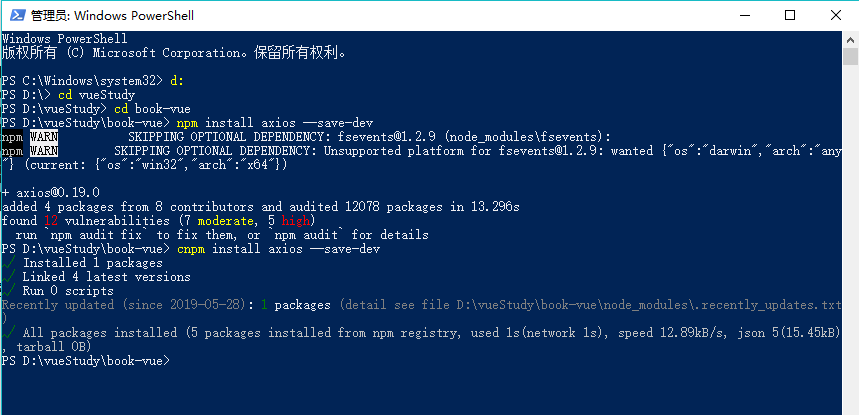
修改 Main.js
新增
var axios = require('axios')
axios.defaults.baseURL = 'http://localhost:8888/api'
//将API方法绑定到全局
Vue.prototype.$axios = axios
import Vue from 'vue'

import VueRouter from 'vue-router'

import router from './router'

var axios = require('axios')

axios.defaults.baseURL = 'http://localhost:8888/api'

//将API方法绑定到全局

Vue.prototype.$axios = axios

// 导入 ElementUI

import ElementUI from 'element-ui'

import 'element-ui/lib/theme-chalk/index.css'

import App from './App'

// 安装路由

Vue.use(VueRouter);

// 安装 ElementUI

Vue.use(ElementUI);

new Vue({

  el: '#app',

  // 启用路由

  router,

  // 启用 ElementUI

  render: h => h(App)

});
修改config/index.js
新增
'/api':{
target:'http://localhost:8888',
changeOrigin:true,
pathRewrite:{
'^/api':''
}
}
'use strict'

// Template version: 1.3.1

// see http://vuejs-templates.github.io/webpack for documentation.

const path = require('path')

module.exports = {

  dev: {

    // Paths

    assetsSubDirectory: 'static',

    assetsPublicPath: '/',

    proxyTable: {

      '/api':{

        target:'http://localhost:8888',

        changeOrigin:true,

        pathRewrite:{

          '^/api':''

        }

      }

    },

    // Various Dev Server settings

    host: 'localhost', // can be overwritten by process.env.HOST

    port: 8080, // can be overwritten by process.env.PORT, if port is in use, a free one will be determined

    autoOpenBrowser: false,

    errorOverlay: true,

    notifyOnErrors: true,

    poll: false, // https://webpack.js.org/configuration/dev-server/#devserver-watchoptions-

    /**

     * Source Maps

     */

    // https://webpack.js.org/configuration/devtool/#development

    devtool: 'cheap-module-eval-source-map',

    // If you have problems debugging vue-files in devtools,

    // set this to false - it *may* help

    // https://vue-loader.vuejs.org/en/options.html#cachebusting

    cacheBusting: true,

    cssSourceMap: true

  },

  build: {

    // Template for index.html

    index: path.resolve(__dirname, '../dist/index.html'),

    // Paths

    assetsRoot: path.resolve(__dirname, '../dist'),

    assetsSubDirectory: 'static',

    assetsPublicPath: '/',

    /**

     * Source Maps

     */

    productionSourceMap: true,

    // https://webpack.js.org/configuration/devtool/#production

    devtool: '#source-map',

    // Gzip off by default as many popular static hosts such as

    // Surge or Netlify already gzip all static assets for you.

    // Before setting to `true`, make sure to:

    // npm install --save-dev compression-webpack-plugin

    productionGzip: false,

    productionGzipExtensions: ['js', 'css'],

    // Run the build command with an extra argument to

    // View the bundle analyzer report after build finishes:

    // `npm run build --report`

    // Set to `true` or `false` to always turn it on or off

    bundleAnalyzerReport: process.env.npm_config_report

  }

}
修改Login.vue
<template >

  <div :style ="note" >

    <el-form ref="loginForm" :model="form" :rules="rules" label-width="80px" class="login-box">

      <h3 class="login-title">欢迎登录</h3>

      <el-form-item label="账号" prop="username">

        <el-input type="text" placeholder="请输入账号" v-model="form.username"/>

      </el-form-item>

      <el-form-item label="密码" prop="password">

        <el-input type="password" placeholder="请输入密码" v-model="form.password"/>

      </el-form-item>

      <el-form-item>

        <el-button type="primary" v-on:click="onSubmit('loginForm')">登录</el-button>

      </el-form-item>

    </el-form>

    <el-dialog

      title="温馨提示"

      :visible.sync="dialogWarnVisible"

      width="30%"

      :before-close="handleClose">

      <span >请输入账号和密码</span>

      <span slot="footer" class="dialog-footer">

        <el-button type="primary" @click="dialogWarnVisible = false">确 定</el-button>

      </span>

    </el-dialog>

    <el-dialog

      title="温馨提示"

      :visible.sync="dialogErrorVisible"

      width="30%"

      :before-close="handleClose">

      <span v-text="error"></span>

      <span slot="footer" class="dialog-footer">

        <el-button type="primary" @click="dialogErrorVisible = false">确 定</el-button>

      </span>

    </el-dialog>

  </div>

</template>

<script>

  export default {

    name: "Login",

    data() {

      return {

        note: {

          backgroundImage: "url(" + require("../assets/background.jpg") + ") ",

          backgroundPosition: "center center",

          backgroundRepeat: "no-repeat",

          backgroundSize: "cover" ,

        },

        form: {

          username: '',

          password: ''

        },

        // 表单验证,需要在 el-form-item 元素中增加 prop 属性

        rules: {

          username: [

            {required: true, message: '账号不可为空', trigger: 'blur'}

          ],

          password: [

            {required: true, message: '密码不可为空', trigger: 'blur'}

          ]

        },

        // 对话框显示和隐藏

        dialogWarnVisible: false,

        dialogErrorVisible: false

      }

    },

    methods: {

      onSubmit(formName) {

        // 为表单绑定验证功能

        this.$refs[formName].validate((valid) => {

          if (valid) {

            // 使用 vue-router 路由到指定页面,该方式称之为编程式导航

            //this.$router.push("/main");

            this.$axios.post(

              '/login',

              {

                username:this.form.username,

                password:this.form.password

            })

            .then(resultResponse => {

              this.resultResponse = JSON.stringify(resultResponse.data)

              //成功后执行 带着用户名跳转到Main页面

              if(resultResponse.data.code === 200) {

                this.$router.replace({

                  name:'Main',

                  params:{

                    username :resultResponse.data.object.username

                  }

                  })

              }else if(resultResponse.data.code === 400) {

                 this.dialogErrorVisible = true;

                 this.error = resultResponse.data.msg;

              }

            })

            .catch(failResponse => {})

          } else {

            this.dialogWarnVisible = true;

            return false;

          }

        });

      }

    }

  }

</script>

<style lang="scss" scoped>

  .login-box {

    border: 1px solid #DCDFE6;

    width: 350px;

    margin: 180px auto;

    padding: 35px 35px 15px 35px;

    border-radius: 5px;

    -webkit-border-radius: 5px;

    -moz-border-radius: 5px;

    box-shadow: 0 0 25px #909399;

  }

  .login-title {

    text-align: center;

    margin: 0 auto 40px auto;

    color: #303133;

  }

</style>
修改Main.vue
将admin 改成{{$route.params.username}}
<span> {{$route.params.username}}</span>
spring boot + vue 前后分离实现登录功能(二)的更多相关文章
- spring boot + vue 前后分离实现登录功能(三)
Spring boot 后台 github 地址 SpringBoot-book-vue-demo 使用tk.mytabis 简化mybatis 开发 使用 durid 连接池 连接Mysql pom ...
- spring boot + vue 前后分离实现登录功能(一)
使用webpack 打包初始化项目 vue init webpack book-vue 进入工程目录 cd hello-vue 安装 vue-router npm install vue-router ...
- 喜大普奔,两个开源的 Spring Boot + Vue 前后端分离项目可以在线体验了
折腾了一周的域名备案昨天终于搞定了. 松哥第一时间想到赶紧把微人事和 V 部落部署上去,我知道很多小伙伴已经等不及了. 1. 也曾经上过线 其实这两个项目当时刚做好的时候,我就把它们部署到服务器上了, ...
- 两个开源的 Spring Boot + Vue 前后端分离项目
折腾了一周的域名备案昨天终于搞定了. 松哥第一时间想到赶紧把微人事和 V 部落部署上去,我知道很多小伙伴已经等不及了. 1. 也曾经上过线 其实这两个项目当时刚做好的时候,我就把它们部署到服务器上了, ...
- 一个实际的案例介绍Spring Boot + Vue 前后端分离
介绍 最近在工作中做个新项目,后端选用Spring Boot,前端选用Vue技术.众所周知现在开发都是前后端分离,本文就将介绍一种前后端分离方式. 常规的开发方式 采用Spring Boot 开发项目 ...
- 前后端分离,我怎么就选择了 Spring Boot + Vue 技术栈?
前两天又有小伙伴私信松哥,问题还是职业规划,Java 技术栈路线这种,实际上对于这一类问题我经常不太敢回答,每个人的情况都不太一样,而小伙伴也很少详细介绍自己的情况,大都是一两句话就把问题抛出来了,啥 ...
- spring boot+vue实现H5聊天室客服功能
spring boot+vue实现H5聊天室客服功能 h5效果图 vue效果图 功能实现 spring boot + webSocket 实现 官方地址 https://docs.spring.io/ ...
- Spring Boot +Vue 项目实战笔记(三):数据库的引入
这一篇的主要内容是引入数据库并实现通过数据库验证用户名与密码. 一.引入数据库 之前说过数据库的采用是 MySQL,算是比较主流的选择,从性能和体量等方面都比较优秀,当然也有一些弊端,但数据库不是我们 ...
- Spring Boot + Vue 跨域请求问题
使用Spring Boot + Vue 做前后端分离项目搭建,实现登录时,出现跨域请求 Access to XMLHttpRequest at 'http://localhost/open/login ...
随机推荐
- jqTransform:呈现更美的表单
jqTransform,是DFC Engineering写的一个jQuery的样式插件,用于美化表单元素,使用方便简单,能美化所有表单元素包括input,radio,textarea,select,c ...
- iOS 开发之模糊效果的五种实现
前言 在iOS开发中我们经常会用到模糊效果使我们的界面更加美观,而iOS本身也提供了几种达到模糊效果的API,如:Core Image,使用Accelerate.Framework中的vImage A ...
- ResourceManager学习之ApplicationMaster,NodeManager管理
ApplicationMaster管理部分主要由三个服务构成,分别是ApplicationMasterLauncher.AMLivelinessMonitor和ApplicationMasterSer ...
- Linux常用命令与详解
在Linux系统中文件删除.创建.更改等操作都是通过一个个不同的命令来完成我们想要的操作,那么什么是命令呢? 凡是在字符操作界面中输入的能够完成特定操作和任务的字符串都可以称为命令.严格来说,命令通常 ...
- vim配置笔记
1. vim两种配置方法 1)配置文件 全局配置文件:/etc/vim/vimrc或者/etc/vimrc 用户个人配置文件:~/.vimrc 2)命令模式 命令行模式下直接输入配置命令即可.如:se ...
- 报错:ipython 6.5.0 has requirement prompt-toolkit<2.0.0,>=1.0.15, but you'll have prompt-toolkit 2.0.15 which is incompatible.
pip install imagededup 时,报错:ipython 6.5.0 has requirement prompt-toolkit<2.0.0,>=1.0.15, but y ...
- PHP message: PHP Fatal error: Allowed memory size of 134217728 bytes exhausted 错误
php运行一段时间后,部分页面打不开,查看nginx日志里面一直在报PHP message: PHP Fatal error: Allowed memory size of 134217728 by ...
- Luogu P3243 菜肴制作
Luogu P3243 菜肴制作 神神奇奇的拓扑排序,也就是借这道题学习一下大名鼎鼎的Toposort了-- #include<bits/stdc++.h> #define N 10001 ...
- leetcode-cn上面刷题
https://leetcode-cn.com/problemset/database/ ------------------------------------------------------- ...
- 接口调优——WebAPI 过滤器,IIS WebDAV
目录 1.身份认证过滤器—AuthenticationFilter 2.Action 过滤器—ActionFilter 3.异常处理过滤器—ExceptionFilterAttribute 4.IS ...