
[易学易懂系列|rustlang语言|零基础|快速入门|(25)|实战2:命令行工具minigrep(2)]
[易学易懂系列|rustlang语言|零基础|快速入门|(25)|实战2:命令行工具minigrep(2)]
项目实战
实战2:命令行工具minigrep
我们继续开发我们的minigrep。
我们现在以TDD测试驱动开发的模式,来开发新的功能search函数。
开始吧,我们先在src/lib.rs文件中,增加测试代码:
#[cfg(test)]

mod tests {

    use super::*;

    #[test]

    fn one_result() {

        let query = "duct";

        let contents = "\

Rust:

safe, fast, productive.

Pick three.";

        assert_eq!(vec!["safe, fast, productive."], search(query, contents));

    }

}
然后同样再写一个空函数:
pub fn search<'a>(query: &str, contents: &'a str) -> Vec<&'a str> {

    vec![]

}
然后,我们要跑一下命令:
cargo test
结果显示:
$ cargo test

   Compiling minigrep v0.1.0 (file:///projects/minigrep)

--warnings--

    Finished dev [unoptimized + debuginfo] target(s) in 0.43 secs

     Running target/debug/deps/minigrep-abcabcabc

running 1 test

test tests::one_result ... FAILED

failures:

---- tests::one_result stdout ----

        thread 'tests::one_result' panicked at 'assertion failed: `(left ==

right)`

left: `["safe, fast, productive."]`,

right: `[]`)', src/lib.rs:48:8

note: Run with `RUST_BACKTRACE=1` for a backtrace.

failures:

    tests::one_result

test result: FAILED. 0 passed; 1 failed; 0 ignored; 0 measured; 0 filtered out

error: test failed, to rerun pass '--lib'
测试不通过。
我们的实现函数search,只简单返回一个空vector。当然,不通过。
怎么办?
重构一下search函数:
pub fn search<'a>(query: &str, contents: &'a str) -> Vec<&'a str> {

    let mut results = Vec::new();

    for line in contents.lines() {

        if line.contains(query) {

            results.push(line);

        }

    }

    results

}
然后,我们跑一下命令:
cargo test
结果显示:
running 1 test

test tests::one_result ... ok

test result: ok. 1 passed; 0 failed; 0 ignored; 0 measured; 0 filtered out
测试通过!漂亮!
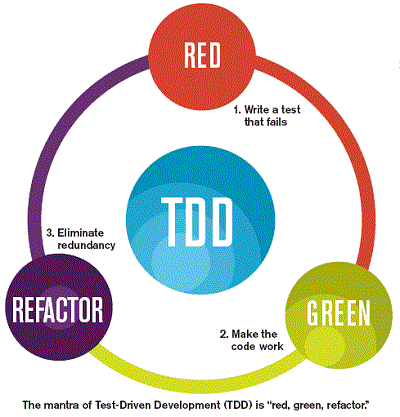
这就是TDD的基本流程。
我们看看示图:
好吧,现在我们可以直接调用search函数了,把它放到src/lib.rs中的run函数里:
//重构从文件中读取内容的业务逻辑

pub fn run(config: Config) -> Result<(), Box<dyn Error>> {

    let contents = fs::read_to_string(config.filename)?;

    println!("With text:\n{}", contents);

    for line in search(&config.query, &contents) {

       println!("-----search result ------{}", line);

    }

    Ok(())

}
然后,我们用运行命令:
cargo run frog poem.txt
结果为:
.......

-----search result ------How public, like a frog
我们找到包含frog单词的那一行!完美!
我们再找下body单词:
cargo run body poem.txt
结果为:
......

-----search result ------I'm nobody! Who are you?

-----search result ------Are you nobody, too?

-----search result ------How dreary to be somebody!
结果正确!
当然,我们也可以试试不存在的单词:
cargo run monomorphization poem.txt
结果为:
E:\code\rustProject\minigrep> cargo run monomorphization poem.txt

    Finished dev [unoptimized + debuginfo] target(s) in 0.01s

     Running `target\debug\minigrep.exe monomorphization poem.txt`

With text:

I'm nobody! Who are you?

Are you nobody, too?

Then there's a pair of us - don't tell!

They'd banish us, you know.

How dreary to be somebody!

How public, like a frog

To tell your name the livelong day

To an admiring bog!
没有出现带“-----search result ------”的结果信息,说明没有找到单词:monomorphization。
结果符合期望。
现在我们再以TDD的开发方式来开发新的功能函数search_case_insensitive,新增测试代码:
#[test]

fn case_insensitive() {

    let query = "rUsT";

    let contents = "\

Rust:

safe, fast, productive.

Pick three.

Trust me.";

    assert_eq!(

        vec!["Rust:", "Trust me."],

        search_case_insensitive(query, contents)

    );

}
当然,我们可以简单实现一下search_case_insensitive函数,让它fail,因为这个逻辑比较简单,那就直接实现吧:
pub fn search_case_insensitive<'a>(query: &str, contents: &'a str) -> Vec<&'a str> {

    let query = query.to_lowercase();

    let mut results = Vec::new();

    for line in contents.lines() {

        if line.to_lowercase().contains(&query) {

            results.push(line);

        }

    }

    results

}
好的,我们跑一下命令:
cargo test
结果:
$cargo test

   Compiling minigrep v0.1.0 (E:\code\rustProject\minigrep)

    Finished dev [unoptimized + debuginfo] target(s) in 1.38s

     Running target\debug\deps\minigrep-07da7ef1bffd9ef9.exe

running 2 tests

test case_insensitive ... ok

test tests::one_result ... ok
测试通过,漂亮!
我们现在把这个方法整合到run函数里:
//重构从文件中读取内容的业务逻辑

pub fn run(config: Config) -> Result<(), Box<dyn Error>> {

    let contents = fs::read_to_string(config.filename)?;

    println!("With text:\n{}", contents);

    let results = if config.case_sensitive {

        search(&config.query, &contents)

    } else {

        search_case_insensitive(&config.query, &contents)

    };

    for line in results {

        println!("-----search result ------{}", line);

    }

    Ok(())

}
当然,我们也要把属性case_sensitive放到结构体Config里面:
//结构体Config用来封装参数属性

pub struct Config {

    pub query: String,

    pub filename: String,

    pub case_sensitive: bool,

}
src/lib.rs的完整代码如下 :
use std::env;

use std::error::Error;

use std::fs;

//结构体Config用来封装参数属性

pub struct Config {

    pub query: String,

    pub filename: String,

    pub case_sensitive: bool,

}

//为结构体实现一个构造器,其主要功能也是读取和解析参数

impl Config {

    pub fn new(args: &[String]) -> Result<Config, &'static str> {

        if args.len() < 3 {

            return Err("参数个数不够!not enough arguments");

        }

        let query = args[1].clone();

        let filename = args[2].clone();

        let case_sensitive = env::var("CASE_INSENSITIVE").is_err();

        Ok(Config {

            query,

            filename,

            case_sensitive,

        })

    }

}

//重构从文件中读取内容的业务逻辑

pub fn run(config: Config) -> Result<(), Box<dyn Error>> {

    let contents = fs::read_to_string(config.filename)?;

    println!("With text:\n{}", contents);

    let results = if config.case_sensitive {

        search(&config.query, &contents)

    } else {

        search_case_insensitive(&config.query, &contents)

    };

    for line in results {

        println!("-----search result ------{}", line);

    }

    Ok(())

}

pub fn search<'a>(query: &str, contents: &'a str) -> Vec<&'a str> {

    let mut results = Vec::new();

    for line in contents.lines() {

        if line.contains(query) {

            results.push(line);

        }

    }

    results

}

pub fn search_case_insensitive<'a>(query: &str, contents: &'a str) -> Vec<&'a str> {

    let query = query.to_lowercase();

    let mut results = Vec::new();

    for line in contents.lines() {

        if line.to_lowercase().contains(&query) {

            results.push(line);

        }

    }

    results

}

#[cfg(test)]

mod tests {

    use super::*;

    #[test]

    fn one_result() {

        let query = "duct";

        let contents = "\

Rust:

safe, fast, productive.

Pick three.";

        assert_eq!(vec!["safe, fast, productive."], search(query, contents));

    }

}

#[test]

fn case_insensitive() {

    let query = "rUsT";

    let contents = "\

Rust:

safe, fast, productive.

Pick three.

Trust me.";

    assert_eq!(

        vec!["Rust:", "Trust me."],

        search_case_insensitive(query, contents)

    );

}
我们现在运行命令:
cargo run to poem.txt
结果:
......

-----search result ------Are you nobody, too?

-----search result ------How dreary to be somebody!
现在我们把环境变量设置一下:
如果你的终端是powershell,用以下命令
$env:CASE_INSENSITIVE=1
我们现在运行命令:
cargo run to poem.txt
结果:
......

-----search result ------Are you nobody, too?

-----search result ------How dreary to be somebody!

-----search result ------To tell your name the livelong day

-----search result ------To an admiring bog!
我们现在看看把错误信息输出到一个output.txt文件,运行以下命令:
cargo run > output.txt
我们观察到,控制台没有输出。
但当前工程目录有一个output.txt文件,打开文件。里面有错误信息。
我们现在来用eprintln!宏替换掉println!宏。src/main.rs代码更新如下:
use minigrep::run;

use minigrep::Config;

use std::env;

use std::process;

//主函数,程序入口

fn main() {

    let args: Vec<String> = env::args().collect();

    let config = Config::new(&args).unwrap_or_else(|err| {

        eprintln!("Problem parsing arguments: {}", err);

        process::exit(1);

    });

    if let Err(e) = run(config) {

        //根据处理结果返回值 来处理,如果有错误,则打印信息,并直接退出当前程序

        eprintln!("Application error: {}", e);

        process::exit(1);

    }

}
运行以下命令:
cargo run > output.txt
我们观察到,控制台现在会输出错误信息。
我们运行如下命令:
cargo run to poem.txt > output.txt
这里控制台没有输出。
但打开output.txt,里面的信息为:
With text:

I'm nobody! Who are you?

Are you nobody, too?

Then there's a pair of us - don't tell!

They'd banish us, you know.

How dreary to be somebody!

How public, like a frog

To tell your name the livelong day

To an admiring bog!

-----search result ------Are you nobody, too?

-----search result ------How dreary to be somebody!

-----search result ------To tell your name the livelong day

-----search result ------To an admiring bog!
以上,希望对你有用。
如果遇到什么问题,欢迎加入:rust新手群,在这里我可以提供一些简单的帮助,加微信:360369487,注明:博客园+rust
参考文章:
https://doc.rust-lang.org/stable/book/ch12-05-working-with-environment-variables.html
[易学易懂系列|rustlang语言|零基础|快速入门|(25)|实战2:命令行工具minigrep(2)]的更多相关文章
- [易学易懂系列|rustlang语言|零基础|快速入门|(28)|实战5:实现BTC价格转换工具]
[易学易懂系列|rustlang语言|零基础|快速入门|(28)|实战5:实现BTC价格转换工具] 项目实战 实战5:实现BTC价格转换工具 今天我们来开发一个简单的BTC实时价格转换工具. 我们首先 ...
- [易学易懂系列|rustlang语言|零基础|快速入门|(27)|实战4:从零实现BTC区块链]
[易学易懂系列|rustlang语言|零基础|快速入门|(27)|实战4:从零实现BTC区块链] 项目实战 实战4:从零实现BTC区块链 我们今天来开发我们的BTC区块链系统. 简单来说,从数据结构的 ...
- [易学易懂系列|rustlang语言|零基础|快速入门|(26)|实战3:Http服务器(多线程版本)]
[易学易懂系列|rustlang语言|零基础|快速入门|(26)|实战3:Http服务器(多线程版本)] 项目实战 实战3:Http服务器 我们今天来进一步开发我们的Http服务器,用多线程实现. 我 ...
- [易学易懂系列|rustlang语言|零基础|快速入门|(24)|实战2:命令行工具minigrep(1)]
[易学易懂系列|rustlang语言|零基础|快速入门|(24)|实战2:命令行工具minigrep(1)] 项目实战 实战2:命令行工具minigrep 有了昨天的基础,我们今天来开始另一个稍微有点 ...
- [易学易懂系列|rustlang语言|零基础|快速入门|(23)|实战1:猜数字游戏]
[易学易懂系列|rustlang语言|零基础|快速入门|(23)|实战1:猜数字游戏] 项目实战 实战1:猜数字游戏 我们今天来来开始简单的项目实战. 第一个简单项目是猜数字游戏. 简单来说,系统给了 ...
- [易学易懂系列|rustlang语言|零基础|快速入门|(5)|生命周期Lifetime]
[易学易懂系列|rustlang语言|零基础|快速入门|(5)] Lifetimes 我们继续谈谈生命周期(lifttime),我们还是拿代码来说话: fn main() { let mut a = ...
- [易学易懂系列|rustlang语言|零基础|快速入门|(22)|宏Macro]
[易学易懂系列|rustlang语言|零基础|快速入门|(22)|宏Macro] 实用知识 宏Macro 我们今天来讲讲Rust中强大的宏Macro. Rust的宏macro是实现元编程的强大工具. ...
- [易学易懂系列|rustlang语言|零基础|快速入门|(21)|智能指针]
[易学易懂系列|rustlang语言|零基础|快速入门|(21)|智能指针] 实用知识 智能指针 我们今天来讲讲Rust中的智能指针. 什么是指针? 在Rust,指针(普通指针),就是保存内存地址的值 ...
- [易学易懂系列|rustlang语言|零基础|快速入门|(20)|错误处理]
[易学易懂系列|rustlang语言|零基础|快速入门|(20)|错误处理] 实用知识 错误处理 我们今天来讲讲Rust中的错误处理. 很多语言都有自己的错误处理方式,比如,java是异常处理机制. ...
随机推荐
- Java 基础篇之注解
注解 注解,其实是代码里的特殊标记,这些标记可以在编译.类加载.运行时被读取,并执行相应的处理.通过使用注解,可以在不改变原有逻辑的情况下,在源文件中嵌入补充一些信息. Annotation 提供了一 ...
- list-style-type:none是加在ul还是li中呢?
很多时候我们都需要多对列表元素进行初始化,方法是给列表元素添加list-style-type: none,但作为小白的我是经常纠结一个问题:是把它加在ul中还是li中呢 我试了一下,加在ul和li都能 ...
- 在vue中让某个组件重新渲染的笨方法
在vue中,推崇的是数据驱动也就是数据更新进而使组件得以重新渲染:在某些情况下,我们想要在数据不改变的情况下,重新渲染组件:我遇到的一个情况是:同一个页面,两个tab页分别为tab1和tab2,公用了 ...
- co源码
co模块整体包括三部分 对于几种参数类型的判断,主要判断是否object,array,promise,generator,generatorFunction这几种; 将几种不同的参数类型转换为prom ...
- vue项目自动构建工具1.0,支持多页面构建
该工具适用于超多项目开发,每个项目不用都安装依赖,所有依赖都安装在ffk命令项目中,对于多分支拉到本地进行开发,亦有益处.对于多页面开发,也是相当便利,不用手动撸entry和plugin. git: ...
- Mysql创建、使用循环函数
创建函数 create procedure names() begin declare i int default 0; while i < 3000 do INSERT INTO studen ...
- PAT A1012 Best Rank(25)
题目描述 To evaluate the performance of our first year CS majored students, we consider their grades of ...
- 【Life】 今天的思考
今天一个实习生来问我问题,他要用python操作outlook发送邮件,代码是从网上找的. 在其他人的电脑上可以成功运行,但在他的电脑上就失败. 处理过程 (1)我查看了他method里的代码, 发现 ...
- web框架链接
django系列教程(优):https://www.cnblogs.com/feixuelove1009/p/5823135.html
- O055、Detach Volume 操作
参考https://www.cnblogs.com/CloudMan6/p/5636510.html 本节我们开始学习 Volume Detach 操作,就是将Volume从Instance上 ...