
spring cloud微服务实践二
在上一篇,我们已经搭建了spring cloud微服务中的注册中心.但只有一个注册中心还远远不够.
接下来我们就来尝试提供服务.
注:这一个系列的开发环境版本为 java1.8, spring boot2.x, spring cloud Greenwich.SR2, IDE为 Intelli IDEA
服务提供
假设我们现在有个需求,需要一个接口,当我们传入一个名字,它会返回一句问好的话.如传入body,输入则为hello body!.
创建一个spring cloud的工程项目
具体的步骤这里就不在详细介绍了,需要的可以看[spring cloud微服务实践二]里面的内容.
步骤如下:
- Idea中选择之前的目录
firstCloud, 右击>New>Module, 选择Spring Initialzr. - 工程中 Group
- Project Metadata中Group为
com.xingyys, Artifact为producer - 直接next,直到完成.
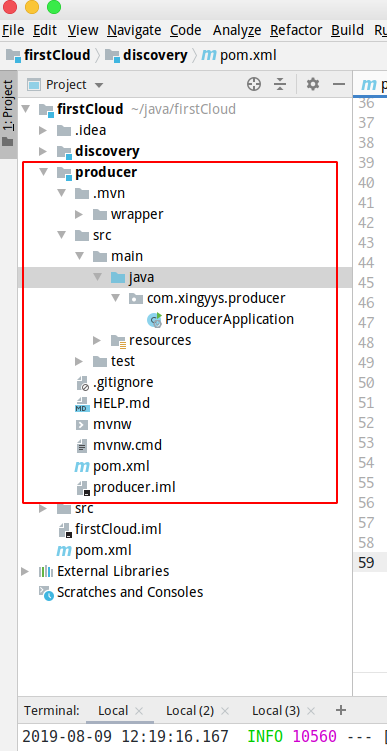
pom 配置
在producer目录下,修改 pom.xml文件,添加依赖:
<?xml version="1.0" encoding="UTF-8"?>

<project xmlns="http://maven.apache.org/POM/4.0.0" xmlns:xsi="http://www.w3.org/2001/XMLSchema-instance"

         xsi:schemaLocation="http://maven.apache.org/POM/4.0.0 http://maven.apache.org/xsd/maven-4.0.0.xsd">

    <modelVersion>4.0.0</modelVersion>

    <parent>

        <groupId>org.springframework.boot</groupId>

        <artifactId>spring-boot-starter-parent</artifactId>

        <version>2.1.7.RELEASE</version>

        <relativePath/> <!-- lookup parent from repository -->

    </parent>

    <groupId>com.xingyys</groupId>

    <artifactId>producer</artifactId>

    <version>0.0.1-SNAPSHOT</version>

    <name>producer</name>

    <description>Demo project for Spring Boot</description>

    <properties>

        <java.version>1.8</java.version>

        <spring-cloud.version>Greenwich.SR2</spring-cloud.version>

    </properties>

    <dependencies>

        <dependency>

            <groupId>org.springframework.boot</groupId>

            <artifactId>spring-boot-starter</artifactId>

        </dependency>

        <dependency>

            <groupId>org.springframework.cloud</groupId>

            <artifactId>spring-cloud-starter-netflix-eureka-server</artifactId>

        </dependency>

        <dependency>

            <groupId>org.springframework.boot</groupId>

            <artifactId>spring-boot-starter-test</artifactId>

            <scope>test</scope>

        </dependency>

    </dependencies>

    <dependencyManagement>

        <dependencies>

            <dependency>

                <groupId>org.springframework.cloud</groupId>

                <artifactId>spring-cloud-dependencies</artifactId>

                <version>${spring-cloud.version}</version>

                <type>pom</type>

                <scope>import</scope>

            </dependency>

        </dependencies>

    </dependencyManagement>

    <build>

        <plugins>

            <plugin>

                <groupId>org.springframework.boot</groupId>

                <artifactId>spring-boot-maven-plugin</artifactId>

            </plugin>

        </plugins>

    </build>

</project>
配置文件
修改 resources下的配置文件 application.properties.
spring.application.name=producer

server.port=9000

eureka.client.service-url.defaultZone=http://localhost:8000/eureka/
启动类
修改com.xingyys.producer下的 ProducerApplication.java:
@SpringBootApplication

@EnableDiscoveryClient

public class ProducerApplication {

    public static void main(String[] args) {

        SpringApplication.run(ProducerApplication.class, args);

    }

}
有了@EnableDiscoveryClient,就表示producer具有注册服务的功能了.
添加Controller
这里添加一个controller提供我们需要的服务 com.xingyys.producer/controller/HelloController.java:
@RestController

public class HelloController {

    @RequestMapping("/hello")

    public String hello(@RequestParam String name) {

        return "Hello " + name + " !";

    }

}
编译运行
producer代码和配置文件这样就可以了,接下来运行producer看看效果:
cd producer

mvn clean package -Dmaven.test.skip=true

java -jar target/producer-0.0.1-SNAPSHOT.jar
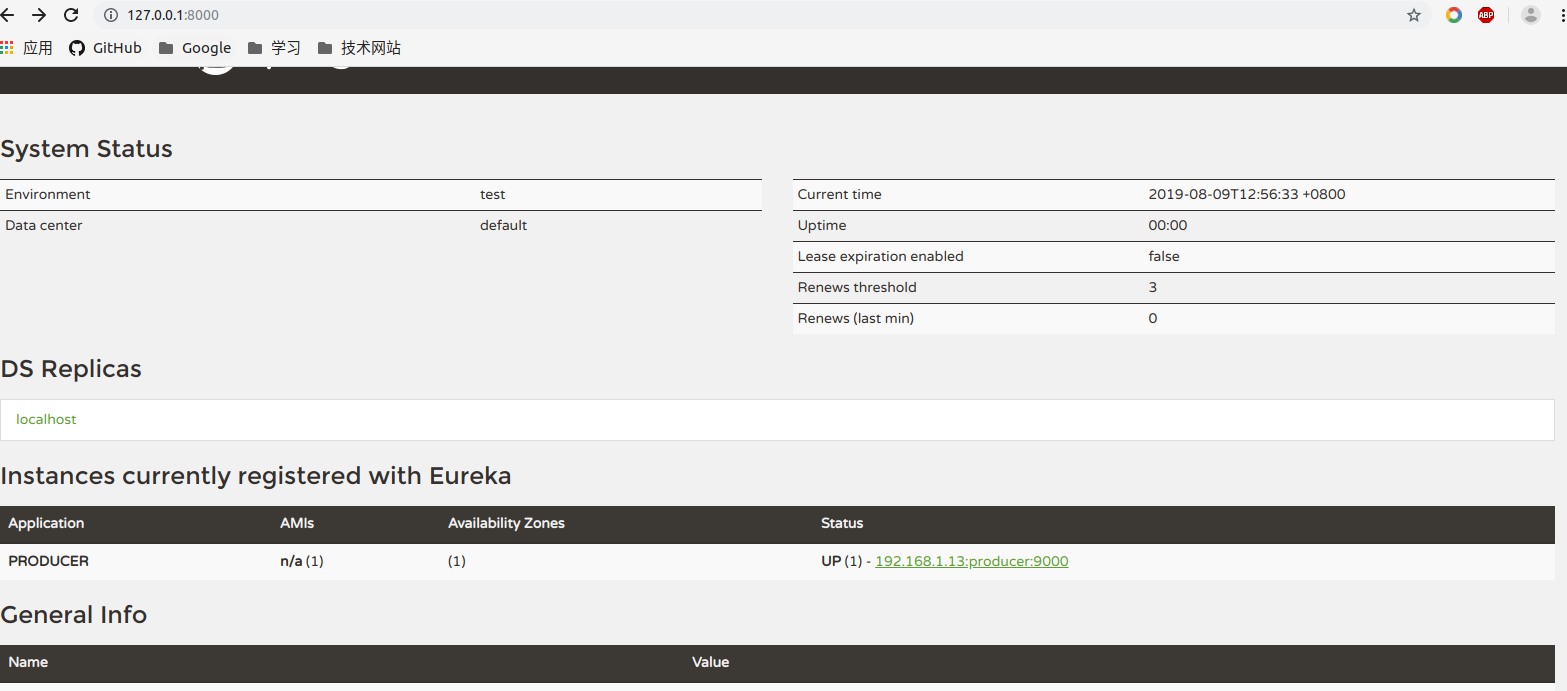
访问http://localhost:9000/hello?name=xingyys,返回Hello xingyys !,表示注册成功,producer可以提供服务了.
服务调用
既然服务的提供者有了,接着我们就来设置一个服务的使用者.
创建项目
项目命名为consumer,步骤同上,不在说明...
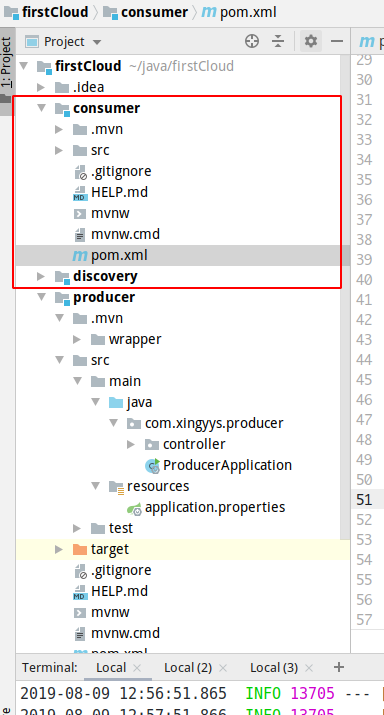
pom配置
    <properties>

        <java.version>1.8</java.version>

        <spring-cloud.version>Greenwich.SR2</spring-cloud.version>

    </properties>

    <dependencies>

        <dependency>

            <groupId>org.springframework.boot</groupId>

            <artifactId>spring-boot-starter</artifactId>

        </dependency>

        <dependency>

            <groupId>org.springframework.cloud</groupId>

            <artifactId>spring-cloud-starter-netflix-eureka-server</artifactId>

        </dependency>

        <dependency>

            <groupId>org.springframework.cloud</groupId>

            <artifactId>spring-cloud-starter-openfeign</artifactId>

        </dependency>

        <dependency>

            <groupId>org.springframework.boot</groupId>

            <artifactId>spring-boot-starter-test</artifactId>

            <scope>test</scope>

        </dependency>

    </dependencies>

    <dependencyManagement>

        <dependencies>

            <dependency>

                <groupId>org.springframework.cloud</groupId>

                <artifactId>spring-cloud-dependencies</artifactId>

                <version>${spring-cloud.version}</version>

                <type>pom</type>

                <scope>import</scope>

            </dependency>

        </dependencies>

    </dependencyManagement>
远程调用
spring cloud使用 feign 进行远程调用.
Feign是一个声明式Web Service客户端。使用Feign能让编写Web Service客户端更加简单, 它的使用方法是定义一个接口,然后在上面添加注解,同时也支持JAX-RS标准的注解。Feign也支持可拔插式的编码器和解码器。Spring Cloud对Feign进行了封装,使其支持了Spring MVC标准注解和HttpMessageConverters。Feign可以与Eureka和Ribbon组合使用以支持负载均衡。
// com.xingyys.consumer.remote.HelloRemote.java

// name 为 服务端的实例名

@FeignClient(name = "producer")

public interface HelloRemote {

    @RequestMapping(value = "/hello")

    public String hello(@RequestParam(value = "name") String name);

}
创建服务
注意: 这里的服务指的是微服务中对外的暴露的接口
// com.xingyys.consumer.controller.ConsumerController.java

@RestController

public class ConsumerController {

    @Autowired

    HelloRemote helloRemote;

    @RequestMapping("/hello/{name}")

    public String hello(@PathVariable("name") String name) {

        return helloRemote.hello(name);

    }

}
启动类
// ConsumerApplication.java

@SpringBootApplication

@EnableDiscoveryClient

// 注意这里接口和低版本有不同,需要在这里指定远程调用接口的路径

@EnableFeignClients(basePackages = "com.xingyys.consumer.remote")

public class ConsumerApplication {

    public static void main(String[] args) {

        SpringApplication.run(ConsumerApplication.class, args);

    }

}
配置文件
spring.application.name=consumer

server.port=9001

eureka.client.service-url.defaultZone=http://localhost:8000/eureka/
编译运行
cd consumer

mvn clean package -Dmaven.test.skip=true

java -jar target/consumer-0.0.1-SNAPSHOT.jar
测试
浏览器访问: http://localhost:9001/hello/xingyys,返回Hello xingyys !
spring cloud微服务实践二的更多相关文章
- spring cloud微服务实践七
在spring cloud 2.x以后,由于zuul一直停滞在1.x版本,所以spring官方就自己开发了一个项目 Spring Cloud Gateway.作为spring cloud微服务的网关组 ...
- spring cloud微服务实践五
本篇我们来看看怎么实现spring cloud的配置中心. 在分布式系统中,特别是微服务架构下,可能会存在许多的服务,每个服务都会存在一个或多个的配置文件.那怎么多的配置文件的管理就会成为一个大问题. ...
- spring cloud微服务实践一
最近在学习spring框架.其中spring cloud在微服务方面很火,所以在学习过程中,也做一些记录. 注:这一个系列的开发环境版本为 java1.8, spring boot2.x, sprin ...
- spring cloud微服务实践六
本片我们就来认识下spring cloud中的zuul组件. 注:这一个系列的开发环境版本为 java1.8, spring boot2.x, spring cloud Greenwich.SR2, ...
- spring cloud微服务实践三
上篇文章里我们实现了spring cloud中的服务提供者和使用者.接下来我们就来看看spring cloud中微服务的其他组件. 注:这一个系列的开发环境版本为 java1.8, spring bo ...
- Spring Cloud微服务实践之路-起始
由于各种原因,公司要对现有的营销产品进行微服务化,如果可以,则对公司所有产品逐步进行微服务化. 而本人将探索这条路,很艰难,但干劲十足.整个过会记录下来,以便以后查阅. 感谢公司!感谢领导! 相关书籍 ...
- spring cloud微服务实践四
spring cloud的hystrix还有一个配搭的库hystrix-dashboard,它是hystrix的一款监控工具,能直观的显示hystrix响应信息,请求成功率等.但是hystrix-da ...
- Spring Cloud微服务实践之路- Eureka Server 中的第一个异常
EMERGENCY! EUREKA MAY BE INCORRECTLY CLAIMING INSTANCES ARE UP WHEN THEY'RE NOT. RENEWALS ARE LESSER ...
- 放弃Dubbo,选择最流行的Spring Cloud微服务架构实践与经验总结
http://developer.51cto.com/art/201710/554633.htm Spring Cloud 在国内中小型公司能用起来吗?从 2016 年初一直到现在,我们在这条路上已经 ...
随机推荐
- (转)SLOW READPROCESSOR;ERROR SLOW BLOCKRECEIVER错误日志分析
1.总结 "Slow ReadProcessor" 和"Slow BlockReceiver"往往是因为集群负载比较高或者某些节点不健康导致的,本文主要是帮助你 ...
- 搞定TADA68机械键盘的固件修改
一.先到http://config.qmk.fm,在键盘型号中选择tada68,千万不要选择错了,可在kdemap name中为自己的键位名个名,例如:vimgood 二.修改自己的键位,都是可视化的 ...
- 小程序tabBar的使用
这个selectedIconPath一定要写,否则选中的那个图片是不会显示的 下面是不写的现象: onTabItemTap的使用---下面的现象说明:只有tab值向哪个页面才会触发.
- spring cloud 常见面试题 来理解微服
为什么要谈 这些理论知识呢 理论知识 = 面试时候的谈资 !!! 你只有 进去公司 才有资格 去做一个码农 ok 话不多说 经历如此漫长的互联网发展 以本人的拙见 软件开发 粗略的 分为 ...
- javaSE集合---进度2
一.集合框架 1.特点 对象封装数据,对象多了也需要存储,集合用于存储对象. 对象的个数确定可以使用数组,但是不确定的话,可以用集合,因为集合是可变长度的. 2.集合和数组的区别 数组是固定长度的,集 ...
- c++比例-libcurl多线程并发时的core【转载】
转自: https://www.cnblogs.com/edgeyang/articles/3722035.html 浅析libcurl多线程安全问题 背景:使用多线程libcurl发送请求,在未设置 ...
- jQuery中ajax如何返回值到上层函数
jQuery中ajax如何返回值到上层函数 一.总结 一句话总结: ajax的同步操作即可,设置 async: false, 二.jquery的同步操作 var can_submit=true; $. ...
- 调用百度地图API的总结
因为项目要用到百度地图,所以先摸索了一下,各种功能官方都有文档,点击可查看,文章的话我就直接写我用到的功能例子了,要用可以直接复制粘贴~ 一.主要涉及到的几个接口(先申请密钥): 1.技术一:坐标转换 ...
- Java并发包线程池之ScheduledThreadPoolExecutor
前言 它是一种可以安排在给定的延迟之后执行一次或周期性执行任务的ThreadPoolExecutor.因为它继承了ThreadPoolExecutor, 当然也具有处理普通Runnable.Calla ...
- ubuntu 12.04 nfs-server/client安装配置
由于opennebula的共享存储的方式需要nfs,为了opennebula 3.8在ubuntu 12.04上搭建做铺垫,先介绍下nfs server和client端的安装和配置. 1. nfs ...