
Personalize Oracle Applications Home Page Browser Window Title
修改登录页
http://expertoracle.com/2016/03/10/personalizing-the-e-business-suite-r12-login-page/
STEP 2 : DEFAULT BRANDING CHANGE
1. Login with system administrator responsibility
2. Navigate: Application —> Function
3. Query the function FWK_HOMEPAGE_BRAND
4. Replace the User Function Name with the desired text
5. Logout, login and the change should be visible immediate
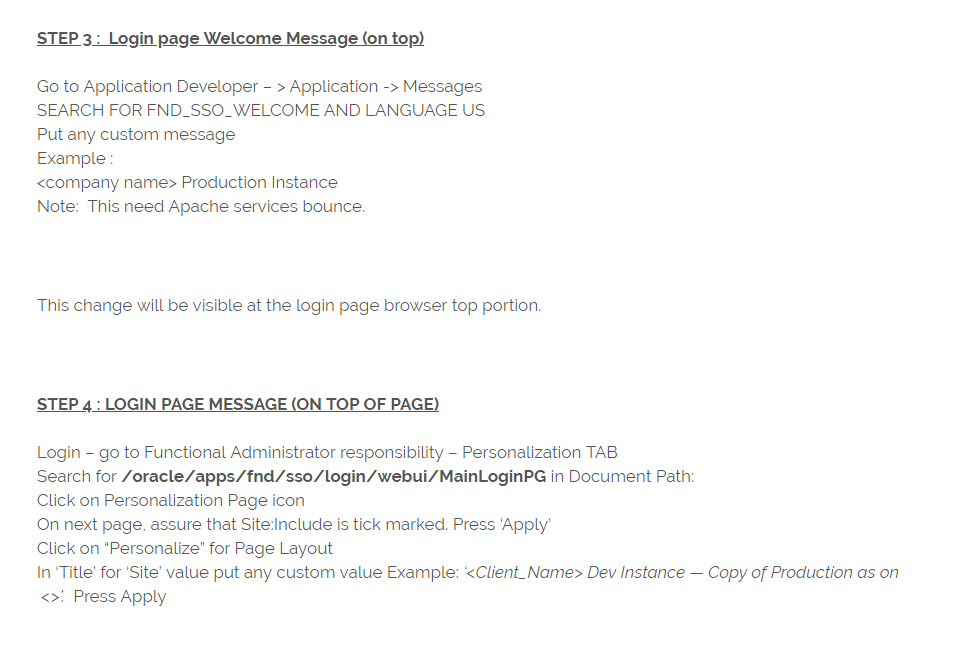
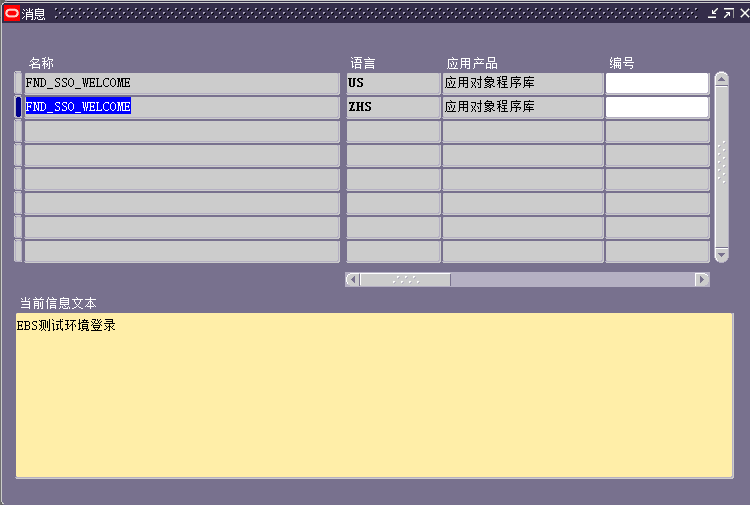
Go to Application Developer – > Application -> Messages
SEARCH FOR FND_SSO_WELCOME AND LANGUAGE US
<company name> Production Instance
Login – go to Functional Administrator responsibility – Personalization TAB
Search for /oracle/apps/fnd/sso/login/webui/MainLoginPG in Document Path:
Click on Personalization Page icon
On next page, assure that Site:Include is tick marked. Press ‘Apply’
Click on “Personalize” for Page Layout
In ‘Title’ for ‘Site’ value put any custom value Example: ‘<Client_Name> Dev Instance — Copy of Production as on <>’. Press Apply
Login – go to Functional Administrator responsibility – Personalization TAB
Search for /oracle/apps/fnd/sso/login/webui/MainLoginPG in Document Path:
Click on Personalization Page icon
On next page, assure that Site:Include is tick marked. Press ‘Apply’
Click on “Personalize” for Page Layout
In ‘Title’ for ‘Site’ value put any custom value Example: ‘<Client_Name> Dev Instance — Copy of Production as on <>’. Press Apply
修改首页
Changing the browser page name for the Home Page
This option is not specific to the new homepage. In fact, it can be performed on versions 11i, 12.0.X and 12.1.X
By default the browser displays the homepage as 'Oracle Applications Home Page'
You may want to change this so that when working with multiple environments at the same time it is easy to distinguish via the browser tabs (Firefox or Internet Explorer) which environment is which.
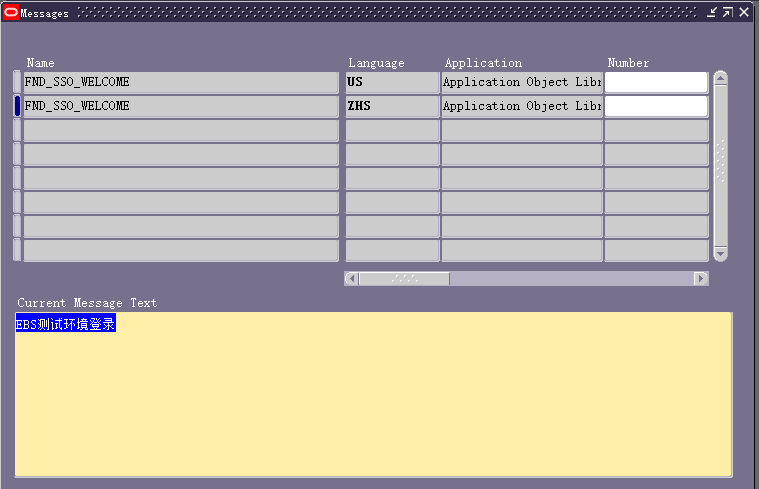
To make the change, login to the homepage and select the 'personalize page' link at the top right of the page. Select the pencil icon for the very first option in the list. This should be 'Page Layout: Oracle Applications Home Page'
Change the window title at the required level to the text of your choice. Now apply and return to the application. You will notice the browser tab now displays your chosen name
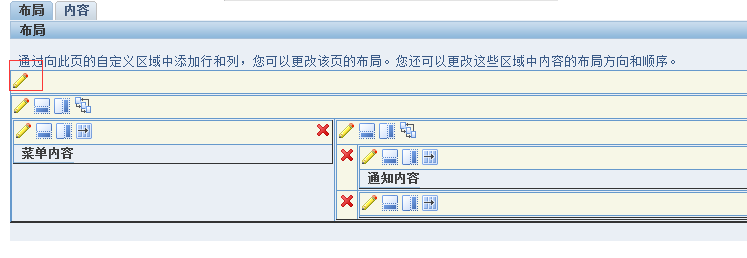
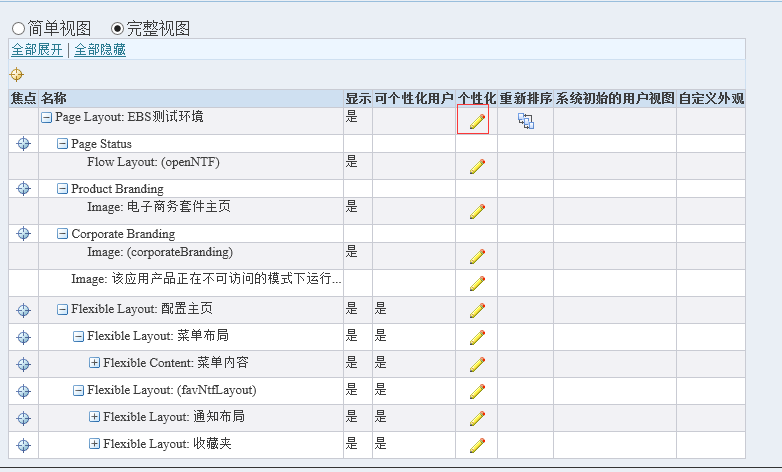

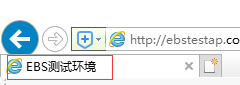
Personalize Oracle Applications Home Page Browser Window Title

Have you ever think of changing this name? …. Yes? … But don’t know how ???
Note:
Personalize Oracle Applications Home Page Browser Window Title的更多相关文章
- How to set window title name on Oracle EBS Form?
--1. 置換掉原來Winodw Property上的Title String ex. SET_WINDOW_PROPERTY('XXDII_INV_MISC_TXN_V',TITLE,:misc_t ...
- Globalization Guide for Oracle Applications Release 12
Section 1: Overview Section 2: Installing Section 3: Configuring Section 4: Maintaining Section 5: U ...
- Oracle Applications Multiple Organizations Access Control for Custom Code
档 ID 420787.1 White Paper Oracle Applications Multiple Organizations Access Control for Custom Code ...
- Embedding Flash Fullscreen in the Browser Window
For Developers > Design Documents > Embedding Flash Fullscreen in the Browser Window Auth ...
- 查找EBS中各种文件版本(Finding File Versions in the Oracle Applications EBusiness Suite - Checking the $HEADER)
Finding File Versions in the Oracle Applications EBusiness Suite - Checking the $HEADER (文档 ID 85895 ...
- Oracle Applications DBA 基础(一)
1.引子 2014年9月13日 20:33 <oracle Applications DBA 基础>介绍Oracle Applications R12的系统架构, 数据库后台及应用系统的基 ...
- UI Framework-1: Browser Window
Browser Window The Chromium browser window is represented by several objects, some of which are incl ...
- WPF选项卡页面分离之Page调用Window类
此项目源码下载地址:https://github.com/lizhiqiang0204/WPF_PageCallWindow 如果Page与Window直接没有任何调用就用这种方法https://ww ...
- wsse:InvalidSecurity Error When Testing FND_PROFILE Web Service in Oracle Applications R 12.1.2 from SOAP UI (Doc ID 1314946.1)
wsse:InvalidSecurity Error When Testing FND_PROFILE Web Service in Oracle Applications R 12.1.2 from ...
随机推荐
- 阶段5 3.微服务项目【学成在线】_day18 用户授权_04-方法授权-方法授权实现
2.3 方法授权实现 2.3.1资源服务添加授权控制 1.要想在资源服务使用方法授权,首先在资源服务配置授权控制 1)添加spring-cloud-starter-oauth2依赖. 2)拷贝授权配置 ...
- 一个link加载多个css文件
细看正则时匹配慕课网链接时发现的,一个link加载多个css文件 http://static.mukewang.com/static/css/??base.css,common/common-less ...
- iOS 字符串和图片互转
for (UIImage *myImg in _imgArray) { NSData *imageData = UIImageJPEGRepresentation(myImg,0.5); NSStri ...
- 关于采样率&位深&码率&无损的一些心得
转载自:https://blog.csdn.net/Marenow/article/details/85253283 记笔记,记下来自己的一些关于音频基础知识的总结. 采样率外界的声音都是模拟信号,在 ...
- 【创业】2B创业历程
http://www.woshipm.com/chuangye/2800111.html http://www.woshipm.com/chuangye/2803240.html http://www ...
- mysql导入、导出 ( 带视图)
1创建账号授权 grant all privileges on jenkinsddbes.* to 'jenkinsddbes'@'%' identified by '1iN@Da12tA&* ...
- Spring Cloud(6.2):搭建OAuth2 Client
配置web.xml 添加spring-cloud-starter-security,spring-security-oauth2-autoconfigure和spring-boot-starter-o ...
- C# Newtonsoft.Json JObject 操作
C# Newtonsoft.Json JObject 操作举例 JArray j = new JArray(); JObject obj = new JObject( ") ); JObje ...
- 不论报任何错误 都是网络源有问题,安装spacemacs报错的解决方式
不论报任何错误 都是网络源有问题 打开.spacemacs ### 这是原头部 (defun dotspacemacs/layers () "Configuration Layers d ...
- GPU Skinning 结合 Instanced 高效实现大量单位动画
GPU Skinning 与 Instance 蒙皮动画 计算骨骼信息 蒙皮 GPU Skinning CPU Skinning 与 GPU Skinning 实现方式 Skinning 类型 优点 ...