
IdentityServer4入门一
这几天学习IdentityServer4,感觉内容有点乱,也可能自己水平有限吧。但为了巩固学习的内容,也打算自己理一下思路。
首先IdentityServer解决什么问题?
下图是我们的一个程序的组织形式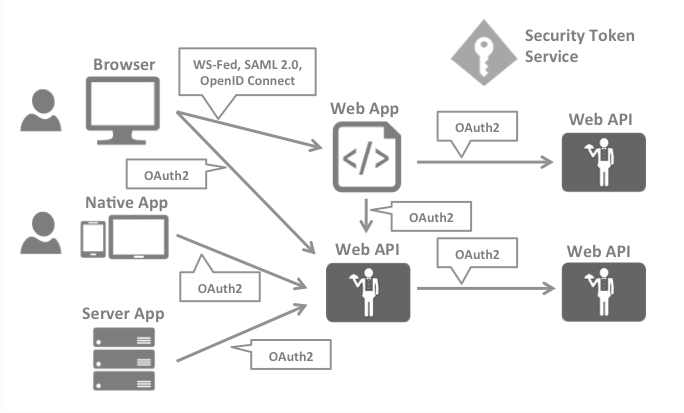
详情可以看看官网的描述:https://identityserver4.readthedocs.io/en/latest/intro/big_picture.html
我的理解是:IdentityServer就是解决多点登录及API授权、WEB授权的问题
第一个例子
我们将重现官网上的第一个范例来学习相关概念,但与官网的不同,我打算一开始就将服务端从一个MVC网站开始。官网的第一个范例:https://identityserver4.readthedocs.io/en/latest/quickstarts/1_client_credentials.html
下面截图和代码来自VS.NET2019+asp.net core 3.0
新建服务端
新增asp.net core Web应用程序,项目名称IdentityMvc。因为还要后面加上测试的客户端,所以解决方案我使用了另外的一个名称OpenIdConnect
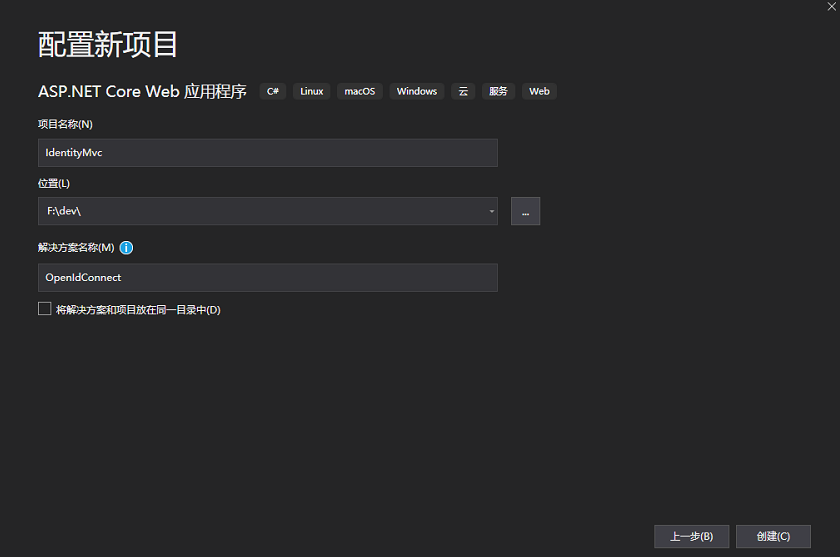
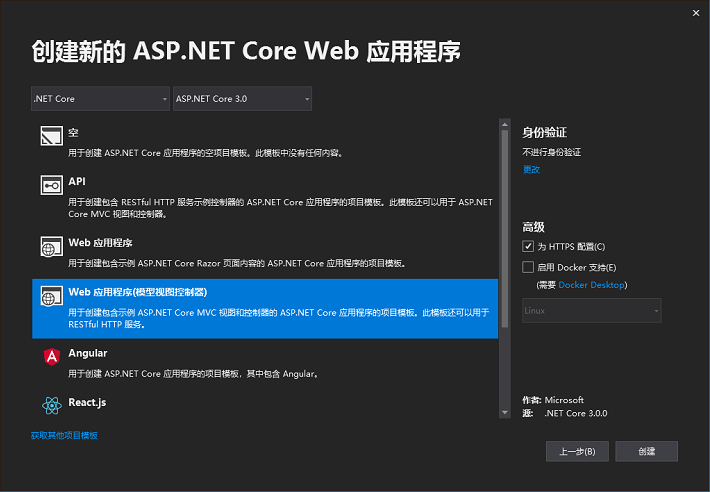
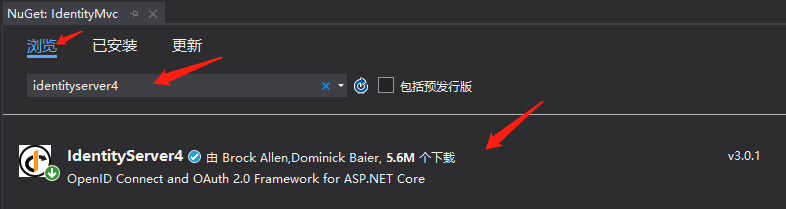
利用nuget添加(安装)引用
IdentityServer4
将端口修改一下,授权服务的端口我们使用44300。打开Properties\launchSettings.json文件
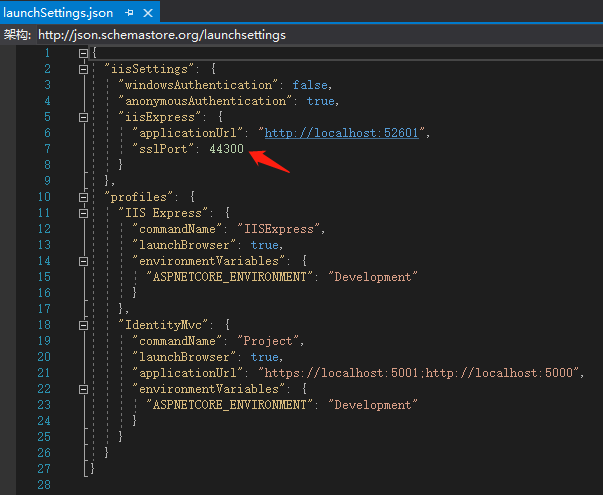
新增Config.cs文件
using IdentityServer4.Models;

using System.Collections.Generic;

namespace IdentityMvc

{

    public static class Config

    {

        public static IEnumerable<IdentityResource> GetIdentityResources()

        {

            return new IdentityResource[]

            {

                new IdentityResources.OpenId()

            };

        }

        public static IEnumerable<ApiResource> GetApis()

        {

            return new List<ApiResource>

            {

                new ApiResource("api1", "My API")

            };

        }

        public static IEnumerable<Client> GetClients()

        {

            return new List<Client>

            {

                new Client

                {

                    ClientId = "client",

                    // no interactive user, use the clientid/secret for authentication

                    AllowedGrantTypes = GrantTypes.ClientCredentials,

                    // secret for authentication

                    ClientSecrets =

                    {

                        new Secret("secret".Sha256())

                    },

                    // scopes that client has access to

                    AllowedScopes = { "api1" }

                }

            };

        }

    }

}
修改startup.cs文件
在ConfigureServices(IServiceCollection services)文件添加以下代码
var builder = services.AddIdentityServer()

                .AddInMemoryIdentityResources(Config.GetIdentityResources())

                .AddInMemoryApiResources(Config.GetApiResources())

                .AddInMemoryClients(Config.GetClients());
在Configure(IApplicationBuilder app, IWebHostEnvironment env)方法,添加app.UseIdentityServer();
public void Configure(IApplicationBuilder app, IWebHostEnvironment env)

{

    if (env.IsDevelopment())

    {

        app.UseDeveloperExceptionPage();

    }

    else

    {

        app.UseExceptionHandler("/Home/Error");

        // The default HSTS value is 30 days. You may want to change thi

        app.UseHsts();

    }

    app.UseIdentityServer();//添加这一句

    app.UseHttpsRedirection();

    app.UseStaticFiles();

    //...省略下方代码
至此,保护API的服务端就做好了。我们可以点击调试运行,IDE会打开IE并访问home页。home页一般能正常打开,但如何测试授权服务是否正常呢,可以在地址栏添加.well-known/openid-configuration,应能看到类似的内容
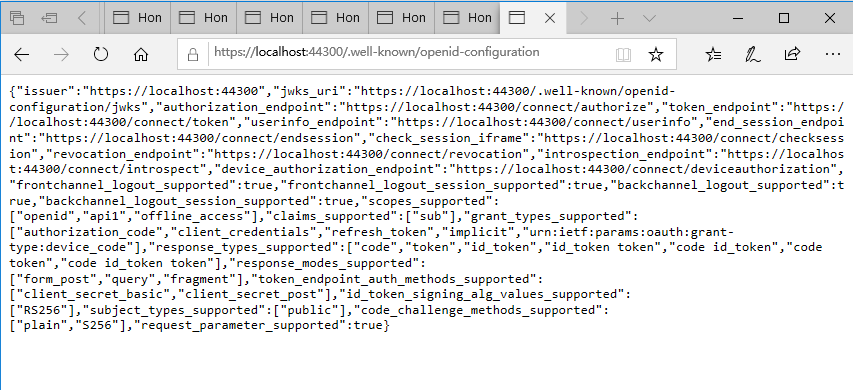
上图的地址的端口可能会有所不同。如果openid-configuration页面看到是空白的话,估计我们少加入了app.UseIdentityServer()方法。
好了,授权服务端就这样的了。接着就是需要一个API的服务程序,和一个调用API的客户端。
IdentityServer4入门一的更多相关文章
- IdentityServer4入门二
在 IdentityServer4入门一 我们准备好了一个认证的服务端,这里做一个需要保护的API服务 首先,向解决方案新增一个项目.我们同样使用入门一的方式新增一个asp.net core Web程 ...
- IdentityServer4入门三:授权模式
在入门一.入门二我们实现了一个完整的API保护的过程.需要保护的API只需在其Controler上应用[Authorize]特性,来显式指定受保护的资源.而我们实现的这个例子,所应用的模式叫“Clie ...
- Asp.net Core IdentityServer4 入门教程(一):概念解析
目录 1.IdentityServer4 是什么 2.什么是OpenID和OAuth 2.0协议 3.IdentityServer4 可以用来做什么 其他 1.IdentityServer4 是什么 ...
- IdentityServer4入门五:错误处理
在访问ClientMvc的保护页面时,会跳转到IdentityMvc页面,这时会出现类似下图的错误界面,让人无从入手. 如果你尝试按文字所说的内容去处理.你发现项目已正确设置.其实上面的内容是固定的, ...
- IdentityServer4入门四:应用Implicit模式保护网站(下)
为认证服务端增加数据库支持 我计划使用一个名为Admin的表,放在一个已有的数据库里.所以我需要定义Admin类和在配置里预先加上数据库连接 新增类:Admin.cs public class Adm ...
- IdentityServer4入门四:应用Implicit模式保护网站(上)
我们先新增一个网站,名为“ClientMvc",也是asp.net core Web应用程序(模型视图控制器) 使用nuget安装以下引用 Microsoft.AspNetCore.Auth ...
- IdentityServer4 中文文档 -16- (快速入门)使用 EntityFramework Core 存储配置数据
IdentityServer4 中文文档 -16- (快速入门)使用 EntityFramework Core 存储配置数据 原文:http://docs.identityserver.io/en/r ...
- IdentityServer4 中文文档 -15- (快速入门)添加 JavaScript 客户端
IdentityServer4 中文文档 -15- (快速入门)添加 JavaScript 客户端 原文:http://docs.identityserver.io/en/release/quicks ...
- IdentityServer4 中文文档 -14- (快速入门)使用 ASP.NET Core Identity
IdentityServer4 中文文档 -14- (快速入门)使用 ASP.NET Core Identity 原文:http://docs.identityserver.io/en/release ...
随机推荐
- 私服nexus的权限问题,带admin和带view的区别
admin和view的区别只找到了这个解释: https://blog.csdn.net/tian_111222333/article/details/100159983 最终得出答案,我只需要给他们 ...
- 关于js异步的一些知识点
1,什么是单线程,和异步有什么关系 单线程-只有一个线程,只能做一件事 单线程的原因:避免DOM 渲染的冲突 浏览器需要渲染DOM JS 可以修改DOM 结构 JS 执行的时候,浏览器DOM 渲染会暂 ...
- 当SAP云平台account的service Marke place里找不到Machine Learning服务该怎么办
问题症状: 我在CloudFoundry环境的Service Market place里根本找不到Leonardo ML foundation这组服务. 解决方案: 进入global Account- ...
- LINUX档案权限
一.ls命令显示目录详细信息 列表显示目录内容 : ls drwxr-xr-x. 4 root root 4096 Jun 26 02:07 acpi -rw-r--r--. 1 ...
- javascript冒泡事件详解
冒泡事件: 定义:当多个Dom元素互相嵌套的时候,一个元素触发了某个事件(例如Click事件),那么嵌套此事件的所有元素都会被触发一次Click事件,注意:只会触发他的直系亲属元素,而与其自己,父级, ...
- 为什么说Java程序员必须掌握 Spring Boot ?
Spring Boot 2.0 的推出又激起了一阵学习 Spring Boot 热,那么, Spring Boot 诞生的背景是什么?Spring 企业又是基于什么样的考虑创建 Spring Boot ...
- Ubuntu 手动挂载exfat格式的U盘
1.默认Ubuntu不支持exFat格式的U盘,先要安装支持: sudo apt-get install exfat-fuse 2.挂载磁盘,我选择挂在mnt下面 a.创建挂载目录:sudo mkdi ...
- 虚拟机配置双网卡适配器后(桥接和NAT模式),重新打开后两个适配器的ip都没有了(重启网卡报Job for network.service failed because the control process exited with error code)
科普双网卡适配器的好处: 我是配了一个桥接模式的网卡和一个NAT模式的网卡,桥接模式,也就是将虚拟机的虚拟网络适配器与主机的物理网络适配器进行交接,虚拟机中的虚拟网络适配器可通过主机中的物理网络适配器 ...
- linux getpid _getpid()
getpid是一种函数,功能是取得进程识别码,许多程序利用取到的此值来建立临时文件,以避免临时文件相同带来的问题. 函数功能:取得进程识别码 相关函数:fork,kill,getpid 头文件:旧版本 ...
- python学习之文件读写,序列化(json,pickle,shelve)
python基础 文件读写 凡是读写文件,所有格式类型都是字符串形式传输 只读模式(默认) r f=open('a.txt','r')#文件不存在会报错 print(f.read())#获取到文件所 ...