
IdentityServer4入门一
这几天学习IdentityServer4,感觉内容有点乱,也可能自己水平有限吧。但为了巩固学习的内容,也打算自己理一下思路。
首先IdentityServer解决什么问题?
下图是我们的一个程序的组织形式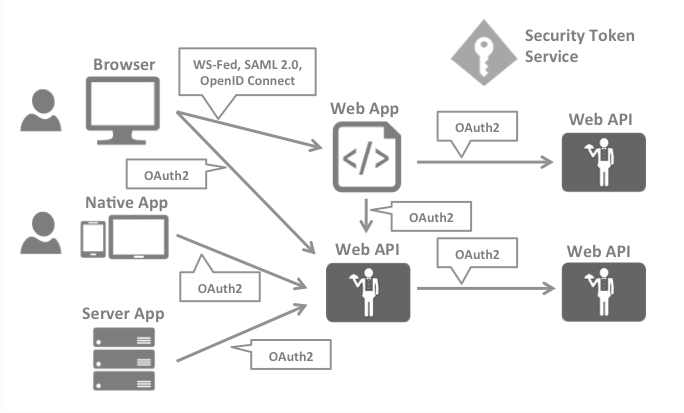
详情可以看看官网的描述:https://identityserver4.readthedocs.io/en/latest/intro/big_picture.html
我的理解是:IdentityServer就是解决多点登录及API授权、WEB授权的问题
第一个例子
我们将重现官网上的第一个范例来学习相关概念,但与官网的不同,我打算一开始就将服务端从一个MVC网站开始。官网的第一个范例:https://identityserver4.readthedocs.io/en/latest/quickstarts/1_client_credentials.html
下面截图和代码来自VS.NET2019+asp.net core 3.0
新建服务端
新增asp.net core Web应用程序,项目名称IdentityMvc。因为还要后面加上测试的客户端,所以解决方案我使用了另外的一个名称OpenIdConnect
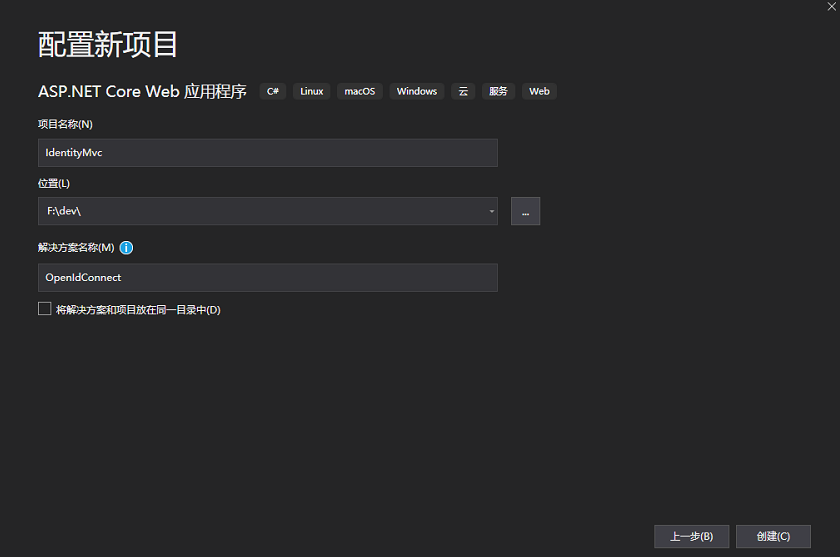
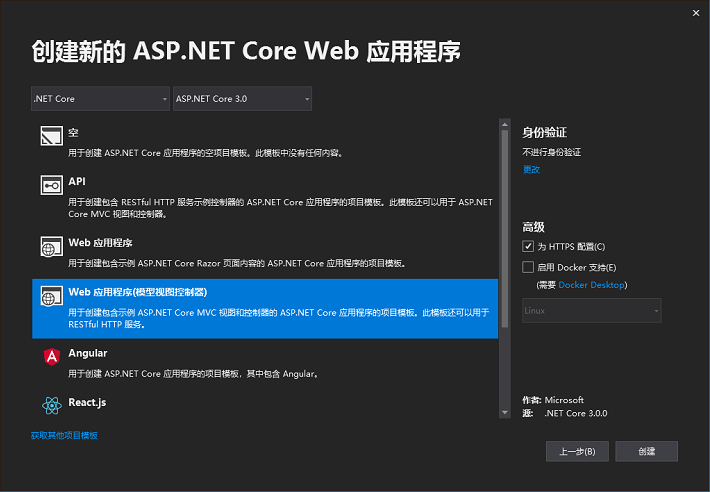
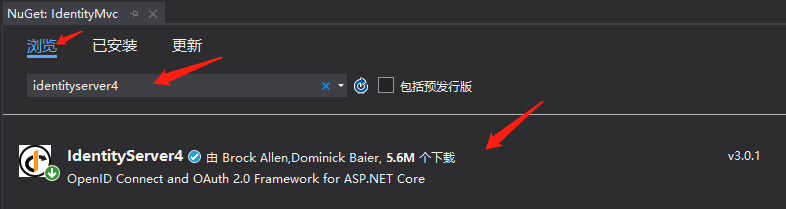
利用nuget添加(安装)引用
IdentityServer4
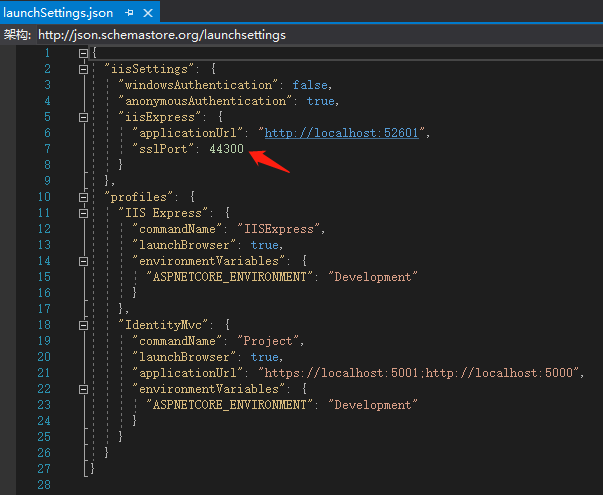
将端口修改一下,授权服务的端口我们使用44300。打开Properties\launchSettings.json文件
新增Config.cs文件
using IdentityServer4.Models;

using System.Collections.Generic;

namespace IdentityMvc

{

    public static class Config

    {

        public static IEnumerable<IdentityResource> GetIdentityResources()

        {

            return new IdentityResource[]

            {

                new IdentityResources.OpenId()

            };

        }

        public static IEnumerable<ApiResource> GetApis()

        {

            return new List<ApiResource>

            {

                new ApiResource("api1", "My API")

            };

        }

        public static IEnumerable<Client> GetClients()

        {

            return new List<Client>

            {

                new Client

                {

                    ClientId = "client",

                    // no interactive user, use the clientid/secret for authentication

                    AllowedGrantTypes = GrantTypes.ClientCredentials,

                    // secret for authentication

                    ClientSecrets =

                    {

                        new Secret("secret".Sha256())

                    },

                    // scopes that client has access to

                    AllowedScopes = { "api1" }

                }

            };

        }

    }

}
修改startup.cs文件
在ConfigureServices(IServiceCollection services)文件添加以下代码
var builder = services.AddIdentityServer()

                .AddInMemoryIdentityResources(Config.GetIdentityResources())

                .AddInMemoryApiResources(Config.GetApiResources())

                .AddInMemoryClients(Config.GetClients());
在Configure(IApplicationBuilder app, IWebHostEnvironment env)方法,添加app.UseIdentityServer();
public void Configure(IApplicationBuilder app, IWebHostEnvironment env)

{

    if (env.IsDevelopment())

    {

        app.UseDeveloperExceptionPage();

    }

    else

    {

        app.UseExceptionHandler("/Home/Error");

        // The default HSTS value is 30 days. You may want to change thi

        app.UseHsts();

    }

    app.UseIdentityServer();//添加这一句

    app.UseHttpsRedirection();

    app.UseStaticFiles();

    //...省略下方代码
至此,保护API的服务端就做好了。我们可以点击调试运行,IDE会打开IE并访问home页。home页一般能正常打开,但如何测试授权服务是否正常呢,可以在地址栏添加.well-known/openid-configuration,应能看到类似的内容
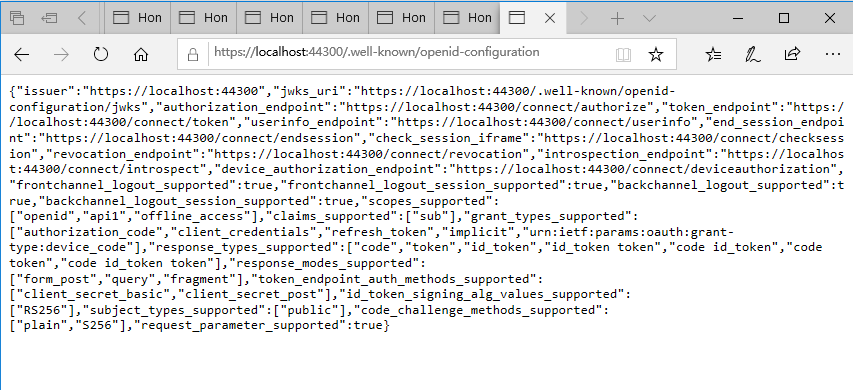
上图的地址的端口可能会有所不同。如果openid-configuration页面看到是空白的话,估计我们少加入了app.UseIdentityServer()方法。
好了,授权服务端就这样的了。接着就是需要一个API的服务程序,和一个调用API的客户端。
IdentityServer4入门一的更多相关文章
- IdentityServer4入门二
在 IdentityServer4入门一 我们准备好了一个认证的服务端,这里做一个需要保护的API服务 首先,向解决方案新增一个项目.我们同样使用入门一的方式新增一个asp.net core Web程 ...
- IdentityServer4入门三:授权模式
在入门一.入门二我们实现了一个完整的API保护的过程.需要保护的API只需在其Controler上应用[Authorize]特性,来显式指定受保护的资源.而我们实现的这个例子,所应用的模式叫“Clie ...
- Asp.net Core IdentityServer4 入门教程(一):概念解析
目录 1.IdentityServer4 是什么 2.什么是OpenID和OAuth 2.0协议 3.IdentityServer4 可以用来做什么 其他 1.IdentityServer4 是什么 ...
- IdentityServer4入门五:错误处理
在访问ClientMvc的保护页面时,会跳转到IdentityMvc页面,这时会出现类似下图的错误界面,让人无从入手. 如果你尝试按文字所说的内容去处理.你发现项目已正确设置.其实上面的内容是固定的, ...
- IdentityServer4入门四:应用Implicit模式保护网站(下)
为认证服务端增加数据库支持 我计划使用一个名为Admin的表,放在一个已有的数据库里.所以我需要定义Admin类和在配置里预先加上数据库连接 新增类:Admin.cs public class Adm ...
- IdentityServer4入门四:应用Implicit模式保护网站(上)
我们先新增一个网站,名为“ClientMvc",也是asp.net core Web应用程序(模型视图控制器) 使用nuget安装以下引用 Microsoft.AspNetCore.Auth ...
- IdentityServer4 中文文档 -16- (快速入门)使用 EntityFramework Core 存储配置数据
IdentityServer4 中文文档 -16- (快速入门)使用 EntityFramework Core 存储配置数据 原文:http://docs.identityserver.io/en/r ...
- IdentityServer4 中文文档 -15- (快速入门)添加 JavaScript 客户端
IdentityServer4 中文文档 -15- (快速入门)添加 JavaScript 客户端 原文:http://docs.identityserver.io/en/release/quicks ...
- IdentityServer4 中文文档 -14- (快速入门)使用 ASP.NET Core Identity
IdentityServer4 中文文档 -14- (快速入门)使用 ASP.NET Core Identity 原文:http://docs.identityserver.io/en/release ...
随机推荐
- Python练习_Python初识_day1
题目 1.作业 1.简述变量命名规范 2.name = input(“>>>”) name变量是什么数据类型? 3.if条件语句的基本结构? 4.用print打印出下面内容: ⽂能提 ...
- Python中的一些常用模块1
OS模块,sys模块,time模块,random模块,序列化模块 os模块是与操作系统交互的一个接口 OS模块简单的来说是一个Python的系统编程操作模块,可以处理文件和目录这些我们日常手动需要做的 ...
- python常见函数运用【一】
1.Python hasattr() 函数 描述hasattr() 函数用于判断对象是否包含对应的属性. 语法 hasattr 语法: hasattr(object, name)参数object -- ...
- 【SQL server】SQL server基础(一)
一.关系型数据库 关系型数据库的基本元素是二维表,这些二维表可以被独立或者通过join语句连接起来使用.主键和外键是用来连接二维表之间的主要工具 1.主键(primary key)和外键(foreig ...
- c# 枚举和位标志
- openssl/opensslv.h错误的解决方案
sudo apt install libssl-dev
- Linux学习之九-Linux系统定时任务
Linux系统定时任务 在一些实际工作中需要机器在某个时间自动执行某个任务,不需要人为在此时刻参与,可以建立一个定时任务. crond 服务是linux下用来周期性的执行某种任务或等待处理某些事件的一 ...
- ubuntu---记录.opencv多版本管理与切换
首先当然准备两个不同版本opencv (比如2..9和3.1.0) cmake-gui 设置 CMAKE_INSTALL_PREFIX 安装路径:/usr/local/opencv2 安装路径 :/u ...
- Ubuntu系统---Ubuntu16.04进不了界面(登录界面循环,密码正确)(一体化安装(CUDA +NVIDIA驱动)+ cuDNN)
Ubuntu16.04进不了界面(登录界面循环,密码正确)(一体化安装(CUDA +NVIDIA驱动)+ cu ...
- 关于python logging模块读文档的几个心得
1. logger是分层级的,root是所有logger的祖先. 2. root这个logger在执行logging.warning() 等一系列方法和basicConfig()的时候才会被初始化ha ...