
路由器配置——基于区域的OSPF简单认证
一、实验目的:掌握区域的OSPF简单认证
二、拓扑图:

三、具体步骤配置:
(1)R1路由器配置
Router>enable
Router#configure terminal
Enter configuration commands, one per line. End with CNTL/Z.
Router(config)#hostname R1
R1(config)#interface s0/0/0
R1(config-if)#ip address 192.168.1.1 255.255.255.0
R1(config-if)#clock rate 64000
R1(config-if)#no shutdown
%LINK-5-CHANGED: Interface Serial0/0/0, changed state to down
R1(config-if)#exit
R1(config)#interface l0
R1(config-if)#ip address 1.1.1.1 255.255.255.0
R1(config-if)#no shutdown
R1(config-if)#exit
R1(config)#router ospf 1
R1(config-router)#router-id 1.1.1.1
R1(config-router)#network 192.168.1.0 0.0.0.255 area 0
R1(config-router)#network 1.1.1.0 0.0.0.255 area 0
R1(config-router)#area 0 authentication
R1(config-router)#interface s0/0/0
R1(config-if)#ip ospf authentication-key 123
R1(config-if)#end
(2)R2路由器配置
Router>enable
Router#configure terminal
Enter configuration commands, one per line. End with CNTL/Z.
Router(config)#hostname R2
R2(config)#interface s0/0/0
R2(config-if)#ip address 192.168.1.2 255.255.255.0
R2(config-if)#clock rate 64000
This command applies only to DCE interfaces
R2(config-if)#no shutdown
R2(config-if)#exit
R2(config)#interface l0
R2(config-if)#ip address 2.2.2.2 255.255.255.0
R2(config-if)#no shutdown
R2(config-if)#exit
R2(config)#router ospf 1
R2(config-router)#router-id 2.2.2.2
R2(config-router)#network 192.168.1.0 0.0.0.255 area 0
R2(config-router)#network 2.2.2.0 0.0.0.255 area 0
R2(config-router)#area 0 authentication
R2(config-router)#interface s0/0/0
R2(config-if)#ip ospf authentication-key 123
R2(config-if)#end
四、验证测试:
1、检查端口是否启用了简单口令认证
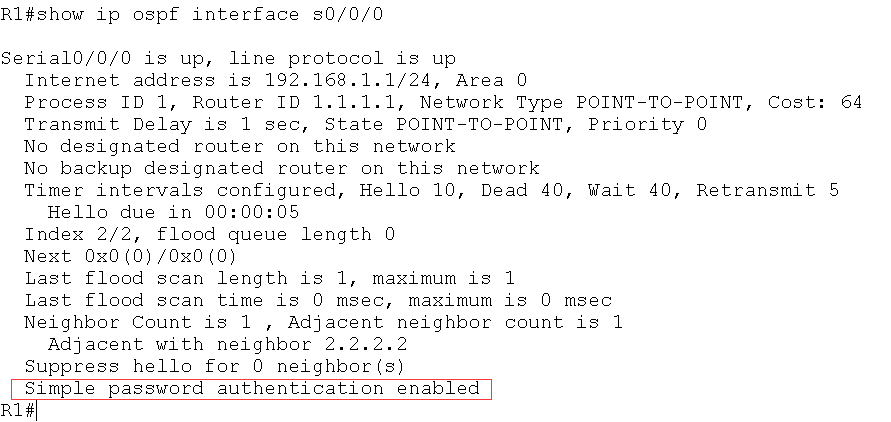
图中红色标记处信息表明端口启用了简单口令认证
(2)检查区域是否采用了简单口令认证
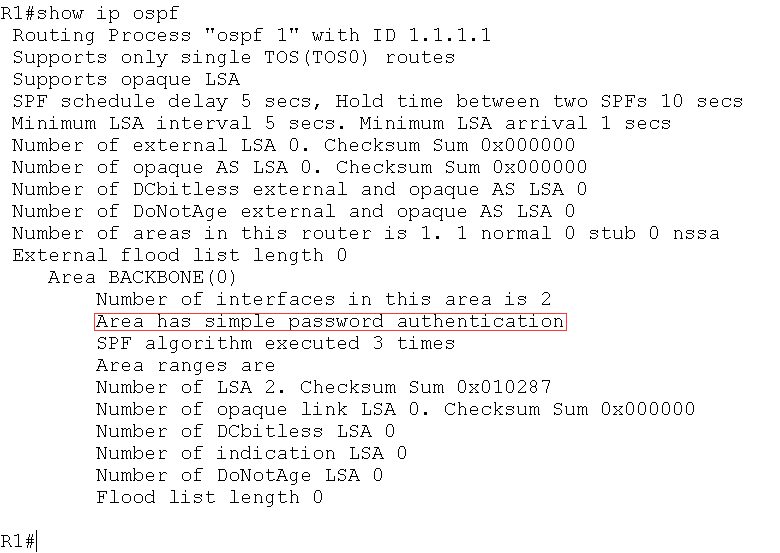
图中红色标记处表明区域0采用了简单口令认证
(3)如果R1区域0没有启动认证,而R2区域0启动简单口令认证,则R2上出现下面
的信息
*Feb 10 11:03:03.071: OSPF: Rcv pkt from 192.168.12.1, Serial0/0/0 : Mismatch
Authentication type. Input packet specified type 0, we use type 1
(4)如果R1 和R2 的区域0 都启动简单口令认证,但是R2 的接口下没有配置密码或密
码错误,则R2 上出现下面的信息:
*Feb 10 10:55:53.071: OSPF: Rcv pkt from 192.168.12.1, Serial0/0/0 : Mismatch
Authentication Key - Clear Text
路由器配置——基于区域的OSPF简单认证的更多相关文章
- 路由器配置——基于链路的OSPF简单口令认证
一.实验目的:掌握基于链路的OSPF简单口令认证 二.拓扑图: 三.具体步骤配置: (1)R1路由器配置 Router>enable Router#configure terminal Ente ...
- 路由器配置——基于区域的OSPF,MD5认证
一.实验目的:掌握OSPF基于区域的MD5认证 二.拓扑图: 三.具体步骤配置 (1)R1路由器配置 Router>enable Router#configure terminal Enter ...
- 基于区域的OSPF简单认证
实验要求:掌握OSPF区域简单认证配置 拓扑如下: 配置如下: R1enable configure terminal interface s0/0/0ip address 192.168.1.1 2 ...
- 路由器配置——基于链路的OSPF的MD5口令认证
一.实验目的:掌握基于链路的OSPFMD5口令认证 二.拓扑图: 三.具体步骤配置: (1)R1路由器的配置 Router>enable Router#configure terminal En ...
- 基于链路的OSPF简单口令认证
实验要求:掌握基于链路的OSPF简单口令认证 拓扑如下: 配置如下: R1enable configure terminal interface s0/0/0ip address 192.168.1. ...
- SharePoint 2013 配置基于表单的身份认证
前 言 这里简单介绍一下为SharePoint 2013 配置基于表单的身份认证,简单的说,就是用Net提供的工具创建数据库,然后配置SharePoint 管理中心.STS服务.Web应用程序的三处w ...
- 基于区域的OSPF的MD5认证
实验要求:掌握OSPF基于区域的MD5认证 拓扑如下: 配置如下: R1enable configure terminal interface s0/0/0ip address 192.168.1.1 ...
- 神州数码OSPF基于区域认证(简单、MD5认证)
实验要求:掌握基于区域的简单认证及MD5认证 拓扑如下 简单认证 R1 enable 进入特权模式 config 进入全局模式 hostname R1 修改名称 interface l0 进入端口 i ...
- 神州数码OSPF基于端口认证(简单认证、MD5认证)
实验要求:掌握OSPF基于端口认证方式 拓扑如下 简单认证 R1 enable 进入特权模式 config 进入全局模式 hostname R1 修改名称 interface s0/1 进入端口 i ...
随机推荐
- java--键盘输入任意数字进行求和
思路,我将键盘输入的数放入数组,然后便利数组进行求和 package com.test.day01; import java.util.Scanner; public class Test { pub ...
- DP单调队列--斜率优化P3195
题意:https://www.luogu.com.cn/problem/P3195 思路:https://www.luogu.com.cn/problemnew/solution/P3195 #def ...
- HTNL基础之二
HTML实体字符 “<”:< “>”:> “空格”: ' / / ' “"”:" “®”:® “©”:© 列表 ①无序列表:列表用来在网页上组织信息, ...
- Prometheus Operator 自动发现和持久化
Prometheus Operator 自动发现和持久化 之前在 Prometheus Operator 下面自定义一个监控选项,以及自定义报警规则的使用.那么我们还能够直接使用前面课程中的自动发现功 ...
- 6-MySQL DBA笔记-查询优化
第6章 查询优化 查询优化是研发人员比较关注也是疑问较多的领域.本章首先为读者介绍常用的优化策略.MySQL的优化器.连接机制,然后介绍各种语句的优化,在阅读本章之前,需要先对EXPLAIN命令,索引 ...
- spring-cloud 学习四 服务网关
API Gateway 服务网关在微服务中是一个很重要的组成部分,通过服务网关可以统一向外提供REST API,例如 / 映射到后端应用 /api/user 映射到 user service, /a ...
- JavaScript 的查询机制——LHS 与 RHS
JavaScript 引擎在查找一个变量的时候,有两种查找机制:LHS 和 RHS. RHS 的查询是简单地查找到某个变量的值,而 LHS 则是试图找到变量的容器的本身. 一个简单的例子:当我们执行 ...
- asp.net mvc5 DataBase First下model校验问题(MetadataType使用)
最近学习asp.net mvc5,使用 asp.net mvc5+EF6+AutoFac做个小Demo,其中是先设计的数据库表,就直接选择了EF的DataBase First(三种开发模式分别是c ...
- 运行时异常与受检异常有何异同、error和exception有什么区别
1.运行时异常与受检异常有何异同? 异常表示程序运行过程中可能出现的非正常状态,运行时异常表示虚拟机的通常操作中可能遇到的异常,是一种常见运行错误,只要程序设计得没有问题通常就不会发生.受检异常跟程序 ...
- Docker镜像拉取失败或超时的解决办法:添加国内镜像
$ docker pull php:7.1-fpm-alpine Error response from daemon: Get https://registry-1.docker.io/v2/: n ...