
am335x system upgrade usb wifi rtl8188eus(十九)
1 Scope of Document
This document describes how to port rtl8188eus driver to linux 4.14.y design.
2 Requiremen
2.1 Function Requirement
Support usb wifi rtl8188eus working in sta mode under linux 4.14.y kernel version
2.2 Performance Requirement
NA
3 Hardware Overview
usb interface,pin map:
USB0_N
USB0_P
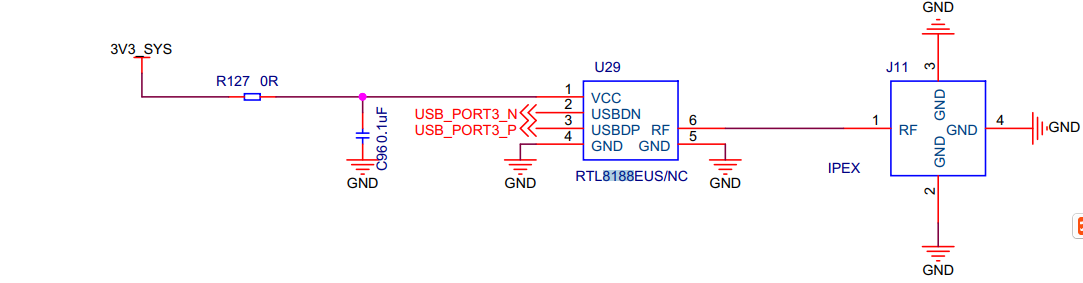
Figure 1 usb wifi rtl8188eus interface block diagram
4 Functional Description
4.1 Functional Block Diagram
It combines CMOSMAC,Baseband PHYand RF in a single chip for IEEE802.11/b/g/n compatible. It supports IEEE802.11i safety protocol, along with IEEE802.11e standard service quality. It supports the new data encryption on 64/128 bit WEP and safety mechanism on WPA-PSK/WPA2-PSK, WPA/WPA2.It can implement the wireless network function on the laptop/desktop/MID and other wireless devices easily
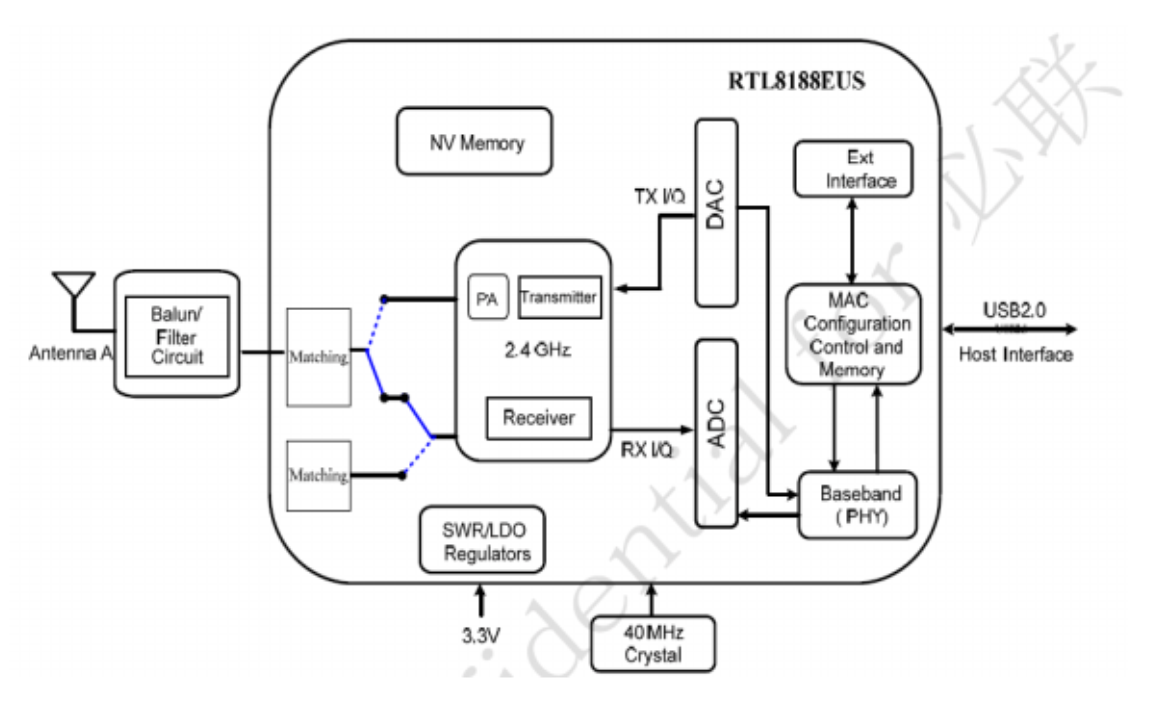
Figure 2 usb wifi rtl8188eus interface block diagram
4.2 RTL8188EUS
4.2.1 Overview
5 Porting
5.1 Kernel porting
+CONFIG_WIRELESS_EXT=y
+CONFIG_WEXT_PRIV=y
+CONFIG_WLAN_VENDOR_RSI=y
+CONFIG_CLKDEV_LOOKUP=y
+++ drivers/net/wireless/realtek/Kconfig
+source "drivers/net/wireless/realtek/rtl8188eus/Kconfig"
+++ drivers/net/wireless/realtek/Makefile
+obj-$(CONFIG_RTL8188EU) += rtl8188eus/
get driver from : https://github.com/quickreflex/rtl8188eus
add include/autoconf.h for support ap+sta ,but ap driver is not compatible with linux.4.14.y kernel version, beause of manufacturer no longer maintain rtl8188eus drivers. So ap mode not work properly….
+109 #define CONFIG_CONCURRENT_MODE
5.2 Application Interface
After the usb wifi rtl8188eus driver was loaded , we can find wlan0 wlan1 network devices

Kernel message:
[ 304.654082] 8188eu: loading out-of-tree module taints kernel.
[ 304.690852] RTL871X: module init start
[ 304.690875] RTL871X: rtl8188eu v4.3.0.8_13968.20150417
[ 304.691129] RTL871X:
usb_endpoint_descriptor(0):
[ 304.691139] RTL871X: bLength=7
[ 304.691145] RTL871X: bDescriptorType=5
[ 304.691152] RTL871X: bEndpointAddress=81
[ 304.691159] RTL871X: wMaxPacketSize=512
[ 304.691166] RTL871X: bInterval=0
[ 304.691173] RTL871X: RT_usb_endpoint_is_bulk_in = 1
[ 304.691179] RTL871X:
usb_endpoint_descriptor(1):
[ 304.691184] RTL871X: bLength=7
[ 304.691190] RTL871X: bDescriptorType=5
[ 304.691195] RTL871X: bEndpointAddress=2
[ 304.691201] RTL871X: wMaxPacketSize=512
[ 304.691206] RTL871X: bInterval=0
[ 304.691213] RTL871X: RT_usb_endpoint_is_bulk_out = 2
[ 304.691219] RTL871X:
usb_endpoint_descriptor(2):
[ 304.691224] RTL871X: bLength=7
[ 304.691230] RTL871X: bDescriptorType=5
[ 304.691235] RTL871X: bEndpointAddress=3
[ 304.691241] RTL871X: wMaxPacketSize=512
[ 304.691246] RTL871X: bInterval=0
[ 304.691252] RTL871X: RT_usb_endpoint_is_bulk_out = 3
[ 304.691260] RTL871X: nr_endpoint=3, in_num=1, out_num=2
[ 304.691266] RTL871X: USB_SPEED_HIGH
[ 304.691397] RTL871X: CHIP TYPE: RTL8188E
[ 304.691445] RTL871X: register rtw_netdev_ops to netdev_ops
[ 304.691465] RTL871X: rtw_wdev_alloc(padapter=d0ee9000)
[ 304.720692] RTL871X: Chip Version Info: CHIP_8188E_Normal_Chip_TSMC_A_CUT_1T1R_RomVer(0)
[ 304.720711] RTL871X: RF_Type is 3!!
[ 304.720726] RTL871X: _ConfigNormalChipOutEP_8188E OutEpQueueSel(0x05), OutEpNumber(2)
[ 304.720926] RTL871X: EEPROM type is E-FUSE
[ 304.720936] RTL871X: ====> _ReadAdapterInfo8188EU
[ 304.721015] RTL871X: Boot from EFUSE, Autoload OK !
[ 304.723461] RTL871X: SetHwReg8188EU: bMacPwrCtrlOn=1
[ 304.723693] bFWReady == _FALSE call reset 8051...
[ 304.724300] RTL871X: =====> _8051Reset88E(): 8051 reset success .
[ 304.739727] RTL871X: efuse_read_phymap_from_txpktbuf bcnhead:0
[ 304.740293] RTL871X: efuse_read_phymap_from_txpktbuf len:118, lenbak:118, aaa:118, aaabak:118
[ 304.754846] RTL871X: efuse_read_phymap_from_txpktbuf read count:116
[ 304.755152] RTL871X: EEPROM ID=0x8129
[ 304.755165] RTL871X: VID = 0x0BDA, PID = 0x8179
[ 304.755173] RTL871X: Customer ID: 0x00, SubCustomer ID: 0xCD
[ 304.755185] RTL871X: Hal_ReadPowerSavingMode88E...bHWPwrPindetect(0)-bHWPowerdown(0) ,bSupportRemoteWakeup(1)
[ 304.755192] RTL871X: ### PS params=> power_mgnt(0),usbss_enable(0) ###
[ 304.755202] RTL871X: ======= Path 0, Channel 1 =======
[ 304.755208] RTL871X: Index24G_CCK_Base[0][1] = 0x21
[ 304.755214] RTL871X: Index24G_BW40_Base[0][1] = 0x25
[ 304.755219] RTL871X: ======= Path 0, Channel 2 =======
[ 304.755225] RTL871X: Index24G_CCK_Base[0][2] = 0x21
[ 304.755230] RTL871X: Index24G_BW40_Base[0][2] = 0x25
[ 304.755236] RTL871X: ======= Path 0, Channel 3 =======
[ 304.755242] RTL871X: Index24G_CCK_Base[0][3] = 0x21
[ 304.755247] RTL871X: Index24G_BW40_Base[0][3] = 0x25
[ 304.755252] RTL871X: ======= Path 0, Channel 4 =======
[ 304.755258] RTL871X: Index24G_CCK_Base[0][4] = 0x21
[ 304.755263] RTL871X: Index24G_BW40_Base[0][4] = 0x25
[ 304.755269] RTL871X: ======= Path 0, Channel 5 =======
[ 304.755274] RTL871X: Index24G_CCK_Base[0][5] = 0x21
[ 304.755279] RTL871X: Index24G_BW40_Base[0][5] = 0x25
[ 304.755285] RTL871X: ======= Path 0, Channel 6 =======
[ 304.755290] RTL871X: Index24G_CCK_Base[0][6] = 0x21
[ 304.755296] RTL871X: Index24G_BW40_Base[0][6] = 0x25
[ 304.755301] RTL871X: ======= Path 0, Channel 7 =======
[ 304.755307] RTL871X: Index24G_CCK_Base[0][7] = 0x21
[ 304.755312] RTL871X: Index24G_BW40_Base[0][7] = 0x25
[ 304.755317] RTL871X: ======= Path 0, Channel 8 =======
[ 304.755323] RTL871X: Index24G_CCK_Base[0][8] = 0x21
[ 304.755328] RTL871X: Index24G_BW40_Base[0][8] = 0x25
[ 304.755333] RTL871X: ======= Path 0, Channel 9 =======
[ 304.755339] RTL871X: Index24G_CCK_Base[0][9] = 0x21
[ 304.755345] RTL871X: Index24G_BW40_Base[0][9] = 0x25
[ 304.755350] RTL871X: ======= Path 0, Channel 10 =======
[ 304.755356] RTL871X: Index24G_CCK_Base[0][10] = 0x21
[ 304.755362] RTL871X: Index24G_BW40_Base[0][10] = 0x25
[ 304.755367] RTL871X: ======= Path 0, Channel 11 =======
[ 304.755373] RTL871X: Index24G_CCK_Base[0][11] = 0x21
[ 304.755378] RTL871X: Index24G_BW40_Base[0][11] = 0x25
[ 304.755383] RTL871X: ======= Path 0, Channel 12 =======
[ 304.755389] RTL871X: Index24G_CCK_Base[0][12] = 0x1f
[ 304.755395] RTL871X: Index24G_BW40_Base[0][12] = 0x23
[ 304.755400] RTL871X: ======= Path 0, Channel 13 =======
[ 304.755405] RTL871X: Index24G_CCK_Base[0][13] = 0x1f
[ 304.755411] RTL871X: Index24G_BW40_Base[0][13] = 0x23
[ 304.755417] RTL871X: ======= Path 0, Channel 14 =======
[ 304.755422] RTL871X: Index24G_CCK_Base[0][14] = 0x1f
[ 304.755428] RTL871X: Index24G_BW40_Base[0][14] = 0x23
[ 304.755434] RTL871X: ======= TxCount 0 =======
[ 304.755440] RTL871X: CCK_24G_Diff[0][0]= 0
[ 304.755445] RTL871X: OFDM_24G_Diff[0][0]= 2
[ 304.755451] RTL871X: BW20_24G_Diff[0][0]= 0
[ 304.755457] RTL871X: BW40_24G_Diff[0][0]= 0
[ 304.755461] RTL871X: EEPROMRegulatory = 0x0
[ 304.755470] RTL871X: mlmepriv.ChannelPlan = 0x20
[ 304.755476] RTL871X: CrystalCap: 0x10
[ 304.755482] RTL871X: EEPROM Customer ID: 0x 0
[ 304.755490] RTL871X: EEPROM : AntDivCfg = 0, TRxAntDivType = 3
[ 304.755495] RTL871X: Board Type: 0x 0
[ 304.755500] RTL871X: ThermalMeter = 0x1a
[ 304.755508] RTL871X: <==== _ReadAdapterInfo8188EU in 30 ms
[ 304.755746] RTL871X: init_channel_set ChannelPlan ID 20 Chan num:13
[ 304.756621] RTL871X: pwrctrlpriv.bSupportRemoteWakeup~~~~~~
[ 304.756633] RTL871X: pwrctrlpriv.bSupportRemoteWakeup~~~[1]~~~
[ 304.756645] RTL871X: can't get autopm:
[ 304.756658] RTL871X: rtw_macaddr_cfg MAC Address = 00:11:7f:36:05:51
[ 304.756668] RTL871X: bDriverStopped:1, bSurpriseRemoved:0, bup:0, hw_init_completed:0
[ 304.756749] RTL871X: register rtw_netdev_ops to netdev_ops
[ 304.756763] RTL871X: register rtw_netdev_if2_ops to netdev_ops
[ 304.756848] RTL871X: rtw_wdev_alloc(padapter=d0f52000)
[ 304.787825] RTL871X: Chip Version Info: CHIP_8188E_Normal_Chip_TSMC_A_CUT_1T1R_RomVer(0)
[ 304.787844] RTL871X: RF_Type is 3!!
[ 304.787860] RTL871X: _ConfigNormalChipOutEP_8188E OutEpQueueSel(0x05), OutEpNumber(2)
[ 304.799518] RTL871X: init_channel_set ChannelPlan ID 20 Chan num:13
[ 304.800371] RTL871X: rtw_ndev_init(wlan0)
[ 304.822284] RTL871X: cfg80211_rtw_get_txpower
[ 304.835936] RTL871X: cfg80211_rtw_get_txpower
[ 304.844868] RTL871X: cfg80211_rtw_get_txpower
[ 304.845345] RTL871X: cfg80211_rtw_get_txpower
[ 304.845571] RTL871X: _rtw_drv_register_netdev, MAC Address (if1) = 00:11:7f:36:05:51
[ 304.845630] RTL871X: rtw_ndev_init(wlan1)
[ 304.846650] RTL871X: cfg80211_rtw_get_txpower
[ 304.853231] RTL871X: cfg80211_rtw_get_txpower
[ 304.853920] RTL871X: cfg80211_rtw_get_txpower
[ 304.854138] RTL871X: _rtw_drv_register_netdev, MAC Address (if2) = 02:11:7f:36:05:51
[ 304.854977] pwm-backlight backlight: GPIO lookup for consumer enable
[ 304.854990] pwm-backlight backlight: using device tree for GPIO lookup
[ 304.855016] of_get_named_gpiod_flags: can't parse 'enable-gpios' property of node '/backlight[0]'
[ 304.855029] of_get_named_gpiod_flags: can't parse 'enable-gpio' property of node '/backlight[0]'
[ 304.855038] pwm-backlight backlight: using lookup tables for GPIO lookup
[ 304.855049] pwm-backlight backlight: lookup for GPIO enable failed
[ 304.855077] pwm-backlight backlight: backlight supply power not found, using dummy regulator
[ 304.856092] usbcore: registered new interface driver rtl8188eu
[ 304.856103] RTL871X: module init ret=0
[ 305.247860] RTL871X: cfg80211_rtw_get_txpower
6 Follow-up
Sta mode test method:
root@IoTP:~# /etc/init.d/8188euSta connect panzidong 12345678
Starting 8188eu sta connectAPDRIVER = 8188eu
connect to AP_SSID : panzidong, AP_PASSWORD : 12345678
Successfully initialized wpa_supplicant
.
root@IoTP:~# script_runreason: /usr/libexec/dhcpcd-run-hooks: WEXITSTATUS 127
script_runreason: /usr/libexec/dhcpcd-run-hooks: WEXITSTATUS 127
wlan1: waiting for carrier
wlan1: carrier acquired
wlan1: adding address fe80::bede:af04:e62a:30c8
script_runreason: /usr/libexec/dhcpcd-run-hooks: WEXITSTATUS 127
DUID 00:01:00:01:1e:4f:73:1f:f8:36:9b:0b:cc:1b
wlan1: IAID 7f:36:05:51
wlan1: soliciting an IPv6 router
wlan1: soliciting a DHCP lease
root@IoTP:~# wlan1: offered 172.20.10.14 from 172.20.10.1 `panzidong'
wlan1: probing address 172.20.10.14/28
root@IoTP:~# wlan1: leased 172.20.10.14 for 85536 seconds
wlan1: adding route to 172.20.10.0/28
wlan1: adding default route via 172.20.10.1
script_runreason: /usr/libexec/dhcpcd-run-hooks: WEXITSTATUS 127
forked to background, child pid 1568
root@IoTP:~# ifconfig wlan1
wlan1 Link encap:Ethernet HWaddr 02:11:7f:36:05:51
inet addr:172.20.10.14 Bcast:172.20.10.15 Mask:255.255.255.240
inet6 addr: fe80::bede:af04:e62a:30c8/64 Scope:Link
UP BROADCAST RUNNING MULTICAST MTU:1500 Metric:1
RX packets:4 errors:0 dropped:53 overruns:0 frame:0
TX packets:19 errors:0 dropped:0 overruns:0 carrier:0
collisions:0 txqueuelen:1000
RX bytes:1078 (1.0 KB) TX bytes:2950 (2.9 KB)
am335x system upgrade usb wifi rtl8188eus(十九)的更多相关文章
- am335x system upgrade kernel f-ram fm25l16b(十六)
1 Scope of Document This document describes SPI F-RAM hardware design 2 Requiremen 2.1 ...
- am335x system upgrade kernel usb stroage(十)
1 Scope of Document This document describes USB hardware design, support stardard usb2.0 port o ...
- am335x system upgrade rootfs using yocto make rootfs(十二)
1 Scope of Document This document describes how to make am335x arago rootfs using ycoto project ...
- am335x system upgrade kernel gpio(九)
1 Hardware Overview gpio interface,pin map: AM335X_I2C0_W_C----------------------MCASP0_AXR1 /* ...
- am335x system upgrade rootfs for bridge-utils cross compile (十四)
bridge-utils移植 [目的] 移植bridge-utils的目是在AM335X开发板上使用bridge功能. [环境] 1. Ubuntu 16.04发行版 2. MC183平台 3. ...
- am335x system upgrade kernel emmc(十八)
1 Scope of Document This document describes EMMC hardware design 2 Requiremen 2.1 Func ...
- am335x system upgrade set/get current cpufreq(二十一)
1 Scope of Document This document describes am335x cpufreq technology insider. 2 Requireme ...
- am335x system upgrade kernel tf(五)
1 Scope of Document This document describes TF hardware design 2 Requiremen 2.1 Functi ...
- am335x system upgrade kernel can(八)
1 Scope of Document This document describes can bus hardware design and can bus driver developm ...
随机推荐
- 【静态延迟加载】self关键字和static关键字的区别
先来看下代码,从代码中发现问题.解决问题 //先实现一个手机工厂类 class Phone{ public static function setBrand(){ echo "Main Ph ...
- unittest参数化(paramunittest)
前言 paramunittest是unittest实现参数化的一个专门的模块,可以传入多组参数,自动生成多个用例前面讲数据驱动的时候,用ddt可以解决多组数据传入,自动生成多个测试用例.本篇继续介绍另 ...
- nginx日志模块、事件模块
日志模块 1.access_log指令 语法: access_log path [format [buffer=size [flush=time]]]; access_log logs/access. ...
- git忽略而不提交文件的3种情形
1.从未提交过的文件可以用.gitignore 也就是添加之后从来没有提交(commit)过的文件,可以使用.gitignore忽略该文件 该文件只能作用于未跟踪的文件(Untracked Files ...
- Asp.net core 学习笔记 QR code and Barcode
QR code 和 Barcode 经常会使用到. Java 阵营有著名的 zxing https://github.com/zxing/zxing .Net 有对接它的 port https://g ...
- 微信公众号支付备忘及填坑之路-java
一.背景 最近公司给第三方开发了一个公众号,其中最重要的功能是支付,由于是第一次开发,遇到的坑特别的多,截止我写博客时,支付已经完成,在这里我把遇到的坑记录一下(不涉及退款).不得不吐槽一下,腾讯这么 ...
- vi学习笔记
dd 删除一行 de删除光标后面的单词 o向下插入一行 O向上插入一行 y复制 yy复制一行 ye复制光标后面的单词 p粘贴 == 代码自动布局 批量注释 ctrl + v , 输入大写I, 选 ...
- javabean转成json字符首字母大写
今天写接口的时候有个需求将接口返回的json字符串首字母大写:{"SN":"","Result":""}格式, 只需要在 ...
- Django中间件理解
一.中间件 https://www.cnblogs.com/maple-shaw/articles/9333824.html 中间件:是一个类处理django的请求和响应,本质上就是一个类,在类里面定 ...
- js对象中属性调用.和[] 两种方式的区别
JS 调用属性一般有两种方法——点和中括号的方法. 标准格式是对象.属性(不带双引号),注意一点的是:js对象的属性,key标准是不用加引号的,加也可以,特别的情况必须加,如果key数字啊,表达式啊等 ...