
Python+opencv 图像拼接
1.http://www.cnblogs.com/skyfsm/p/7411961.html ,给出了很好地拼接算法实现
2.由于不是Python的,所以简单做了一些翻译转成Python+opencv的实现
3.修改了原来的特征点检测算法为ORB(由于sift和surf的专利问题)
4.结果
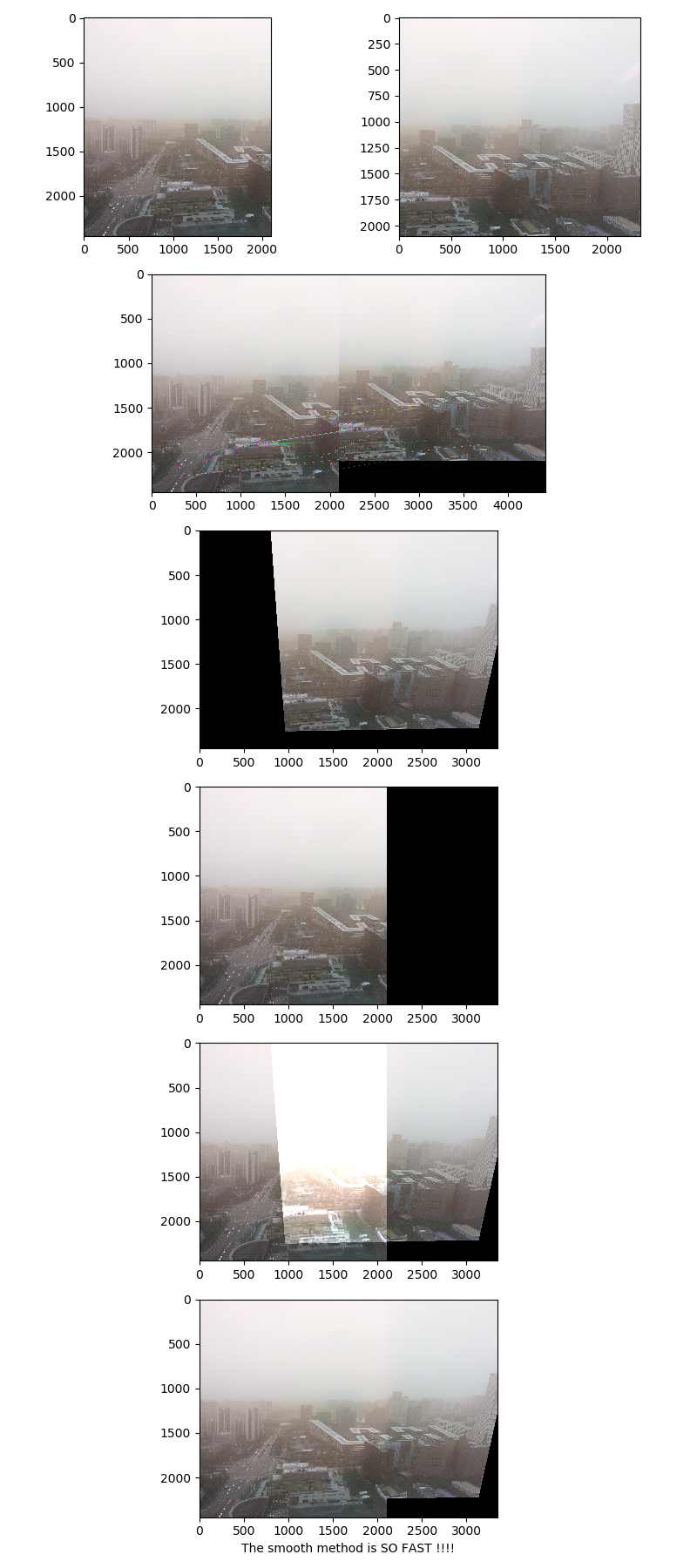
5.源码
import numpy as np

import cv2 as cv

from matplotlib import pyplot as plt

import matplotlib.gridspec as gridspec

GOOD_POINTS_LIMITED = 0.99

src = 'photoes\\homograph\\w1.jpg'

des = 'photoes\\homograph\\w2.jpg'

img1_3 = cv.imread(src,1)# 基准图像

img2_3 = cv.imread(des,1)# 拼接图像

orb = cv.ORB_create()

kp1, des1 = orb.detectAndCompute(img1_3,None)

kp2, des2 = orb.detectAndCompute(img2_3,None)

bf = cv.BFMatcher.create()

matches = bf.match(des1,des2)

matches = sorted(matches, key = lambda x:x.distance)

goodPoints =[]

for i in range(len(matches)-1):

    if matches[i].distance < GOOD_POINTS_LIMITED * matches[i+1].distance:

        goodPoints.append(matches[i])

# goodPoints = matches[:20] if len(matches) > 20   else matches[:]

print(goodPoints)

img3 = cv.drawMatches(img1_3,kp1,img2_3,kp2,goodPoints, flags=2,outImg=None )

src_pts = np.float32([kp1[m.queryIdx].pt for m in goodPoints]).reshape(-1, 1, 2)

dst_pts = np.float32([kp2[m.trainIdx].pt for m in goodPoints]).reshape(-1, 1, 2)

M, mask = cv.findHomography( dst_pts,src_pts, cv.RHO)

# 获取原图像的高和宽

h1,w1,p1 = img2_3.shape

h2,w2,p2 = img1_3.shape

h = np.maximum(h1,h2)

w = np.maximum(w1,w2)

_movedis = int(np.maximum(dst_pts[0][0][0],src_pts[0][0][0]))

imageTransform = cv.warpPerspective(img2_3,M,(w1+w2-_movedis,h))

M1 = np.float32([[1, 0, 0], [0, 1, 0]])

h_1,w_1,p = img1_3.shape

dst1 = cv.warpAffine(img1_3,M1,(w1+w2-_movedis, h))

dst = cv.add(dst1,imageTransform)

dst_no = np.copy(dst)

dst_target = np.maximum(dst1,imageTransform)

fig = plt.figure (tight_layout=True, figsize=(8, 18))

gs = gridspec.GridSpec (6, 2)

ax = fig.add_subplot (gs[0, 0])

ax.imshow(img1_3)

ax = fig.add_subplot (gs[0, 1])

ax.imshow(img2_3)

ax = fig.add_subplot (gs[1, :])

ax.imshow(img3)

ax = fig.add_subplot (gs[2, :])

ax.imshow(imageTransform)

ax = fig.add_subplot (gs[3, :])

ax.imshow(dst1)

ax = fig.add_subplot (gs[4, :])

ax.imshow(dst_no)

ax = fig.add_subplot (gs[5, :])

ax.imshow(dst_target)

ax.set_xlabel ('The smooth method is SO FAST !!!!')

plt.show()
Python+opencv 图像拼接的更多相关文章
- 搭建基于python +opencv+Beautifulsoup+Neurolab机器学习平台
搭建基于python +opencv+Beautifulsoup+Neurolab机器学习平台 By 子敬叔叔 最近在学习麦好的<机器学习实践指南案例应用解析第二版>,在安装学习环境的时候 ...
- .NET + OpenCV & Python + OpenCV 配置
最近需要做一个图像识别的GUI应用,权衡了Opencv+ 1)QT,2)Python GUI,3).NET后选择了.NET... 本文给出C#+Opencv和Python+Opencv的相应参考,节省 ...
- RPi 2B python opencv camera demo example
/************************************************************************************** * RPi 2B pyt ...
- Python+OpenCV图像处理(一)
Python+OpenCV图像处理(一): 读取,写入和展示图片 调用摄像头拍照 调用摄像头录制视频 1. 读取.写入和展示图片 图像读入:cv2.imread() 使用函数cv2.imread() ...
- python opencv show图片,debug技巧
debug的时候可以直接把图片画出来debug. imshow函数就是python opencv的展示图片的函数,第一个是你要起的图片名,第二个是图片本身.waitKey函数是用来展示图片多久的,默认 ...
- Python+OpenCV图像处理(一)——读取显示一张图片
先在此处先声明,后面学习python+opencv图像处理时均参考这位博主的博文https://blog.csdn.net/u011321546/article/category/7495016/2? ...
- 【python+opencv】直线检测+圆检测
Python+OpenCV图像处理—— 直线检测 直线检测理论知识: 1.霍夫变换(Hough Transform) 霍夫变换是图像处理中从图像中识别几何形状的基本方法之一,应用很广泛,也有很多改进 ...
- python - opencv 的一些小技巧备忘
python - opencv 的一些小技巧备忘 使用python-opencv来处理图像时,可以像matlab一样,将一幅图像看成一个矩阵,进行矢量操作,以加快代码运行速度. 下面记录几个常用的操作 ...
- ubuntu14.04 python + opencv 傻瓜式安装解决方案
ubuntu14.04 python + opencv 傻瓜式安装解决方案 ubuntu下使python和opencv来做开发的话,总要花那么点时间来配置环境.我偶然间发现了一种傻瓜式安装办法希望快 ...
随机推荐
- November 08th, 2017 Week 45th Wednesday
Keep your face to the sunshine and you cannot see the shadow. 始终面朝阳光,我们就不会看到黑暗. I love sunshine, but ...
- Python3编写网络爬虫01-基本请求库urllib的使用
安装python后 自带urllib库 模块篇 分为几个模块如下: 1. urllib.request 请求模块 2. urllib.parse 分析模块 3. urllib.error 异常处理模块 ...
- leetcode 3. Longest Substring Without Repeating Characters [java]
idea: 设置一个hashset存储非重复元素 j:遍历s i:最近的一个非重复指针 注意点: 1.Set set = new HashSet<>(); add remove publi ...
- Asp.Net WebApi服务的创建
Web API一种REST架构风格的Web服务.所谓的REST架构与技术无关,而是面向资源的一种软件架构设计. WCF自3.5之后也提供了对REST风格的支持,但和WebAPI来比较显得较为笨重,We ...
- XSS详解
什么是XSS(跨站脚本攻击) XSS又叫CSS (Cross Site Script) ,跨站脚本攻击.它指的是恶意攻击者往Web页面里插入恶意html代码或者javascript代码,当用户浏览该页 ...
- BZOJ1121:[POI2008]激光发射器SZK(乱搞)
Description 多边形相邻边垂直,边长为整数,边平行坐标轴.要在多边形的点上放一些激光发射器和接收器.满足下列要求: 1发射器和接收器不能放置在同一点: 2发射器发出激光可以沿壁反射,最终到达 ...
- ethereumjs/ethereumjs-icap
https://github.com/ethereumjs/ethereumjs-icap ethereumjs-icap 安装: npm install ethereumjs-icap --save ...
- 企业案例--生产环节更改mysql字符集
查看数据库字符集: show database create dbname \G; 查看数据库表字符集: show table create tbname \G; 查看现有数据库字符集设置: show ...
- pyspider爬取数据存入es--2.测试数据库连通性
写一个简单案例测试能否将数据写入es #!/usr/bin/env python # -*- encoding: utf-8 -*- # Created on 2017-10-27 08:35:57 ...
- Android 网络请求超时处理方案
以用户登录为例介绍用户访问网络时的请求超时处理的两种方法: 1)使用android提供的工具类AsyncTask类,此类提供了一个AsyncTask.execute().get(timeout, un ...