
leaflet入门(一)示例
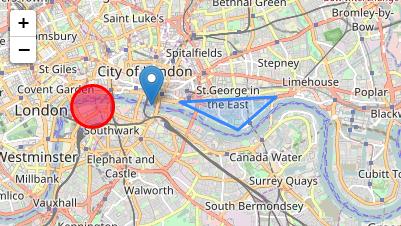
代码示例:
<!DOCTYPE html>
<html xmlns="http://www.w3.org/1999/xhtml">
<head>
<meta http-equiv="Content-Type" content="text/html; charset=utf-8" />
<title></title>
<style>
#mapDiv {
/*必须指定高度*/
height: 900px;
}
</style>
<!--leaflet样式文件-->
<link rel="stylesheet" href="./js/lib/leaflet/leaflet.css" />
<!--leaflet核心JS文件--> <script type="text/javascript" src="./js/lib/leaflet/leaflet.js"></script>
<script type="text/javascript" src="./js/jquery-3.2.1.min.js"></script>
<script> </script> </head>
<body>
<div id="mapDiv">
</div> <!--脚本必须放在尾部-->
<script>
var map = L.map('mapDiv').setView([51.505, -0.09], 13);
L.tileLayer('http://{s}.tile.osm.org/{z}/{x}/{y}.png', {
attribution: '© <a href="http://osm.org/copyright">中科院数字与遥感研究所</a> contributors'
}).addTo(map);
var marker = L.marker([51.508, -0.09]).addTo(map);
var circle = L.circle([51.508, -0.11], {
color: 'red',
fillColor: '#f03',
fillOpacity: 0.5,
radius: 500
}).addTo(map);
circle.bindPopup("I am a circle.");
var polygon = L.polygon([
[51.509, -0.08],
[51.503, -0.06],
[51.51, -0.047]
]).addTo(map); var popup = L.popup(); function onMapClick(e) {
popup
.setLatLng(e.latlng)
.setContent("You clicked the map at " + e.latlng.toString())
.openOn(map);
} map.on('click', onMapClick); </script> </body>
</html>
leaflet入门(一)示例的更多相关文章
- Leaflet入门:添加点线面并导入GeoJSON数据|Tutorial of Leaflet: Adding Points, Lines, Polygons and Import GeoJSON File
Web GIS系列: 1.搭建简易Web GIS网站:使用GeoServer+PostgreSQL+PostGIS+OpenLayers3 2.使用GeoServer+QGIS发布WMTS服务 3.使 ...
- Spring MVC 入门教程示例 (一)
今天和大家分享下 Spring MVC 入门教程 首先还是从 HelloWorld web 工程开始 -------------------------- 1.首先创建一个Maven Web工程 ...
- wxPython 入门开发示例
1.背景资料 wxPython API:https://www.wxpython.org/Phoenix/docs/html/ 2.入门示例 wxPython最重要的两个概念:App与Frame,其中 ...
- leaflet入门(五)API翻译(下)
L.PointConstructor(函数构造器)Properties(属性)Methods(方法) L.BoundsConstructor(函数构造器)Properties(属性)Methods(方 ...
- leaflet入门(四)API翻译(上)
L.Map L.Marker L.Popup L.Map API各种类中的核心部分,用来在页面中创建地图并操纵地图. Constructor(构造器) 通过div元素和带有地图选项的描述的文字对象来实 ...
- Highcharts入门小示例
一.创建条形图 1.创建div容器 <div id="container" style="min-width:800px;height:400px"> ...
- 复杂事件处理——Esper入门(示例程序)
前面对Esper Quick Start & Tutorial进行了简单描述,希望各位看官能够大致了解what is Esper,甚至对how to work有朦朦胧胧的了解. 开发一个Esp ...
- Arduino 入门程序示例之直流电机(2015-06-15)
概述 演示直流电机的控制. 示例程序 PWM控制直流电机 略过控制电机转停的示例啦,有需要就把这里的 PWM 换成数字口输出 HIGH 或 LOW 就行了. // ------------------ ...
- Arduino 入门程序示例之一片 LED(2015-06-11)
概述 从点到线,从线到面.现在开始要来一片的 LED 了,一大波的 LED 正在到来! 示例程序 因为手头没有现成的模块,手头只有 595,所以这里每一个示例程序都是使用 74HC595 扩展 IO ...
随机推荐
- sql:inner join,left join,right join,full join用法及区别
join的语法: select [字段] from [表名1] inner/left/right/full join [表名2] on [表名1.字段1] <关系运算符> [表名2.字段2 ...
- prototype.js的Ajax对IE8兼容问题解决方案
你是否遇到过这样的问题?在使用protype.js的Ajax应用时,会出现这样的问题:只要调用了Ajax.Request,然后点该页面右键,查看“属性”就弹出“IE停止工作”的对话框,然后强制重新加载 ...
- background 和渐变 总结
一,background-position:(图片定位) 三种写法: 1):按%比,左上角最小(0%,0%),右下角最大(100%,%100): 2):(x,y)左上角最小(0,0),右下角最大(ma ...
- mysql学习笔记-1.下载与安装
1.到mysql官网下载操作系统对应的数据库,下载地址https://dev.mysql.com/downloads/mysql/ 2.有msi安装版本和zip压缩版本,2种安装方式不同, 3.安装后 ...
- 循环&信息添加&颜色修改
#import "AViewController.h" @interface AViewController () <UIActionSheetDelegat ...
- MySQL学习笔记-cache 与 buffer
Cache和Buffer是两个不同的概念,简单的说,Cache是加速"读",而 buffer是缓冲"写",前者解决读的问题,保存从磁盘上读出的数据,后者是解决写 ...
- UI设计教程分享:字体变形—阴阳收缩法
阴阳师中国古代对自然规律发展变化基础因素的描述,是古代美学逻辑思维.推理分析的核心要素,也是描述万物基本要素和成因的概念之一.阴阳代表事物的对立关系,它是自然界的客观规律,是万物运动变化的本源,是人类 ...
- Java中的四种内部类
Java中有四种内部类: 成员内部类:定义在另一个类(外部类)的内部,而且与成员属性和方法平级,故称成员内部类.类比于外部类的非静态方法,如果用static修饰就变成了静态内部类 静态内部类:使用st ...
- Linux下文件的三种时间标记(atime ctime mtime)
在windows下,一个文件有:创建时间.修改时间.访问时间. 在Linux下,一个文件有:状态改动时间.修改时间.访问时间. 1)查看文件(或文件夹)的三种时间标记 (stat 命令) Access ...
- 不立flag了……
当天刚说再也不想下这游戏了,后来和女友聊了会天视了会屏又动摇了..后悔和她那么计较这些小事,可能玩游戏时生气时就想不起来那么多事了吧..于是游戏过两天就又下回来了.. 这两天培训课程也是很快的感觉,昨 ...