
Getting started with C# and GDAL
Getting started with C# and GDAL
http://vipassanaandenvironmentalinformatics.blogspot.jp/2013/03/getting-started-with-c-and-gdal.html
转自。
http://www.gisremotesensing.com/2017/01/code-snippet-create-new-field-in-shape.html
http://www.gisremotesensing.com/2015/10/read-esri-file-gdodatabase-filegdb.html
http://www.gisremotesensing.com/2015/09/read-raster-block-by-block-using-gdal.html
http://www.gisremotesensing.com/2015/09/read-raster-file-into-array-using-c-and.html
http://www.gisremotesensing.com/2016/12/esri-featureclass-vs-feature-layer.html
http://www.gisremotesensing.com/2015/10/enable-esri-arcgis-extension-licence.html
http://www.gisremotesensing.com/2015/09/feature-to-raster-conversion-using-c.html
http://www.gisremotesensing.com/2015/09/vector-to-raster-conversion-using-gdal-c.html
http://www.gisremotesensing.com/2015/07/building-arcmaps-add-in-using-command.html
http://www.gisremotesensing.com/2015/09/vector-to-raster-conversion-using-gdal-c.html
- Download the latest version of the precompiled GDAL binaries from here. Choose the ones that suit your system (32bit or 64bit). Extract the contents from the zip file to a location on your hard disk e.g. C:\Program Files\GDAL (I ran into a number of AccessViolationExceptions when I used the binaries from FWTools 2.4.7).
- Include both the path to C:\Program Files\GDAL\bin\gdal\csharp as well as C:\Program Files\GDAL\bin in your PATH system variable.
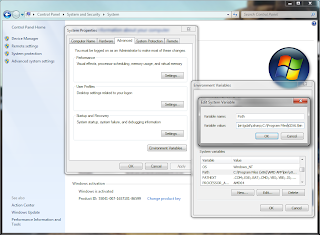 |
| Setting of the PATH variable |
- On http://svn.osgeo.org/gdal/trunk/gdal/swig/csharp/apps/ you will find sample C#-classes that use the GDAL-bindings. In the following I will use GDALInfo.cs as an example. Create a C# Console Application project that uses the file GDALInfo.cs.
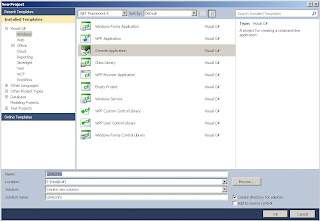 |
| Creating a Console Application (VS 2010) |
- Add four of.the dll-files that can can be found at C:\Program Files\GDAL\bin\gdal\csharp (or wherever your installation path of the current binaries is) to your project references: gdal_csharp.dll, gdalconst_csharp.dll,ogr_csharp.dll and osr_csharp.
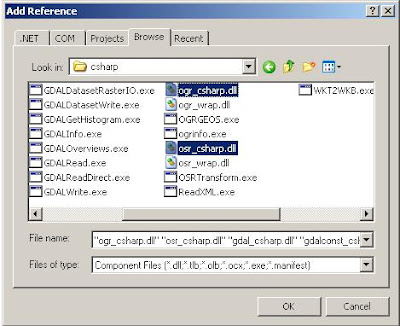 |
| Adding necessary references (VS 2010) |
- Build the solution. If you are on a 64bit system and you are using the 64bit GDAL binaries you have to make sure you actually build for 64bit (you will get errors otherwise when you try to run the program).
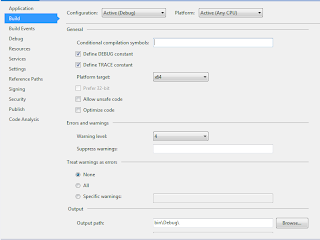 |
| Setting of the platform target for 64bit (VS 2012) |
- Now you can run the program with some data. Include a reference to one of the raster files in the Command line arguments field of your Debug options (in the properties of your GDALInfo project; don't forget to put the path inside double quotes of it includes blanks).
- Run the program (Ctrl-F5). It should show you something similar to the following:
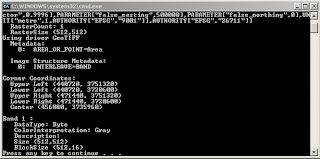 |
| Output of GDALInfo |
That's it. Now you can use the other example C#-programs to open, copy, manipulate raster data in variety of file formats. For some of the other example files it is necessary to add some additional references (e.g. System.Drawing).
Getting started with C# and GDAL的更多相关文章
- GDAL生成Erdas Imagine
GDAL原生支持超过100种栅格数据类型,涵盖所有主流GIS与RS数据格式,包括• ArcInfo grids, ArcSDE raster, Imagine, Idrisi, ENVI, GRAS ...
- QGis、Gdal本地中文路径问题
编译qgis完整项目后,由于Gdal库的原因,中文路径下通过添加矢量数据中数据库中是没有OGR的Oracle数据库功能的: 最开始打算通过重新编译gadl库从内部支持中文的(有成功的麻烦也请告诉我), ...
- VS2015下编译64位GDAL总结
使用VS2015编译最新的64位GDAL(最新gdal2.11),确实有一些问题,看来双方还是太新了,有点不兼容,特总结如下. 以前经常用的通过VisualStudio IDE进行编译的方式现在似乎不 ...
- VS2010和opencv-2.4.10、GDAL
系统环境:win10 64位 本文只限于学习交流,商业用途请支持正版! 转载请注明:转载请注明http://www.cnblogs.com/mxbs/p/6206060.html 2016 ...
- VS2012配置OpenCV、GDAL开发环境
VS2012和opencv-2.4.10 第一步:配置之前的准备工作. 完成VS2012的安装,以及opencv-2.4.10的下载和文件提取, 双击此文件,设置文件路径,即可得到提取文件,提取后的文 ...
- 编译带有PROJ4和GEOS模块的GDAL
1.下载三个软件的源代码(去各自官网下载即可) 2.将PROJ4和GEOS的源码放到GDAL目录下的supportlibs文件夹中. 3.修改GDAL的nmake.opt文件,部分内容如下: # Un ...
- Java 使用GDAL 读写 shapefile
读取shp文件,并把它转化为json import org.gdal.ogr.*; import org.gdal.ogr.Driver; import org.gdal.gdal.*; public ...
- GDAL C# 开发出现的异常
在使用开发C#下的GDAL时,编译时正确. 在执行 Gdal.AllRegister(); 出现异常:OSGeo.GDAL.GdalPINVOKE”的类型初始值设定项引发异常. 解决方案: 编译正常, ...
- GDAL关于读写图像的简明总结
读写影像可以说是图像处理最基础的一步.关于使用GDAL读写影像,平时也在网上查了很多资料,就想结合自己的使用心得,做做简单的总结. 在这里写一个例子:裁剪lena图像的某部分内容,将其放入到新创建的. ...
- Java maven安装GDAL
1. 使用编译好的安装jdal http://www.gisinternals.com/release.phpgdal-111-1800-x64-core.msi下载地址:http://downloa ...
随机推荐
- 在VMware中安装Mac OS
macOS与Darwin http://blog.csdn.net/hintcnuie/article/details/38468093 OS X 是整个操作系统的一个集体名称.而Darwin 就是其 ...
- 数据挖掘标准规范之CRISP-DM基础
一.前言 每每提到数据挖掘,总有些人上来就是ETL.是算法.是数学模型,作为搞工程实施的我而言,很是头疼.其实作为数据挖掘的而言,算法只是其实现手段.是工具和实现手段而已,我们不是在创造算法(国外职业 ...
- 4:WPF中查看PDF文件
引用连接:https://www.cnblogs.com/yang-fei/p/4885570.html 在Github上看到一个非常好的WPF中承载PDF文件的类库. https://github. ...
- Netty Tutorial Part 1: Introduction to Netty [z]
Netty Tutorial, Part 1: Introduction to Netty Update: Part 1.5 Has Been Published: Netty Tutorial P ...
- [Java]JGit用法总结
clone public static void gitClone(String remoteUrl, File repoDir) { try { Git git = Git.cloneReposit ...
- 【ThreadLocal】使用ThreadLocal实现线程安全
非线程安全 public class UnSafeThreadLocalDemo { private int count = 0; public static void main(String[] a ...
- SQL优化系列——索引
索引可能是数据库中最被误解的主题,因为有很多方式让你糊涂索引如何工作,以及服务器如何使用它们.要正确设计索引,让索引在数据库服务器中满足以下三个重要目的:1,索引使服务器查找一组相邻行,而不是单独的行 ...
- 廖雪峰Java2面向对象编程-4抽象类和接口-2接口
1.接口的定义 抽象方法本质上是定义接口规范. 在抽象类中定义了一个抽象方法,子类中必须实现这个抽象方法. public abstract class Person{ public abstract ...
- Jmeter(十四)Logic Controller 之 If Controller
If Controller---如果控制器:属于逻辑判断类型的组件,其实学过代码的都知道if--else,while等都是常用的逻辑判断关键词,Jmeter也提供了逻辑判断--If Controlle ...
- [UE4]把枪打飞addImpulse
一.武器如果没有开启模拟物理,会漂浮在空中 二.武器开启模拟物理,运行游戏的时候就会掉到地上了.之所以要加“Delay”延迟,是因为创建武器在先(没有持有人),持有武器动作在后,加上“delay”延迟 ...