
【WebService】使用CXF开发WebService(四)
CXF简介
Apache CXF = Celtix + XFire,开始叫 Apache CeltiXfire,后来更名为 Apache CXF 了,以下简称为 CXF。CXF 继承了 Celtix 和 XFire 两大开源项目的精华,提供了对 JAX-WS 全面的支持,并且提供了多种 Binding 、DataBinding、Transport 以及各种 Format 的支持,并且可以根据实际项目的需要,采用代码优先(Code First)或者 WSDL 优先(WSDL First)来轻松地实现 Web Services 的发布和使用。Apache CXF已经是一个正式的Apache顶级项目。
使用CXF开发WebService服务端
1、使用eclipse新建一个服务端java工程

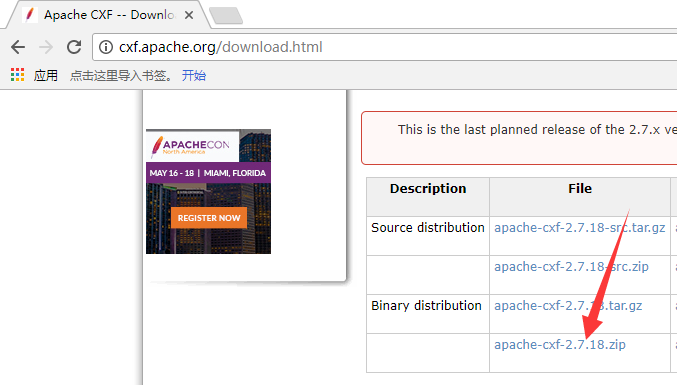
2、使用CXF开发WebService服务端需要导入相应的jar包,所以这一步先下载cxf的jar包,官网:http://cxf.apache.org/
解压下载的cxf文件如下:
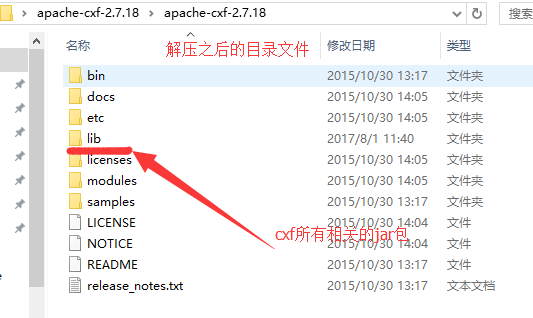
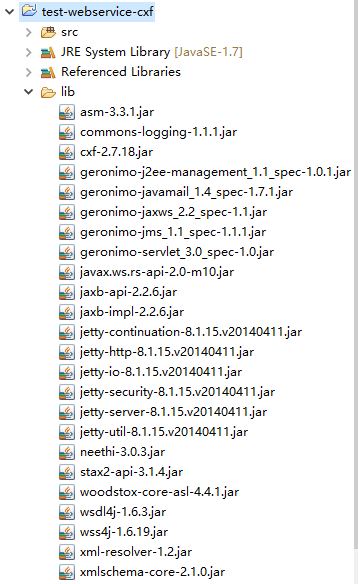
3、在解压后的lib目录中,有很多cxf相关的jar包,有些jar包不一定要使用,本例选出一些必要的jar包,拷贝到java工程里面(当然也可以拷贝lib目录下的所有jar包)。
在工程下新建lib目录,并把jar包拷贝到此目录,同时添加引用关系。如下图:
4、新建一个接口,使用@WebService(SEI和SEI的实现类)注解标注接口,使用@WebMethod(SEI中的所有方法)注解标注接口中定义的所有方法,如下:
 package com.test.ws;

 import javax.jws.WebMethod;

 import javax.jws.WebService;

 /**

  * 定义SEI(WebService EndPoint Interface)终端

  * @author H__D

  * @date 2017年7月28日 上午11:35:34

  *

  */

 //使用@WebService注解标注WebServiceI接口

 @WebService

 public interface HelloWS {

     //使用@WebMethod注解标注WebServiceI接口中的方法

     @WebMethod

     public String sayHello(String name);

 }
5、编写一个接口实现类,使用@WebService注解标注实现类,如下:
 package com.test.ws;

 import javax.jws.WebService;

 /**

  * SEI的具体实现

  * @author H__D

  * @date 2017年7月28日 上午11:37:43

  *

  */

 //使用@WebService注解标注

 @WebService

 public class HelloWSImpl implements HelloWS{

     @Override

     public String sayHello(String name) {

         System.out.println("WebService sayHello : " + name);

         return "Hello : " + name;

     }

 }
6、使用Endpoint(终端)类发布webservice,如下:
 package com.test.ws.server;

 import javax.xml.ws.Endpoint;

 import com.test.ws.HelloWSImpl;

 /**

  * 发布Web Service

  * @author H__D

  * @date 2017年7月28日 上午11:40:48

  *

  */

 public class ServerTest {

     public static void main(String[] args) {

         //定义WebService的发布地址,这个地址就是提供给外界访问Webervice的URL地址,URL地址格式为:http://ip:端口号/xxxx

         String address = "http://127.0.0.1:8989/test-webservice/hellows";

         //使用Endpoint类提供的publish方法发布WebService,发布时要保证使用的端口号没有被其他应用程序占用

         Endpoint.publish(address, new HelloWSImpl());

         System.out.println("发布webservice成功!");

     }

 }
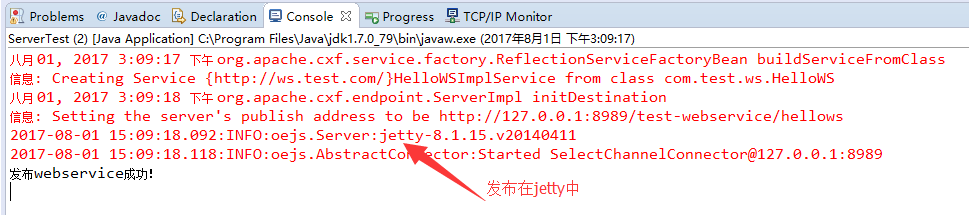
7、运行SeverTest类的main方法,使用浏览器进行访问,访问地址:http://127.0.0.1:8989/test-webservice/hellows,如下:
控制台输出:
使用CXF开发WebService客户端
1、使用eclipse新建一个客服端java工程

2、使用cxf包中的wsdl2java.bat工具(在cxf包中的bin目录中)生成客户端代码,如下:
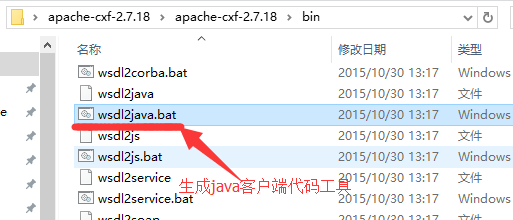
执行命令:wsdl2java -d location(输入目录,生成.java文件会在该目录) -all url(url为wsdl文件的路径)
参数说明:
-p 也就是package 对应Java中的包
-d 输入目录,生成.java文件会在该目录,会自动添加-p参数配置的包路径
-client 生成客户端测试web service的代码.
-server 生成服务器启动web service的代码.
-impl 生成web service的实现代码.
-ant 生成build.xml文件.
-all 生成上面-client -server -impl -ant 对应的所有文件.
打开cmd命令窗口--》进入cxf包中的bin目录--》执行命令。如下:
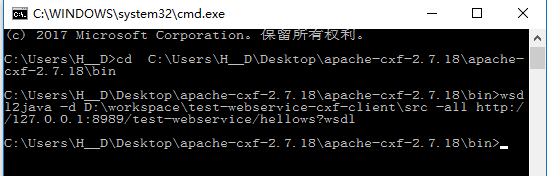
刷新工程即可看到生成的代码。
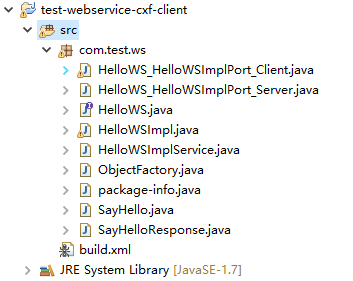
3、编写调用WebService对外提供的方法,如下:
 package com.test.ws.client;

 import com.test.ws.HelloWS;

 import com.test.ws.HelloWSImpl;

 import com.test.ws.HelloWSImplService;

 /**

  * 调用WebService的客户端

  * @author H__D

  * @date 2017年7月28日 下午2:39:24

  *

  */

 public class WSClient {

     public static void main(String[] args) {

         //创建一个用于产生WebServiceImpl实例的工厂,WebServiceImplService类是wsimport工具生成的

         HelloWSImplService factory = new HelloWSImplService();

         //通过工厂生成一个WebServiceImpl实例,WebServiceImpl是wsimport工具生成的

         HelloWS helloWS = factory.getHelloWSImplPort();

         System.out.println(helloWS.getClass());

         //调用WebService的sayHello方法

         String result = helloWS.sayHello("Jack");

         System.out.println(result);

     }

 }
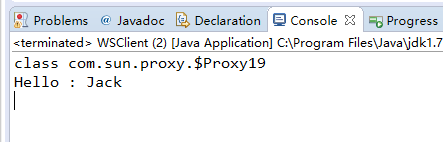
4、控制台输出,如下:
【WebService】使用CXF开发WebService(四)的更多相关文章
- struts1+spring+myeclipse +cxf 开发webservice以及普通java应用调用webservice的实例
Cxf + Spring+ myeclipse+ cxf 进行 Webservice服务端开发 使用Cxf开发webservice的服务端项目结构 Spring配置文件applicationCont ...
- 使用cxf开发webservice应用时抛出异常
在使用cxf开发webservice应用时,报出了类似下面的错误 JAXB: [javax.xml.bind.UnmarshalException: unexpected element (uri:& ...
- 使用cxf开发webservice接口
项目中经常用到开发webservice接口,及调用webService接口.这里讲解如何使用cxf开发webService接口. 一.webservice介绍及理解 webservice是一种跨平台, ...
- 3.使用CXF开发webService
CXF 简介 关于 Apache CXF Apache CXF = Celtix + XFire,Apache CXF 的前身叫 Apache CeltiXfire,现在已经正式更名为 Apache ...
- Spring boot+CXF开发WebService
最近工作中需要用到webservice,而且结合spring boot进行开发,参照了一些网上的资料,配置过程中出现的了一些问题,于是写了这篇博客,记录一下我这次spring boot+cxf开发的w ...
- Spring boot+CXF开发WebService Demo
最近工作中需要用到webservice,而且结合spring boot进行开发,参照了一些网上的资料,配置过程中出现的了一些问题,于是写了这篇博客,记录一下我这次spring boot+cxf开发的w ...
- [转] WebService开发笔记 1 -- 利用cxf开发WebService竟然如此简单
以下文章来自 http://www.blogjava.net/jacally/articles/186655.html 现在的项目中需要用到SOA概念的地方越来越多,最近我接手的一个项目中就提出了 ...
- (三)使用CXF开发WebService客户端
前面一讲开发了webservice服务器端接口,今天的话,我们来开发webservice客户端,让大家来体验下过程: 首先建一个Maven项目,项目名字,WS_Client: 然后我们要用CXF给我们 ...
- (二)使用CXF开发WebService服务器端接口
CXF作为java领域主流的WebService实现框架,Java程序员有必要掌握它. CXF主页:http://cxf.apache.org/ 简介:百度百科 今天的话,主要是用CXF来开发下Web ...
随机推荐
- html中相对(relative),绝对(absolute)位置以及float的学习和使用案例 (转)
这几天着手于CSS的研究,研究的原因主要是工作需要,最近发现如果做前端仅仅会javascript很难尽善尽美,当然懂样式和html在一定程度上可以让我们更近一步. css较为简单,由于个人擅长编写代码 ...
- 15种css居中方式
1 水平居中 1.1 内联元素水平居中 利用 text-align: center 可以实现在块级元素内部的内联元素水平居中.此方法对内联元素(inline), 内联块(inline-block), ...
- (转)学习ffmpeg官方示例transcoding.c遇到的问题和解决方法
转自:https://blog.csdn.net/w_z_z_1991/article/details/53002416 Top 最近学习ffmpeg,官网提供的示例代码transcoding.c演示 ...
- 侯捷STL课程及源码剖析学习2: allocator
以STL 的运用角度而言,空间配置器是最不需要介绍的东西,它总是隐藏在一切组件(更具体地说是指容器,container)的背后,默默工作默默付出. 一.分配器测试 测试代码 #include < ...
- Python+Selenium学习--定位一组对象
场景 从上一节的例子中可以看出,webdriver可以很方便的使用find_element方法来定位某个特定的对象,不过有时候我们却需要定位一组对象,这时候就需要使用find_elements方法. ...
- js,JavaScript,a标签onclick传递参数不对,A标签调用js函数写法总结
错误示例: <a href="javascript:waterLineEdit(${goods.goods_id})" >修改 </a> <!-- 浏 ...
- Spring Boot 使用465端口发送邮件
2017年10月27日 15:04:24 伊宇紫 阅读数:2710 标签: 465端口邮件springboot 更多 个人分类: Java 版权声明:本文为博主原创文章,未经博主允许不得转载. h ...
- LIS LCS 最长上升子序列 最长公共子序列 ...
最长上升子序列,问题定义:http://blog.csdn.net/chenwenshi/article/details/6027086 代码: public static void getData( ...
- 任意格式视频转MP4格式
下载ffmpeg解压,提取ffmpeg.exe 在mmfpeg.exe目录下新建批处理,内容如下 @echo off title 正在转换,mp4转换完成自动关闭 ffmpeg -i %1 -y -q ...
- code first 添加外键时,与原有的数据冲突ALTER TABLE 语句与 FOREIGN KEY 约束"FK_XXXXX"冲突
问题的原因是新增的外键字段没有默认值,造成的,有很多方法可以解决,我这里通过修改生成的迁移文件,设定为可空,或者设置默认值即可.具体看情况使用.