
C#在二维码中添加圆角logo
 public class QRCodeHelper

    {

        #region 合并用户QR图片和用户头像

        /// <summary>

        /// 合并用户QR图片和用户头像

        /// </summary>

        /// <param name="qrImg">QR图片</param>

        /// <param name="headerImg">用户头像</param>

        /// <param name="n">缩放比例</param>

        /// <returns></returns>

        public Bitmap MergeQrImg(Bitmap qrImg, Bitmap headerImg, double n = 0.23)

        {

            int margin = ;

            float dpix = qrImg.HorizontalResolution;

            float dpiy = qrImg.VerticalResolution;

            var _newWidth = ( * qrImg.Width -  * margin) * 1.0f / ;

            var _headerImg = ZoomPic(headerImg, _newWidth / headerImg.Width);

            //处理头像

            int newImgWidth = _headerImg.Width + margin;

            Bitmap headerBgImg = new Bitmap(newImgWidth, newImgWidth);

            headerBgImg.MakeTransparent();

            Graphics g = Graphics.FromImage(headerBgImg);

            g.InterpolationMode = System.Drawing.Drawing2D.InterpolationMode.HighQualityBicubic;

            g.SmoothingMode = System.Drawing.Drawing2D.SmoothingMode.HighQuality;

            g.Clear(Color.Transparent);

            Pen p = new Pen(new SolidBrush(Color.White));

            Rectangle rect = new Rectangle(, , newImgWidth - , newImgWidth - );

            using (GraphicsPath path = CreateRoundedRectanglePath(rect, ))

            {

                g.DrawPath(p, path);

                g.FillPath(new SolidBrush(Color.White), path);

            }

            //画头像

            Bitmap img1 = new Bitmap(_headerImg.Width, _headerImg.Width);

            Graphics g1 = Graphics.FromImage(img1);

            g1.InterpolationMode = System.Drawing.Drawing2D.InterpolationMode.HighQualityBicubic;

            g1.SmoothingMode = System.Drawing.Drawing2D.SmoothingMode.HighQuality;

            g1.Clear(Color.Transparent);

            Pen p1 = new Pen(new SolidBrush(Color.Gray));

            Rectangle rect1 = new Rectangle(, , _headerImg.Width - , _headerImg.Width - );

            using (GraphicsPath path1 = CreateRoundedRectanglePath(rect1, ))

            {

                g1.DrawPath(p1, path1);

                TextureBrush brush = new TextureBrush(_headerImg);

                g1.FillPath(brush, path1);

            }

            g1.Dispose();

            PointF center = new PointF((newImgWidth - _headerImg.Width) / , (newImgWidth - _headerImg.Height) / );

            g.DrawImage(img1, center.X, center.Y, _headerImg.Width, _headerImg.Height);

            g.Dispose();

            Bitmap backgroudImg = new Bitmap(qrImg.Width, qrImg.Height);

            backgroudImg.MakeTransparent();

            backgroudImg.SetResolution(dpix, dpiy);

            headerBgImg.SetResolution(dpix, dpiy);

            Graphics g2 = Graphics.FromImage(backgroudImg);

            g2.Clear(Color.Transparent);

            g2.DrawImage(qrImg, , );

            PointF center2 = new PointF((qrImg.Width - headerBgImg.Width) / , (qrImg.Height - headerBgImg.Height) / );

            g2.DrawImage(headerBgImg, center2);

            g2.Dispose();

            return backgroudImg;

        }

        #endregion

        #region 图形处理

        /// <summary>

        /// 创建圆角矩形

        /// </summary>

        /// <param name="rect">区域</param>

        /// <param name="cornerRadius">圆角角度</param>

        /// <returns></returns>

        private GraphicsPath CreateRoundedRectanglePath(Rectangle rect, int cornerRadius)

        {

            //下午重新整理下,圆角矩形

            GraphicsPath roundedRect = new GraphicsPath();

            roundedRect.AddArc(rect.X, rect.Y, cornerRadius * , cornerRadius * , , );

            roundedRect.AddLine(rect.X + cornerRadius, rect.Y, rect.Right - cornerRadius * , rect.Y);

            roundedRect.AddArc(rect.X + rect.Width - cornerRadius * , rect.Y, cornerRadius * , cornerRadius * , , );

            roundedRect.AddLine(rect.Right, rect.Y + cornerRadius * , rect.Right, rect.Y + rect.Height - cornerRadius * );

            roundedRect.AddArc(rect.X + rect.Width - cornerRadius * , rect.Y + rect.Height - cornerRadius * , cornerRadius * , cornerRadius * , , );

            roundedRect.AddLine(rect.Right - cornerRadius * , rect.Bottom, rect.X + cornerRadius * , rect.Bottom);

            roundedRect.AddArc(rect.X, rect.Bottom - cornerRadius * , cornerRadius * , cornerRadius * , , );

            roundedRect.AddLine(rect.X, rect.Bottom - cornerRadius * , rect.X, rect.Y + cornerRadius * );

            roundedRect.CloseFigure();

            return roundedRect;

        }

        /// <summary>

        /// 图片按比例缩放

        /// </summary>

        private Image ZoomPic(Image initImage, double n)

        {

            //缩略图宽、高计算

            double newWidth = initImage.Width;

            double newHeight = initImage.Height;

            newWidth = n * initImage.Width;

            newHeight = n * initImage.Height;

            //生成新图

            //新建一个bmp图片

            System.Drawing.Image newImage = new System.Drawing.Bitmap((int)newWidth, (int)newHeight);

            //新建一个画板

            System.Drawing.Graphics newG = System.Drawing.Graphics.FromImage(newImage);

            //设置质量

            newG.InterpolationMode = System.Drawing.Drawing2D.InterpolationMode.HighQualityBicubic;

            newG.SmoothingMode = System.Drawing.Drawing2D.SmoothingMode.HighQuality;

            //置背景色

            newG.Clear(Color.Transparent);

            //画图

            newG.DrawImage(initImage, new System.Drawing.Rectangle(, , newImage.Width, newImage.Height), new System.Drawing.Rectangle(, , initImage.Width, initImage.Height), System.Drawing.GraphicsUnit.Pixel);

            newG.Dispose();

            return newImage;

        }

        #endregion

    }
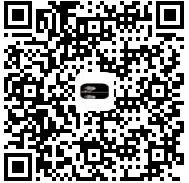
效果图如下
C#在二维码中添加圆角logo的更多相关文章
- QRCode二维码生成方案及其在带LOGO型二维码中的应用(1)
原文:QRCode二维码生成方案及其在带LOGO型二维码中的应用(1) 提要:很多公司为商业宣传之需,常将企业LOGO加入二维码中,但如果LOGO遮挡区域足够地大,二维码就变得无法识别.那么,有没有一 ...
- QRCode二维码生成方案及其在带LOGO型二维码中的应用(2)
原文:QRCode二维码生成方案及其在带LOGO型二维码中的应用(2) 续前:QRCode二维码生成方案及其在带LOGO型二维码中的应用(1) http://blog.csdn.net/johnsu ...
- C# ZXing.Net生成二维码、识别二维码、生成带Logo的二维码(二)
1.使用ZXint.Net生成带logo的二维码 /// <summary> /// 生成带Logo的二维码 /// </summary> /// <param name ...
- 关于JAVA实现二维码以及添加二维码LOGO
今天在公司,完成了之前的任务,没有什么事做,就想鼓捣一下二维码,因为之前没有接触过,我就去翻看了几本书,也基本完成了二维码的实现,以及添加二维码的LOGO. 现在绘制二维码一般都使用的是谷歌的zxin ...
- java 生成二维码、可带LOGO、可去白边
1.准备工作 所需jar包: JDK 1.6: commons-codec-1.11.jar core-2.2.jar javase-2.2.jar JDK 1.7: commons-codec- ...
- 微信创建带参数二维码,并加上logo
现在需要创建一个场景二维码,除了基础的微信接口创建外,需要加上小logo,思路如下: 1. 首先根据微信的开发文档创建二维码,获取二维码的url,没啥可说的,按照文档来就好了 获取到的二维码就是这么素 ...
- Android:使用ZXing生成二维码(支持加入Logo图案)
ZXing是谷歌的一个开源库.能够用来生成二维码.扫描二维码.本文所介绍的是第一部分. 首先上效果图: ZXing相关各种文件官方下载地址:https://github.com/zxing/zxing ...
- 生成二维码 打上自定义logo
private void RenderQrCode(string Code) { try { string level = "Q"; string url = ZConfig.Ge ...
- 【VB.NET】利用 ZXing.Net 生成二维码(支持自定义LOGO)
有任何疑问请去我的新博客提出 https://blog.clso.fun/posts/2019-03-03/vb-net-zxing-net-qr-maker.html ZXing .NET 的项目主 ...
随机推荐
- mysql函数大全
对于针对字符串位置的操作,第一个位置被标记为1. ASCII(str) 返回字符串str的最左面字符的ASCII代码值.如果str是空字符串,返回0.如果str是NULL,返回NULL. mysql& ...
- async & await 的前世今生
async 和 await 出现在C# 5.0之后,给并行编程带来了不少的方便,特别是当在MVC中的Action也变成async之后,有点开始什么都是async的味道了.但是这也给我们编程埋下了一些隐 ...
- Medial Queries的另一用法——实现IE hack
众所周知,有些时候为了实现IE下的某些效果与现代浏览器一致,我们不得不使用一些hack手段来实现目的.比如说使用"\0","\"和"\9"来 ...
- Django form
简单的from验证 文件目录结构 urls.py from app1.views import account urlpatterns = [ url(r'^admin/', admin.site.u ...
- 研究Extension和Category的一个例子
Category: 1. 无法添加实例变量 2.将类的实现分散到多个不同文件或多个不同框架中. Extension: 1. 可以添加实例变量 注: 如果Category的头文件中也使用Extensio ...
- 大数据量冲击下Windows网卡异常分析定位
背景 mqtt的服务端ActiveMQ在windows上,多台PC机客户端不停地向MQ发送消息. 现象 观察MQ自己的日志data/activemq.log里显示,TCP链接皆异常断开.此时尝试从服务 ...
- Bzoj1076 [SCOI2008]奖励关
Time Limit: 10 Sec Memory Limit: 128 MBSubmit: 1935 Solved: 1053 Description 你正在玩你最喜欢的电子游戏,并且刚刚进入一 ...
- 关于 feature team 的一些内容
矩阵式管理,是常见的经典管理架构.其最早起源于美国的航空航天部门,然后被美国人带到了日本,然后被日本人带到了台湾,然后台湾人带到大陆...矩阵管理最典型的特征是,组织架构按职能与专业划分,项目由跨越部 ...
- iOS - URL Scheme 操作
推荐JLRoutes路由跳转 NSScanner 在寻找更加灵活的页面跳转和通知,我遇见了JLRoutes,从而学习使用URL Scheme来定义界面入口.以前从来没有使用过,不过很多大厂和流行的框架 ...
- IntelliJ IDEA 15,16 win 7 64位安装包以及注册码 百度云盘
不知道发出来,有用没有,要是官网下载不了的话,可以用我的这个哦,虽然不是最新的. ideaIU-162.1447.21 ideaIU-15.0.2 win7 64系统的安装包 链接:http://p ...