
【Python图像】给你的头像+1
早些年,微信朋友圈有段时间非常流行这个头像+1的套路,简直逼死强迫症。
将你的 QQ 头像(或者微博头像)右上角加上红色的数字,类似于微信未读信息数量那种提示效果。 类似于图中效果

涉及知识:
Python Imaging Library (PIL)图像库,Image, ImageDraw, ImageFont模块
话不多说先上代码:
 from PIL import Image, ImageDraw, ImageFont

 def add_num(img):

     draw = ImageDraw.Draw(img)

     myfont = ImageFont.truetype("C:\\WINDOWS\\Fonts\\SIMYOU.TTF", 200)

     width, height = img.size

     draw.ellipse((width-200,0,width,200),fill="red",outline ="red")

     draw.text((width-150, 15), '', font=myfont, fill="white")

     img.save('result.jpg','jpeg')

 image = Image.open('yoyo.jpg')

 add_num(image)
其中ImageFont.truetype(file,size) ? Font instance
含义:加载一个TrueType或者OpenType字体文件,并且创建一个字体对象。这个函数从指定的文件加载了一个字体对象,并且为指定大小的字体创建了字体对象。
在windows系统中,如果指定的文件不存在,加载器会顺便看看windows的字体目录下是否存在。
绘制效果:
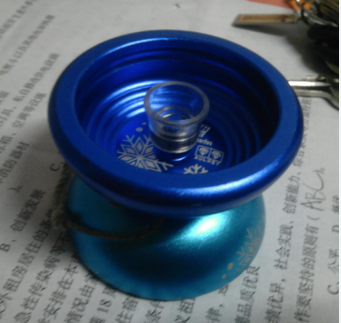
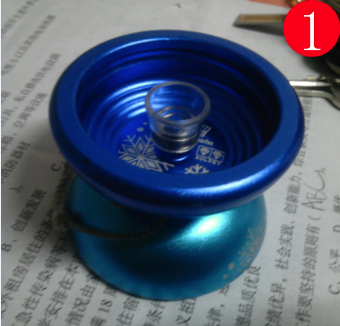
过程中可能会出现的问题:
首先是PIL库的安装。我用的是pycharm,Python版本2.7。第一次装也是装了几次才成功,主要原因是,通过pycharm直接安装,里面装的版本只有1.1.6的,安装之后,运行不了,会提示你找不到合适的Python版本。
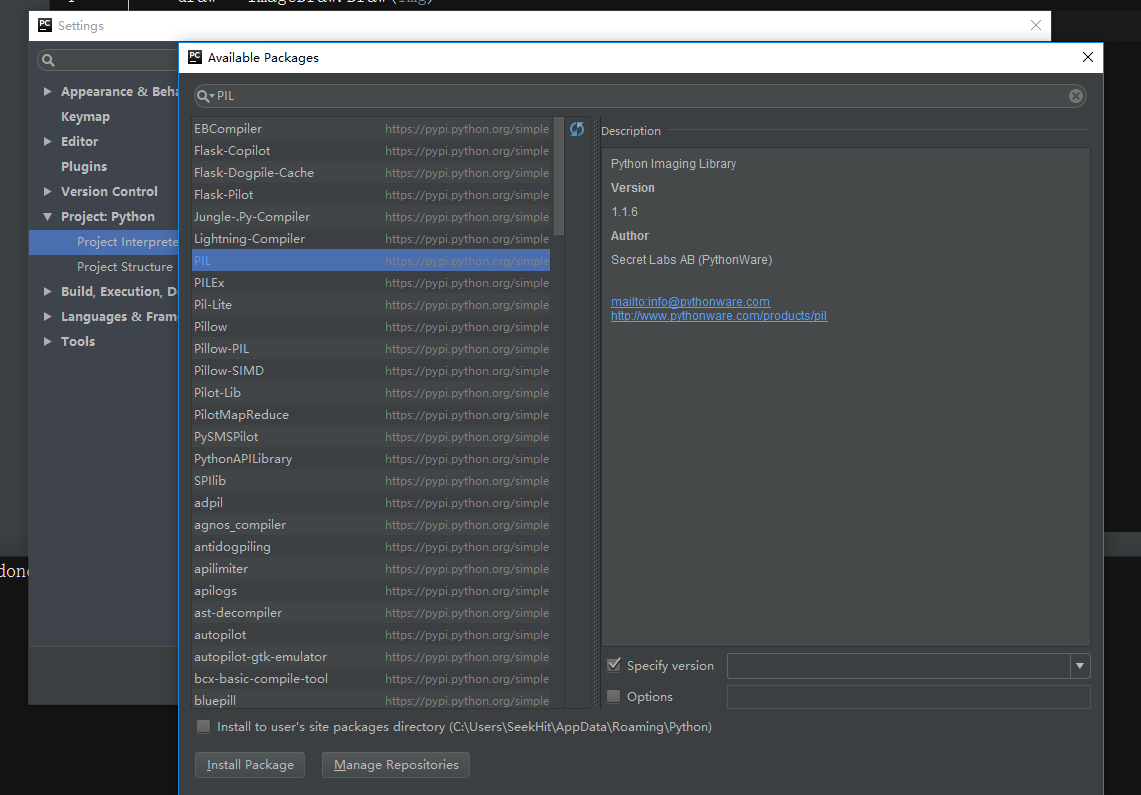
然后我就去网上查了下,知道了PIL库主要2.5 2.6用的比较多,2.7需要装最新版的库。
The following downloads are currently available:
PIL 1.1.7
- Python Imaging Library 1.1.7 Source Kit (all platforms) (November 15, 2009)
- Python Imaging Library 1.1.7 for Python 2.4 (Windows only)
- Python Imaging Library 1.1.7 for Python 2.5 (Windows only)
- Python Imaging Library 1.1.7 for Python 2.6 (Windows only)
- Python Imaging Library 1.1.7 for Python 2.7 (Windows only)
Additional downloads may be found here.
PIL 1.1.6
- Python Imaging Library 1.1.6 Source Kit (all platforms) (440k TAR GZ) (December 3, 2006)
- Python Imaging Library 1.1.6 for Python 2.2 (Windows only)
- Python Imaging Library 1.1.6 for Python 2.3 (Windows only)
- Python Imaging Library 1.1.6 for Python 2.4 (Windows only)
- Python Imaging Library 1.1.6 for Python 2.5 (Windows only)
- Python Imaging Library 1.1.6 for Python 2.6 (Windows only)
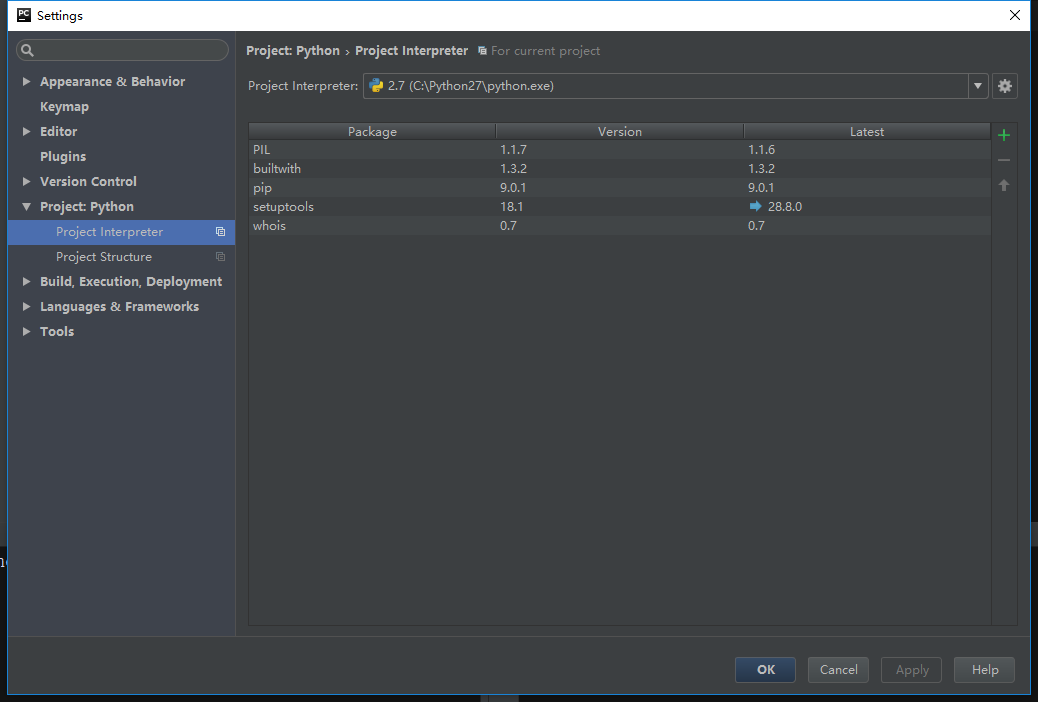
然后下载了2.7可以用的1.1.7,双击安装,然后再Pycharm - File - Setting - Project Interpreter - Available Packages 然后面板左下角的Manage Repositories中添加,PIL安装的路径,我的路径是(C:\Python27\Lib\site-packages\PIL)。
退回到settings界面,可以看到PIL库已经安装好了。
在程序运行的过程中又出现了错误提示PIL库中:The _imagingft C module is not installed错误。
提示有个C模块咩有安装,明明是在官网下的,怎么会出现这样的情况呢,又查了一番,原来是PIL库中,有一个模块那没有编译,导致提示C模块找不到,附上一个编译过的1.1.7PIL库。(http://pan.baidu.com/s/1pLCTb1h)
安装之前,记得要将原来的版本卸载掉。
【Python图像】给你的头像+1的更多相关文章
- python Django注册页面显示头像
python Django注册页面显示头像(views) def register(request): ''' 注册 :param request: :return: ''' if request.m ...
- 【Tool】Augmentor和imgaug——python图像数据增强库
Augmentor和imgaug--python图像数据增强库 Tags: ComputerVision Python 介绍两个图像增强库:Augmentor和imgaug,Augmentor使用比较 ...
- python图像、视频转字符画
python图像转字符画需要用到matplotlib.pyplot库,视频转字符画需要用到opencv库,这里的代码基于python 3.5 图像转字符画需要先将图像转为灰度图,转灰度图的公式是 gr ...
- [Python] 图像简单处理(PIL or Pillow)
前几天弄了下django的图片上传,上传之后还需要做些简单的处理,python中PIL模块就是专门用来做这个事情的. 于是照葫芦画瓢做了几个常用图片操作,在这里记录下,以便备用. 这里有个字体文件,大 ...
- python批量下载微信好友头像,微信头像批量下载
#!/usr/bin/python #coding=utf8 # 自行下载微信模块 itchat 小和QQ496631085 import itchat,os itchat.auto_login() ...
- Python图像全屏显示
需要在嵌入式设备上全屏显示图像,使用pil显示图像时,只能通过系统的图像浏览器显示.所以使用Python自带的tkinter import Tkinter as tk 这句在Python3中已经改 ...
- 【Python图像特征的音乐序列生成】使用Python生成简单的MIDI文件
这个全新的Python音乐创作系列,将会不定期更新.写作这个系列的初衷,是为了做一个项目<基于图像特征的音乐序列生成模型>,实时地提取照片特征,进行神经网络处理,生成一段音乐. 千里之行, ...
- Python之微信-微信好友头像合成
仔细看下图,你的头像就藏在里面哦!!! 有没有犯密集恐惧症?这并不震撼,如果你有 5000 位好友的话,做出来的图看着会更刺激些. 看完了图,你可能想知道这个图咋做出来的,不会是我闲着无聊把把好友头像 ...
- python 图像的离散傅立叶变换
图像(MxN)的二维离散傅立叶变换可以将图像由空间域变换到频域中去,空间域中用x,y来表示空间坐标,频域由u,v来表示频率,二维离散傅立叶变换的公式如下: 在python中,numpy库的fft模块有 ...
随机推荐
- [LeetCode] Permutations II 全排列之二
Given a collection of numbers that might contain duplicates, return all possible unique permutations ...
- JavaScript模板引擎artTemplate.js——template.helper()方法
上一篇文章我们已经讲到了helper()方法,但是上面的例子只是一个参数的写法,如果是多个参数,写法就另有区别了. <div id="user_info"></d ...
- Eclipse开发环境JDK版本问题和校验问题
今天遇到的两个问题: 1.启动程序报错:Unsupported major.minor version 52.0 这是JDK版本过低的问题,统一一下Build Path和java Complie中的版 ...
- javascript中的感叹号 "!"
JavaScript中会经常遇到一个操作符:! 这是一个布尔操作符,用于将操作的值强制转换为布尔值并取反.常用场景如下: //条件判断中使用 var a; var b=null; if(!a){ co ...
- canvas-图片翻转
图片90度翻转 在canvas中插入图片需先加载图片(利用Image对象);加载完成后再执行操作drawImage(obj,x,y,w,h) 插入图片的坐标宽高等值 <!DOCTYPE html ...
- spring定时器,定时器一次执行两次的问题
Spring 定时器 方法一:注解形式 配置文件头加上如下: xmlns:task="http://www.springframework.org/schema/task" htt ...
- sqli篇-本着就了解安全本质的想法,尽可能的用通俗易懂的语言去解释安全漏洞问题
前言 最早接触安全也是从xss攻击和sql注入攻击开始的. 和xss一样屡居OWASPtop10 前三名的漏洞,sqli(sql Injection)sql注入攻击也是web安全中影响较大和影响范围较 ...
- Redis设计与实现读书笔记(一) SDS
作为redis最基础的底层数据结构之一,SDS提供了许多C风格字符串所不具备的功能,为之后redis内存管理提供了许多方便.它们分别是: 二进制安全 减少字符串长度获取时间复杂度 杜绝字符串溢出 减少 ...
- VS2013编译google protobuf 出现问题error C3861: “min”:
问题描述: 今天用vs2013编译protobuf 2.4.1 报错: 错误 3 error C3861: "max": 找不到标识符 f:\google\protobuf\pro ...
- KMP算法实现
链接:http://blog.csdn.net/joylnwang/article/details/6778316 KMP算法是一种很经典的字符串匹配算法,链接中的讲解已经是很明确得了,自己按照其讲解 ...